当前位置:网站首页>HCIP实验(04)
HCIP实验(04)
2022-07-25 09:47:00 【雨天_】
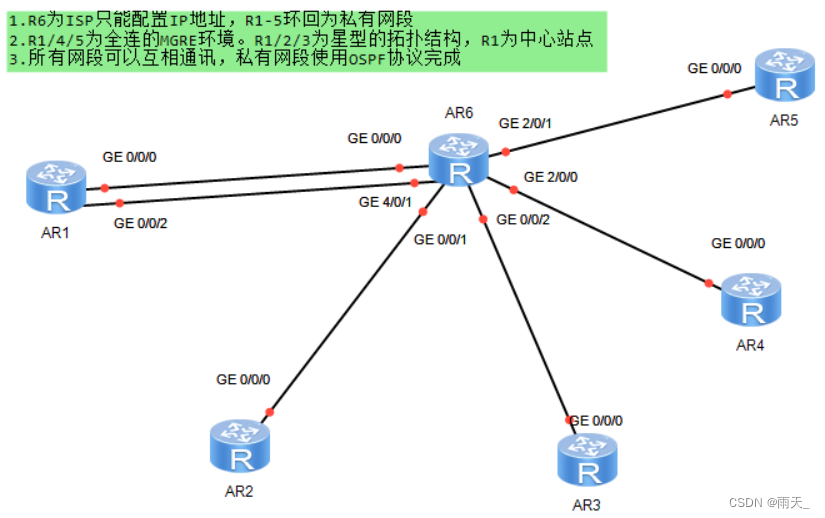
拓扑设计和IP地址规划
1.配置路由器接口IP地址和环回
[r1]int LoopBack 0
[r1-LoopBack0]ip add 192.168.1.1 24
[r1]int g0/0/0
[r1-GigabitEthernet0/0/0]ip add 16.1.1.1 24
[r1]int g0/0/2
[r1-GigabitEthernet0/0/2]ip add 61.1.1.1 24
[r2]int LoopBack 0
[r2-LoopBack0]ip add 192.168.2.1 24
[r2]int g0/0/0
[r2-GigabitEthernet0/0/0]ip add 26.1.1.1 24
[r3]int LoopBack 0
[r3-LoopBack0]ip add 192.168.3.1 24
[r3]int g0/0/0
[r3-GigabitEthernet0/0/0]ip add 36.1.1.1 24
[r4]int LoopBack 0
[r4-LoopBack0]ip add 192.168.4.1 24
[r4]int g0/0/0
[r4-GigabitEthernet0/0/0]ip add 46.1.1.1 24
[r5]int LoopBack 0
[r5]int lo0
[r5-LoopBack0]ip add 192.168.5.1 24
[r5]int g0/0/0
[r5-GigabitEthernet0/0/0]ip add 56.1.1.1 24
[r6]int LoopBack 0
[r6-LoopBack0]ip add 6.6.6.6 24
[r6]int g0/0/0
[r6-GigabitEthernet0/0/0]ip add 16.1.1.2 24
[r6]int g4/0/1
[r6-GigabitEthernet4/0/1]ip add 61.1.1.2 24
[r6]int g0/0/1
[r6-GigabitEthernet0/0/1]ip add 26.1.1.2 24
[r6]int g0/0/2
[r6-GigabitEthernet0/0/2]ip add 36.1.1.2 24
[r6]int g2/0/0
[r6-GigabitEthernet2/0/0]ip add 46.1.1.2 24
[r6]int g2/0/1
[r6-GigabitEthernet2/0/1]ip add 56.1.1.2 24
查看
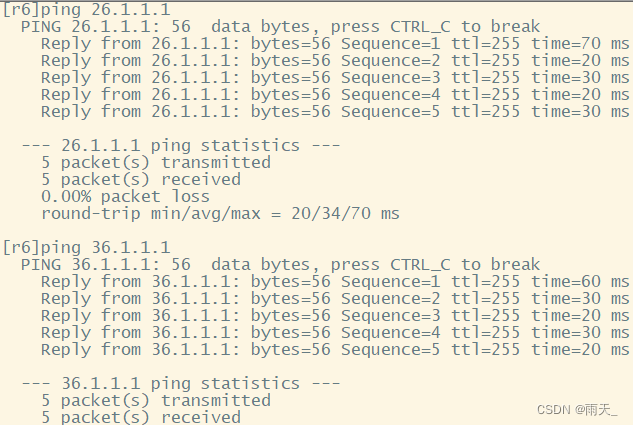
测试
2.配置缺省路由
[r1]ip route-static 0.0.0.0 0 16.1.1.2
[r1]ip route-static 0.0.0.0 0 61.1.1.2
[r2]ip route-static 0.0.0.0 0 26.1.1.2
[r3]ip route-static 0.0.0.0 0 36.1.1.2
[r4]ip route-static 0.0.0.0 0 46.1.1.2
[r5]ip route-static 0.0.0.0 0 56.1.1.2
测试

3.构建MGRE环境
[r1]int t0/0/0
[r1-Tunnel0/0/0]ip add 10.1.1.1 24
[r1-Tunnel0/0/0]tunnel-protocol gre p2mp
[r1-Tunnel0/0/0]source 16.1.1.1
[r1-Tunnel0/0/0]nhrp entry multicast dynamic
[r1-Tunnel0/0/0]nhrp network-id 100
[r2]int t0/0/0
[r2-Tunnel0/0/0]ip add 10.1.1.2 24
[r2-Tunnel0/0/0]tunnel-protocol gre p2mp
[r2-Tunnel0/0/0]source g0/0/0
[r2-Tunnel0/0/0]nhrp entry 10.1.1.1 16.1.1.1 register
[r2-Tunnel0/0/0]nhrp network-id 100
[r3]int t0/0/0
[r3-Tunnel0/0/0]ip add 10.1.1.3 24
[r3-Tunnel0/0/0]tunnel-protocol gre p2mp
[r3-Tunnel0/0/0]source g0/0/0
[r3-Tunnel0/0/0]nhrp entry 10.1.1.1 16.1.1.1 register
[r3-Tunnel0/0/0]nhrp network-id 100
[r1]int t0/0/1
[r1-Tunnel0/0/1]ip add 10.1.2.1 24
[r1-Tunnel0/0/1]tunnel-protocol gre p2mp
[r1-Tunnel0/0/1]source 61.1.1.1
[r1-Tunnel0/0/1]nhrp entry multicast dynamic
[r1-Tunnel0/0/1]nhrp network-id 101
[r4]int t0/0/0
[r4-Tunnel0/0/0]ip add 10.1.2.2 24
[r4-Tunnel0/0/0]tunnel-protocol gre p2mp
[r4-Tunnel0/0/0]source 46.1.1.1
[r4-Tunnel0/0/0]nhrp entry 10.1.2.1 61.1.1.1 register
[r4-Tunnel0/0/0]nhrp entry 10.1.2.3 56.1.1.1 register
[r4-Tunnel0/0/0]nhrp network-id 101
[r5]int t0/0/0
[r5-Tunnel0/0/0]ip add 10.1.2.3 24
[r5-Tunnel0/0/0]tunnel-protocol gre p2mp
[r5-Tunnel0/0/0]source 56.1.1.1
[r5-Tunnel0/0/0]nhrp entry 10.1.2.1 61.1.1.1 register
[r5-Tunnel0/0/0]nhrp entry 10.1.2.2 46.1.1.1 register
[r5-Tunnel0/0/0]nhrp network-id 101
(打开R5的t0/0/0的伟光播)
测试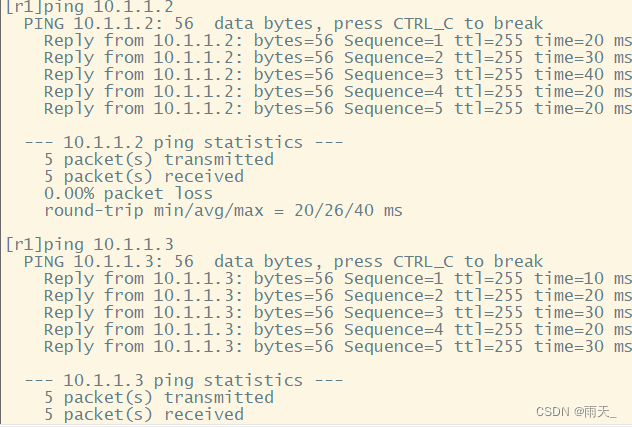

4.宣告
(不用进行区域划分,都在私网范围内)
[r1]ospf 1 router-id 1.1.1.1
[r1-ospf-1]area 0
[r1-ospf-1-area-0.0.0.0]network 192.168.1.1 0.0.0.0
[r1-ospf-1-area-0.0.0.0]network 10.1.1.1 0.0.0.0
[r1-ospf-1-area-0.0.0.0]network 10.1.2.1 0.0.0.0
[r2]ospf 1 router-id 2.2.2.2
[r2-ospf-1]area 0
[r2-ospf-1-area-0.0.0.0]network 192.168.2.1 0.0.0.0
[r2-ospf-1-area-0.0.0.0]network 10.1.1.2 0.0.0.0
[r3]ospf 1 router-id 3.3.3.3
[r3-ospf-1]area 0
[r3-ospf-1-area-0.0.0.0]network 192.168.3.1 0.0.0.0
[r3-ospf-1-area-0.0.0.0]network 10.1.1.3 0.0.0.0
[r4]ospf 1 router-id 4.4.4.4
[r4-ospf-1]area 0
[r4-ospf-1-area-0.0.0.0]network 192.168.4.1 0.0.0.0
[r4-ospf-1-area-0.0.0.0]network 10.1.2.2 0.0.0.0
[r5]ospf 1 router-id 5.5.5.5
[r5-ospf-1]area 0
[r5-ospf-1-area-0.0.0.0]network 192.168.5.1 0.0.0.0
[r5-ospf-1-area-0.0.0.0]network 10.1.2.3 0.0.0.0
查看
优化
[r1]int t0/0/0
[r1-Tunnel0/0/0]ospf network-type broadcast
[r2]int t0/0/0
[r2-Tunnel0/0/0]ospf network-type broadcast
[r3]int t0/0/0
[r3-Tunnel0/0/0]ospf network-type broadcast
(R2和R3优先级改为0,放弃DR/BDR选举)
[r2-Tunnel0/0/0]ospf dr-priority 0
[r3-Tunnel0/0/0]ospf dr-priority 0
[r1]int t0/0/1
[r1-Tunnel0/0/0]ospf network-type broadcast
[r4]int t0/0/0
[r4-Tunnel0/0/0]ospf network-type broadcast
[r5]int t0/0/0
[r5-Tunnel0/0/0]ospf network-type broadcast
(R2和R3优先级改为0,放弃DR/BDR选举)
[r4-Tunnel0/0/0]ospf dr-priority 0
[r5-Tunnel0/0/0]ospf dr-priority 0
查看
(1)


(2)


5.测试


边栏推荐
猜你喜欢

11.iptables 防火墙

Set up lnmp+discuz Forum

Pytorch calculates the loss for each sample in the batch

Fastdfs offline deployment (Graphic)

2021 去哪儿网笔试总结

JS encryption parameter positioning

Acquisition and compilation of UE4 source code

After switching the shell command line terminal (bash/zsh), CONDA cannot be used: command not found

Mysql5.7 master-slave database deployment (offline deployment)
Pytorch code template (CNN)
随机推荐
微信小程序WxPrase中包含文件无法点击解决
Angr(三)——angr_ctf
Test plan and test plan
6. Regular expression of shell
Voxceleb1 dataset Download
Angr (VII) -- angr_ ctf
js 哈希表 02
UE4 external open EXE file
JS hash table 02
DHCP configuration (take Huawei ENSP as an example)
【策略模式】就像诸葛亮的锦囊
Pytoch separates tensor by the value of one dimension of tensor (simple)
Introduction to onnx runtime
Pytorch tensor list is converted to tensor list of tensor to tensor using torch.stack()
Angr (I) - Installation
8.shell文件处理三剑客之sed
4. FTP service configuration and principle
4.隔壁小孩都会的,各种shell符号{}[]等
存储、计算、分布式计算篇(收集整理适合小白)
Use of mongodb