当前位置:网站首页>C#做一个简单浏览器
C#做一个简单浏览器
2022-07-23 06:36:00 【Walk in loosing】
你想拥有一个自己的浏览器么?你想实现浏览器定制吗?
是不是好难啊?
是不是的学c++各种底层绘图啊?
NO,没那么复杂,借助谷歌开源的chromium内核包个浏览器还是容易很多。
但是那是c++的内核啊,岂不是要学c++,看内核文档?
NO,也没那么复杂。有开源的C#项目,包装chromium内核为C#动态库,对C#只要引用dll后就是一个普通控件拖拽就能使用。
效果:
下载下来的包只需要C#winfrom工程引用cwber.dll就可以使用浏览器控件了

然后可以进行最傻瓜式的winform操作,把控件往页面拖就可实现一个浏览器了。
代码设置它的URL就可以用了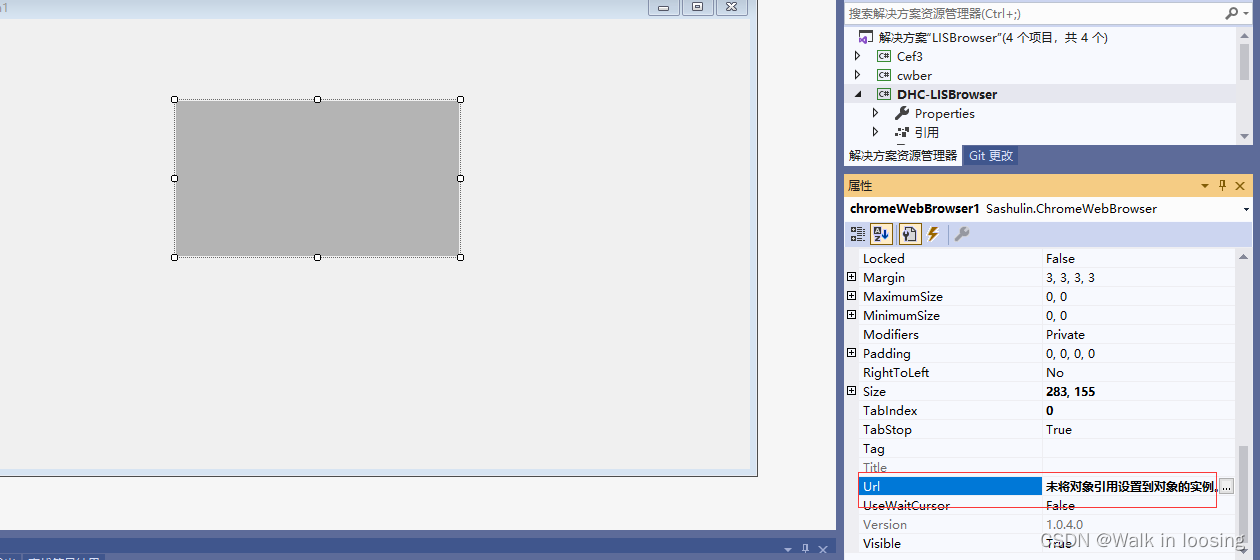
上面是传统点的搞法,要自己官网下载动态库和依赖包。这次用nuget引用包的方式新做一个浏览器示例。
1.先创建一个.net4.6工程,右键-引用添加buget包里搜cefsharp安装
2.给窗口Load事件加上下面代码测试,这样就得到了一个没有url输入的浏览器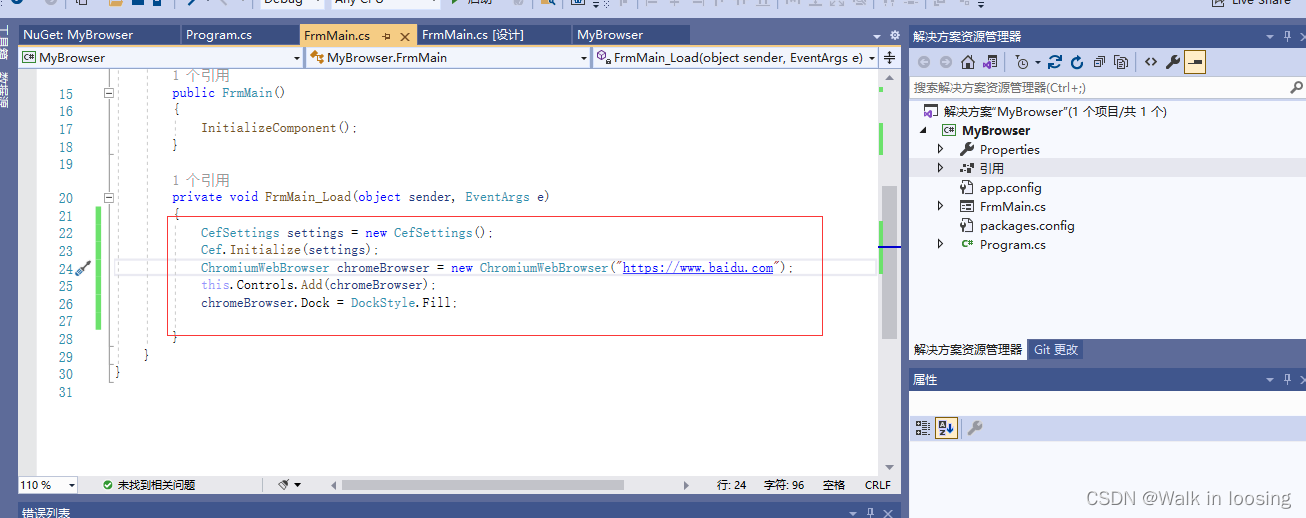

3.然后给页面拖两个面板和一个url输入的文本框
4.然后改代码实现文本框回车事件,这样就为自己定制了一个简单浏览器
using System;
using System.Collections.Generic;
using System.ComponentModel;
using System.Data;
using System.Drawing;
using System.Text;
using System.Windows.Forms;
using CefSharp;
using CefSharp.WinForms;

namespace MyBrowser
{

    public partial class FrmMain : Form
    {

        /// <summary>
        /// 浏览器对象
        /// </summary>
        ChromiumWebBrowser chromeBrowser = null;

        public FrmMain()
        {

            InitializeComponent();
        }

        private void FrmMain_Load(object sender, EventArgs e)
        {

            txtPath.Text = "https://www.baidu.com";
            CefSettings settings = new CefSettings();
            Cef.Initialize(settings);
            chromeBrowser = new ChromiumWebBrowser(txtPath.Text);
            panel2.Controls.Add(chromeBrowser);
            chromeBrowser.Dock = DockStyle.Fill;


        }


        /// <summary>
        /// 输入框按键
        /// </summary>
        /// <param name="sender"></param>
        /// <param name="e"></param>
        private void textBox1_KeyDown(object sender, KeyEventArgs e)
        {

            if(e.KeyCode==Keys.Enter&& txtPath.Text!="")
            {

                chromeBrowser.LoadUrl(txtPath.Text);
            }
        }
    }
}
5.效果

够easy吧,带注释不到50行C#就定制一个浏览器。还可以包webkit内核的。
再其他定制随便玩
using System;
using System.Collections.Generic;
using System.ComponentModel;
using System.Data;
using System.Drawing;
using System.Text;
using System.Windows.Forms;
using System.Configuration;
using Sashulin;
using Sashulin.Core;
using Sashulin.common;
using System.IO;
using System.Net;
using System.Net.Sockets;

namespace LISBrowser
{

    /// <summary>
    /// 执行命令委托
    /// </summary>
    /// <param name="result"></param>
    public delegate void ExcCodeDelegate(string code);

    ///<summary NoteObject="Class">
    /// [功能描述:LIS浏览器主页] <para/>
    /// [创建者:zlz] <para/>
    /// [创建时间:2015年5月24日] <para/>
    ///<说明>
    /// [说明:LIS浏览器主页]<para/>
    ///</说明>
    ///<修改记录>
    /// [修改时间:本次修改时间]<para/>
    /// [修改内容:本次修改内容]<para/>
    ///</修改记录>
    ///<修改记录>
    /// [修改时间:本次修改时间]<para/>
    /// [修改内容:本次修改内容]<para/>
    ///</修改记录>
    ///</summary>
    public partial class LBMainForm : Form
    {

        /// <summary>
        /// IP信息
        /// </summary>
        private string IPStr = "";

        /// <summary>
        /// 标题信息
        /// </summary>
        private string TitleStr = "";

        //是否全屏
        private string FullScreen = ConfigurationManager.AppSettings["FullScreen"];

        //显示硬件信息
        private string ShowHardware = ConfigurationManager.AppSettings["ShowHardware"];

        /// <summary>
        /// 构造函数
        /// </summary>
        public LBMainForm()
        {

            InitializeComponent();
            //得到配置的url
            string url = ConfigurationManager.AppSettings["StartUrl"];
            if (FullScreen == "1")
            {

                this.FormBorderStyle = FormBorderStyle.None;
            }
            if (FullScreen == "2")
            {

                this.ControlBox = false;
                this.MinimizeBox = false;
                this.MaximizeBox = false;
            }

            if (ShowHardware == "1" || ShowHardware == "2" || ShowHardware == "3")
            {

                IPStr = " 当前设备编号:" + GetIpv4Str();
                this.Text = " 当前设备编号:" + GetIpv4Str() + ",启动时间:" + DateTime.Now.ToString("yyyy-MM-dd hh:mm:ss");
                timerMian.Enabled = true;
            }
            //检测是否配置
            if (url == null || url == "")
            {

                MessageBox.Show("请在运用程序同名的config文件下配置LIS系统的启动路径!");
                return;
            }
            //打开开始页
            OpenPage(url, null, false);
            //设置线程
            System.Windows.Forms.Control.CheckForIllegalCrossThreadCalls = false;
        }

        /// <summary>
        /// 获得当前机器的ip4串
        /// </summary>
        /// <returns></returns>
        private string GetIpv4Str()
        {

            IPAddress[] arrIPAddresses = Dns.GetHostAddresses(Dns.GetHostName());
            foreach (IPAddress ip in arrIPAddresses)
            {

                if (ip.AddressFamily.Equals(AddressFamily.InterNetwork))
                {

                    return ip.ToString();
                }
            }
            return string.Empty;
        }

        /// <summary>
        /// 改变图标
        /// </summary>
        private void ChangeIconByName(string name)
        {

            this.Icon = new Icon(Application.StartupPath + "\\" + name + ".ico");
        }

        /// <summary>
        /// 标题改变事件
        /// </summary>
        /// <param name="sender">事件触发者</param>
        /// <param name="e">参数</param>
        private void chromeWebBrowser_BrowserTitleChange(object sender, TitleEventArgs e)
        {

            //显示硬件信息
            string ShowHardware = ConfigurationManager.AppSettings["ShowHardware"];
            if (ShowHardware == "1")
            {

                return;
            }
            if (ShowHardware == "2" || ShowHardware == "3")
            {

                TitleStr = e.Title;
                return;
            }
            if (e.Title != "about:blank")
            {

                this.Text = e.Title;
            }
        }

        /// <summary>
        /// 委托
        /// </summary>
        /// <param name="url">url</param>
        /// <param name="request">请求对象,没有为空</param>
        /// <param name="isNewPage">是否新开页面</param>
        delegate void NewPageListener(string url, object request, bool isNewPage);

        /// <summary>
        /// 弹出新窗口事件
        /// </summary>
        /// <param name="sender">事件触发者</param>
        /// <param name="e">参数</param>
        private void chromeWebBrowser_BrowserNewWindow(object sender, NewWindowEventArgs e)
        {

            if (this.InvokeRequired)
            {

                NewPageListener a = new NewPageListener(OpenPage);
                this.Invoke(a, new object[] {
     e.NewUrl, e.Request, true });
            }
            else
            {

                OpenPage(e.NewUrl, e.Request, true);
            }
        }

        /// <summary>
        /// 打开页
        /// </summary>
        /// <param name="url">url</param>
        /// <param name="req">请求对象,没有的话为空</param>
        /// <param name="isNewPage">是否创建新页面</param>
        private void OpenPage(string url, object req, bool isNewPage)
        {

            //设置对象
            CSharpBrowserSettings settings = new CSharpBrowserSettings();
            settings.Locale = "zh-CN";
            //版本
            settings.UserAgent = "Mozilla/5.0 (Windows; 7 4.2.1; en-us; Nexus 4 Build/JOP40D) AppleWebKit/535.19 (KHTML, like Gecko) Chrome/18.0.1025.166 Mobile Safari/535.19";
            //缓存路径
            settings.CachePath = @"C:\temp\caches";
            //创建浏览器对象
            ChromeWebBrowser browser = new ChromeWebBrowser();
            //绑定事件
            browser.BrowserNewWindow += new NewWindowEventHandler(chromeWebBrowser_BrowserNewWindow);
            //绑定标题改变事件
            browser.BrowserTitleChange += new TitleChangeEventHandler(chromeWebBrowser_BrowserTitleChange);
            //初始化设置
            browser.Initialize(settings);
            //如果不是新页面
            if (isNewPage == false)
            {

                this.Controls.Clear();
                this.Controls.Add(browser);
                //验证
                browser.Validate();
                //设置填满
                browser.Dock = DockStyle.Fill;
                if (!url.Contains("&"))
                {

                    browser.OpenUrl(url);
                }
                else
                {

                    browser.OpenUrl(req);
                }
                //设置Cookie路径
                browser.SetCookiePath("c:\\temp");
            }
            //创建并弹出新页面
            else
            {

                LBDialogForm form = new LBDialogForm();
                form.OpenPage(url, req, false);
                form.Show();
            }

        }

        /// <summary>
        /// 拷贝目录
        /// </summary>
        /// <param name="srcPath">源路径</param>
        /// <param name="aimPath">目标路径</param>
        private void CopyDir(string srcPath, string aimPath)
        {

            try
            {

                // 检查目标目录是否以目录分割字符结束如果不是则添加
                if (aimPath[aimPath.Length - 1] != System.IO.Path.DirectorySeparatorChar)
                {

                    aimPath += System.IO.Path.DirectorySeparatorChar;
                }
                // 判断目标目录是否存在如果不存在则新建
                if (!System.IO.Directory.Exists(aimPath))
                {

                    System.IO.Directory.CreateDirectory(aimPath);
                }
                // 得到源目录的文件列表,该里面是包含文件以及目录路径的一个数组
                // 如果你指向copy目标文件下面的文件而不包含目录请使用下面的方法
                // string[] fileList = Directory.GetFiles(srcPath);
                string[] fileList = System.IO.Directory.GetFileSystemEntries(srcPath);
                // 遍历所有的文件和目录
                foreach (string file in fileList)
                {

                    // 先当作目录处理如果存在这个目录就递归Copy该目录下面的文件
                    if (System.IO.Directory.Exists(file))
                    {

                        CopyDir(file, aimPath + System.IO.Path.GetFileName(file));
                    }
                    // 否则直接Copy文件
                    else
                    {

                        System.IO.File.Copy(file, aimPath + System.IO.Path.GetFileName(file), true);
                    }
                }
            }
            catch (Exception e)
            {

                throw;
            }
        }

        /// <summary>
        /// 定时器函数
        /// </summary>
        /// <param name="sender"></param>
        /// <param name="e"></param>
        private void timerMian_Tick(object sender, EventArgs e)
        {

            if (ShowHardware == "2")
            {

                this.Text = TitleStr + IPStr + ",当前时间:" + DateTime.Now.ToString("yyyy-MM-dd hh:mm:ss");
            }
            else if (ShowHardware == "3")
            {

                this.Text = IPStr + ",当前时间:" + DateTime.Now.ToString("yyyy-MM-dd hh:mm:ss") + TitleStr;
            }
            else
            {

                this.Text = IPStr + ",当前时间:" + DateTime.Now.ToString("yyyy-MM-dd hh:mm:ss");
            }
        }

        /// <summary>
        /// 禁止双击标题栏事件
        /// </summary>
        /// <param name="m"></param>
        protected override void WndProc(ref Message m)
        {

            if (FullScreen == "2")
            {

                //拦截双击标题栏、移动窗体的系统消息
                if (m.Msg != 0xA3 && m.Msg != 0x0003 && m.WParam != (IntPtr)0xF012)
                {

                    base.WndProc(ref m);
                }
            }
            else
            {

                base.WndProc(ref m);
            }
        }
    }
}
这样的好处就是简单、可定制。缺点就是没最新浏览器好用,调试功能比较弱。然后内核在有的操作系统渲染慢。跟不上最新w3c标准。
边栏推荐
- 深入理解微信小程序的底层框架(一)
- Charles' bag grabbing tool test practice
- Opencv video operation
- 倍福PLC和C#通过ADS通信传输bool类型变量
- The unity model is displayed in front of the UI, and the UI behind it jitters
- Course design - push box C (win form)
- Beifu and C transmit real type through ads communication
- Are there any academic requirements for career transfer software testing? Is there really no way out below junior college?
- ES6——周考题
- High voltage MOS tube knx42150 1500v/3a is applied to frequency converter power supply inverter, etc
猜你喜欢
第十天笔记

Introduction to radar part vii 4 SAR system design

4D antenna array layout design

Beifu PLC and C transmit string array type variables through ads communication

Charles抓包工具测试实战

0722~线程池扩展

“算力猛兽”浪潮NF5468A5 GPU服务器开放试用免费申请

倍福PLC和C#通过ADS通信传输int类型变量
![[jzof] 11 minimum number of rotation array](/img/a3/6c3672a2a7b4f436874664034a4964.png)
[jzof] 11 minimum number of rotation array
![[visual scheduling software] Shanghai daoning brings netronic downloads, trials and tutorials to SMB organizations](/img/2f/ea0d6ceefca84ef4aeef9c384861f9.png)
[visual scheduling software] Shanghai daoning brings netronic downloads, trials and tutorials to SMB organizations
随机推荐
ES6——周考题
Space shooting part 1: player spirit and control
高中语文教资考试大纲
The principle of Google interview questions is to analyze 12 table tennis balls, one of which is defective. Weigh it with a balance for 3 times to find it
深入理解微信小程序的底层框架(一)
NFT 交易市场的格局之变:从一家独大到百家争鸣
PHP framework MVC class code audit
When using fastjson to parse and assign JSON data, the order of JSON fields is inconsistent
Defi will never die?
0722~线程池扩展
Knowledge map: basic concepts
Day 11 notes
倍福PLC和C#通过ADS通信传输int数组类型变量
Beifu PLC and C transmit int array type variables through ads communication
"Computing beast" Inspur nf5468a5 GPU server open trial free application
Communicate 11 tips for poor performance 
"100 Android interview questions" I brushed angrily for Dachang
Charles抓包工具测试实战
The unity model is displayed in front of the UI, and the UI behind it jitters
Don't be silly to distinguish these kinds of storage volumes of kubernetes