当前位置:网站首页>[SWT] user defined data table
[SWT] user defined data table
2022-07-24 15:40:00 【Boy Baoding】
Purpose
Use SWT Technical custom data tables , This article is a good introduction , given SWT The basic idea and simple implementation of building data tables . More special requirements, namely, the realization of table functions, will be continued ……
Ideas
Data table is composed of table header and two sides of table body .
The header of the form is fixed , The right side of the field contains a simple table tool – Sort ;
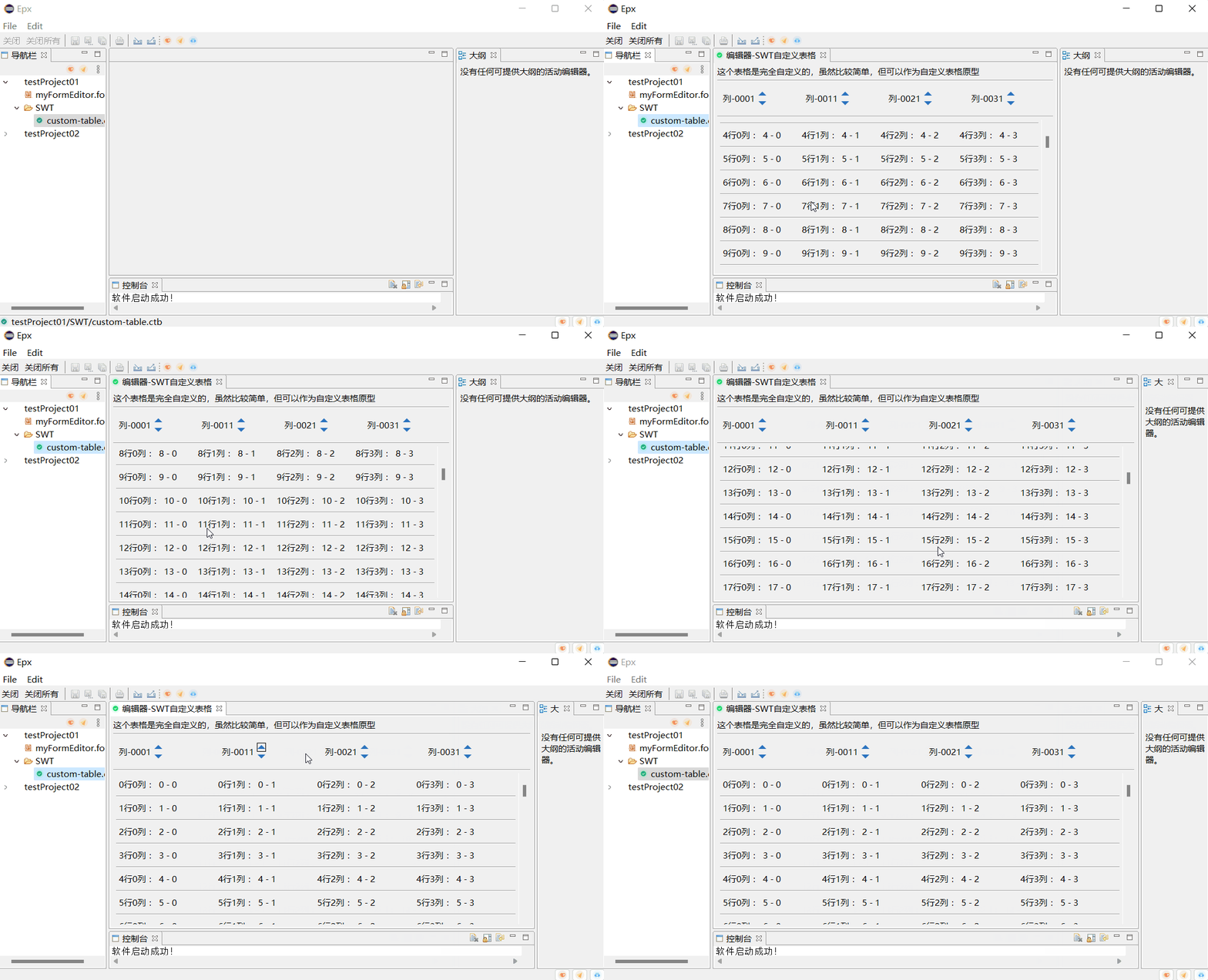
The body of the table is important for displaying data , It needs to support scrolling , This example only realizes vertical scrolling ( Horizontal rolling can be completed by referring to vertical rolling )
Technical aspects . Scrolling can be used ScrolledComposite Scroll components , Data table layout uses GridLayout complete .
Realization
In this case , Still show the effect in the editor , The specific steps are as follows :
- plugin.xml Define editor
      <!--  Editor -SWT Custom form  -->
      <editor class="com.xzbd.editors.CustomTableEditor" default="false" extensions="ctb" icon="icons/20220417/chenggongtishi.png" id="com.xzbd.editor.CustomTableEditor" name=" Editor -SWT Custom form ">
      </editor>
- Editor implementation class
package com.xzbd.editors;

import org.eclipse.core.runtime.IProgressMonitor;
import org.eclipse.swt.widgets.Composite;
import org.eclipse.ui.IEditorInput;
import org.eclipse.ui.IEditorSite;
import org.eclipse.ui.PartInitException;
import org.eclipse.ui.part.EditorPart;

import com.xzbd.views.CustomTableEditorViewer;

public class CustomTableEditor extends EditorPart {


	public static String ID = "com.xzbd.editors.CustomTableEditor";

	public boolean isDirty = false;
	private CustomTableEditorViewer viewer;

	@Override
	public void doSave(IProgressMonitor monitor) {

		clearDirty();
	}

	@Override
	public void doSaveAs() {


	}

	@Override
	public void init(IEditorSite site, IEditorInput input) throws PartInitException {

		this.setSite(site);
		this.setInput(input);
	}

	@Override
	public boolean isDirty() {

		return isDirty;
	}

	@Override
	public boolean isSaveAsAllowed() {

		return false;
	}

	@Override
	public void createPartControl(Composite parent) {

		viewer = new CustomTableEditorViewer(parent, this);

	}

	@Override
	public void setFocus() {


	}

	/** *  Transition editor state  * * @param isDirty */
	public void changeDirtyState(boolean isDirty) {

		this.isDirty = isDirty;
		firePropertyChange(PROP_DIRTY);
	}

	public void toDirty() {

		changeDirtyState(true);
	}

	public void clearDirty() {

		changeDirtyState(false);
	}
}
- View implementation class
package com.xzbd.views;

import org.eclipse.swt.SWT;
import org.eclipse.swt.custom.ScrolledComposite;
import org.eclipse.swt.events.ControlListener;
import org.eclipse.swt.graphics.Color;
import org.eclipse.swt.graphics.GC;
import org.eclipse.swt.graphics.Rectangle;
import org.eclipse.swt.layout.FillLayout;
import org.eclipse.swt.layout.GridData;
import org.eclipse.swt.layout.GridLayout;
import org.eclipse.swt.widgets.Composite;
import org.eclipse.swt.widgets.Control;
import org.eclipse.swt.widgets.Label;
import org.eclipse.swt.widgets.Listener;
import org.eclipse.swt.widgets.Widget;

import com.xzbd.editors.CustomTableEditor;
import com.xzbd.utils.LayoutUtil;
import com.xzbd.utils.SWTResourceManager;


/** * * SWT- Customize the data table editor view  * */
public class CustomTableEditorViewer {


	private CustomTableEditor editor;
	private Composite parent;


	public CustomTableEditorViewer(Composite parent, CustomTableEditor editor) {

		this.parent = parent;
		//  cache  Editor
		setEditor(editor);

		//  draw UI
		buildPageUI();
	}

	//  establish UI
	private void buildPageUI() {

		//  Set up  parent  Layout
		parent.setLayout(new FillLayout());


		Composite contaniner = new Composite(parent, SWT.NONE);
		contaniner.setLayout(new GridLayout());

		Label descLabel  = new Label(contaniner, SWT.NONE);
		descLabel.setText(" This form is completely customized , Although it's relatively simple , But it can be used as a custom table prototype ");

		Label sepratorLine = new Label(contaniner, SWT.SEPARATOR | SWT.HORIZONTAL);
		sepratorLine.setLayoutData(new GridData(GridData.FILL_HORIZONTAL));

		Composite header = new Composite(contaniner, SWT.NONE);
		header.setLayoutData(new GridData(GridData.FILL_HORIZONTAL));
		header.setLayout(new GridLayout(4, false));
		for (int j = 0; j < 4; j++) {

			Composite col = new Composite(header, SWT.NONE);
			col.setLayout(new GridLayout(2, false));
			col.setLayoutData(new GridData(GridData.FILL_HORIZONTAL));
			Label label = new Label(col, SWT.None);
			label.setText(" Column -00" + j + 1);

			Composite tools = new Composite(col, SWT.NONE);
			tools.setLayoutData(new GridData(GridData.FILL_HORIZONTAL));
			tools.setLayout(LayoutUtil.clearMarin(new GridLayout()));

			Label asc = new Label(tools, SWT.NONE);
			asc.setImage(SWTResourceManager.getImage(CustomTableEditorViewer.class, "/icons/sort-up.png"));
			Boolean[] check = {
     false };
			Boolean[] line = {
     false };
			asc.addPaintListener(e -> {

				if (line[0] || check[0]) {

					GC gc = e.gc;
					Rectangle bounds = asc.getBounds();
// gc.setForeground(ColorConstant.MAIN_BLUE);
					gc.drawRectangle(0, 0, bounds.width - 1, bounds.height - 1);
					gc.dispose();
				}

			});
			asc.addListener(SWT.MouseEnter, e -> {

				line[0] = true;
				asc.redraw();
			});
			asc.addListener(SWT.MouseExit, e -> {

				if (check[0]) {

					return;
				}
				line[0] = false;
				asc.redraw();
			});
			asc.addListener(SWT.MouseDown, e -> {

				check[0] = !check[0];
				asc.redraw();
			});

			Label desc = new Label(tools, SWT.PUSH);
			desc.setImage(SWTResourceManager.getImage(CustomTableEditorViewer.class, "/icons/sort-down.png"));

		}

		Label seprator = new Label(contaniner, SWT.SEPARATOR | SWT.HORIZONTAL);
		seprator.setLayoutData(new GridData(GridData.FILL_HORIZONTAL));

		Composite scContaniner = new Composite(contaniner, SWT.NONE);
		scContaniner.setLayoutData(new GridData(GridData.FILL_BOTH));
		scContaniner.setLayout(new FillLayout());

		//  Sliding panel
		ScrolledComposite sc = new ScrolledComposite(scContaniner, SWT.H_SCROLL | SWT.V_SCROLL);
		Composite content = new Composite(sc, SWT.None);
		content.setLayout(new GridLayout());
// content.setBackground(SWTResourceManager.getColor(SWT.COLOR_RED));

		Color activeColor = SWTResourceManager.getColor(SWT.COLOR_GRAY);
		Listener activeListener = e -> {

			Control widget = (Control) e.widget;
			widget.setBackground(activeColor);
		};
		Listener defaultListener = e -> {

			Control widget = (Control) e.widget;
			widget.setBackground(null);
		};

		for (int i = 0; i < 100; i++) {

			Composite row = new Composite(content, SWT.NONE);
			GridData gridData = new GridData(GridData.FILL_HORIZONTAL);
			row.setLayoutData(gridData);

			row.setLayout(new GridLayout(4, false));
			for (int j = 0; j < 4; j++) {

				Label label = new Label(row, SWT.None);
				label.setLayoutData(new GridData(GridData.FILL_HORIZONTAL));
				label.setText(i + " That's ok " + j + " Column  : " + i + " - " + j);

				//  Event binding
				label.addListener(SWT.MouseEnter, activeListener);
				label.addListener(SWT.MouseExit, defaultListener);
			}
			Label rowSeprator = new Label(content, SWT.SEPARATOR | SWT.HORIZONTAL);
			rowSeprator.setLayoutData(new GridData(GridData.FILL_HORIZONTAL));

			//  Event binding
			row.addListener(SWT.MouseEnter, activeListener);
			row.addListener(SWT.MouseExit, defaultListener);

		}

		sc.setExpandHorizontal(true);
		sc.setExpandVertical(true);
		sc.addControlListener(ControlListener.controlResizedAdapter(e -> {

			Rectangle r = sc.getClientArea();
			sc.setMinSize(content.computeSize(r.width, SWT.DEFAULT));
		}));

		//  Set sliding content
		sc.setContent(content);
		content.setSize(content.computeSize(SWT.DEFAULT, SWT.DEFAULT));
		// sc  Redraw , Otherwise it doesn't show   Slide content
		sc.layout();

	}

	public CustomTableEditor getEditor() {

		return editor;
	}

	public void setEditor(CustomTableEditor editor) {

		this.editor = editor;
	}

	private void addDirtyListener(Widget com) {

		com.addListener(SWT.Modify, e->{

			editor.toDirty();
		});
	}

}
The tool classes used , Please refer to the relevant source code in the project , Project address :https://gitee.com/xzbd/epx
effect
summary
This article USES the SWT Medium ScrolledComposite 、 GridLayout and SWT Event implements a simple data table implementation , The table function is relatively simple , But it is enlightening enough , Readers can implement more complex tables based on this .
SWT Test implementation
import org.eclipse.swt.SWT;
import org.eclipse.swt.custom.CLabel;
import org.eclipse.swt.custom.ScrolledComposite;
import org.eclipse.swt.events.ControlListener;
import org.eclipse.swt.graphics.Color;
import org.eclipse.swt.graphics.GC;
import org.eclipse.swt.graphics.Image;
import org.eclipse.swt.graphics.Rectangle;
import org.eclipse.swt.layout.FillLayout;
import org.eclipse.swt.layout.GridData;
import org.eclipse.swt.layout.GridLayout;
import org.eclipse.swt.widgets.Button;
import org.eclipse.swt.widgets.Canvas;
import org.eclipse.swt.widgets.Composite;
import org.eclipse.swt.widgets.Control;
import org.eclipse.swt.widgets.Display;
import org.eclipse.swt.widgets.Label;
import org.eclipse.swt.widgets.Layout;
import org.eclipse.swt.widgets.Listener;
import org.eclipse.swt.widgets.Shell;
import org.eclipse.swt.widgets.Widget;

import com.xzbd.swt01.core.ColorConstant;
import com.xzbd.swt01.utils.LayoutUtil;
import com.xzbd.swt01.utils.SWTResourceManager;
import com.xzbd.swt01.utils.SWTTools;

public class ScrolledCompositeTest {


	public static void main(String[] args) {

		final Display display = new Display();
		final Shell shell = new Shell(display);
		shell.setText("SWT  Custom data table ");
		shell.setLayout(new FillLayout());
		Composite contaniner = new Composite(shell, SWT.NONE);
		contaniner.setLayout(new GridLayout());

		Composite header = new Composite(contaniner, SWT.NONE);
		header.setLayoutData(new GridData(GridData.FILL_HORIZONTAL));
		header.setLayout(new GridLayout(4, false));
		for (int j = 0; j < 4; j++) {

			Composite col = new Composite(header, SWT.NONE);
			col.setLayout(new GridLayout(2, false));
			col.setLayoutData(new GridData(GridData.FILL_HORIZONTAL));
			Label label = new Label(col, SWT.None);
			label.setText(" Column -00" + j + 1);

			Composite tools = new Composite(col, SWT.NONE);
			tools.setLayoutData(new GridData(GridData.FILL_HORIZONTAL));
			tools.setLayout(LayoutUtil.clearMarin(new GridLayout()));

			Label asc = new Label(tools, SWT.NONE);
			asc.setImage(SWTResourceManager.getImage(ScrolledCompositeTest.class, "/icons/sort-up.png"));
			Boolean[] check = {
     false };
			Boolean[] line = {
     false };
			asc.addPaintListener(e -> {

				if (line[0] || check[0]) {

					GC gc = e.gc;
					Rectangle bounds = asc.getBounds();
// gc.setForeground(ColorConstant.MAIN_BLUE);
					gc.drawRectangle(0, 0, bounds.width - 1, bounds.height - 1);
					gc.dispose();
				}

			});
			asc.addListener(SWT.MouseEnter, e -> {

				line[0] = true;
				asc.redraw();
			});
			asc.addListener(SWT.MouseExit, e -> {

				if (check[0]) {

					return;
				}
				line[0] = false;
				asc.redraw();
			});
			asc.addListener(SWT.MouseDown, e -> {

				check[0] = !check[0];
				asc.redraw();
			});

			Label desc = new Label(tools, SWT.PUSH);
			desc.setImage(SWTResourceManager.getImage(ScrolledCompositeTest.class, "/icons/sort-down.png"));

		}

		Label seprator = new Label(contaniner, SWT.SEPARATOR | SWT.HORIZONTAL);
		seprator.setLayoutData(new GridData(GridData.FILL_HORIZONTAL));

		Composite scContaniner = new Composite(contaniner, SWT.NONE);
		scContaniner.setLayoutData(new GridData(GridData.FILL_BOTH));
		scContaniner.setLayout(new FillLayout());

		//  Sliding panel
		ScrolledComposite sc = new ScrolledComposite(scContaniner, SWT.H_SCROLL | SWT.V_SCROLL);
		Composite content = new Composite(sc, SWT.None);
		content.setLayout(new GridLayout());
// content.setBackground(SWTResourceManager.getColor(SWT.COLOR_RED));

		Color activeColor = SWTResourceManager.getColor(SWT.COLOR_GRAY);
		Listener activeListener = e -> {

			Control widget = (Control) e.widget;
			widget.setBackground(activeColor);
		};
		Listener defaultListener = e -> {

			Control widget = (Control) e.widget;
			widget.setBackground(null);
		};

		for (int i = 0; i < 100; i++) {

			Composite row = new Composite(content, SWT.NONE);
			GridData gridData = new GridData(GridData.FILL_HORIZONTAL);
			row.setLayoutData(gridData);

			row.setLayout(new GridLayout(4, false));
			for (int j = 0; j < 4; j++) {

				Label label = new Label(row, SWT.None);
				label.setLayoutData(new GridData(GridData.FILL_HORIZONTAL));
				label.setText(i + " That's ok " + j + " Column  : " + i + " - " + j);

				//  Event binding
				label.addListener(SWT.MouseEnter, activeListener);
				label.addListener(SWT.MouseExit, defaultListener);
			}
			Label rowSeprator = new Label(content, SWT.SEPARATOR | SWT.HORIZONTAL);
			rowSeprator.setLayoutData(new GridData(GridData.FILL_HORIZONTAL));

			//  Event binding
			row.addListener(SWT.MouseEnter, activeListener);
			row.addListener(SWT.MouseExit, defaultListener);

		}

		sc.setExpandHorizontal(true);
		sc.setExpandVertical(true);
		sc.addControlListener(ControlListener.controlResizedAdapter(e -> {

			Rectangle r = sc.getClientArea();
			sc.setMinSize(content.computeSize(r.width, SWT.DEFAULT));
		}));

		//  Set sliding content
		sc.setContent(content);
		content.setSize(content.computeSize(SWT.DEFAULT, SWT.DEFAULT));
		// sc  Redraw , Otherwise it doesn't show   Slide content
		sc.layout();

		shell.setSize(800, 720);
		shell.open();
		while (!shell.isDisposed()) {

			if (!display.readAndDispatch())
				display.sleep();
		}
		display.dispose();
	}
}
边栏推荐
- Feign for 20 minutes every day
- Sklearn.metrics module model evaluation function
- Exomiser对外显子组变体进行注释和优先排序
- 徽商期货平台安全吗?办理期货开户没问题吧?
- 2022 robocom world robot developer competition - undergraduate group (provincial competition) -- fifth question tree and bipartite diagram (completed)
- Kubernetes GPU's Dilemma and failure
- Istio1.12: installation and quick start
- [machine learning basics] - another perspective to explain SVM
- 微调LayoutLM v3进行票据数据的处理和内容识别
- 降噪蓝牙耳机哪个好?性价比最高的降噪蓝牙耳机排行
猜你喜欢
![Dynamics crm: [problem solved]cannot open SQL encryption symmetric key because symmetric key password](/img/ae/125fcb16c9d85714c7bbd1255d1d18.png)
Dynamics crm: [problem solved]cannot open SQL encryption symmetric key because symmetric key password

JUC源码学习笔记3——AQS等待队列和CyclicBarrier,BlockingQueue

有了这个机器学习画图神器,论文、博客都可以事半功倍了!

AttributeError: module ‘seaborn‘ has no attribute ‘histplot‘
【SWT】自定义数据表格
JUC source code learning note 3 - AQS waiting queue and cyclicbarrier, BlockingQueue

Cloud development standalone image Jiugongge traffic main source code

2022 robocom world robot developer competition - undergraduate group (provincial competition) rc-u4 strategy team (completed)

MATLAB image defogging technology GUI interface - global balance histogram

2022 robocom world robot developer competition - undergraduate group (provincial competition) -- question 2: intelligent medication assistant (finished)
随机推荐
云开发单机版图片九宫格流量主源码
3、 Set foundation ArrayList set and simple student management system
[tkinter美化] 脱离系统样式的窗口(三系统通用)
Still using listview? Use animatedlist to make list elements move
[TA frost wolf \u may - hundred people plan] Figure 3.4 introduction to delayed rendering pipeline
维护香港服务器安全的9个关键措施
公钥私钥传输,以及对CA证书的理解
【着色器实现Pixelate马赛克效果_Shader效果第七篇】
【洛谷】P1908 逆序对
Read the paper with me - multi model text recognition network
Huffman tree (optimal binary tree)
matlab图像去雾技术GUI界面-全局平衡直方图
You can't just focus on flex layout and elaborate animation to explain all flex layout methods! Easy to understand dry goods tutorial
Nine key measures to maintain server security in Hong Kong
MySQL learning notes (summary)
Arduino ide esp32 firmware installation and upgrade tutorial
Sklearn.metrics module model evaluation function
You are only one SQL statement away from the tdengine Developer Conference!
Storage and traversal of Graphs
Force button 31. Next arrangement -- double finger needling