当前位置:网站首页>Data visualization - White Snake 2: black snake robbery (1)
Data visualization - White Snake 2: black snake robbery (1)
2022-07-24 10:53:00 【Python slag】
Catalog
Data loading and preprocessing
Premise : Toolkit introduction
Data loading and preprocessing
Premise : Toolkit introduction
# Data processing
import numpy as np
import pandas as pd

# visualization
import matplotlib.pyplot as plt
import seaborn as sns

from pyecharts.charts import Map
from pyecharts import options as opts
from pyecharts.globals import ThemeType, SymbolType, ChartType
Read the form White Snake ( Including provinces ) data .xlsx
df = pd.read_excel(r"C:\Users\1\Desktop\ Data analysis \ White Snake ( Including provinces ) data .xlsx")View
# It is used to view statistical indicators for numerical types
df.describle()# View all field details
df.info()# View table structure It can be used
df.head()adopt any() Know the null value in the table
Code runs :
array = np.array([True,False,False])
array.any()
Operation result diagram :

adopt mean() Know the null value in the table
df.isnull().mean()
Code runs :
df.isnull().mean()Result chart :

Filter for null values
It can be done by how and axis To formulate the rules of null value filtering
Filter null values with dropna(how='any',axis=0)
When how='any' If there is an empty row in the table, filter it out
When how='all' If this row in the table is empty, filter it out
axis = 0 Filter line
axis = 1 Filter columnRule setting : Delete a row of data with null values
Code :df = df.dropna(how='any',axis=0)
df = df.dropna(how='any',axis=0)
Reset
Because the index is filtering null values , There is a change , So reset
df.index = np.arange(df.shape[0])
Visual analysis
1、 Grade distribution
The goal is : take White Snake ( Including provinces ) data .xlsx The grade distribution in the table file is displayed graphically .
Global Sketchpad settings
sns.set ()
Parameter description :
sort=True: Whether to sort ; Sort by default
ascending=False: Default descending order ;
normalize=False: Whether to standardize the calculation results , And display the results after standardization , The default is False.
bins=None: You can customize the grouping interval , Default whether ;
dropna=True: Delete missing values nan, Delete by defaultbar Histogram
Code :
df_star = df[' score '].value_counts().sort_index(ascending=False)

sns.set()# Overall Sketchpad style    Background setting
df_star.plot(kind='bar')
Result display :

Set the row coordinate cell to ‘ Numbers + branch ’
Method 1:
def nonamefunction(x):
return f'{x} branch ’
Method 2:
lambda x : f'{x} branch '
Set the row coordinate cell to ‘ Numbers + branch ’ Code :
df_star.index.map(lambda x : f'{x} branch ')Result display :

Configure the display of Chinese
plt.rcParams['font.sans-serif']='SimHei'
plt.rcParams['axes.unicode_minus']=False
Use histogram and pie chart to It means to view the data in the table , The code is as follows :
plt.rcParams['font.sans-serif']='SimHei'
plt.rcParams['axes.unicode_minus']=False

figure = plt.figure(figsize=(12,5))#figsize=(12,5) wide 12 high 5

x = np.arange(df_star.size)
plt.bar(x,df_star.values)
# Custom scale
_ = plt.xticks(x,df_star.index.map(lambda x : f'{x} branch '))

ax = figure.add_subplot(1,3,3)
_ = ax.pie(df_star.values,labels=df_star.index,autopct='%.1f%%')
Result display :

2、 Daily Comments
Show the daily comment time in the table :
df[' Comment on time '].min(),df[' Comment on time '].max()Result chart :

Set the time column to index , It is convenient to use the technology of time series to do data statistics
# Set the time column as the index , It is convenient to use the technology of time series to do data statistics
df = df.set_index(' Comment on time ')

 #D It means statistics by day
comment_count = df.resample('D')[' Comment on '].coun
Recall the content of the last article here , Do a memory recovery
plot usage , The code is as follows :
text_x = np.linspace(0,2*np.pi)
text_y = np.sin(text_x)
plt.plot(text_x,text_y)
Result display :

Then we start Show the data volume of daily comments in August in a graph , The code is as follows :
plt.rcParams['font.sans-serif']='SimHei'
plt.rcParams['axes.unicode_minus']=False
plt.figure(figsize=(12,5))
plt.plot(comment_count.index.day.tolist(),comment_count.values,color = 'green',marker = 'o')

for x,y in zip(comment_count.index.day.tolist(),comment_count.values):
    plt.text(x,y*1.08,str(y))

plt.title(' Daily comments in August ',fontsize=16,color='green')

plt.fill_between(comment_count.index.day.tolist(),comment_count.values,color='green')
_ = plt.xticks(comment_count.index.day.tolist())
Result display :
3、 Comments per hour
df.resample('H')[' Comment on '].count() #H Hours 
df.reset_index(inplace = True)# Remember to run once   Do not repeat this sentence
df[' Hours '] = df[' Comment on time '].dt.hour
comment_hours = df.groupby(' Hours ')[' Comment on '].count()
figure = plt.figure(figsize=(12,5))
ax1 = figure.add_subplot(1,1,1)
ax1.bar(comment_hours.index,comment_hours.values)
_ = ax1.set_xticks(comment_hours.index)
_ = ax1.set_xticklabels(comment_hours.index.map(lambda x:f'{x} when '))# Make one map mapping
for x,y in zip(comment_hours.index,comment_hours.values):
ax1.text(x-0.4,y*1.05,str(y))
plt.title(' Comments per hour ')
plt.xlabel(' Hours ')
plt.ylabel(' Comment frequency ')
Follow up on the next : Data visualization -《 White Snake 2: The green snake robbed 》(2)
边栏推荐
猜你喜欢

Zero basis learning canoe panel (5) -- change the value of the variable, and the control image also changes. What's going on?

I admire a Google boss very much, and he left..

Zero basic learning canoe panel (6) -- switch/indicator

Zero basic learning canoe panel (3) -- static text, group box, picture box
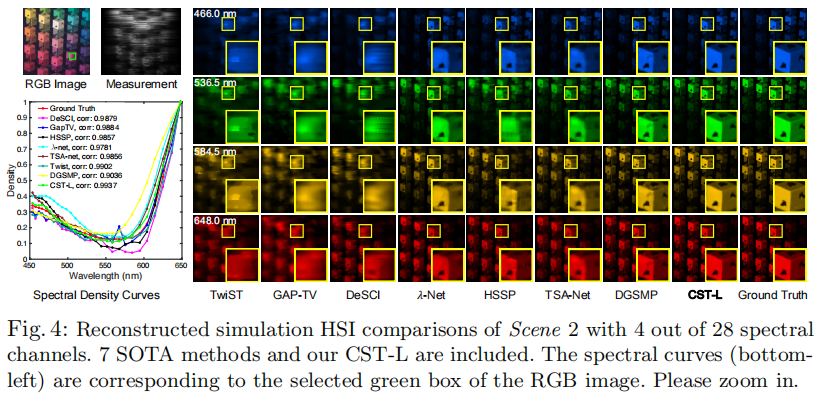
ECCV 2022 | 清华提出首个嵌入光谱稀疏性的Transformer

Princeton chendanqi: how to make the "big model" smaller

QT create application tray and related functions

变频器的工作原理和功能应用

MySQL - unique index

Five application scenarios of Bluetooth module
随机推荐
PC博物馆(1) 1970年 Datapoint 2000
MySQL - normal index
Cub school learning - Kernel Development
乘势而上,OceanBase推动数字支付精益增长
Real time weather API
零基础学习CANoe Panel(8)—— 数据/文本编辑控件(Hex/Text Editor )
MySQL - update data records in tables
[personal summary] end of July 17, 2022
PC博物馆(2) 1972年 HP-9830A
Princeton chendanqi: how to make the "big model" smaller
[about Modelsim simulation] design and Simulation of 4-bit counter
Partition data 1
Windows virtual machine security reinforcement process steps, detailed description of windows setting security policy, detailed description of win7 setting IP security policy, windows setting firewall
LoRa无线技术与LoRaWAN网关模块的区别
BBR 与 queuing
Call bind apply simple summary
Sentinel flow control quick start
[FPGA]: IP core -- xadc
binlog、iptables防止nmap扫描、xtrabackup全量+增量备份以及redlog和binlog两者的关系
Modbus RTU通讯协议详解与实例演示