当前位置:网站首页>pycharm安装教程,超详细
pycharm安装教程,超详细
2022-06-23 09:55:00 【皮小孩ls】
在安装pycharm之前,确保你的电脑配置好了python,没有下载安装的可以去看我的文章—>>>python安装详细教程
pycharm windows版本下载地址:https://www.jetbrains.com/pycharm/download/#section=windows
下载社区版本(日常学习使用够用了),专业版是收费的哦(功能更强大)
下载完后打开安装程序,点击next
选择一个路径然后next
把这些选项都勾选上。
点击Install
安装完后点击Finish
然后就可以开始使用了,双击桌面的pycharm快捷方式
接受,继续!
直接关闭或者Don’t Send.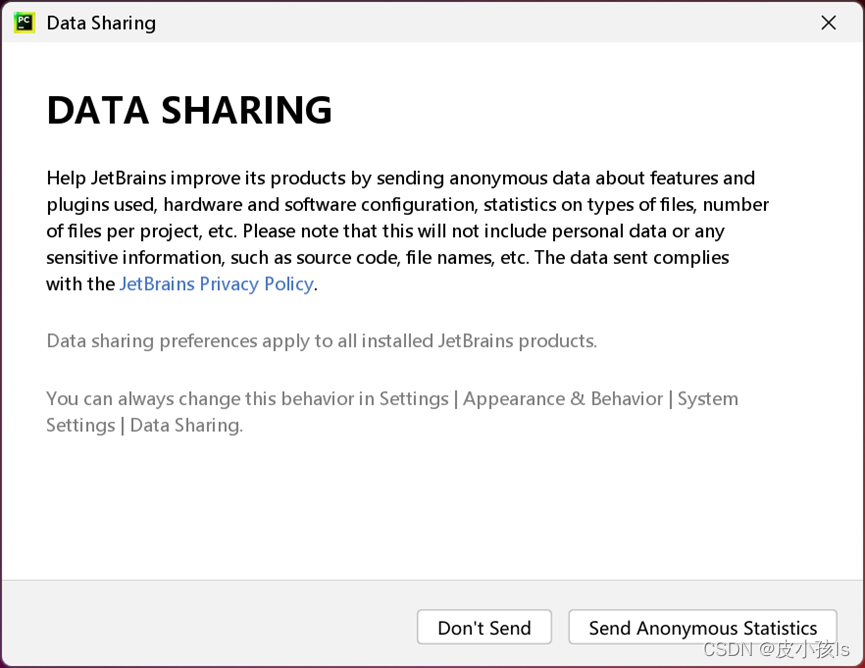
点击New Project(新建一个项目)
选择项目所在路径—>>>选择Previously configured interpreter(需要提前下载安装好python,我这里python版本是python3.10)—>>勾选Create a main.py—>>>最后点击Create.
python安装的教程可以去看我的文章—>>>python安装详细教程
弹出这个直接关闭
鼠标右击main.py,点击运行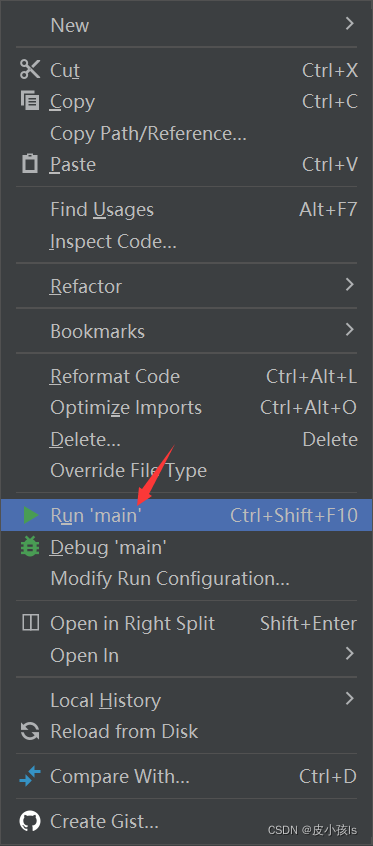
成功输出!说明配置好咯。
然后我们新建一个python file(右击你的项目文件夹)
命名一下
把下面代码复制粘贴过去,看看会出现什么吧。源码来自github
# !/usr/bin/env python3
# -*- coding: utf-8 -*-
# @Author: dong
# @Date: 2018-07-05 19:37:42
# @Env: python 3.6
# @Github: https://github.com/PerpetualSmile

from turtle import *


# 无轨迹跳跃
def my_goto(x, y):
    penup()
    goto(x, y)
    pendown()

# 眼睛
def eyes():
    fillcolor("#ffffff")
    begin_fill()

    tracer(False)
    a = 2.5
    for i in range(120):
        if 0 <= i < 30 or 60 <= i < 90:
            a -= 0.05
            lt(3)
            fd(a)
        else:
            a += 0.05
            lt(3)
            fd(a)
    tracer(True)
    end_fill()


# 胡须
def beard():
    my_goto(-32, 135)
    seth(165)
    fd(60)

    my_goto(-32, 125)
    seth(180)
    fd(60)

    my_goto(-32, 115)
    seth(193)
    fd(60)

    my_goto(37, 135)
    seth(15)
    fd(60)

    my_goto(37, 125)
    seth(0)
    fd(60)

    my_goto(37, 115)
    seth(-13)
    fd(60)

# 嘴巴
def mouth():
    my_goto(5, 148)
    seth(270)
    fd(100)
    seth(0)
    circle(120, 50)
    seth(230)
    circle(-120, 100)

# 围巾
def scarf():
    fillcolor('#e70010')
    begin_fill()
    seth(0)
    fd(200)
    circle(-5, 90)
    fd(10)
    circle(-5, 90)
    fd(207)
    circle(-5, 90)
    fd(10)
    circle(-5, 90)
    end_fill()

# 鼻子
def nose():
    my_goto(-10, 158)
    seth(315)
    fillcolor('#e70010')
    begin_fill()
    circle(20)
    end_fill()

# 黑眼睛
def black_eyes():
    seth(0)
    my_goto(-20, 195)
    fillcolor('#000000')
    begin_fill()
    circle(13)
    end_fill()

    pensize(6)
    my_goto(20, 205)
    seth(75)
    circle(-10, 150)
    pensize(3)

    my_goto(-17, 200)
    seth(0)
    fillcolor('#ffffff')
    begin_fill()
    circle(5)
    end_fill()
    my_goto(0, 0)


# 脸
def face():

    fd(183)
    lt(45)
    fillcolor('#ffffff')
    begin_fill()
    circle(120, 100)
    seth(180)
    # print(pos())
    fd(121)
    pendown()
    seth(215)
    circle(120, 100)
    end_fill()
    my_goto(63.56,218.24)
    seth(90)
    eyes()
    seth(180)
    penup()
    fd(60)
    pendown()
    seth(90)
    eyes()
    penup()
    seth(180)
    fd(64)

# 头型
def head():
    penup()
    circle(150, 40)
    pendown()
    fillcolor('#00a0de')
    begin_fill()
    circle(150, 280)
    end_fill()

# 画哆啦A梦
def Doraemon():
    # 头部
    head()

    # 围脖
    scarf()

    # 脸
    face()

    # 红鼻子
    nose()

    # 嘴巴
    mouth()

    # 胡须
    beard()

    # 身体
    my_goto(0, 0)
    seth(0)
    penup()
    circle(150, 50)
    pendown()
    seth(30)
    fd(40)
    seth(70)
    circle(-30, 270)


    fillcolor('#00a0de')
    begin_fill()

    seth(230)
    fd(80)
    seth(90)
    circle(1000, 1)
    seth(-89)
    circle(-1000, 10)

    # print(pos())

    seth(180)
    fd(70)
    seth(90)
    circle(30, 180)
    seth(180)
    fd(70)

    # print(pos())
    seth(100)
    circle(-1000, 9)

    seth(-86)
    circle(1000, 2)
    seth(230)
    fd(40)

    # print(pos())


    circle(-30, 230)
    seth(45)
    fd(81)
    seth(0)
    fd(203)
    circle(5, 90)
    fd(10)
    circle(5, 90)
    fd(7)
    seth(40)
    circle(150, 10)
    seth(30)
    fd(40)
    end_fill()

    # 左手
    seth(70)
    fillcolor('#ffffff')
    begin_fill()
    circle(-30)
    end_fill()

    # 脚
    my_goto(103.74, -182.59)
    seth(0)
    fillcolor('#ffffff')
    begin_fill()
    fd(15)
    circle(-15, 180)
    fd(90)
    circle(-15, 180)
    fd(10)
    end_fill()

    my_goto(-96.26, -182.59)
    seth(180)
    fillcolor('#ffffff')
    begin_fill()
    fd(15)
    circle(15, 180)
    fd(90)
    circle(15, 180)
    fd(10)
    end_fill()

    # 右手
    my_goto(-133.97, -91.81)
    seth(50)
    fillcolor('#ffffff')
    begin_fill()
    circle(30)
    end_fill()

    # 口袋
    my_goto(-103.42, 15.09)
    seth(0)
    fd(38)
    seth(230)
    begin_fill()
    circle(90, 260)
    end_fill()

    my_goto(5, -40)
    seth(0)
    fd(70)
    seth(-90)
    circle(-70, 180)
    seth(0)
    fd(70)

    #铃铛
    my_goto(-103.42, 15.09)
    fd(90)
    seth(70)
    fillcolor('#ffd200')
    # print(pos())
    begin_fill()
    circle(-20)
    end_fill()
    seth(170)
    fillcolor('#ffd200')
    begin_fill()
    circle(-2, 180)
    seth(10)
    circle(-100, 22)
    circle(-2, 180)
    seth(180-10)
    circle(100, 22)
    end_fill()
    goto(-13.42, 15.09)
    seth(250)
    circle(20, 110)
    seth(90)
    fd(15)
    dot(10)
    my_goto(0, -150)

    # 画眼睛
    black_eyes()

if __name__ == '__main__':
    screensize(800,600, "#f0f0f0")
    pensize(3)  # 画笔宽度
    speed(9)    # 画笔速度
    Doraemon()
    my_goto(100, -300)
    write('by dongdong', font=("Bradley Hand ITC", 30, "bold"))
    mainloop()
效果图:
更多python代码可以去我的专栏看看:
python实用代码
python爬虫入门
基于python和go-cqhttp实现的QQ机器人
最后教大家怎么安装第三方库。
点击pycharm下方的Termainal,输入pip install 第三方库的名称,比如pip install numpy,后面可以跟指定的版本,比如pip install numpy==1.21.0
出现Successfully installed …就说明安装成功了,然后他还提醒我更新pip,这个不管。
大家如果发现下载速度很慢,可以使用国内的镜像。
命令: pip install -i 国内镜像地址 numpy
国内常用源镜像地址:
清华:https://pypi.tuna.tsinghua.edu.cn/simple
阿里云:http://mirrors.aliyun.com/pypi/simple/
中国科技大学 https://pypi.mirrors.ustc.edu.cn/simple/
华中理工大学:http://pypi.hustunique.com/
山东理工大学:http://pypi.sdutlinux.org/
豆瓣:http://pypi.douban.com/simple/
例如:pip install -i https://mirrors.aliyun.com/pypi/simple/ numpy
当然安装第三方库的方法有很多种,上述描述的是我推荐的一种。
边栏推荐
- 在OpenCloudOS使用snap安装.NET 6
- Distributed common interview questions
- Go language JSON processing
- mysql中innodb下的redo log什么时候开始执行check point落盘的?
- How does thymeleaf get the value of the request parameter in the URL?
- Navagation navigation
- regular expression
- Game of life of leetcode topic analysis
- What is BFC? What problems can BFC solve
- 太阳塔科技招聘PostgreSQL数据库工程师
猜你喜欢

漫画 | Code Review快把我逼疯了!

汇编语言中断及外部设备操作篇--06

启明星辰华典大数据量子安全创新实验室揭牌,发布两款黑科技产品

I have been promoted. How can I get along with my former colleagues at the same level?
Qiming Xingchen Huadian big data quantum security innovation laboratory was unveiled and two black technology products were released

Developer, you may have some misunderstandings about cloud computing

文件IO(1)

What is BFC? What problems can BFC solve

Bioinformatics | effective drug target correlation prediction based on interacting neural network

Web -- Information Disclosure
随机推荐
数值计算方法
2021-05-07构造器
构建信创产业生态,移动云立足全栈自主创新连放大招
RBtree
Bi SQL drop & alter
Subscript operator of map
mysql中innodb下的redo log什么时候开始执行check point落盘的?
2021-05-12接口的定义与实现
2021-04-12 the first implementation of linked list!!!
Copilot免费时代结束!正式版67元/月,学生党和热门开源项目维护者可白嫖
Unity技术手册 - 生命周期LifetimebyEmitterSpeed-周期内颜色ColorOverLifetime-速度颜色ColorBySpeed
在OpenCloudOS使用snap安装.NET 6
Find minimum in rotated sorted array
高性能算力中心 — NVMe/NVMe-oF — NVMe-oF Overview
RT thread add MSH command
NFTs、Web3和元宇宙对数字营销意味着什么?
ICLR 2022 | 视频中的动态卷积TAdaConv以及高效的卷积视频理解模型TAdaConvNeXt
J. Med. Chem. | RELATION: 一种基于靶标结构的深度学习全新药物设计模型
Successful experience of postgraduate entrance examination in materials and Chemical Engineering (metal) of Beijing University of Aeronautics and Astronautics in 2023
表单重复提交问题