当前位置:网站首页>JS to achieve progress steps (small exercise)
JS to achieve progress steps (small exercise)
2022-07-24 18:20:00 【lalaxuan】
Use javascript Achieve one progress-steps Consolidate your basic knowledge .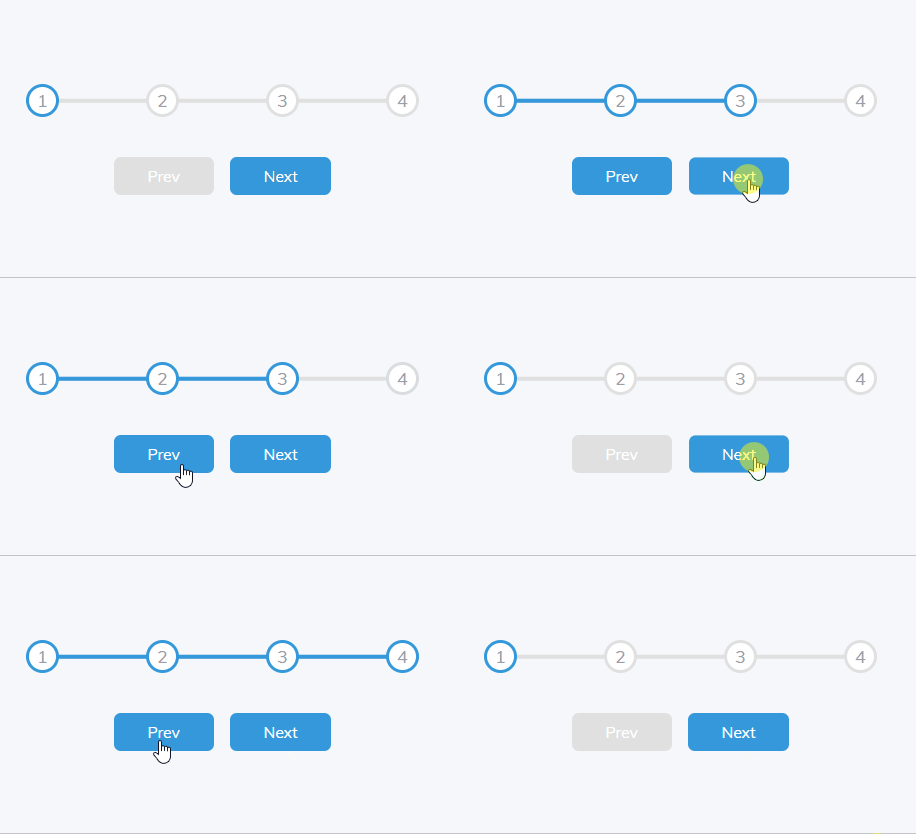 ️index.html
<!DOCTYPE html>
<html lang="en">
<head>
  <meta charset="UTF-8">
  <meta http-equiv="X-UA-Compatible" content="IE=edge">
  <meta name="viewport" content="width=device-width, initial-scale=1.0">
  <title>Progress Steps</title>
  <link rel="stylesheet" href="style.css">
</head>
<body>
  <div class="container">

    <div class="progress-container">
      <div class="progress" id="progress"></div>
      <div class="circle active">1</div>
      <div class="circle">2</div>
      <div class="circle">3</div>
      <div class="circle">4</div>
    </div>

    <button class="btn" id="prev" disabled>Prev</button>
    <button class="btn" id="next">Next</button>
  </div>

  <script src="script.js"></script>
</body>
</html>
️ Layout basic use flex Layout , Positioning is also used
/*  Import font styles  */
@import url(https://fonts.googleapis.com/css?family=Muli&display=swap);

/*  Definition css Variable  */
:root {

  --line-border-fill: #3498db;
  --line-border-empty: #e0e0e0;
}

* {

  box-sizing: border-box;
}

body {

  background-color: #f6f7fb;
  font-family: 'Muli',sans-serif;
  display: flex;
  align-items: center;
  justify-content: center;
  height: 100vh;
  overflow: hidden;
  margin: 0;
}

.container {

  /*  Writing in the middle  */
  text-align: center;
}

/*  written words  +  Progress bar section  */
.progress-container {

  display: flex;
  justify-content: space-between;

  /*  Adjust the distance between the text and the button  */
  margin-bottom: 30px;
  max-width: 100%;
  width: 350px;

  /*  The son is the father  */
  position: relative;
}

/*  The straight line of the progress bar  */
.progress-container::before {

  content: '';
  background-color: var(--line-border-empty);
  position: absolute;
  top: 50%;
  left: 0;
  /* y Axis movement 50%  Put it in the middle of the text  */
  transform: translateY(-50%);
  height: 4px;
  width: 100%;
  /*  Effective only on elements with positioning  z-index:-1;  The progress bar is after the text  */
  z-index: -1;
}

/*  Click after the event is written   Click on width increase   Or decrease  */
.progress {

  background-color: var(--line-border-fill);
  position: absolute;
  top: 50%;
  left: 0;
  transform: translateY(-50%);
  height: 4px;
  width: 0%;
  z-index: -1;
  /*  The time when the progress bar changes color  */
  transition: .4s ease;
}

/*  Numbers  */
.circle {

  display: flex;
  align-items: center;
  justify-content: center;
  width: 30px;
  height: 30px;
  border-radius: 50%;
  border: 3px solid var(--line-border-empty);
  background-color: #fff;
  color: #999;
  /*  The border outside the number   Transition time to blue  */
  transition: .4s ease;
}

.circle.active {

  border-color: var(--line-border-fill);
}

/*  Button  */
.btn {

  background-color: var(--line-border-fill);
  color: #fff;
  border: 0;
  border-radius: 6px;
  cursor: pointer;
  font-family: inherit;
  padding: 8px 30px;
  margin: 5px;
  font-size: 14px;
}

/*  The mouse zooms when you click   The smaller the numerical   The more obvious observation  */
.btn:active {

  transform: scale(0.98);
}


.btn:disabled {

  background-color: var(--line-border-empty);
  cursor: not-allowed;
}
️javascript part
const progress = document.getElementById('progress')
const prev = document.getElementById('prev')
const next = document.getElementById('next')
const circles = document.querySelectorAll('.circle')

let currentActive = 1
next.addEventListener('click',() => {

  currentActive++

  if(currentActive > circles.length) {

    currentActive = circles.length
  }

  update()
})

prev.addEventListener('click',() => {

  currentActive--

  if(currentActive < 1) {

    currentActive = 1
  }

  update()
})

function update() {

  circles.forEach((circle,index) => {

    if(index < currentActive) {

      circle.classList.add('active')
    }else {

      circle.classList.remove('active')
    }
  })

  //  Select the blue circle   Then move the progress bar forward or backward
  const actives = document.querySelectorAll('.active')
  progress.style.width = (actives.length - 1) / (circles.length - 1) * 100 + '%'

  if(currentActive === 1) {

    prev.disabled = true
  } else if(currentActive === circles.length) {

    next.disabled = true
  }else {

    prev.disabled = false
    next.disabled = false
  }
}
This case is in github What you see 50 individual javascript project
Link address :50 individual javascript Small projects
边栏推荐
猜你喜欢

根证书的有效期与服务器SSL证书一样长吗?

Web penetration experience summary ing
Sword finger offer 21. adjust the array order so that odd numbers precede even numbers

模拟实现vector

redis集群的三种方式

Get familiar with pytoch and pytoch environment configuration

["code" power is fully open, and "chapter" shows strength] list of contributors to the task challenge in the first quarter of 2022

手写博客平台~第二天

Mid year inventory | in 2022, PAAS will be upgraded again

How to render millions of 2D objects smoothly with webgpu?
随机推荐
手写博客平台~第二天
odoo中的bom理解
Just one dependency to give swagger a new skin, which is simple and cool!
SSM framework learning
如何向 google colab 快速上传文件
【刷题记录】20. 有效的括号
Shanghai Jiaotong University team used joint deep learning to optimize metabonomics research
Section 10 cache breakdown follow Daewoo redis ------- directory post
undefined reference to H5PTopen
Pytoch's journey 1: linear model
Inheritance and Derive
Alibaba 1688 keyword search product API usage display
Three ways of redis cluster
05mysql lock analysis
运维小白成长记——架构第8周
0621~ES&Lucene
Variable and immutable data types
移动端实现0.5px的实用方案
The collapse of margin
6126. Design food scoring system