当前位置:网站首页>Static route configuration instance learning record
Static route configuration instance learning record
2022-07-23 12:59:00 【Amateur visionary】
Static route configuration instance
Routes set manually are called static routes , Static routing is fixed , It will not change automatically with the change of network topology
List of articles
1、 The goal of the experiment
Learn how to configure static routes , Understand the characteristics of router hop by hop forwarding .
2、 Network topology
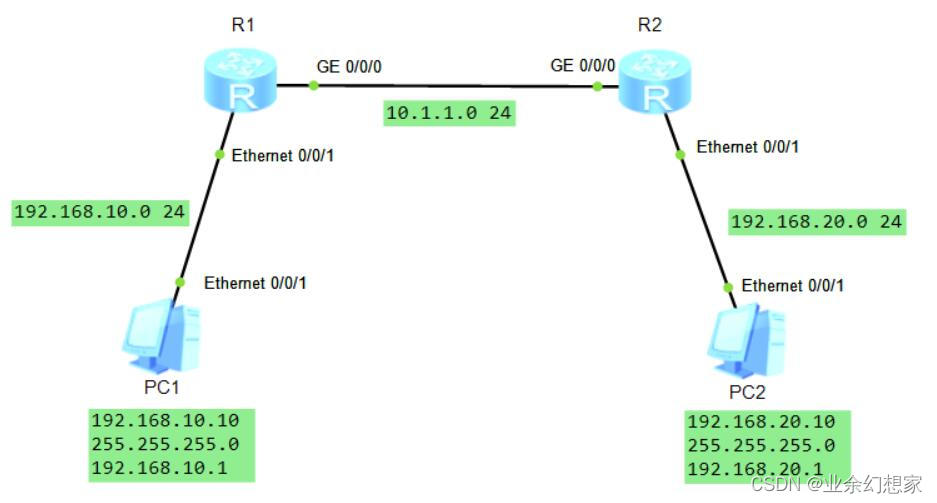
3、 Configuration steps
(1) Configure ports by topology IP Address
R1 To configure :
<R1>system-view  // Enter the system view
[R1]interface GigabitEthernet0/0/0
[R1-GigabitEthernet0/0/0]ip address 10.1.1.1 24  // configure port  IP  Address (IP  Address : 10.1.1.1  Subnet mask : 24)
[R1-GigabitEthernet0/0/0]quit
[R1]interface Ethernet0/0/1
[R1-Ethernet0/0/1]ip address 192.168.10.1 24  // configure port  IP  Address (IP  Address : 192.168.10.1  Subnet mask : 24)
[R1-Ethernet0/0/1]quit
R2 To configure :
<R2>system-view  // Enter the system view
[R2]interface GigabitEthernet0/0/0
[R2-GigabitEthernet0/0/0]ip address 10.1.1.2 24  // configure port  IP  Address (IP  Address : 10.1.1.2  Subnet mask : 24)
[R2-GigabitEthernet0/0/0]quit
[R2]interface Ethernet0/0/1
[R2-Ethernet0/0/1]ip address 192.168.20.1 24  // configure port  IP  Address (IP  Address : 192.168.20.1  Subnet mask : 24)
[R2-Ethernet0/0/1]quit
(2) Configure static routing
R1 To configure :
[R1]ip route-static 192.168.20.0 24 10.1.1.2 //ip route-static [ Destination address segment ] [ Destination address subnet mask ] [ Next jump IP Address ]
R2 To configure :
[R2]ip route-static 192.168.10.0 24 10.1.1.1 //ip route-static [ Destination address segment ] [ Destination address subnet mask ] [ Next jump IP Address ]
4、 test
(1) View the established route entries , Static routing... Look
Tips : Use display ip routing-table Command to view the routing table
see R1 Routing table :
[R1]display ip routing-table  // View routing table
Route Flags: R - relay, D - download to fib
------------------------------------------------------------------------------
Routing Tables: Public
         Destinations : 7        Routes : 7

Destination/Mask    Proto   Pre  Cost      Flags NextHop         Interface

       10.1.1.0/24  Direct  0    0           D   10.1.1.1        GigabitEthernet
0/0/0
       10.1.1.1/32  Direct  0    0           D   127.0.0.1       GigabitEthernet
0/0/0
      127.0.0.0/8   Direct  0    0           D   127.0.0.1       InLoopBack0
      127.0.0.1/32  Direct  0    0           D   127.0.0.1       InLoopBack0
   192.168.10.0/24  Direct  0    0           D   192.168.10.1    Ethernet0/0/1
   192.168.10.1/32  Direct  0    0           D   127.0.0.1       Ethernet0/0/1
   192.168.20.0/24  Static  60   0          RD   10.1.1.2  GigabitEthernet  // R1  This is the static route
0/0/0
see R2 Routing table :
[R2]display ip routing-table  // View routing table
Route Flags: R - relay, D - download to fib
------------------------------------------------------------------------------
Routing Tables: Public
         Destinations : 7        Routes : 7

Destination/Mask    Proto   Pre  Cost      Flags NextHop         Interface

       10.1.1.0/24  Direct  0    0           D   10.1.1.2        GigabitEthernet
0/0/0
       10.1.1.2/32  Direct  0    0           D   127.0.0.1       GigabitEthernet
0/0/0
      127.0.0.0/8   Direct  0    0           D   127.0.0.1       InLoopBack0
      127.0.0.1/32  Direct  0    0           D   127.0.0.1       InLoopBack0
   192.168.10.0/24  Static  60   0          RD   10.1.1.1          GigabitEthernet  // R2  This is the static route
0/0/0
   192.168.20.0/24  Direct  0    0           D   192.168.20.1    Ethernet0/0/1
   192.168.20.1/32  Direct  0    0           D   127.0.0.1       Ethernet0/0/1
(2)PC1 You can talk to PC2 Interworking
use PC1 Go to ping PC2 Of IP Address , The discovery has ping Through the notes : Access to the host IP The first few addresses may appear Request timeout! ( request timeout ) Tips , Normal phenomenon

use PC2 Go to ping PC1 Of IP Address , Discovery can also ping through notes : Access to the host IP The first few addresses may appear Request timeout! ( request timeout ) Tips , Normal phenomenon

5、 Summary
Configuring static routing is mainly to understand the concept of target address network segment and next hop .
In the routing table , Static routing Proto The field is displayed as Static, By default , Routing priority Pre by 60, The routing overhead is 0.
Advantages of static routing : It does not occupy network bandwidth and system resources , Security .
Disadvantages of static routing : When a failure occurs in the network , Static routing doesn't automatically fix , It must be manually configured one by one by the network administrator , It cannot automatically make corresponding adjustments according to the changes of network status .
边栏推荐
- Hcip --- condition matching and OSPF Protocol
- harbor部署
- 2020-09-20
- 静态路由配置实例学习记录
- Learning diary - (routing and switching technology) OSPF Protocol
- Hcip - first experiment
- 2020-09-22
- Understanding of LSM tree (log structured merge tree)
- Explain the interactive data flow and block data flow of TCP in detail
- 2020-09-22
猜你喜欢
OSPF comprehensive experiment in hcip-mgre environment
Nas里搭建Frpc客户端【超级无脑】

Simple use of psutil monitoring

三层交换配置实例学习记录

Learning diary - (routing and switching technology) layer 3 switch

Learning diary - (routing and switching technology) ACL access control list

手动配置DHCP服务
路由与交换技术——静态路由
Hcip --- condition matching and OSPF Protocol

学习日记——(路由与交换技术)OSPF协议
随机推荐
RK3588编译问题集
Explain the release of TCP connection in detail
Unity3d: vector calculation, AOE graph intersection
Learning diary - (routing and switching technology) OSPF Protocol
SQL server performance analysis, view slow queries
三层交换配置实例学习记录
快速解决:Xshell拖不進去文件夾或者軟件包的問題
Learning diary - (routing and switching technology) network address translation NAT Technology
Learning diary - (routing and switching technology) single arm routing
DHCP原理与配置
ACL 配置实例学习记录
sftp部署配置
Instant messaging websocket
[Reading Notes "Phoenix architecture" - a large-scale distributed system with reliable architecture. Zhou Zhiming] (I)
Write a test case where the executable depends on.So
Square root cube root
写一个可执行文件依赖.so的测试用例
helm安装rancher
C#输入一个字母,判断其大小写
学习日记——(路由与交换技术)OSPF协议