当前位置:网站首页>OC--Foundation--字典
OC--Foundation--字典
2022-07-25 09:21:00 【山河丘壑】
一、字典是什么
NSDictionary用于保存具有映射关系的数组。NSDictionary集合里保存着两组值,一组是key,另一组是value.他们都可以是任何类型的指针。
key值不允许重复。
key和value之间存在一一对应的关系。
把NSDictionary中的所有key放在一起,他们就组成了一个NSSet集合(key值没有顺序,key和key之间不能重复)
二、NSDictionary
1.创建
类方法以dicotionary开头,实例方法以init开头
| dictionary: | 创建一个不包含任何key-value的NSDictionary |
|---|---|
| dictionaryWithContentdOfFile:(initWithContentsOfFile:) | 读取指定文件内容,使用指定文件内容来初始化NSD ictionary.该文件通常是由NSDictionary输出生成的 |
| dictionaryWithDictionary:(initWithDictionary:) | 使用已有的NSDictionary包含的key-value来初始化NSDictionary对象 |
| dictionaryWithObject:forKey: | 使用单个key-value来创建NSDictionary对象 |
| dictionaryWithobjects:forKeys:(initWithObjects:forKeys:) | 使用两个NSArray分别指定key,value集合可以创建包含多个key-value的NSDictionary |
| dictionaryWithObjectsAndKeys:(initWIthObjectsAndKeys:) | 按照value1,key1,value2,key2…的格式传入多个key-value对 |
2.访问
- count:返回NSDictionary所包含的key-value对数
- allKeys:返回包含的全部key
- allKeysForObject:返回指定value的对应的全部key
- allValues:返回字典包含的所有value
- objectForKey:用于获取字典中指定key的value
- objectForKeyedSubscript:可允许通过下标获取指定key对应的value
- valueForKey:获取指定key的对应的value
- keyEnumerator:返回遍历字典中所有key的NSEnumerator对象
- objectEnumerator:返回该字典中所有value的NSEnumerator对象
- enumerateKeysAndObjectsUsingBlock:使用指定代码块来迭代执行该集合中所有的key-value对
- enumerateKeysAndObjectsWithOptions:usingBlock:使用指定代码块来迭代执行该集合中所有的key-value对,可以额外传入一个NSEnumerationOptions参数
- writeToFile:atomically:将字典内容写入文件
user类的接口
#import<Foundation/Foundation.h>
@interface User:NSObject
@property(nonatomic,copy)NSString* name;
@property(nonatomic,copy)NSString* pass;
-(id)initWithName:(NSString*)aName
             pass:(NSString*)aPass;
-(void)say:(NSString*)content;

@end
user类的实现
#import "06022.h"
#import<Foundation/Foundation.h>
@implementation User
-(id)initWithName:(NSString*)name
            pass:(NSString*)pass{

    if(self=[super init]){

        self->_name=name;
        self->_pass=pass;

    }
    return self;
}
-(void)say:(NSString*)content{

    NSLog(@"%@说:%@",self.name,content);
}
-(BOOL)isEqual:(id)other{

    if(self==other){

        return YES;
    }
    if([other class]==User.class){

        User* target=(User*)other;
        return  [self.name isEqualToString:target.name]&&[self.pass isEqualToString:target.pass];
    }
    return NO;
}
-(NSString*)description{

    return [NSString stringWithFormat:@"<User[name=%@,pass=%@]>",self.name,self.pass];
}
@end
类的接口
#import <Foundation/Foundation.h>

NS_ASSUME_NONNULL_BEGIN

@interface NSDictionary(print)
-(void)print;
@end

NS_ASSUME_NONNULL_END
类的实现
#import "0602.h"
@implementation NSDictionary (print)
-(void)print{

    NSMutableString* result = [NSMutableString stringWithString:@"{"];
    for(id key in self){

        [result appendString:[key description]];
        [result appendString:@"="];
        [result appendString:[self[key] description]];
        [result appendString:@","];

    }
    NSUInteger len = [result length];
    [result deleteCharactersInRange:NSMakeRange(len-2,2)];
    [result appendString:@"}"];
    NSLog(@"%@",result);
}
@end
测试:
#import<Foundation/Foundation.h>
#import"0602.h"
#import"06022.h"
int main(int argc,char* argv[]){

    @autoreleasepool {

        NSDictionary* dict = [NSDictionary
                              dictionaryWithObjectsAndKeys:
                                  [[User alloc]initWithName:@"sun"
                                                       pass:@"123"],@"one",
                              [[User alloc]initWithName:@"bai"
                                                   pass:@"345"],@"two",
                              [[User alloc]initWithName:@"sun"
                                                   pass:@"123"],@"three",
                              [[User alloc]initWithName:@"tang"
                                                   pass:@"178"],@"four",
                              [[User alloc]initWithName:@"niu"
                                                   pass:@"155"],@"five",nil];
        [dict print];
        NSLog(@"dict包含%ld个key-value对",[dict count]);
        NSLog(@"dict的所有key为:%@",[dict allKeys]);
        NSLog(@"<User[name=sun,pass=123]>对于的所有key为:%@",[dict allKeysForObject:[[User alloc]initWithName:@"sun" pass:@"123"]]);
        NSEnumerator* en=[dict objectEnumerator];
        id value;
        while(value=[en nextObject]){

            NSLog(@"%@",value);
        }
        [dict enumerateKeysAndObjectsUsingBlock:^(id key, id value, BOOL *stop) {

            NSLog(@"key的值为:%@",key);
            [value say:@"娜娜"];

        }];
    }
}

3.对NSDictionary的key排序
keysSortedByValueUsingSelector:根据所有返回值对key排序,嗲用value的该方法必须返回NSOrderedAscending,NSOrderedDescending,NSOrderedSame这三个枚举值之一。
keysSortedByValueUsingComparator:使用指定的代码来遍历key-value对,并根据结果对字典的所有key值排序。该方法必须返回NSOrderedAscending,NSOrderedDescending,NSOrderedSame这三个枚举值之一。
keysSortedByValueWithOptions:usingComparator:使用指定的代码来遍历key-value对,并根据结果对字典的所有key值排序。可以额外传入一个NSEnumerationOptions参数
接口部分代码和上边相同,这里是测试部分代码
#import<Foundation/Foundation.h>
#import"0602.h"
#import"06022.h"
int main(int argc,char* argv[]){

    @autoreleasepool {

        NSDictionary* dict = @{
    @"one":@"nana",
                               @"two":@"nuonuo",
                               @"three":@"magic",
                               @"four":@"hailuo"};
        [dict print];
        NSArray* keyArr1 = [dict keysSortedByValueUsingSelector:@selector(compare:)];
        NSLog(@"%@",keyArr1);
        NSArray* keyArr2 = [dict keysSortedByValueUsingComparator:^(id value1,id value2) {

            if([value1 length]>[value2 length]){

                return NSOrderedDescending;

            }if([value1 length]<[value2 length]){

                return NSOrderedAscending;
            }
            return NSOrderedSame;
        }];
        NSLog(@"%@",keyArr2);
    }
}
结果如下: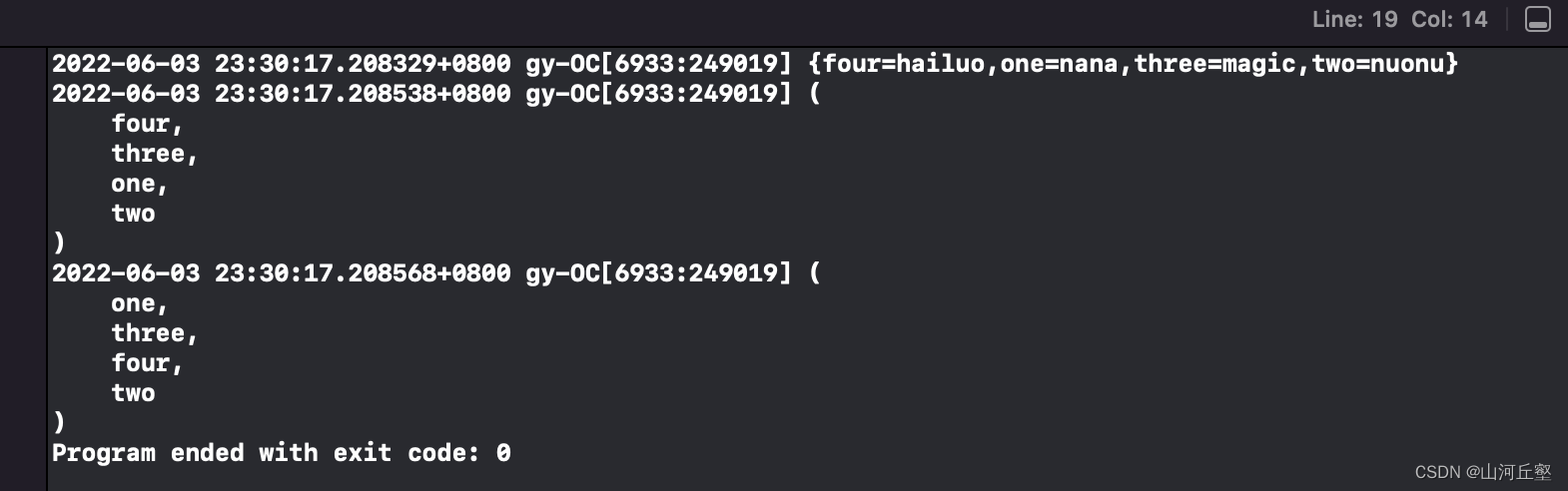
- 第一次调用value的compare:方法排序,字符串比较大小直接根据字符编码进行
- 第二次调用代码块对字典的所有value比较大小,value对应的字符串越长,系统就认为该value越大。
4.对NSDictionary的key过滤
NSDictionary提供了对NSDictionary的所有key执行过滤,完成后将满足返回过滤条件的key组成NSSet.
接口部分和实现部分和上边相同,这里是测试部分代码:
#import<Foundation/Foundation.h>
#import"0602.h"
#import"06022.h"
int main(int argc,char* argv[]){

    @autoreleasepool {

        NSDictionary* dict = @{

            @"nuonuo":[NSNumber numberWithInt:89],
            @"hailuo":[NSNumber numberWithInt:69],
            @"nana":[NSNumber numberWithInt:75],
            @"magic":[NSNumber numberWithInt:109]};
        [dict print];
        NSSet* keySet = [dict keysOfEntriesPassingTest:^(id key,id value,BOOL* stop){

            return (BOOL)([value intValue]>80);
        }];
        NSLog(@"%@",keySet);
    }
}
结果如下:
三、自定义类型作为key
自定义类型需要满足的要求:
正确重写过isEqual:和hash方法
实现了copyWithZone:方法,最好返回对象的不可变副本。这是出于安全性的考虑,当程序吧多个key-value值传入字典后,对于字典而言,key啥非常关键的,字典需要根据key来访问value。value就相当于字典元素的索引。如果key值可变,且程序可以通过其他变量来修改字典的key,就可能导致字典的索引被破坏,导致字典的完整性被破坏
对类实现的补充
- (id) copyWithZone: (NSZone*) zone {

    NSLog(@"start");
    FKUser* newUser = [[[self class] allocWithZone:zone] init];
    newUser->name = name;
    newUser->pass = pass;
    return newUser;
}
测试:
#import<Foundation/Foundation.h>
#import"0602.h"
#import"06022.h"
int main(int argc,char* argv[]){

    @autoreleasepool {

        User* u1=[[User alloc]initWithName:@"bai" pass:@"345"];
        NSDictionary* dict = @{

            [[User alloc]initWithName:@"sun" pass:@"123"]:@"one",u1:@"two",
            [[User alloc]initWithName:@"sun" pass:@"123"]:@"three",
            [[User alloc]initWithName:@"tang" pass:@"178"]:@"four",
            [[User alloc]initWithName:@"niu" pass:@"155"]:@"five"};
        u1.pass = nil;
        [dict print];
    }
}
四、NSMUtableDictionary
NSMUtableDictionary继承了NSDictionary,代表一个key-value可变的NSDictionary集合。

#import <Foundation/Foundation.h>
#import "NSDictionary+print.h"
int main(int argc, char* argv[]) {

    @autoreleasepool {

        NSMutableDictionary* dict = [NSMutableDictionary
                                     dictionaryWithObjectsAndKeys:
                                     [NSNumber numberWithInt:89], @"嘿嘿",  nil];
        dict[@"嘿嘿"] = [NSNumber numberWithInt:99];
        [dict print];
        NSLog(@"again");
        dict[@"娜娜"] = [NSNumber numberWithInt:69];
        [dict print];
        NSDictionary* dict2 = [NSDictionary
                               dictionaryWithObjectsAndKeys:
                               [NSNumber numberWithInt:79], @"神奇",
                               [NSNumber numberWithInt:89], @"hai", nil];
        [dict addEntriesFromDictionary:dict2];
        [dict print];
        [dict removeObjectForKey:@"嘿嘿"];
        [dict print];
    }
    return 0;
}

边栏推荐
猜你喜欢


![[HCTF 2018]admin](/img/d7/f0155c72d3fbddf0a8c1796a179a0f.png)


![[GKCTF 2021]easynode](/img/f0/1daf6f83fea66fdefd55608cbddac6.png)
随机推荐
MySQL takes the query result as the data updated by update, and concatenates it after the original field data (Lej)
数据控制语言(DCL)
Deep understanding of static keyword
Database operation language (DML)
最短路问题 Bellman-Ford(单源最短路径)(图解)
PHP介绍
Swagger2 shows that there is a problem with the get interface, which can be solved with annotations
uni-app小程序如何自定义标题内容(如何解决小程序标题不居中)
变量名可以用中文?直接把人干蒙了
【代码源】每日一题 简单字段和
Read and write mongodb database files
[GYCTF2020]Ez_ Express
浏览器访问swagger失败,显示错误ERR_UNSAFE_PORT
[HCTF 2018]admin
~2 ccf 2022-03-1 未初始化警告
OverTheWire-Natas
UI——无限轮播图和分栏控制器
[GKCTF 2021]easynode
多态和接口
数据分析之numpy基础包