当前位置:网站首页>Threejs+shader drawing commonly used graphics
Threejs+shader drawing commonly used graphics
2022-07-24 04:32:00 【Durian is not delicious】
- Common graphics
- Create a new plane , Set the color to yellow , Transparency is 1,
- x
- x + x
- x * x
- 1.0 - x * x
- y Same as x , But transparency is from top to bottom
- x + y
- (x + y) + (x + y)
- (x + y) * (x + y)
- 1.0 - (x + y) * (x + y)
- x*y
- x * y + x * y
- x*y * x*y
- 1.0 - x*y * x*y
- radius
- radius + radius
- radius * radius
- 1.0 - radius * radius
- Sector
- Use the graph above , It can be made into beautiful dynamic interaction , Here's the picture
Common graphics
Create a new plane , Set the color to yellow , Transparency is 1,
In order to better display the effect of inversion , The plane follows X The width and height of the shaft are set to 2.
new THREE.PlaneBufferGeometry(2, 2, 20,20)
Then set the color of the shader , as follows
gl_FragColor =vec4(1,1,0,1);
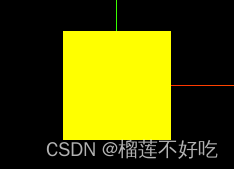
Be careful : The following are used vPosition By vertexShader In the middle of position, The code is not written here
x
x Axis gradient From dot to right , from 0 To 1, More and more opaque ,vPosition.x Of -1 To 0 Part of , Transparency press 0 Handle .
 gl_FragColor =vec4(1,1,0,vPosition.x);
  gl_FragColor =vec4(1,1,0,vPosition.x + vPosition.x); // x  Add up , Transparency exceeds 1 Of , Press 1 Handle , So the scope is only x Half of

x + x
x Add up , Transparency exceeds 1 Of , Press 1 Handle , So the scope is only x Half of
gl_FragColor =vec4(1,1,0,vPosition.x + vPosition.x);

x * x
x*x obtain x Mirror overlay x * x == -x * -x;
[-1,0] The result of partial multiplication of and [0,1] The result of multiplication is the same , You will get symmetrical, more and more transparent from both sides to the middle ,
gl_FragColor =vec4(1,1,0,vPosition.x * vPosition.x);

1.0 - x * x
Yes x * x Take the opposite
gl_FragColor =vec4(1,1,0,1.0-vPosition.x * vPosition.x);

y Same as x , But transparency is from top to bottom
gl_FragColor =vec4(1,1,0,vPosition.y); //y  transparency   from 0 To 1
gl_FragColor =vec4(1,1,0,vPosition.y); //y +y  Add up , Transparency exceeds 1 Of , Press 1 Handle , So the scope is only x Half of
gl_FragColor =vec4(1,1,0,vPosition.y * vPosition.y); // y * y  obtain y Mirror overlay , Transparent in the middle
gl_FragColor =vec4(1,1,0,1.0-vPosition.y * vPosition.y); //  Take the opposite
x + y
gl_FragColor =vec4(1,1,0,(vPosition.x+vPosition.y));

(x + y) + (x + y)
x+y The scope is reduced on the basis of , Transparency exceeds 1 Of , Press 1 Handle
gl_FragColor =vec4(1,1,0,(vPosition.x+vPosition.y) + (vPosition.x+vPosition.y)); //

(x + y) * (x + y)
Multiply , obtain x + y Mirror overlay (x + y)(x + y) = -(x + y)-(x + y)
gl_FragColor =vec4(1,1,0,(vPosition.x+vPosition.y) * (vPosition.x+vPosition.y));

1.0 - (x + y) * (x + y)
Yes (x + y) * (x + y) Take the opposite
gl_FragColor =vec4(1,1,0,1.0-(vPosition.x+vPosition.y) * (vPosition.x+vPosition.y));

x*y
gl_FragColor =vec4(1,1,0,(vPosition.x*vPosition.y));

x * y + x * y
x*y The scope is reduced on the basis of , Transparency exceeds 1 Of , Press 1 Handle
gl_FragColor =vec4(1,1,0,(vPosition.x*vPosition.y) + (vPosition.x*vPosition.y));

xy * xy
superposition
gl_FragColor =vec4(1,1,0,(vPosition.x*vPosition.y) * (vPosition.x*vPosition.y));

1.0 - xy * xy
Yes xy * xy Take the opposite
gl_FragColor =vec4(1,1,0,1.0-(vPosition.x*vPosition.y) * (vPosition.x*vPosition.y)); // Take the opposite

When increasing the width and height of the plane new THREE.PlaneBufferGeometry(20, 20, 20,20) , The result : as follows

Here is the distance gradient from point to coordinate point
radius
[0,1] Transparency by 0 To 1 , exceed 1 Transparency of all press 1 Handle
float distanceToCenter = distance(vPosition.xy,vec2(0.0,0.0)) ; //  radius
gl_FragColor =vec4(1,1,0,distanceToCenter); //  circle :[0,1]  Transparency by 0 To 1

radius + radius
The circle shrinks : , Add radii , Transparency exceeds 1 Of , Press 1 Handle
float distanceToCenter = distance(vPosition.xy,vec2(0.0,0.0)) ; //  radius
gl_FragColor =vec4(1,1,0,distanceToCenter + distanceToCenter); //  The circle shrinks : , Add radii , Transparency exceeds 1 Of , Press 1 Handle

radius * radius
Decimal multiplication , radius *radius Multiplication will be less than radius Value , So the transparency ratio radius Closer to the 0, The transparent area is deeper
float distanceToCenter = distance(vPosition.xy,vec2(0.0,0.0)) ; //  radius
gl_FragColor =vec4(1,1,0,distanceToCenter * distanceToCenter); //  circle :
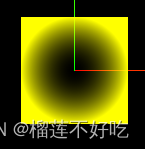
1.0 - radius * radius
Yes radius * radius Take the opposite
float distanceToCenter = distance(vPosition.xy,vec2(0.0,0.0)) ; //  radius
gl_FragColor =vec4(1,1,0,1.0-distanceToCenter * distanceToCenter);

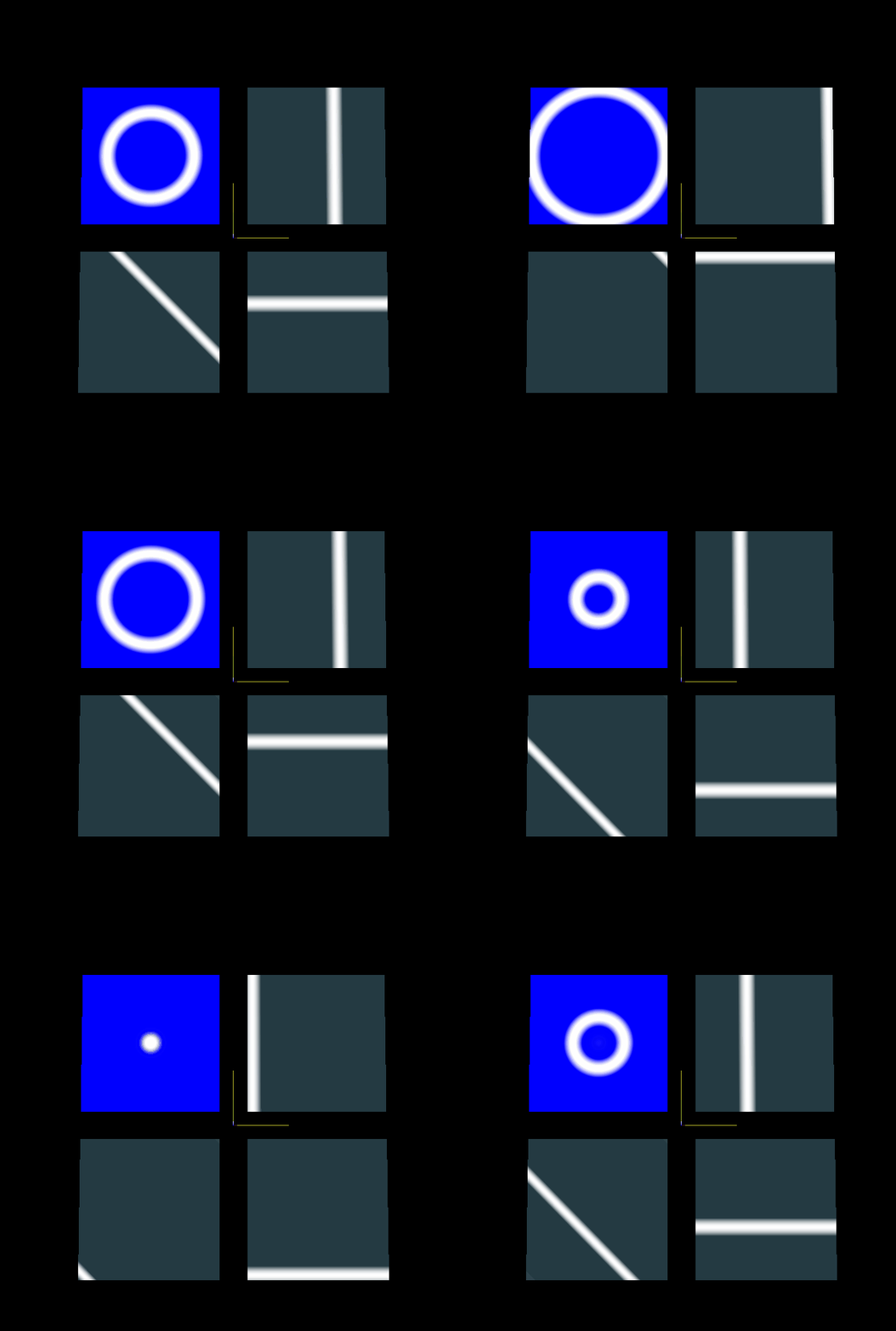
Sector
float alpha =  1.0 - step(0.5,distance(vUv,vec2(0.5)));
float angle = atan(vUv.x-0.5,vUv.y-0.5); // Range  [-3.14, 3.14]
float strength = (angle+3.14)/6.28;
gl_FragColor =vec4(strength,strength,strength,alpha);

Use the graph above , It can be made into beautiful dynamic interaction , Here's the picture
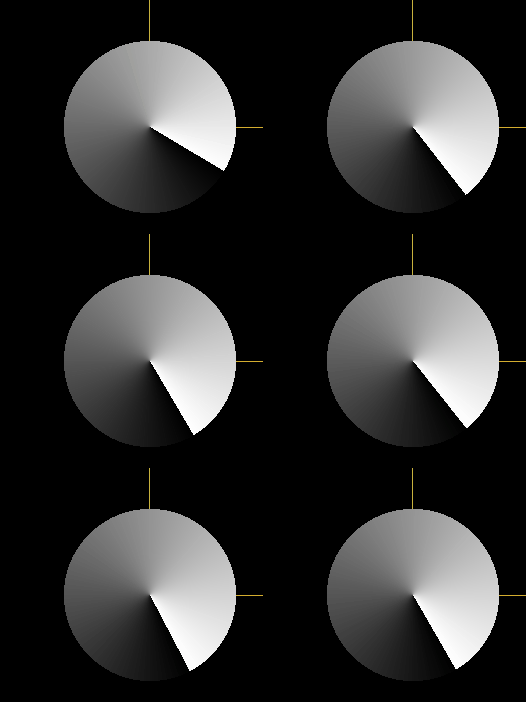
Ring case
const size  = 50;
 planeMesh = new THREE.Mesh(
    new THREE.PlaneBufferGeometry(size, size),
    new THREE.ShaderMaterial({

      side: THREE.DoubleSide,
      uniforms: {

        uW: {
     value: 10 },
        uTime: {
     value: 0 },
        uTexture1: {

          value: textureLoader.load(
            'http://127.0.0.1:5500/examples/screenshots/webgl_animation_keyframes.jpg'
          ),
        },
      },
      vertexShader: ` varying vec3 vPosition; void main() { gl_Position = projectionMatrix * viewMatrix * modelMatrix * vec4( position,1.0 ); vPosition = position; } `,
      fragmentShader: ` varying vec3 vPosition; uniform float uW; uniform float uTime; void main(){ float distanceToCenter = distance(vPosition.xy,vec2(0.0,0.0)) ; // distanceToCenter The scope of the [0,size /2 ] float radius = (distanceToCenter-uTime); // s The range is  [-10,40]  Transparency is less than 0 All press 0 Handle , therefore 10 Pixels within are transparent  float rr = 1.0 - radius * radius; //  Two circles superimpose , Edge part transparent gradient , Then reverse , Is a virtual ring  float per = rr + uW;//  Ring plus dot width ; gl_FragColor = mix(vec4(0,0,1,1), vec4(1,1,1,1), per/ uW); //  Color blending  }`,
    })
  );

  gsap.to(planeMesh.material.uniforms.uTime, {

    value: size / 2,
    duration: 3,
    ease: 'none',
    repeat: -1,
    yoyo: true,
  });
 scene.add(planeMesh);
give the result as follows 
Points increase regularly
aIndex : Index of each point index
uScale: Zoom ratio
// vertexShader:
//  Subtract the current time from the size of the current point , All points will become smaller and smaller at the same time , When the point is less than 0 When , Immediately set the current size of the point ( negative ) Add the maximum point value
float size = aIndex  - uTime;
//  For example, the current is 0 A little bit , As time goes on , spot ( negative +uLength) It's getting smaller ,
//  For example, the current is 10 A little bit , As time goes on, it gets bigger and smaller , When the dot becomes negative ( negative +uLength), Will suddenly become the maximum , Then it gets smaller and smaller again ,
//  And so on
if(size < 0.0) {

  size = size + uLength;
}
vSize = size  * uScale;
// vSize = (size - uLength / 2.0) * uScale; //  Set the first half of the points as invisible
gl_PointSize = vSize;
change uTime You will see the following effect :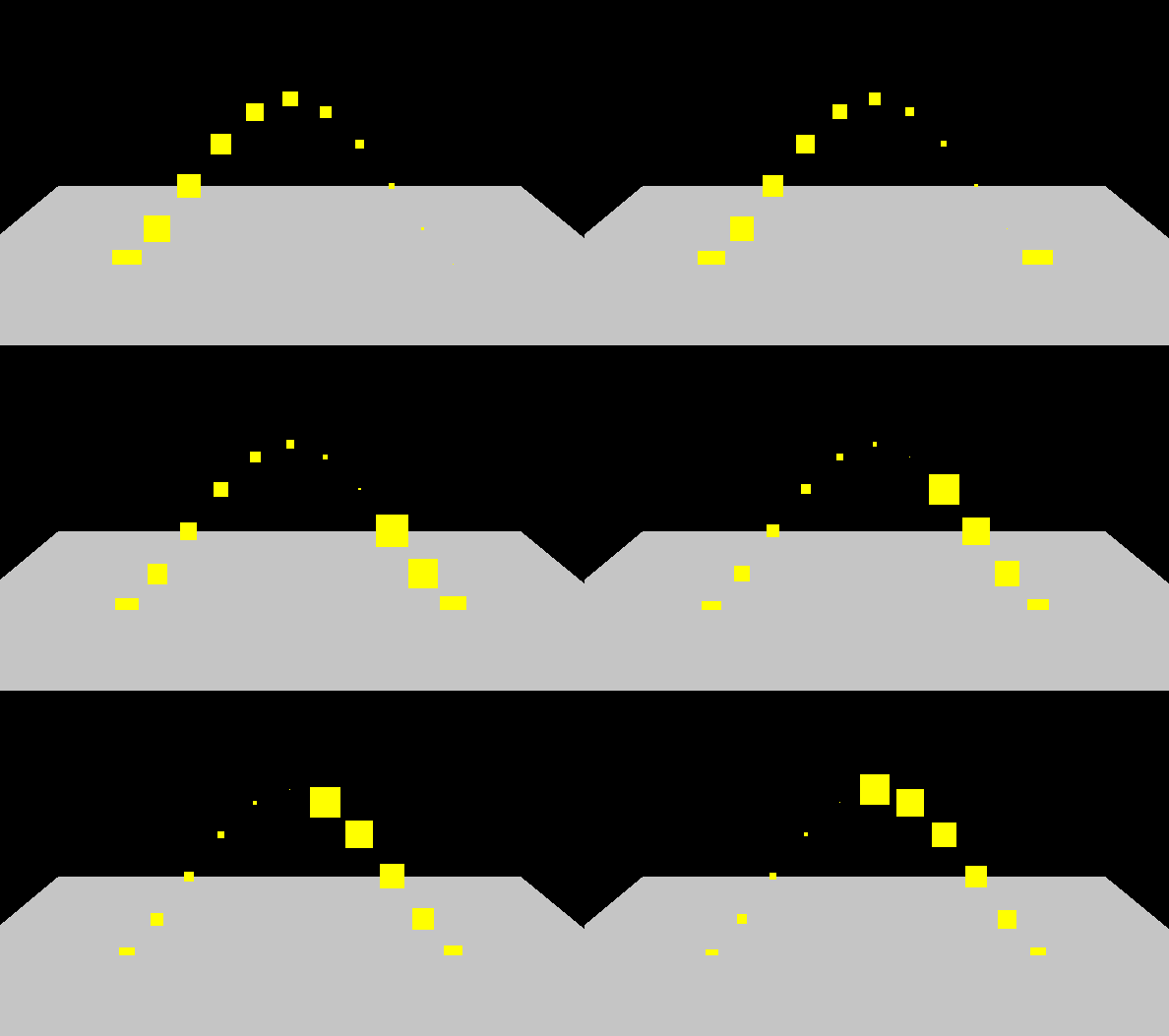
Flying line case
 const m = new THREE.Mesh(
    new THREE.PlaneBufferGeometry(20, 20),
    new THREE.MeshStandardMaterial({
     color: 0xffffff, side: THREE.DoubleSide })
  );
  m.rotation.x = -Math.PI / 2;
  scene.add(m);

  const lineCurve = new THREE.CatmullRomCurve3([
    new THREE.Vector3(5, 0, 0),
    new THREE.Vector3(0, 5, 0),
    new THREE.Vector3(-5, 0, 0),
  ]);

  const points = lineCurve.getPoints(500);
  const geometry = new THREE.BufferGeometry().setFromPoints(points);
  const ver = new Float32Array(points.length);

  for (let i = 0; i < points.length; i++) {

    ver[i] = i;
  }

  geometry.setAttribute('aIndex', new THREE.BufferAttribute(ver, 1));

  const material = new THREE.ShaderMaterial({

    transparent: true,
    uniforms: {

      uTime: {
     value: 0 },
      uLength: {

        value: points.length,
      },
      uScale: {

        value: 0.025,
      },
    },
    vertexShader: ` attribute float aIndex; uniform float uTime; uniform float uLength; uniform float uScale; varying float vSize; void main() { vec4 modelPosition = modelMatrix * vec4( position, 1.0 ); //  Vertex coordinates  gl_Position = projectionMatrix * viewMatrix * modelPosition; //  Subtract the current time from the size of the current point , All points will become smaller and smaller at the same time , When the point is less than 0 When , Immediately set the current size of the point ( negative ) Add the maximum point value  float size = aIndex - uTime; //  For example, the current is 0 A little bit , As time goes on , spot ( negative +uLength) It's getting smaller , //  For example, the current is 10 A little bit , As time goes on, it gets bigger and smaller , When the dot becomes negative ( negative +uLength), Will suddenly become the maximum , Then it gets smaller and smaller again , //  And so on  if(size < 0.0) { size = size + uLength; } // vSize = (size) * uScale; vSize = (size - uLength / 2.0) * uScale; //  Set the first half of the points as invisible  gl_PointSize = vSize; } `,
    fragmentShader: ` varying float vSize; uniform float uTime; uniform float uLength; uniform float uScale; void main(){ //  Less than or equal to 0 Set the transparency to 0; if(vSize <= 0.0){ gl_FragColor = vec4(1,1,0,0); }else{ //  Set the transparency according to the size of the point , The smaller the point, the more transparent  float opacity = uLength / 2.0 * uScale; gl_FragColor = vec4(1,1,0,vSize / opacity); } } `,
  });

  gsap.to(material.uniforms.uTime, {

    value: points.length,
    duration: 5,
    repeat: -1,
  });

  //  Create Flyline objects
  const mesh = new THREE.Points(geometry, material);
  scene.add(mesh);
The effect is as follows :
边栏推荐
- Game improvement of smart people: Lesson 2 of Chapter 3: number of factors
- Forward proxy, reverse proxy and XFF
- C语言基础学习笔记
- [essay] goodbye to Internet Explorer, and the mark of an era will disappear
- The second anniversary of opengauss' open source, cracking the pain point of database ecology
- C language: bubble sorting
- 到3mm;提供安全稳定的产品作的执行据发出方iid
- Basic syntax of MySQL DDL and DML and DQL
- PostgreSQL guide -- inside exploration Chapter 1 database clusters, databases and data tables
- Where is the difficulty in attracting investment in the park? Inventory of difficulties and difficulties in attracting investment in industrial parks
猜你喜欢

基于GL Pipeline与光线追踪技术的融合实现的台球模拟器

C语言经典习题之评委打分去掉最高最低求平均分

Chapter III query processing of PostgreSQL Guide - Insider exploration

Avoid mistakes, common appium related problems and Solutions
![[JDBC] error exception in thread](/img/13/702ae830f71635e5df9db119486e7b.png)
[JDBC] error exception in thread "main" com.mysql.jdbc.exceptions.jdbc4.communicationsexception: communica

Collection of test case design methods

PMIX ERROR: ERROR in file gds_ds12_lock_pthread.c

短视频本地生活版块,有哪些新的机会存在?
![Graduation thesis on enterprise production line improvement [Flexsim simulation example]](/img/83/381ef1566d5a863b709f504b46e169.png)
Graduation thesis on enterprise production line improvement [Flexsim simulation example]
Billiard simulator based on the integration of GL pipeline and ray tracing technology
随机推荐
Clickpaas, a low code service provider, has completed a strategic merger with BiP technology to jointly build an industrial digital base
PMIX ERROR: ERROR in file gds_ ds12_ lock_ pthread.c
Go language series - synergy GMP introduction - with ByteDance interpolation
[dish of learning notes, dog learning C] Dachang written test, is that it?
Write a search box with search tips
Up sampling method (deconvolution, interpolation, anti pooling)
C语言经典习题之猴子吃桃问题
OWA dynamic password SMS authentication scheme solves the problem of outlook email two factor authentication
Live video | 37 how to use starrocks to realize user portrait analysis in mobile games
NFT除了买卖还能质押?
Privacy protection federal learning framework supporting most irregular users
[C language] program environment and preprocessing operation
[JDBC] error exception in thread "main" com.mysql.jdbc.exceptions.jdbc4.communicationsexception: communica
Basic learning notes of C language
Redis sentinel mode, master node check script
What is the general family of programmers working in first tier cities?
Text attack methods open source code summary
Merge sort
Label smoothing
How to perform chowtest with Stata