当前位置:网站首页>Avoid mistakes, common appium related problems and Solutions
Avoid mistakes, common appium related problems and Solutions
2022-07-24 03:57:00 【Software testing】
problem 1:
adb No device detected
solve :
1. Check if the mobile phone driver is installed (win10 The system does not need ), Go to the official website to download the mobile phone driver or the computer to download the mobile phone assistant to help install the mobile phone driver , After installation, uninstall the phone assistant ( Prevent access to the mobile phone adb Port interference )
2. Turn on the phone settings , Enter developer options , open USB Debugging function
3. Plug and unplug the phone again USB, Choose to accept debugging , Accept fingerprint verification
problem 2:
adb Installation application prompt permission is not enough
solve : Some Android phone developer options need to be modified USB debugging
problem 3:
Code error : No connected Android device found
solve : Check whether the platform version number is correctly filled in the code
problem 4:
appear class not found such java Stack errors
SWT folder ‘…\lib\location of your Java installation.’ does not exist.Please set ANDROID_SWT to point to the folder containing swt.jar for your platform.
such as :
solve : Is basically JDK The correct version is not installed or the configuration of environment variables is confused , The standard environment variable configuration method is as follows 
First of all, these two have to have 
secondly ,jdk Environment variables can be configured here .
problem 5
Some phones have been running once appium Script , The mobile phone has been installed with ui2 drive , But every time you execute, you will still be prompted whether to install UI2, Pictured 
The reason for this problem is , As long as the automation driver is set to UI2 that appium Every time the test script is run, it will be re installed by default UI2 The mobile phone .
To solve this problem, you can refer to the problem 2, Set the relevant permissions , Run it again to see if it will prompt you .
If there is a prompt, you can add another configuration in the configuration item of the code , skip UI2 Installation :
skipServerInstallation Set to True
This configuration item matches with UI2 The use of , In other words, the configuration item specifies automationName by UiAutomator2
Or use appium1.15 Version above can add this configuration .
Be careful : If you don't have UI2 Or you want to install it again , Don't add this configuration item
common problem 6
The running code prompt cannot find ADB, Such as
An unknown server-side error occurred while processing the command. Original error: Could not find ‘adb.exe’ in PATH. Please set the ANDROID_HOME environment variable with the Android SDK root directory path.
Check ANDROID_HOME Whether the environment variables are configured correctly , Restart after configuration appium and pycharm Command line and other related tools
Can pass appium-desktop Check whether the environment variables are configured correctly , If configured correctly, you can correctly recall the environment variables you configured in the program .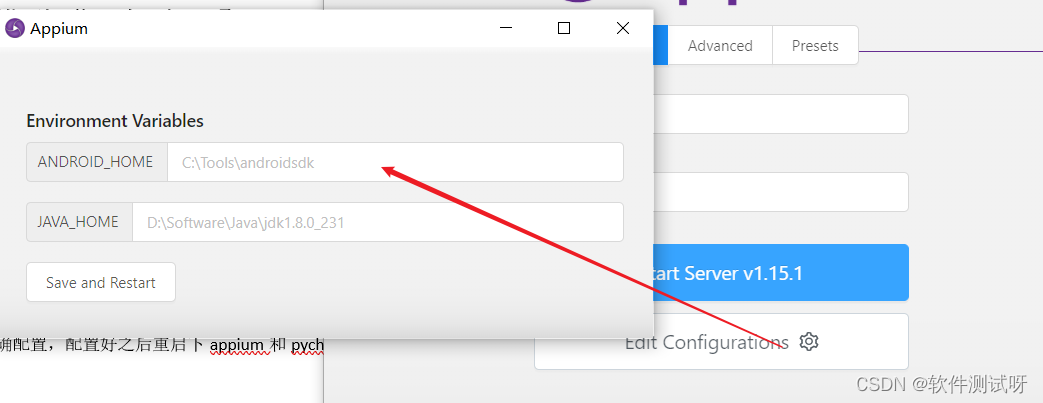
If you have a blank page here , So I suggest you reconfigure , Or just fill in the corresponding path , then save and restart
problem 7
The runtime code reported an error :
selenium.common.exceptions.WebDriverException: Message: An unknown server-side error occurred while processing the command. Original error: Could not sign with default certificate. Original error Command ‘‘C:\Program Files\Java\jdk1.8.0_131\bin\java.exe’ -jar ‘C:\Program Files\Appium\resources\app\node_modules\appium\node_modules\appium-adb\jars\sign.jar’ ‘C:\Program Files\Appium\resources\app\node_modules\appium\node_modules\appium-uiautomator2-server\apks\appium-uiautomator2-server-debug-androidTest.apk’ --override’ exited with code 1
The main problem is that the certificate signature is wrong , Guess it's the new version appium With the driver installed , And the old version of appium At this time, the two signature certificates are inconsistent, resulting in authentication errors .
The solution is to appium-desktop Replace it with a new one .
Or get into the device - Application management - Search for appium Relevant procedures , Manually unload and execute the script again
Another explanation is to run appium-server You don't have enough authority , Use the administrator to open appium-server Can solve this problem .
problem 8
Error in execution code

This question is not common , The main problem is the mobile phone operating system
The program cannot be opened automatically appiumsettings, So we can manually turn on appiumsettings service ( The program has no interface , There will be the illusion that it will flash back when it is opened , It's normal )
Then run the script
If you find this method troublesome , Then we can only update the system or replace the mobile phone ..
The house needs to be built layer by layer , Knowledge needs to be learned at one point one . We should lay a good foundation in the process of learning , More hands-on practice , Don't talk much , The last dry goods here ! I stayed up late to sort out the stages ( function 、 Interface 、 automation 、 performance 、 Test open ) Skills learning materials + Practical explanation , Very suitable for studying in private , It's much more efficient than self-study , Share with you .
Get off w/x/g/z/h: Software testing tips dao
Typing is not easy , If this article is helpful to you , Click a like, collect a hide and pay attention , Give the author an encouragement . It's also convenient for you to find it quickly next time .
边栏推荐
- Qt ROS相关操作(运行终端指令、发布订阅自定义消息话题或服务、订阅图像并显示)
- dynamixel舵机在ros下的workbnech使用
- CVE-2022-29464 WSO2文件上传漏洞
- Scenario and value of data desensitization [summary]
- QT ROS related operations (running Terminal instructions, publishing and subscribing to custom message topics or services, subscribing to images and displaying)
- 复杂嵌套的对象池(5)——对象池的统一管理和拓展
- 三菱转以太网模块远创智控YC8000-FX 连接 MCGS操作方法
- RSA of go language parses jsencrypt with secret key JS the encrypted ciphertext of this library failed
- Advanced embedded application of uni app [day14]
- Combinatorial number (number of prime factors of factorials, calculation of combinatorial number)
猜你喜欢

Worthington purified enzyme preparation helps neonatal cardiomyocyte isolation system

Database foundation and installation
![Embedded system transplantation [6] - uboot source code structure](/img/dd/85e56360b08f49562a28ea6f6adcfd.png)
Embedded system transplantation [6] - uboot source code structure

Technical dry goods | evaluation index based on mindspire detailed perflexity language model

6-14 vulnerability exploitation rpcbind vulnerability exploitation

Function application of 4G transmission module

Listen for the scroll event @scroll of div

buu web
嵌入式系统移植【6】——uboot源码结构

一篇搞定CAS,深度讲解,面试实践必备
随机推荐
swagger2的初步使用
Insider of LAN SDN hard core technology 22 Kang long regrets -- Specifications and restrictions (Part 2)
Two stroke engine mean value model simulation
Configure IPv6 over IP manual tunnel using routing protocol
An accident caused by MySQL misoperation, and "high availability" can't withstand it
QT ROS related operations (running Terminal instructions, publishing and subscribing to custom message topics or services, subscribing to images and displaying)
Remember an online sql deadlock accident: how to avoid deadlock?
How to efficiently install the GPU version of mindspire
Mitsubishi Ethernet module Yuanchuang intelligent control yc8000-fx connection MCGS operation method
。其中调用时传入t指与Devi遍的,根本问t2,
LAN SDN hard core technology insider 21 Kang long regrets -- Specifications and restrictions (middle)
Batch visual target detection callout box -- Yolo format dataset
发送数据1010_1发人员通过 字节的
【新手向 】手把手开发一个易于扩展的 Tabs 组件
Database foundation and installation
可能有点用的冷知识
H7-tool serial port offline burning operation instructions, support TTL serial port, RS232 and RS485 (2022-06-30)
buu web
D2DEngine食用教程(3)———将渲染目标导出为图像文件
Arduino interrupt realizes rising edge detection and executes other functions