当前位置:网站首页>The I2C interface mode offline burning operation method of h7-tool has been released (2022-07-16)
The I2C interface mode offline burning operation method of h7-tool has been released (2022-07-16)
2022-07-23 22:52:00 【Tough guy eric2013】
adopt Lua Applet , We can do it online in a convenient way I2C Interface mode firmware burning , You can also run offline Lua Small program burning .
This time it is explained that H7-TOOL Of I2C Interface connects us V7 Operation instructions for the board .
【 Agreement that 】
1、 Send firmware size : Symbol ‘*’ Synchronization , Then send the firmware size , After receiving the board , reply 0x30 Indicates that erasing the corresponding sector size is successful , reply 0x60 Indicates that erasure failed .
2、 Send firmware data : Symbol ‘$’ Synchronization , Then send firmware data , Every time 64 Byte size , After receiving the board , reply 0x30 Indicates that the data programming is successful , reply 0x60 Indicates that erasure failed . So again and again , Until the sending is finished .
3、 Send the end command : Symbol ‘#’ Indicates the end of transmission , The target board can be loaded into APP It's running .
To update APP Firmware I2C Device address , We set it to 0x20, Communication speed setting 100KHz.
【 Hardware wiring 】
H7-TOOL adopt I2C Receive V7 Of the board I2C On the interface

【 preparation 】
At present, the upper computer has not done special I2C Interface offline burning one click Download Interface , Need to manually Lua Document and app Firmware saved to TOOL Of eMMC
1、H7-TOOL Enter virtual U disc
Press and hold on the power on interface S key -> System settings -> USB eMMC disk , Get into eMMC simulation U After hours , Create a new folder in the following path and burn it offline through the serial port

Save the following two files to the new folder
app.bin (50.03 KB)
i2cbootloader.lua (5.97 KB)

2、 Download the target board program to V7 Development board
Hardware I2C Slave implementation .
be based on V7 Of I2C Interface offline burning target board program .7z (5.39 MB)
【 Online operation instructions 】
H7-TOOL May adopt USB, Ethernet or WiFi Connect the upper computer .
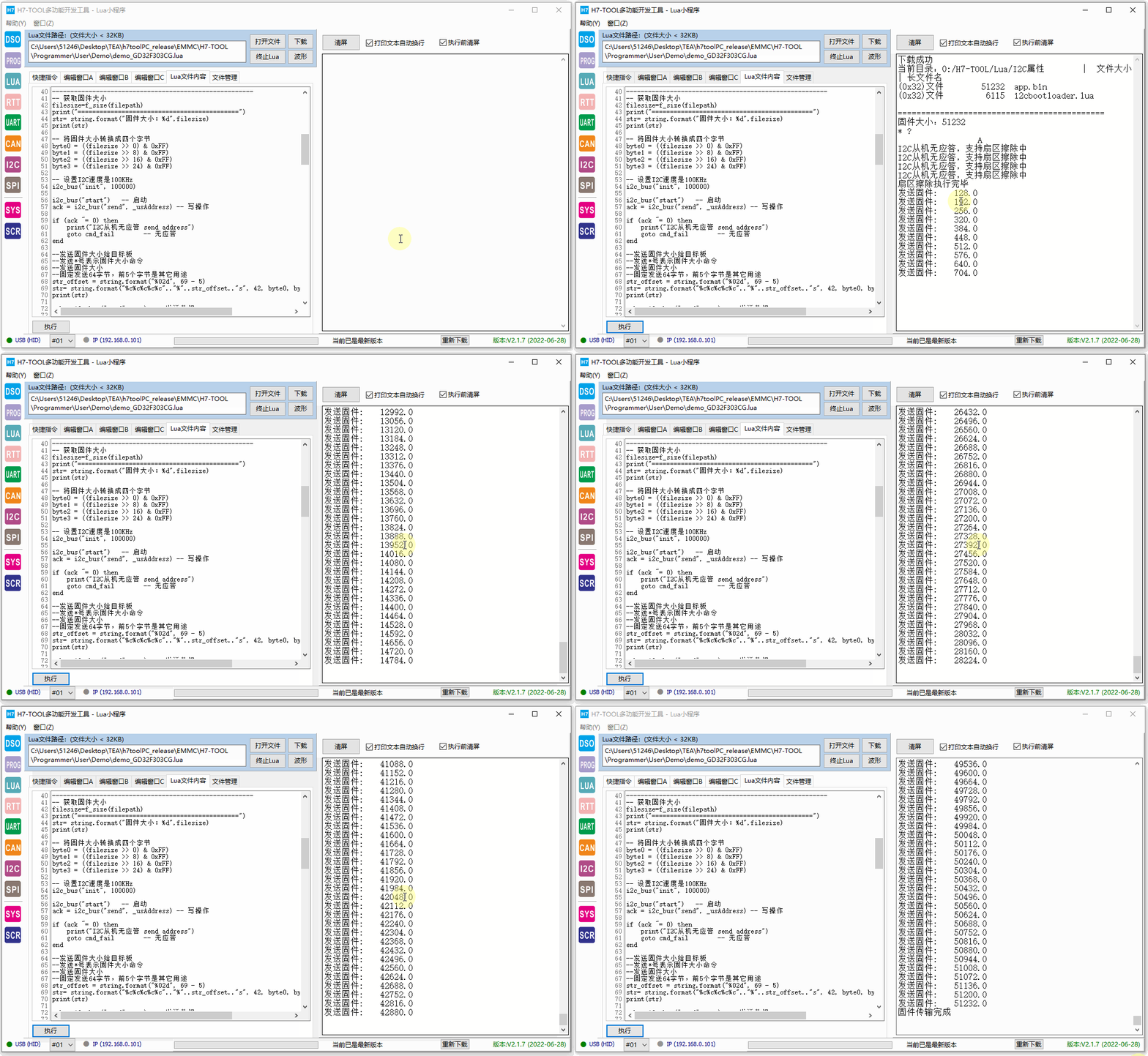
Put the front lua Applet i2cbootloader.lua Copy the contents of to the following window :

Click the execute button below to see the dynamic diagram update :
【 Offline operation instructions 】
operation TOOL display , Get into Lua Applet interface :

perform uartfirmware.lua Applet .
The implementation effect is as follows :

【Lua Brief description of the applet 】
The notes are very detailed :
-------------------------------------------------------
--
--     H7-TOOL  Of I2C Offline burn Lua Applet implementation
--
-------------------------------------------------------
local str
local len
local bytes
local bin
local offset
local value
local count
local filesize
local byte0
local byte1
local byte2
local byte3
local filepath = "0:/H7-TOOL/Lua/I2C Offline burn /app.bin" --  Express I2C Burn the files saved in the folder offline
local filepath1 = "0:/H7-TOOL/Lua/I2C Offline burn "        --  Browse I2C Burn the file saved under the file offline
local ack
local i, m
local res
local str_offset
local str_offset1
local str_offset2

-------------------------------------------------------
--   I2C Device address , Update needs to be modified
-------------------------------------------------------
local _usAddress = 0x20 -- I2C Device address

-------------------------------------------------------
--    The first 1 Step : Browse the files saved in the serial port offline burning folder
-------------------------------------------------------
f_dir(filepath1)
print()

-------------------------------------------------------
--    The first 3 Step : Send firmware size , It is convenient for the target board to erase sectors of corresponding size
-------------------------------------------------------
--  Get firmware size
filesize=f_size(filepath)
print("============================================")
str= string.format(" Firmware size :%d",filesize)
print(str)

--  Convert firmware size to four bytes
byte0 = ((filesize >> 0) & 0xFF)
byte1 = ((filesize >> 8) & 0xFF)
byte2 = ((filesize >> 16) & 0xFF)
byte3 = ((filesize >> 24) & 0xFF)

--  Set up I2C The velocity is 100KHz
i2c_bus("init", 100000)

i2c_bus("start")   --  start-up
ack = i2c_bus("send", _usAddress) --  Write operations

if (ack ~= 0) then
    print("I2C There is no response from the slave  send address")
    goto cmd_fail        --  No response
end

-- Send the firmware size to the target board
-- send out * Number indicates firmware size command
-- Send firmware size
-- Fixed send 64 byte , front 5 Bytes are for other purposes
str_offset = string.format("%02d", 69 - 5)
str= string.format("%c%c%c%c%c".."%"..str_offset.."s", 42, byte0, byte1, byte2, byte3, "A")
print(str)

ack = i2c_bus("send", str)  --  send data

if (ack ~= 0) then
    print("I2C There is no response from the slave  send data")
    goto cmd_fail        --  No response
end

i2c_bus("stop")

 ------- Inquire about , Until the device finishes erasing ---------
 for m=1, 50, 1 do
    i2c_bus("start")
    ack = i2c_bus("send", _usAddress) --  Read operations

    if (ack ~= 0) then
        print("I2C There is no response from the slave , Support sector erasure ")
    else
        break
    end
    delayms(300)
end

 ------- Get the return value -----------------------
i2c_bus("start")
ack = i2c_bus("send", _usAddress+1) --  Read operations

str = i2c_bus("recive", 1) --  Read 17 Bytes of data

if(str == '\x30') then
    print(" Sector erase is completed ")
else
    print(" Sector erase execution failed ")
end
i2c_bus("stop")

-------------------------------------------------------
--    The first 4 Step : Send firmware size
-------------------------------------------------------
offset = 0
--  The first 1 The first parameter is the path , The first 2 Offset address of parameters , The first 3 Parameter read size
--  Return value bytes Represents the number of bytes read ,bin Represents the data returned
bytes, bin = f_read(filepath, 0, 64)
offset = offset + bytes

--  Read data as 0, Indicates that the transmission is complete
while(bytes > 0)
do

    --  send out $ Indicates the start of firmware transmission
    --  Send firmware data to the target board
    --  Fix each send 64 Bytes , front 5 Bytes for other purposes
    count = 69 - 2 - bytes
    str_offset = string.format("%02d", count)
    str_offset1 = string.format("%"..str_offset.."s", "A")
    str_offset2 =  string.format("$%c", bytes)
    str= str_offset2..bin..str_offset1

    i2c_bus("start")   --  start-up
    ack = i2c_bus("send", _usAddress) --  Write operations

    if (ack ~= 0) then
        print("I2C There is no response from the slave  send address")
        goto cmd_fail        --  No response
    end

    ack = i2c_bus("send", str)  --  send data

    if (ack ~= 0) then
        print("I2C There is no response from the slave  send data")
        goto cmd_fail        --  No response
    end

    i2c_bus("stop")

    ------- Inquire about , Until the device finishes sector programming ---------
    for m=1, 50, 1 do
        i2c_bus("start")
        ack = i2c_bus("send", _usAddress) --  Write operations

        --ack = i2c_bus("check", _usAddress)

        if (ack ~= 0) then
            --print("I2C There is no response from the slave  send address")
        else
            break
        end
        delayms(1)
    end

     ------- Get the return value -----------------------
    i2c_bus("start")
    ack = i2c_bus("send", _usAddress+1) --  Read operations
    str = i2c_bus("recive", 1) --  Read 1 Bytes of data
    i2c_bus("stop")
    if(str == '\x30') then  --  If the return value is 0x30, Continue reading
        bytes, bin = f_read(filepath, offset, 64)  --  Continue reading data
        offset = offset + bytes
        if(bytes ~= 0) then                       --  Read not 0, Print the total number of bytes sent
            print(" Send firmware :", offset)
        end
    else
        print(" Sector programming execution failed ")
    end
end

-------------------------------------------------------
--    The first 5 Step : Send the transmission end command
-------------------------------------------------------
str_offset = string.format("%02d", 69 - 1)
str= string.format("#".."%"..str_offset.."s", "A")

i2c_bus("start")   --  start-up
ack = i2c_bus("send", _usAddress) --  Write operations

if (ack ~= 0) then
    print("I2C There is no response from the slave  send address")
    goto cmd_fail        --  No response
end

ack = i2c_bus("send", str)  --  send data

if (ack ~= 0) then
    print("I2C There is no response from the slave  send data")
    goto cmd_fail        --  No response
end

i2c_bus("stop")

print(" Firmware transfer complete ")

::cmd_fail::
    --   After the command fails , Remember to send a stop signal , Avoid impact I2C Other devices on the bus
    --   send out I2C Bus stop signal
    i2c_bus("stop")

-------------------------------------------------------
--  end of file
-------------------------------------------------------
【 A brief description of the target board program 】
The key is I2C process :
/*
*********************************************************************************************************
*         Letter   Count   name : main
*         Functional specifications : c Program entrance
*         shape      ginseng :  nothing
*         return   return   value :  Error code ( No need to deal with )
*********************************************************************************************************
*/
int main(void)
{
        uint32_t SectorCount = 0;
        uint32_t SectorRemain = 0;
        uint32_t i;
    uint32_t TotalSize = 0;
        uint8_t ucState;


        bsp_Init();                /*  Hardware initialization  */
        PrintfLogo();        /*  Print routine information to serial port 1 */
        PrintfHelp();        /*  Print operation prompt  */

        bsp_StartAutoTimer(0, 100);        /*  start-up 1 individual 100ms Self refitting timer of  */

        /*  For the first time to use , First set up 64 Byte receive  */
        g_i2cLen = 69;
        bsp_i2cReceive();

        /*  Enter the main program loop body  */
        while (1)
        {
                bsp_Idle();                /*  This function is in the bsp.c file . The user can modify the function implementation CPU Sleeping and feeding dogs  */

                /*  Judge timer timeout  */
                if (bsp_CheckTimer(0))
                {
                        /*  every other 100ms  Come in once  */
                        bsp_LedToggle(2);
                }

        if (wTransferState != TRANSFER_WAIT)
        {
                        /*  Transfer firmware  */
                        if(g_i2cRxBuf[0] == '*')
                        {
                                /*  Get file size  */
                                filesize = g_i2cRxBuf[1] + (g_i2cRxBuf[2] << 8) + (g_i2cRxBuf[3] << 16) + (g_i2cRxBuf[4] << 24);
                                uwAppSize = filesize;
                                for(int i = 0; i < 69; i++)
                                {
                                        printf("%x ", g_i2cRxBuf[i]);
                                }

                                /*  Erase according to the file size  */
                                SectorCount = filesize/(128*1024);
                                SectorRemain = filesize%(128*1024);

                                printf("filesize = %d\r\n", filesize);
                                for(i = 0; i < SectorCount; i++)
                                {
                                        bsp_EraseCpuFlash((uint32_t)(AppAddr + i*128*1024));
                                }

                                if(SectorRemain)
                                {
                                        bsp_EraseCpuFlash((uint32_t)(AppAddr + i*128*1024));
                                }

                                /*  return 0x30, Indicates that the erasure was successful  */
                                g_i2cLen = 1;
                                g_i2cTxBuf[0] = 0x30;
                                bsp_i2cTransfer();

                                /*  Continue to perform the next reception  */
                                g_i2cLen = 69;
                                bsp_i2cReceive();
                        }

                        /*  Transmission completion command  **************/
                        if(g_i2cRxBuf[0]  == '#')
                        {
                                JumpToApp();
                        }

                        /*  Start transferring firmware commands  **************/
                        if(g_i2cRxBuf[0]  == '$')
                        {
                                /*  Number of received data  */
                                RecSize = g_i2cRxBuf[1];

                                /*  Programming internal Flash, */
                                ucState = bsp_WriteCpuFlash((uint32_t)(AppAddr + TotalSize),  (uint8_t *)&g_i2cRxBuf[2], RecSize);
                                TotalSize += RecSize;
                                printf("=====%d\r\n", TotalSize);

                                /*  If the return is not 0, Indicates programming failure  */
                                if(ucState != 0)
                                {
                                        /*  return 0x60, Indicates programming failure  */
                                        g_i2cLen = 1;
                                        g_i2cTxBuf[0] = 0x60;
                                        bsp_i2cTransfer();
                                }

                                /*  return 0x30, Indicates successful programming  */
                                g_i2cLen = 1;
                                g_i2cTxBuf[0] = 0x30;
                                bsp_i2cTransfer();

                                /*  Continue to perform the next reception  */
                                g_i2cLen = 69;
                                bsp_i2cReceive();
                        }

                }
        }
}
【 Reference material 】
Three issues have been updated before BootLoader Video tutorial , It can be used as a reference to learn :
Single chip microcomputer bootloader project , start-up , Jump to various uses of configuration and debugging downloads
BSP Video tutorial 17 period : Single chip microcomputer bootloader project , start-up , Jump to various uses of configuration and debugging downloads (2022-06-10) - STM32H7 - Hardman embedded Forum - Powered by Discuz!
be based on NAND,eMMC,SD Card and U Discoid BootLoader actual combat , belt CRC Integrity check
BSP Video tutorial 18 period : be based on NAND,eMMC,SD Card and U Discoid BootLoader actual combat , belt CRC Integrity check (2022-06-16) - STM32H7 - Hardman embedded Forum - Powered by Discuz!
Single chip microcomputer BootLoader Of AES Encryption practice , Including upper computer and lower computer code all open source
BSP Video tutorial 19 period : Single chip microcomputer BootLoader Of AES Encryption practice , Including upper computer and lower computer code all open source (2022-06-26) - STM32H7 - Hardman embedded Forum - Powered by Discuz!
边栏推荐
- Crazy God redis notes 10
- Internet协议栈 TCP/IP模型 物理层、链路层、网络层、传输层、应用层的作用
- Getting started database Days1
- 121. The best time to buy and sell stocks
- The font of Siyuan notes is thinner and lighter than that in other editors (atom, VSC, sublime)
- 接口测试
- 【golang学习笔记】包(package)的使用
- Tap series article 5 | cloud native build service
- Mongodb - Introduction to the usage of logical operators not, and, or, nor in query statements
- (CVPR-2022)BiCnet
猜你喜欢

【golang学习笔记】Go语言中参数的传递是值传递还是引用传递
![[laser principle and Application-8]: EMC design of laser circuit](/img/98/8b7a4fc3f9ef9b7e16c63a8c225b02.png)
[laser principle and Application-8]: EMC design of laser circuit

What else do entrepreneurs need besides money? Exclusive interview with Mingyue Lake venture capital institutions

记忆化搜索 - DP

Microsoft SQL Server database language and function usage (XIII)

【Unity3D日常BUG】Unity3D解决“找不到类型或命名空间名称“XXX”(您是否缺少using指令或程序集引用?)”等问题

unity visual studio2019升级到2022版本(扔掉盗版红渣)

Explain NAT technology in detail

Still worrying about xshell cracking, try tabby

H7-tool serial port offline burning operation instructions, support TTL serial port, RS232 and RS485 (2022-06-30)
随机推荐
vip股票账户在手机开通安全吗?
Life always needs a little passion
[golang learning notes] concurrency basis
[laser principle and Application-8]: EMC design of laser circuit
Matlab小波工具箱导入信号出错(doesn‘t contain one dimensional Singal)
Introduction and project development of MVVM and mvvmlight (I)
【golang学习笔记】flag包的简单使用,命令行解析
1000 okaleido tiger launched binance NFT, triggering a rush to buy
砺夏行动|源启数字化:既有模式,还是开源创新?
$, $*, [email protected], $$ Understand the meaning of 0
[unity3d daily bug] unity3d solves "the type or namespace name" XXX "cannot be found (are you missing the using directive or assembly reference?)" Etc
The ultimate experiment of OSPF -- learn the example of OSPF century template
Tap series article 5 | cloud native build service
Ways to improve the utilization of openeuler resources 01: Introduction
The Minesweeper game
Programming in the novel [serial 18] the moon bends in the yuan universe
『晨读』如果你处在我的位置,你会怎么做?我们怎么样做,
D1-H 开发板——哪吒 开发入门
年化收益率6%的理财产品
Crazy bull market, where to go in the second half? 2021-04-30