当前位置:网站首页>AIX system monthly maintenance check (I)
AIX system monthly maintenance check (I)
2022-06-23 23:15:00 【Jinling shopkeeper】
restudy old materials :
Before that 《AIX System commands for viewing system information 》 This article gives you a simple list of AIX Common query commands in the system , Today I want to tell you about AIX What should be checked for the monthly maintenance of the system , It is convenient for us to manage the system skillfully .
know sth. new :
System level
- Log check alarm ——errpt command , Check whether an error is reported ;
- Check to see if there is mail ——/var/spool/mail, Yes mail Describe a user's cron An error occurred during the execution of the script , Or the system has an alarm , If a user appears repeatedly mail, And it's the same problem , Think about cron Whether the script is effective ;
- Check time ——date command , Time matters , It involves database synchronization ;
- check CPU Usage rate ——sar -u 10 6 ( Parameters can be changed ), Lower %idle explain CPU The load is very high
Higher %wio This indicates that the disk is waiting for a long time ; - Check each one CPU The load of ——mpstat 10 6(topas -L), If a certain CPU Of id The value is much larger than the others CPU Of id value , It indicates that the system is abnormal ;
- Check the memory status ——vmstat 1 3 ( Parameters can be changed ), Pay attention to memory surplus and utilization ;
- Check page feed space usage ——lsps command , The general utilization rate shall not exceed 10%, exceed 30% It will be very dangerous .
Disk hierarchy
- Monitoring disk (I/O) condition ——sar -d 10 10 ( Parameters can be changed ), Higher %busy and avque It means that the disk I/O bottleneck ;
- Identify each disk (I/O) bottleneck ——iostat -d device1 device2 … 10 10,Kps Number of bytes transferred per second
tps Number of transfers per second ,servs Average service time ; - Identify each disk (I/O) Read / write status ——iostat -D device1 device2 … 10 10;
- Determine the status of each file system ——df -g, Generally not more than 80% that will do .
Network level
- Monitor the current system network card status ——ifconfig -a, Check whether the network address is normal ;
- Output ARP surface ——arp -a;
- Output routing table ——netstat -nr, Check for missing routes ;
- Output IP Address allocation ——netstat -in , You can check whether the system has experienced network card address switching .
summary :
You can basically master the operation of the system through the above contents , Of course, a complete monthly maintenance report also needs relevant information about the software and hardware of the system , For example, the version of important software installed in the system 、 Hardware ( machine ) Location of the machine room, etc . Today's time is limited , The next article will tell you how to check the database in monthly maintenance .
边栏推荐
- TDP "spark" plan - the third phase of new recruitment is launched
- How to write and read ASM file system data
- Application of clock synchronization system in banking system
- Map集合的四种遍历
- Save: software analysis, verification and test platform
- AAAI 2022 | Tencent Youtu 14 papers were selected, including image coloring, face security, scene text recognition and other frontier fields
- Operation and maintenance failure experience sharing
- AIX系统月维护查什么(一)
- Unknown character set index for field ‘255‘ received from server.
- The fortress machine installs pytorch, mmcv, and mmclassification, and trains its own data sets
猜你喜欢

C# Winform 自定义进度条ProgressBar
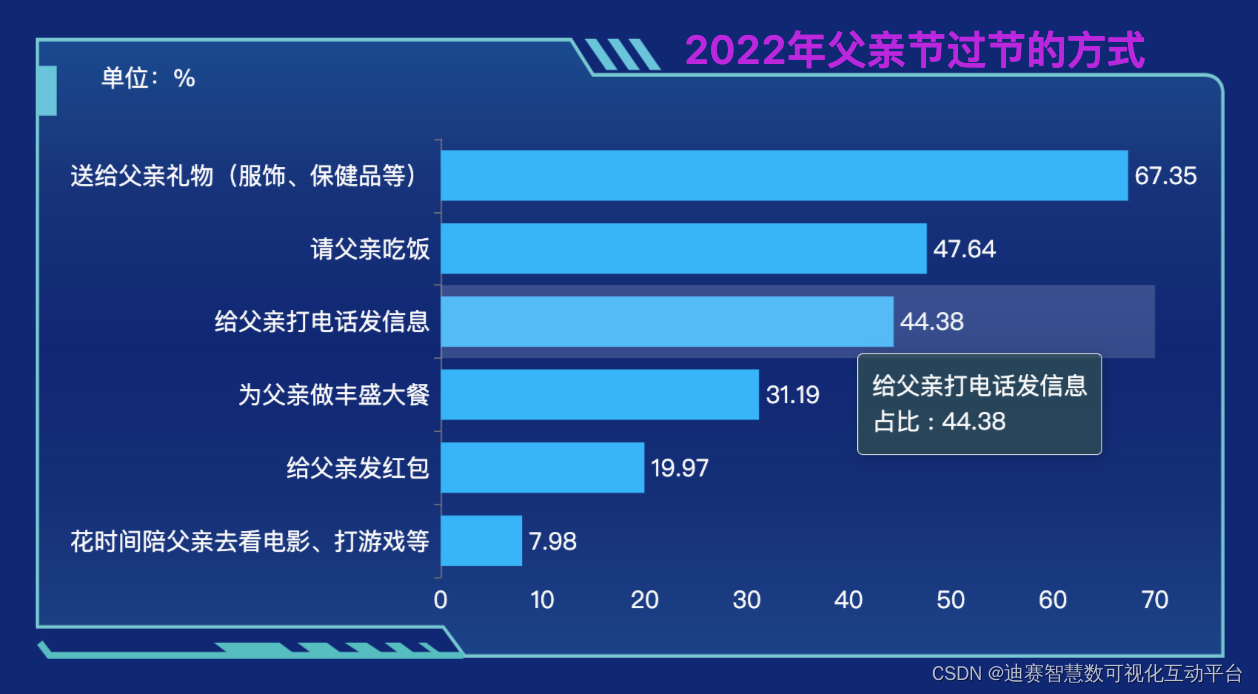
Desai wisdom number - histogram (basic histogram): the way to celebrate father's day in 2022

解密抖音春节红包背后的技术设计与实践

The sandbox week is coming!
![[observation] Dell technology + Intel aoteng Technology: leading storage innovation with](/img/cf/3e3eb6389693667edad534b556c15c.png)
[observation] Dell technology + Intel aoteng Technology: leading storage innovation with "nanosecond speed"

Ant group's self-developed tee technology has passed the national financial technology product certification

根据先序遍历和中序遍历生成后序遍历
云原生流水线工具汇总

The 12 SQL optimization schemes summarized by professional "brick moving" old drivers are very practical!
How PostgreSQL creates partition tables


随机推荐
蚂蚁获FinQA竞赛冠军,在长文本数值推理AI技术上取得突破
Postman可以集成到CI,CD流水线中做自动化接口测试吗?
2022云顾问技术系列之存储&CDN专场分享会
堡垒机安装pytorch,mmcv,mmclassification,并训练自己的数据集
WebService客户端请求失败 can not create a secure xmlinputfactory
C language picture transcoding for performance testing
Summary of some indicators for evaluating and selecting the best learning model
Go language learning
C# Winform 自定义进度条ProgressBar
C# 读取内存条占用大小,硬盘占用大小
Debian change source and uninstall useless services
How to set up links for website construction how to build a website
What is the development prospect of face recognition technology?
Detailed quaternion
根据先序遍历和中序遍历生成后序遍历
Use elastic security to detect the vulnerability exploitation of cve-2021-44228 (log4j2)
解密抖音春节红包背后的技术设计与实践
HAOGE's blog Road
Notes to nodejs (III)
PHPMailer 发送邮件 PHP