当前位置:网站首页>Electronics: Lesson 010 - Experiment 8: relay oscillator
Electronics: Lesson 010 - Experiment 8: relay oscillator
2022-06-25 07:57:00 【acktomas】
experiment 8: Relay oscillator
In the previous experiments , You used a test lead with a spring clip , They have two great advantages : You can connect the circuit quickly , It is also easy to understand how the circuit is connected .
however , Sooner or later you have to become familiar with a faster 、 More convenient 、 More concise 、 More general circuit building methods . Is the most commonly used prototype equipment : Solderless bread board .
20 century 40 years , The circuit is built on the platform , These platforms do look like chopping boards that can cut bread . Wires and components are fixed in place with nails or nuts , Because it's much easier than fixing on a thin piece of metal . remember , There were not many plastic products at that time .( A world without plastic —— Can you imagine ?)
Now ,“ Breadboard ” This term refers to a piece of long 7 Inch 、 wide 2 Inch 、 Not thicker than 1/2 Inch board , Pictured 2-10 Shown . It is fast 、 An ideal system for simple assembly of circuits . The only problem is , It forms a hard to see internal connection between components —— But I have a way to help you deal with these connections .
The best way to learn the breadboard experiment is to assemble the circuit , This is exactly what you are going to do . This experiment goes on to the previous one , Explore further .
Items needed
- Pliers 、 Wire nippers 、 Wire stripper
- 9 V The battery 1 block
- Battery connector 1 individual
- Breadboard 1 block
- Double pole double throw 9 V DC relay 1 individual
- Universal LED 2 individual
- Touch switch 1 individual
- 470 Ω resistor 1 individual
- 1000 μF Capacitor 1 individual
- Connecting line , At least two colors , Each color is no longer than 12 Inch
Circuit board for beginners
chart 2-62 Shows the top half of the board , And I want you to insert the elements of the bread board .

chart 2-62 in , In the middle of the bread board is the relay used in the last experiment . The relay pins are not visible from above , Because they are all inserted in the bread board below . I have shown the position of the pins , So you know how to place the relay ( namely , The pin connecting the coil is at the bottom ). I also showed the connection mode inside the relay , Remind you how they are configured . The switch is in the position when the relay is not energized (“ Slack ” Location ).
The gray circular object is a button switch , Its more exact name is touch switch . I also showed its pin position perspective view , So you know how to put it .
The two red circular objects are LED. Make sure every LED The long pin of is located on the side marked with a plus sign in the figure .
The resistance of the resistor is 470 Ω. Put it on the bread board , It looks like the red of the wire 、 The green and blue segments are really wires inserted into the bread board . The next task is to show you how to make these wires .

2-63 Symbols for representation of bread board elements
Fabricate the jumper wire
It is recommended that you make your own jumper . The specific process of making jumper wire is shown in the figure 2-64 Shown . First , Peel a few inches of insulation off some of the wires . Hold the wire with your left hand ( If you are left-handed , Just hold the wire with your right hand ). Hold the wire stripper with the other hand . Closing wire stripper , Mark the cutting edge with “22” The small hole in the clamp clamps the wire . Pull the wire stripper , It will strip the insulation of the wire together .

next step , Guess when the wire is inserted on the bread board , How long is the exposed part . Let the length of this section be X Inch . Measure on the remaining insulating layer of the connecting wire X Inch , Make this paragraph long X Inch of insulation is pulled about... From the end of the wire 3/8 " place .
Use the cutting edge of the thread cutter or stripper to cut off the moved X Inches behind the insulation 3/8 Wire at inch .
Last , Use pliers to bend a neat right angle at both ends of the wire , Insert the jumper into the bread board . wait a moment —— Isn't that appropriate ? After a little practice , You can quickly make a jumper wire of suitable length by visual inspection .
Electrify
Last , You need to use 9V The battery supplies power to the circuit . You should find that , The end of the wire connected to the connector is a bare welding wire , It can be inserted into the small hole on the bread board . If it is not easy to insert , Try inserting the wire with the tip of a pair of pliers . If there are still difficulties , It may be necessary to strip a few more millimeters of insulation with wire strippers .
Insert the wire into the bread board , Fasten the connector to the battery , Pictured 2-62 Shown . As soon as the bread board is powered on , Left side LED Will light up . Press the button , The switch inside the relay will close , On the right side of the LED Will light up . congratulations ! You made the first breadboard circuit .
that , Why does this circuit work ?
Internal structure of bread board
chart 2-65 Show the hidden copper wire inside the bread board . A small square indicates that the component pins can be inserted , Contact with internal copper wire . Two long vertical copper wires , Each is a bus (bus). Although it's also called bus, But it doesn't carry passengers , It's electrons , Because the positive and negative poles of the power supply are generally connected to the bus .

I always connect the positive pole of the power supply to the bus on the left , The negative pole of the power supply is connected to the bus on the right .
There is one important thing to pay attention to : There are two interrupts in the middle of each bus . Not all breadboards have this feature , But most breadboards do . These two interrupts are intended to allow you to use multiple power supplies of different voltages at different locations on the bread board . actually , We usually don't use multiple power supplies , And interrupts on the bus are really annoying , Because you may forget that there is still a break . When you build the circuit along the whole bread board , You may suddenly find that the electricity on the midpoint mark is mysteriously cut off , Finally you realize that you have forgotten to overlap the jumper wire on the bus interrupt .
When necessary , I will remind you of this little detail .
Uncover the secret of relay circuit
chart 2-66 Show the hidden copper wire inside the bread board . They form a connection between the elements inserted into the bread board . The path of the current is “ And ” The font , But because the resistance of copper wire is very small , So the length of the line doesn't matter .

If I hide the unused copper wire , Draw only part of the copper wire connected to the circuit , Maybe the circuit diagram will be easier to understand , Pictured 2-67 Shown .

Now look at the picture 2-68 Circuit diagram of the same circuit in . I drew the circuit like a bread board , To emphasize similarity . With the deepening of this book , My explanation will rely more on the circuit diagram , And expect you to create your own breadboard circuit diagram , But it will take some time .

Why is there only one 470 Ω To protect the two LED Well ? Because there is only one at a time LED Lighten up .
Make the circuit beep
The next step is to modify the circuit , Make it more interesting . Take a look at the picture 2-69 New circuit diagram in , Compare it to figure 2-68 Compared with the old version of . Can you see the difference ? In the old circuit diagram , The button switch that supplies energy to the coil is directly from 9 V Get electric energy from the power supply . In the new circuit diagram , The button receives electric energy through the lower contact of the relay . What effect will this have ?

chart 2-70 It shows how to modify the original bread board circuit to match the new circuit diagram . All you need to do is rotate the button 90°, Add another jumper ( The green line in the picture ), Give the buttons and to the left LED The powered relay pins are connected .
Press the button briefly , What happened? ? The relay buzzes .

Do you know what happened here ? In a relaxed state , The switch inside the relay rests against the lower contact of the relay . This is the left side LED And the push-button switch provides a positive voltage . therefore , When the button is pressed , Electricity goes into the coil of the relay . The coil pushes the switch inside the relay upward . However , Once it does , The connection is broken , The coil loses its supply voltage , The switch returns to the relaxed position .
however , When it returns to its original position , It also provides electric energy to the coil , So that this cycle is repeated . The relay oscillates back and forth between the two states .
Because you use a small relay , So its switching speed is very fast . actually , It oscillates about per second 20 Time ( This speed is too fast ,LED There is no time to show what is happening ).
The relay is easy to burn out when forced to oscillate , Or damage the contacts . The current in the circuit is also slightly greater than the design maximum current of the touch switch . So don't press the button for a long time ! In order to reduce the self destruction ability of the circuit , We need to make it happen more slowly . I will use capacitors to achieve this effect .
Add capacitors
Pictured 2-71 The circuit is shown in , Add one more 1000 μF Electrolyte capacitor , Parallel to relay coil , Make sure that the short lead of the capacitor is connected to the negative side of the circuit , Otherwise, the capacitor will not work . Except for short leads , You should also find a minus sign on the capacitor housing , This is used to remind you which side of the capacitor should be connected with negative electricity . I use the plus sign in the circuit diagram , Because it's more eye-catching than the minus sign , And I hope it's with LED The representations used are consistent .

If the electrolyte capacitor is connected incorrectly , The reaction will be terrible . They may self destruct . The polarity of the capacitor must be checked twice .
Now press the button , The relay will click intermittently , Not a beep . A capacitor is like a small rechargeable battery . It's so small , It can be fully charged in a fraction of a second , The relay has no time to open the contacts . then , When the contact is open , A capacitor releases electrical energy to a relay ( And on the left LED), Temporarily energize the relay coil . After the capacitor runs out of stored energy , The relay switch is loose , Repeat the process . In the process , The capacitor is charging and discharging .
Disconnect the right side LED The connection of , You will find , Left side LED Flashing in a wonderful way , Its brightness decreases with the decrease of capacitor voltage .
Because the capacitor will produce a large surge current when charging , So in the experiment , If the touch switch is pressed too long , It may overheat .
Basic knowledge of : About Farah
The storage capacity of the capacitor is measured in farads , In capital letters F Express . Farah by Michael • Faraday (Michael Faraday) name , He is another famous electrical pioneer in history .
Farad is a big unit , Divided into micro methods (μF,1 μF be equal to 1 F One millionth of )、 NAFA (nF,1 nF be equal to 1 μF One thousandth of ) And PIFA (p F,1 pF be equal to 1 nF One thousandth of ). In the U.S. , NAFA is not used as much as in Europe , The volume value may be expressed by the skin method or a fraction of the micro method .
Pefa 、 NAFA 、 Micro method 、 The conversion relation of farad is shown in the figure 2-72 Shown .

Be careful : Danger of injury or death caused by capacitors
If a larger capacitor is charged with a high voltage , It can hold this voltage for minutes or even hours . Because the circuit in this book uses a low voltage , So you don't have to worry about it now . But if you are careless , Take apart an old TV set , Rummage around inside ( I don't suggest you do this ), You may encounter an unexpected disaster . A large fully charged capacitor will electrocute you , It's as easy as putting your finger into an electrical outlet .
Basic knowledge of : About capacitors
There is no electrical connection inside the capacitor . Its two leads are internally connected to two plates , There is a certain distance between the plates , The middle is separated by an insulator called a dielectric . therefore , Direct current cannot pass through the capacitor . however , If you connect a capacitor to both ends of the battery , It will start charging , Pictured 2-73 Shown , Because the charge on one plate attracts the opposite charge on the other plate .

In modern capacitors , The plates have been reduced to elastic metal films .
The two most common types of capacitors are ceramic capacitors ( A very small , Less stored charge ) And electrolyte capacitors ( Much bigger ). Electrolyte capacitors are usually made in the form of small metal cans , There may be many colors , But black is the most common . Old ceramic capacitors are usually disc-shaped , The new type of capacitor is a small water drop
Shaped .
Ceramic capacitors have no polarity , This means you don't have to worry about how they should be wired into the circuit . Electrolyte capacitors have polarity , Only when the circuit is connected correctly can it work .
The circuit symbol of the capacitor has two lines , Represents two plates . If both lines are straight , Then the capacitor has no polarity , There are two ways to connect . If a line is curved , Then this side of the capacitor must be connected to a lower potential than the other side . The symbol may also contain a + Number , Remind you of the polarity of the capacitor . chart 2-74 Two symbols are shown .

Symbols with arcs are not often used . People assume that , If you have an electrolyte capacitor , Then you will connect it correctly . and , High capacitance multilayer ceramic capacitors have been produced , Possible replacement for electrolyte capacitors .
- My circuit diagram only uses the non-polar capacitor symbol . Whether to use an electrolyte capacitor or a ceramic capacitor depends on your choice .
- My breadboard circuit diagram will draw electrolyte capacitors where they are most likely to be used . however , You can also replace it with ceramic capacitors .
Be careful : Observe the polarity of the capacitor !
The most common electrolyte capacitors use aluminum plates . The other two capacitors use tantalum and niobium plates respectively . These capacitors are very picky about polarity . In the figure 2-75 in , A tantalum capacitor is inserted on the bread board , Wrongly connected to a power supply that can output a large current . After a minute or so , The capacitor rebelled ,
It exploded with a bang , Burning debris scattered everywhere , Burn it all the way to the breadboard . We have learned a lesson from this : Pay attention to the polarity of the capacitor !

Basic knowledge of : Fault tracking
As you build more circuits on the breadboard , The circuit is becoming more and more complicated , The more likely errors are to occur . No one can escape this unfortunate fact .
A common mistake is to insert the wires into the wrong row on the bread board . When you use relays and similar components , Especially easy to make this mistake , Because the pins of these components are hidden . Usually I take the components down , set eyes on sth. , Then put it back , Just to confirm .
If you forget the connection formed by hidden wires inside the bread board , Will make a more subtle mistake . Take a look at the picture 2-76. Is there a simpler circuit ? Obviously , The current from the positive pole of the power supply flows through LED, Flow through the jumper wire , Then it flows through the resistor , To the negative bus . But if you connect them as shown in the figure , I can absolutely guarantee , This circuit doesn't work .
If you exchange resistors and LED The location of , Things will get worse . This time, , The circuit will burn out immediately LED.
Check the figure below 2-77 Perspective view of the circuit in , The answer is obvious . The problem lies in ,LED Both pins of the are inserted into the same wire in the bread board . There are two options for current , Or flow through LED, Or it flows directly through the copper wire —— Resistance ratio of copper conductor LED The resistance is much smaller , So most of the electrons flow through the wire , and LED It doesn't light up all the time .


There are many other mistakes that can occur . How can you find them as quickly and effectively as possible ? You just need to master a set of methods . Follow these steps .
- Check the voltage .
Put the red lead of the multimeter on the connection point at the top of the positive bus of the bread board , Set the multimeter to measure the voltage ( DC voltage , Unless the experiment suggests using other ranges ). Make sure the circuit power is on . Now? , Touch each position on the negative bus with the black probe of the multimeter . The reading you read on the multimeter should be close to the supply voltage . If the measured voltage is close to zero , Then you probably forgot to add a jumper . Failed to connect the short circuit on the negative bus . If you measure a few volts , But it is much lower than the power supply voltage , Then there may be a short circuit somewhere in the circuit , Pull down the power supply voltage ( If you use electricity
If the pool is powered ).
Now? , Fix the black probe on the connection point at the top of the negative bus , Check the positive bus from top to bottom .
Last , Keep the black pen still , Use the red probe to detect the voltage at any position in the circuit . If a voltage close to zero is detected , Then there is a possibility that the connection is missing somewhere , Or a component / A wire is not connected inside the bread board .
Check layout . Make sure that the positions of all jumper wires and component pins on the bread board are exactly consistent with the predetermined positions .
Check component orientation . A diode with polarity 、 Transistors and capacitors must be properly connected . When using integrated circuit chips ( Later in this book we will talk about ), Check that they are in the right direction , And make sure that all pins on the chip are not bent , Not hidden under the chip .
Check connections . Components may have poor contact inside the bread board , This rarely happens , But it is not impossible . If the voltage has an unexplained intermittent error or zero voltage , Just try changing the position of some components . According to my experience , If you buy a very cheap bread board , Or use less than 22 Wire of wire gauge , The probability of a connection problem is higher .( remember , The larger the wire gauge number , The thinner the wire .)
Check component values . Verify all resistance and capacitance values , Make sure it's right . My standard process is to check the resistance value with a multimeter , Then connect it to the circuit . It will take some trouble , But in the long run , It can still save time .
Check for damage . Integrated circuits and transistors may have incorrect voltages 、 Damaged due to incorrect polarity or static electricity . At hand
Keep some spare parts , Can be used as a substitute for .Check yourself . If nothing else works , Just take a break . Obsession with work for a long time will narrow your vision , So as to prevent you from finding mistakes . If you divert your attention for a while and return to your problem , The answer may suddenly become obvious .
It is recommended that you bookmark this error tracking flowchart , If problems occur again in the future , You can come back and look it up .
Background knowledge : Michael • Faraday and capacitor
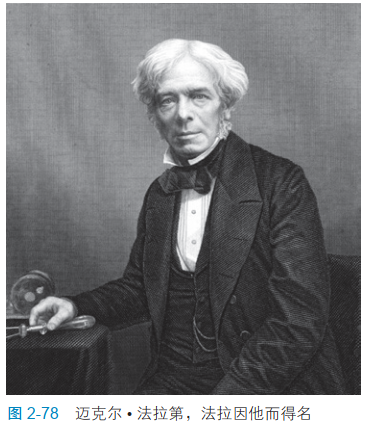
As mentioned earlier , Farah is based on Michael • Named after Faraday . Faraday (1791—1867), British chemist and physicist , The portrait is shown in Figure 2-78.
Although Faraday was not much educated , Mathematics knowledge is also very little , But he apprenticed to a bookbinder for seven years , I read a lot of books , Be able to learn by yourself . and , In his time , Relatively simple experiments can reveal the basic properties of electricity . He made several important discoveries , Including electromagnetic induction , This discovery led to the invention of the electric motor . He also found , Magnetic force can affect light . His work won him great honor , And his portrait is also in 1991~2001 Printed in 20 On a pound note .
边栏推荐
- 57. 插入区间
- 洛谷P5994 [PA2014]Kuglarz(异或思维+MST)
- 【论文学习】《VQMIVC》
- 使用报文和波形记录分析仪RoyalScope的帧统计功能排查CAN总线偶发性故障
- 云计算考试版本1.0
- c#中设置lable控件的TextAlign属性控制文字居中的方法
- Knowledge sharing 𞓜 conventional laminated structure of six layer PCB
- Can bus working condition and signal quality "physical examination"
- 基于Anaconda的模块安装与注意事项
- Analysis of kinsing dual platform mining family virus
猜你喜欢

Matlab代码格式一键美化神器

用函数的递归来解决几道有趣的题

消息中间件之ActiveMQ的基本使用

Tips on how to design soft and hard composite boards ~ 22021/11/22
![[little knowledge] PCB proofing process](/img/bf/f66677294a14baf08cc35d1e8c1e31.jpg)
[little knowledge] PCB proofing process

Ubuntu18下登录mysql 5.7设置root密码

基于STM32MP157调试MIPI-DSI屏幕

This article uses pytorch to build Gan model!

PCB board design - automatic layout 2021-10-15

Sword finger offer II 027 Palindrome linked list
随机推荐
洛谷P2839 [国家集训队]middle(二分 + 主席树 + 区间合并)
【红旗杯?】补题
MySQL simple permission management
Authority design of SaaS system based on RBAC
Can bus working condition and signal quality "physical examination"
将数据导入到MATLAB
[daily training] 207 Class Schedule Card
【莫比乌斯反演】
Analysis and utilization of Microsoft Office Word remote command execution vulnerability (cve-2022-30190)
417-二叉树的层序遍历1(102. 二叉树的层序遍历、107.二叉树的层次遍历 II、199.二叉树的右视图、637.二叉树的层平均值)
navicat定时任务无效
洛谷P5994 [PA2014]Kuglarz(异或思维+MST)
Share the process requirements for single-layer flexible circuit board
2265. 统计值等于子树平均值的节点数
c#磁盘驱动器及文件夹还有文件类的操作
NSIS silent installation vs2013 runtime
使用Adobe Acrobat Pro调整PDF页面为统一大小
bat启动.NET Core
Mining microbial dark matter -- a new idea
Take you through the normalization flow of GaN