当前位置:网站首页>Qt实战案例(53)——利用QDrag实现拖拽拼图功能
Qt实战案例(53)——利用QDrag实现拖拽拼图功能
2022-07-25 06:42:00 【wendy_ya】
目录
一、项目介绍
本文介绍利用QDrag类实现拖拽拼图功能。左边是打散的图,拖动到右边进行复现,此外程序还支持手动拖入原图片。
二、项目基本配置
新建一个Qt案例,项目名称为“puzzle”,基类选择“QMainWindow”,取消选中创建UI界面复选框,完成项目创建。
三、UI界面设置
UI界面如下:
无UI界面
四、主程序实现
4.1 main.cpp
源文件main.cpp中需要预先调用loadImage函数加载图像并显示界面,代码如下:
    QApplication a(argc, argv);
    MainWindow w;
    w.loadImage(QStringLiteral(":/example.jpg"));
    w.show();
    return a.exec();
4.1 mainwindow.h头文件
头文件中声明相应的对象和槽函数:
public:
    MainWindow(QWidget *parent = nullptr);
    ~MainWindow();
    void loadImage(const QString &path);

public slots:
    void openImage();
    void setupPuzzle();

private slots:
    void setCompleted();

private:
    void setupMenus();
    void setupWidgets();

    QPixmap puzzleImage;
    PiecesList *piecesList;
    PuzzleWidget *puzzleWidget;
4.2 mainwindow.cpp源文件
源文件中对函数进行定义,首先在构造函数中运行setupMenus()函数和setupWidgets()函数并设置大小尺寸和标题:
    setupMenus();
    setupWidgets();

    setSizePolicy(QSizePolicy(QSizePolicy::Fixed, QSizePolicy::Fixed));//设置大小策略
    setWindowTitle(tr("拖拽拼图"));
定义打开图像函数:
//打开图像(重新选择图像分割)
void MainWindow::openImage()
{

    const QString directory =
        QStandardPaths::standardLocations(QStandardPaths::PicturesLocation).value(0, QDir::homePath());
    QFileDialog dialog(this, tr("Open Image"), directory);//创建打开文件对话框
    dialog.setFileMode(QFileDialog::ExistingFile);//设置返回存在的文件名
    QStringList mimeTypeFilters;
    for (const QByteArray &mimeTypeName : QImageReader::supportedMimeTypes())
        mimeTypeFilters.append(mimeTypeName);
    mimeTypeFilters.sort(); //排序
    dialog.setMimeTypeFilters(mimeTypeFilters);
    dialog.selectMimeTypeFilter("image/jpeg");
    if (dialog.exec() == QDialog::Accepted)
        loadImage(dialog.selectedFiles().constFirst());
}
定义加载图像函数:
// 加载图片
void MainWindow::loadImage(const QString &fileName)
{

    QPixmap newImage;
    if (!newImage.load(fileName)) {

        QMessageBox::warning(this, tr("Open Image"),
                             tr("The image file could not be loaded."),
                             QMessageBox::Close);
        return;
    }
    puzzleImage = newImage;
    setupPuzzle();
}
拼图完成后弹出完成对话框:
//拼图完成后弹出对话框
void MainWindow::setCompleted()
{

    QMessageBox::information(this, tr("拼图完成"),
                             tr("恭喜!您已经成功拼图 \n"
                                "点击OK重新开始"),
                             QMessageBox::Ok);

    setupPuzzle();
}
建立拼图函数:
void MainWindow::setupPuzzle()
{

    int size = qMin(puzzleImage.width(), puzzleImage.height());//获取图像宽度和高度的最小值
    puzzleImage = puzzleImage.copy((puzzleImage.width() - size) / 2,
        (puzzleImage.height() - size) / 2, size, size).scaled(puzzleWidget->width(),
            puzzleWidget->height(), Qt::IgnoreAspectRatio, Qt::SmoothTransformation);//缩放

    piecesList->clear();//清空List
    //切分成5*5=25张拼图
    for (int y = 0; y < 5; ++y) {

        for (int x = 0; x < 5; ++x) {

            int pieceSize = puzzleWidget->pieceSize();
            QPixmap pieceImage = puzzleImage.copy(x * pieceSize, y * pieceSize, pieceSize, pieceSize);
            piecesList->addPiece(pieceImage, QPoint(x, y));
        }
    }

    for (int i = 0; i < piecesList->count(); ++i) {

        if (QRandomGenerator::global()->bounded(2) == 1) {

            QListWidgetItem *item = piecesList->takeItem(i);
            piecesList->insertItem(0, item);
        }
    }

    puzzleWidget->clear();
}
设置菜单栏:
//设置菜单栏
void MainWindow::setupMenus()
{

    QMenu *fileMenu = menuBar()->addMenu(tr("&文件"));

    QAction *openAction = fileMenu->addAction(tr("&打开..."), this, &MainWindow::openImage);
    openAction->setShortcuts(QKeySequence::Open);   //快捷键
    QAction *exitAction = fileMenu->addAction(tr("&退出"), qApp, &QCoreApplication::quit);
    exitAction->setShortcuts(QKeySequence::Quit);   //快捷键

    QMenu *gameMenu = menuBar()->addMenu(tr("&游戏"));
    gameMenu->addAction(tr("&重启"), this, &MainWindow::setupPuzzle);
}
设置界面布局:
//设置界面布局
void MainWindow::setupWidgets()
{

    QFrame *frame = new QFrame;
    QHBoxLayout *frameLayout = new QHBoxLayout(frame);//水平布局
    puzzleWidget = new PuzzleWidget(400);//新建PuzzleWidget对象,设置图像尺寸为400

    piecesList = new PiecesList(puzzleWidget->pieceSize(), this);


    connect(puzzleWidget, &PuzzleWidget::puzzleCompleted,
            this, &MainWindow::setCompleted, Qt::QueuedConnection);

    frameLayout->addWidget(piecesList);
    frameLayout->addWidget(puzzleWidget);
    setCentralWidget(frame);//中心部件
}
4.3 PiecesList类
新建PiecesList类,并继承自QListWidget:
4.4 PuzzleWidget类
新建PuzzleWidget类,继承自QWidget:
它实现了以下几个方法。
    void dragEnterEvent(QDragEnterEvent *event) override;
    void dragLeaveEvent(QDragLeaveEvent *event) override;
    void dragMoveEvent(QDragMoveEvent *event) override;
    void dropEvent(QDropEvent *event) override;
    void mousePressEvent(QMouseEvent *event) override;
    void paintEvent(QPaintEvent *event) override;
Drag执行的流程是:
Drag是从drag->exec()开始的,此时将开启进入一个新的事件循环,然后在拖动的过程中会在下面三个事件中交替:
其中DragEnter是有拖动进入该Widget时触发的,对应的DragLeave则是拖动离开时触发的,而DragMove就是鼠标拖动的时候触发的。
最后当鼠标释放的时候将触发dragEvent,此时将决定拖拽的结果。
回头看一下Drag的触发,和大多数系统一样,一个Drag可能是从控件外触发的,即将外部的数据拖入,也可以是从控件内部触发,即手动生成一个QDrag对象。
拖动的机制:
其实拖动就是将一处的数据移动或者复制到另外一处,在QT中拖动所承载的数据使用QMimeData表示的,它可以用来表示许多Mime Type的集合。一个Mime Type即有format和data两部分组成,format即指示了如何解析对应的data。更详细的定义可以参考:http://en.wikipedia.org/wiki/MIME。
五、效果演示
完整效果如下:
初始界面: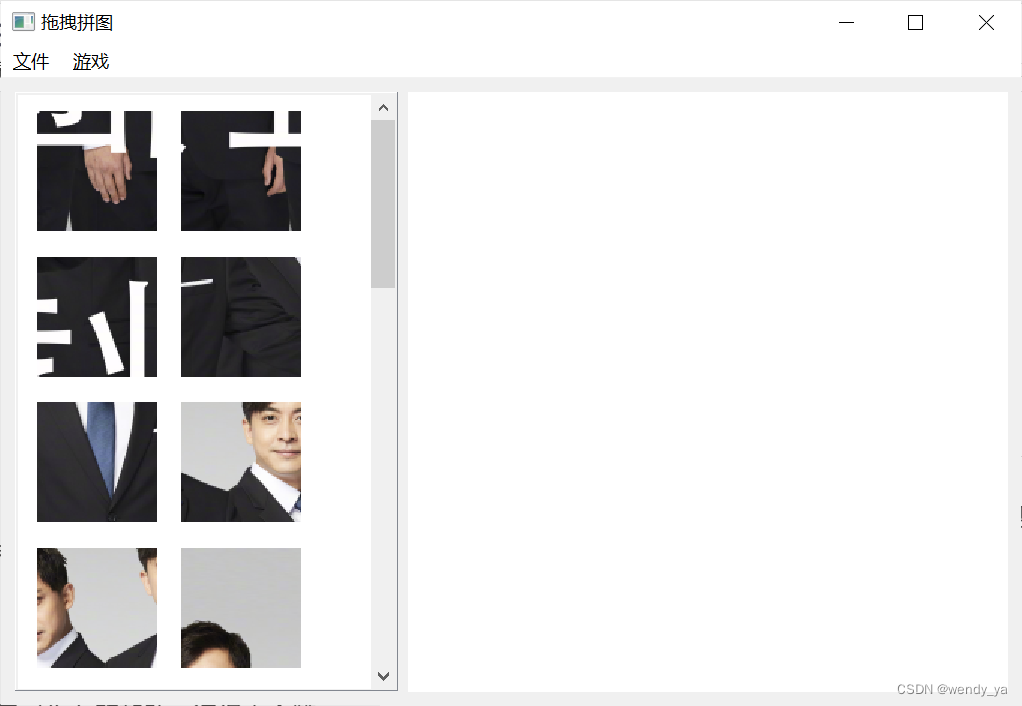
拼图完成后界面:
如果没有看懂的话,完整代码可以参考:https://download.csdn.net/download/didi_ya/86249377
ok,以上便是本文的全部内容了,如果对你有所帮助,记得点个赞哟~
边栏推荐
- 【剑指Offer】模拟实现atoi
- HTX00001_ Keil51 bug encountered in serial port parsing
- Pic16f877xa instruction system (assembly language)
- JS array = number assignment changes by one, causing the problem of changing the original array
- C#读取倍福Beckhoff变量
- Prevention strategy of Chang'an chain Shuanghua transaction
- Filebeat6.4 quick start
- Using JS to realize the linkage effect of form form's secondary menu
- 2022 "strong country Cup" preliminary WP (with script and detailed process)
- Introduction to the usage of explain and the meaning of result field in MySQL
猜你喜欢
【愚公系列】2022年7月 Go教学课程 015-运算符之赋值运算符和关系运算符

JZ7 重建二叉树

Recycleview realizes horizontal sliding of overlapping items

Leetcode46 Full Permutation (Introduction to backtracking)

C#开源控件MetroFramework Demo项目下载和运行
![[sword finger offer] analog implementation ATOI](/img/01/76a3b1fcc6403368a363146d553777.png)
[sword finger offer] analog implementation ATOI
HTX00001_ Keil51 bug encountered in serial port parsing

100 GIS practical application cases (seventeen) - making 3D map based on DEM

C#--MetroFramework框架调用metroModernUI库,并在工具栏使用

睡眠不足有哪些危害?
随机推荐
Easy to understand: basic knowledge of MOS tube
杜教筛
JSON、
labelme标注不同物体显示不同颜色以及批量转换
[add, delete, modify, and check the array base]
C # --metroframework framework calls the metromodernui library and uses it in the toolbar
R奇怪语法总结
【C】程序环境和预处理
A little consideration of strategic mode
VSCode 如何开启多个终端?如何横向显示?
【Jailhouse 文章】Base Architectures for virtual-physical computing(2018)
DOM event type
【知识总结】分块和值域分块
EXCEL
Robot engineering - teaching quality - how to judge
机器学习两周学习成果
Detailed explanation of the difference, working principle and basic structure between NMOS and PMOS
Use abp Zero builds a third-party login module (III): web side development
4、 MFC toolbar, runtime class information mechanism, runtime creation mechanism
[reprint] pycharm packages.Py program as executable exe