当前位置:网站首页>Numpy learning
Numpy learning
2022-07-25 08:07:00 【Cherry_ Zj】
Numpy Study
numpy A preliminary understanding of
1. Use numpy Generating arrays , obtain ndarray The type of
t1 = np.array([1,2,3])
print(t1)
print(type(t1))  #<class 'numpy.ndarray'>
2. np.arange(x) The effect of the method and np.array(range(x)) The effect is the same
t2 = np.array(range(10))
print(t2)
print(type(t2))

t3 = np.arange(10)
print(t3)
print(type(t3))
3. Use dtype You can get the data type
t4 = np.arange(4,10,2)
print(t4)
print(type(t4))

print(t4.dtype)
4.numpy Data types in
t5 = np.array(range(1,4),dtype=float)
#  or t5 = np.array(range(1,4),dtype="float")
#  or t5 = np.array(range(1,4),dtype="float32")
print(t5)
print(t5.dtype)

# numpy Medium bool data type
t6 = np.array([0,1,1,0,1,0,0],dtype="bool")
print(t6)
print(t6.dtype)
print("//")

#  Adjust the data type
t7 = t5.astype("int8")
print(t5.dtype)
print(t7.dtype)
print("***************************")
t5.dtype = "int8"
print(t5.dtype)

# numpy The decimal in
t7 = np.array([random.random() for i in range(10)])
print(t7)
print(t7.dtype)

#  Modify floating point scale
t8 = np.round(t7,2) # Keep two decimal places
print(t8)
Shape and operation of array
a.shapeView array shapes
import numpy as np
t1 = np.arange(12)
print(t1)#t1:{ndarray:(12,)}
print(t1.shape)# Output results :(12,)

t2 = np.array([[1,2,3],[4,5,6]])
print(t2)#t2:{ndarray:(2,3)}
print(t2.shape)# Output results :(2,3)

t3 = np.array([[[1,2,3],[4,5,6]],[[7,8,9],[10,11,12]]])
print(t3)#t2:{ndarray:(2,2,3)}
print(t3.shape)# Output results :(2,2,3)
2.a.reshape(3,4) Modify array shape
t4 = np.arange(12)
print(t4)
print(t4.reshape(3,4))
print(t4.reshape(3,5))# Cannot become an array of this shape

t5 = np.arange(24).reshape(2,3,4)
print(t5)
print("---------------")
# t5.reshape(4,6) There is a return value , Will not change t5 Value
print(t5.reshape(4,6))
print("---------------")
print(t5)
print("---------------")
#  take t5 Into a one-dimensional array
print(t5.reshape(24,))
print("---------------")
#  Find out the following two situations
print(t5.reshape(24,1))
print("---------------")
print(t5.reshape(1,24))
print("#######################")
3.t5.flatten(), take t5 Into a one-dimensional array Don't know t5 How much data is there , take t5 Into a one-dimensional array
# Law 1
t5 = np.arange(24).reshape(2,3,4)
print(t5.reshape(t5.shape[0]*t5.shape[1]*t5.shape[2],))
print("#######################")
#  Law two :
print(t5.flatten())
4. The operation of arrays and numbers
# Operation of array
t5 = np.arange(24).reshape(2,3,4)
t6 = t5.reshape(4,6)
print(t6)
print("************************")
print(t6+2)
print("************************")
print(t6-2)
print("************************")
print(t6*2)
print("************************")
print(t6/2)
print("************************")
print(t6/0)
The result is :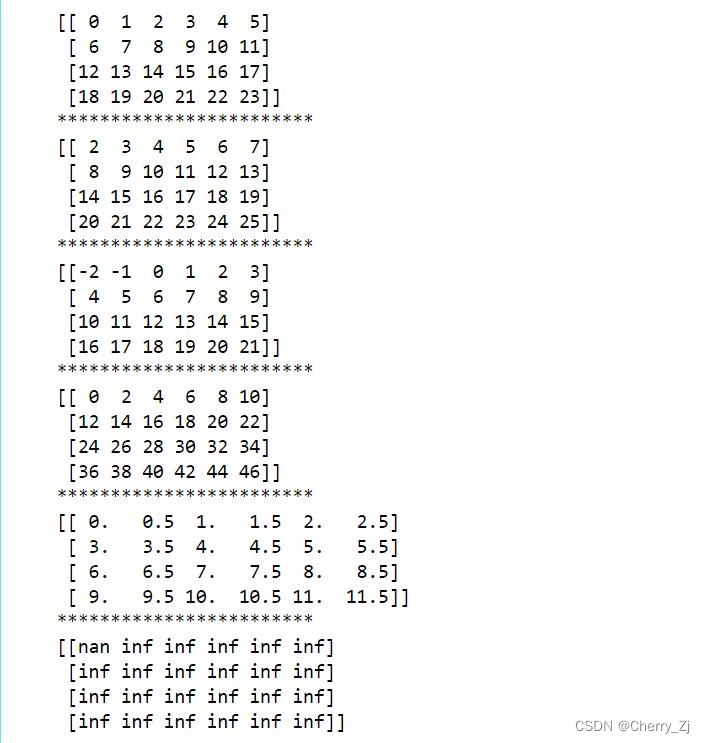
5. Array and array operation
① Situation 1 :
t5 = np.arange(24).reshape(2,3,4)
t6 = t5.reshape(4,6)
t7 = np.arange(100,124).reshape(4,6)
print(t7)
print("**************************")
print(t6+t7)
print("**************************")
print(t6-t7)
print("**************************")
print(t6*t7)
print("**************************")
print(t6/t7)
The result is :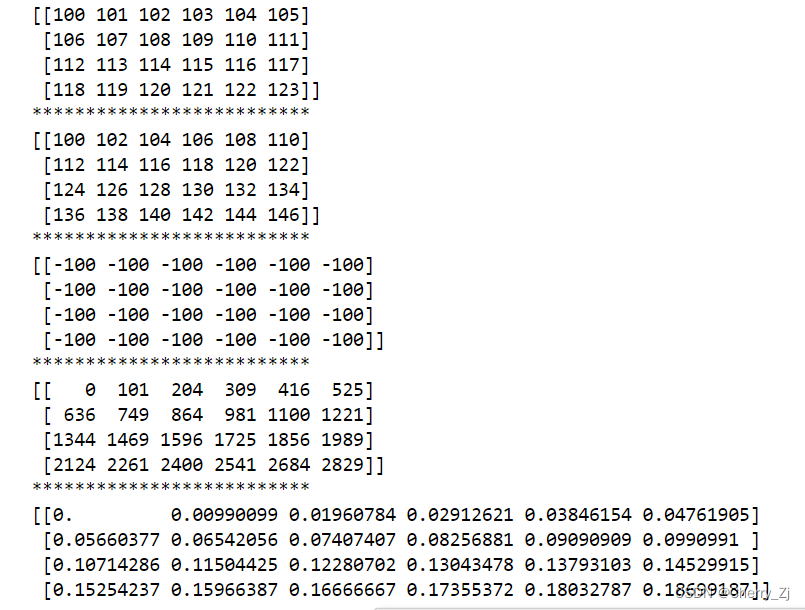
② Situation two :
t5 = np.arange(24).reshape(2,3,4)
t6 = t5.reshape(4,6)
t8 = np.arange(0,6)
print(t8)
print(t6)
print(t6-t8)

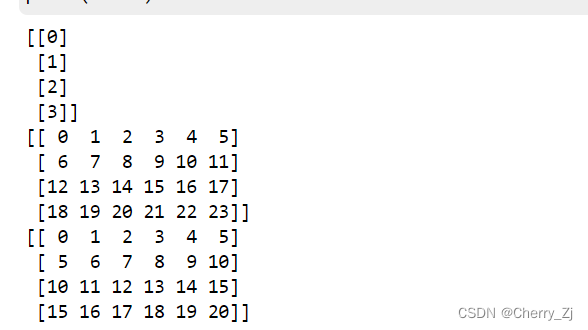
③ Situation three :
t5 = np.arange(24).reshape(2,3,4)
t6 = t5.reshape(4,6)
t9 = np.arange(4).reshape(4,1)
print(t9)
print(t6)
print(t6-t9)
④ Situation four :
t5 = np.arange(24).reshape(2,3,4)
t6 = t5.reshape(4,6)
t10 = np.arange(10)
print(t10)
print(t6)
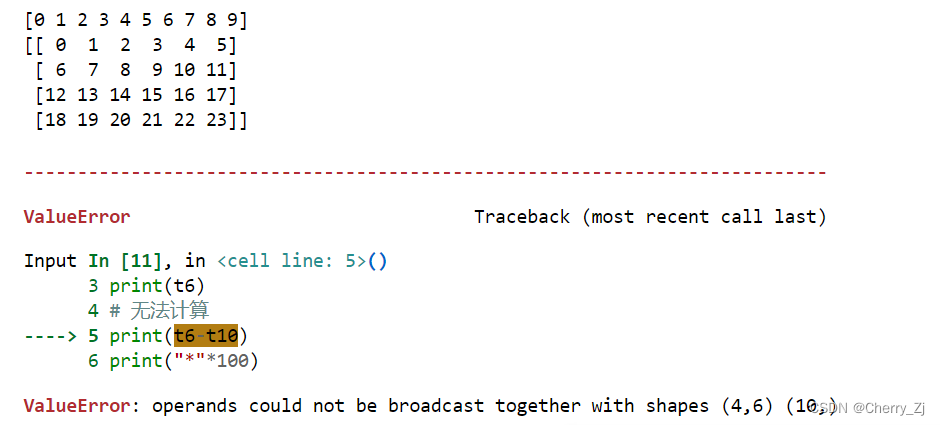
#  Can't calculate
print(t6-t10)
print("*"*100)
numpy Index and slice of
1. Take one row and one column or multiple rows and multiple columns

import numpy as np
us_file_path = "./dataCSV/data.csv"
t1 = np.loadtxt(us_file_path,delimiter=",",dtype="int",unpack=True)
t2 = np.loadtxt(us_file_path,delimiter=",",dtype="int")
print(t1)
print("*"*100)
print(t2)
print("*"*100)
#  Take row
print(t2[2])
print("*"*100)
#  Take consecutive lines
print(t2[2:])
print("*"*100)
#  Take discontinuous lines , Take the first place 2,8,10 That's ok
print(t2[[2,8,10]])
print("*"*100)
#  Take row  print(t2[ That's ok , Column ])
# print(t2[1,:])
# print(t2[2:,:])
# print(t2[[2,8,10],:])

#  Fetch
print(t2[:,0]) # Take the data in the first column of all rows
print("*"*100)
# Take consecutive Columns
print(t2[:,2:])# Take all column data after the third column of all rows
print("*"*100)
# Take consecutive Columns
print(t2[:,[0,2]])## Take the data of the first and third columns of all rows
print("*"*100)
# Fetching rows and columns , Take the third line , The value of the fourth column
a = t2[2,3]
print(a)
print(type(a))
print("*"*100)
# Fetching multiple rows and columns , Take the third line to the fifth line , The values of the second to fourth columns ( Take the position where rows and columns intersect )
b = t2[2:5,1:4]
print(b)
print("*"*100)
# Take multiple non adjacent points
# The result is (0,0) (2,1) (2,3)
c = t2[[0,2,2],[0,1,3]]
print(c)
2. The exchange of ranks

3. Array splicing
①np.vstack(t1,t2) For vertical splicing
②np.hstack(t1,t2) Use horizontal splicing 
4. Array transposition
Transpose is a transformation , about numpy For arrays in , Is in the Exchange data diagonally , The purpose is also to process data more conveniently . There are three ways :
①t.transpose()
②t.swapaxes(1,0)
③t.T
5.numpy Reading data


6.numpy Generate random number

7.numpy Boolean index in
t5 = np.arange(24).reshape(2,3,4)
t6 = t5.reshape(4,6)
print(t6<10)
print("*"*100)
t6[t6<10]=3
print(t6)
print("*"*100)
print(t6[t6>20])
print("*"*100)
t6[t6>20]=20
print(t6)
print("*"*100)

8. The ternary operation
#  The ternary operation
# hold t6 Less than equal to 3 Of is replaced by 100, Otherwise replace with 300
t5 = np.arange(24).reshape(2,3,4)
t6 = t5.reshape(4,6)
print(np.where(t6<=3,100,300))
print("*"*100)
print(t6)
print("*"*100)

## 9. Assign a value to nan
t5 = np.arange(24).reshape(2,3,4)
t6 = t5.reshape(4,6)
t6 = t6.astype(float)
t6[3,3]=np.nan
print(t6)

9.numpy Medium clip

numpy Medium nan and inf

numpy Medium nan Points for attention


Handle : to nan Assigned mean value
import numpy as np
# to nan Assigned mean value
def fill_ndarray(t1):
    for i in range(t1.shape[1]):
        temp_col = t1[:,i]
        nan_num = np.count_nonzero(temp_col != temp_col)
        if nan_num != 0:# Not for 0, It indicates that there are nan
            temp_not_nan_col = temp_col[temp_col == temp_col] # The current column is not nan Of array
            # Check that the current is nan The location of , Assign a value that is not nan The average of
            temp_col[np.isnan(temp_col)] = temp_not_nan_col.mean()
    return t1

if __name__ == '__main__':
    t1 = np.arange(12).reshape((3, 4)).astype("float")
    t1[1, 2:] = np.nan
    print(t1)
    print("*"*100)
    t1 = fill_ndarray(t1)
    print(t1)
numpy Common functions in


numpy Medium copy and view

边栏推荐
- Eval and assert one sentence Trojan horse analysis
- 【5G NR】UE注册拒绝原因
- Common commands of raspberry pie
- 【5G NR】3GPP常用协议整理
- Problems easily ignored by POM
- [recommended reading] a collection of super useful vulnerability scanning tools!
- [QNX hypervisor 2.2 user manual]9.3 CPU
- Oracle trigger creation
- node+js搭建时间服务器
- Cache design in Web services (error allowed, error not allowed)
猜你喜欢

第3章业务功能开发(实现全选按钮实时的响应)

People who lose weight should cry: it's no good not eating food, because your brain will be inflamed

Introduction to machine learning (I): understanding maximum likelihood estimation in supervised learning

Vs2019 C MFC installation

Didi - dispatching
滴滴 - eta(Estimate the Travel Time)

Recommend 7 open source projects of yyds this week
一次简单的SQL注入靶场练习

Pricing is arbitrary, products are difficult to distinguish between true and false, and platforms are running away. Will the Tibetan market continue to be popular?

The two Nobel Prize winners became the chief scientist of the sky high price Baijiu of "taishanglaojun holding a dream"
随机推荐
机器学习理论及案例分析(part1)--机器学习基础
查看电脑重启次数、原因
CM4 development cross compilation tool chain production
ArcGIS Pro脚本工具(10)——从图层生成.stylx样式符号
Technical Analysis | Doris connector combined with Flink CDC to achieve accurate access to MySQL database and table exactly once
滴滴 - dispatching
If Debian infringes the rust trademark, will it be exempted by compromising and renaming?
整数a按位取反(~)后的值为-(a+1)
uiautomator2 常用命令
P1049 [noip2001 popularization group t4] packing problem
Interview questions: common faults and occurrence scenarios of redis
Install MySQL 8.0 using docker
Native form submission data
Hikaricp connection pool does not operate for a period of time, and the data is automatically disconnected
Redis core principles
Check the computer restart times and reasons
第3章业务功能开发(实现全选按钮实时的响应)
Summer Challenge harmonyos - slider slider for custom components
Is the yield of financial products high or low?
一次简单的SQL注入靶场练习