当前位置:网站首页>`Thymeleaf ` template engine comprehensive analysis
`Thymeleaf ` template engine comprehensive analysis
2022-06-24 14:18:00 【Yusheng 168】
List of articles
Thymeleaf template engine
1. introduction
First step : Create a SpringBoot engineering
Introduce relevant scenario initiators
![[ Failed to transfer the external chain picture , The origin station may have anti-theft chain mechanism , It is suggested to save the pictures and upload them directly (img-jROwzUqz-1655975250521)(img\1655817528794.png)]](/img/10/7059953b7b80796ed1655e8d8c90f6.png)
 <dependencies>
        <dependency>
            <groupId>org.springframework.boot</groupId>
            <artifactId>spring-boot-starter-thymeleaf</artifactId>
        </dependency>
        <dependency>
            <groupId>org.springframework.boot</groupId>
            <artifactId>spring-boot-starter-web</artifactId>
        </dependency>

        <dependency>
            <groupId>org.springframework.boot</groupId>
            <artifactId>spring-boot-devtools</artifactId>
            <scope>runtime</scope>
            <optional>true</optional>
        </dependency>
        <dependency>
            <groupId>org.projectlombok</groupId>
            <artifactId>lombok</artifactId>
            <optional>true</optional>
        </dependency>
        <dependency>
            <groupId>org.springframework.boot</groupId>
            <artifactId>spring-boot-starter-test</artifactId>
            <scope>test</scope>
        </dependency>
    </dependencies>

    <build>
        <plugins>
            <plugin>
                <groupId>org.springframework.boot</groupId>
                <artifactId>spring-boot-maven-plugin</artifactId>
                <configuration>
                    <excludes>
                        <exclude>
                            <groupId>org.projectlombok</groupId>
                            <artifactId>lombok</artifactId>
                        </exclude>
                    </excludes>
                </configuration>
            </plugin>
        </plugins>
    </build>
The second step : Write the controller layer
@Controller
public class ThymeleafController {


    @RequestMapping("/")
    public String helloThymeleaf(Model model){

        //  towards request Store data in domain
        model.addAttribute("data"," Welcome to use Thymeleaf template engine ");
        return "hello";
    }
}
The third step : Write page , towards request Get data from shared domain
<!DOCTYPE html>
<html lang="en" xmlns:th="http://www.thymeleaf.org">
<head>
    <meta charset="UTF-8">
    <title>hello page </title>
</head>
<body>
<h3 style="color: green">Thymeleaf Use of template engine </h3>
<p th:text="${data}"> Data display area </p>
</body>
</html>
![[ Failed to transfer the external chain picture , The origin station may have anti-theft chain mechanism , It is suggested to save the pictures and upload them directly (img-5TLT4QnZ-1655975250522)(D:\typora note \springboot2\img\1655817482696.png)]](/img/ec/fcd4b5186c5b28d9341c5d5b607f7a.png)
2. Use spring.thymeleaf You can modify the default configuration in the template engine
# Change the port number to  80
server.port=80

# In the development stage , The template cache is usually turned off  , Let the changes take effect immediately , The default is true Open ,
# After the project goes online , To modify back to open
spring.thymeleaf.cache=false

# Coding mode
spring.thymeleaf.encoding=UTF-8

# Type of template ( The default is html, The template is html file )
spring.thymeleaf.mode=HTML

# The prefix of the template : Classpath : classpath:/templates/
spring.thymeleaf.prefix=classpath:/templates/

# Suffix of template :
spring.thymeleaf.suffix=.html
expression
1. Standard variable expression
grammar :
${key}
effect : obtain key For text data ,key yes request scoped key, Use request.setAttribute(); or model.addAttribute();
In the page html In the label , Use th:text="${key}"
Case study :
The first 0 Step : To write JavaBean
@Data
@NoArgsConstructor
@AllArgsConstructor
@ToString
public class Person {

    private Integer id;
    private String name;
    private String sex;
    private Integer age;
}
First step : Write controller
    @RequestMapping("/expressionl")
    public String expressionl(Model model){

        //  towards request Storing data in a shared domain
        model.addAttribute("site","https://fanyi.baidu.com/");

        model.addAttribute("pojo",new Person(101," The sea, "," male ",23));

        //  Specify jump view
        return "standard";
    }
The second step : Write page
<div style="margin-left: 430px">
    <h3 style="color: green"> Standard variable expression </h3>
    <a th:href="${site}"> Go to Baidu to translate </a><br/>
    <p th:text="${pojo.id}">id</p>
    <p th:text="${pojo.name}"> full name </p>
    <p th:text="${pojo.sex}"> Gender </p>
    <p th:text="${pojo.age}"> Age </p>
</div>
The third step : test
![[ Failed to transfer the external chain picture , The origin station may have anti-theft chain mechanism , It is suggested to save the pictures and upload them directly (img-5aES50a4-1655975436466)(img\1655861093859.png)]](/img/4b/00bfbfe5465e624cc83fc3f9f8293b.png)
2. Select variable expression
grammar :
*{key}
explain : Need to match th:object Use it together , Select variable expression , It's also called an asterisk variable expression , Use th:object Property to bind the object , The selection expression first uses th:object To bind the object passed from the background , And then use * To represent the back of this object {} Values in this object's properties
Select variable expression *{...} Is another expression similar to a standard variable ${...} Methods of representing variables , Select variable expression *{...} It is solved on the selected object during execution , and ${...} Is a variable in context model Upper solution
Select a variable expression to use :
First step :<div th:object="${ Background incoming objects }></div>"
The second step :th:text="*{ Object properties }"
Case study :
The first 0 Step :
@Data
@NoArgsConstructor
@AllArgsConstructor
@ToString
public class Person {

    private Integer id;
    private String name;
    private String sex;
    private Integer age;
}
First step : Write controller
    @RequestMapping("/expression2")
    public String expression2(Model model){

        model.addAttribute("pojo",new Person(102," zhanjiang "," male ",23));
        return "expression2";
    }
The second step : Write page
<div>
  <h3 style="color: green"> Selector expressions </h3>
    <div th:object="${pojo}">
        <p th:text="*{id}">id</p>
        <p th:text="*{name}">name</p>
        <p th:text="*{sex}">sex</p>
        <p th:text="*{age}">age</p>
    </div>
</div>
The third step : test 
3. Link expression URL
grammar :
@{ link url}
explain : Mainly used to link , Display of address , Can be used for <srcipt src=".."><link href=".."><a href=".."><form action=".."><img src=".."> etc. , Can be in URL Get data dynamically in the path
Case study :
The first 0 Step :
@Data
@NoArgsConstructor
@AllArgsConstructor
@ToString
public class Student {

    private Integer studId;
    private String studName;
}
First step : Write the controller method
@Controller
@RequestMapping("/thy")
public class LinkController {


    @RequestMapping("/student")
    public String student(Model model){

        model.addAttribute("studId",101);
        return "link";
    }

    @RequestMapping("/queryById")
    @ResponseBody
    public String queryById(@RequestParam("id") Integer id){

        return " according to Id Student information queried "+id;
    }

    @RequestMapping("/findStudent")
    @ResponseBody
    public Student student(Student student){

        //  return Student object  JSON Format
        return student;
    }
}
The second step : Write page
<div>
  <h3 style="color: green"> Link expression </h3>
    <a th:href="@{
     '/thy/queryById?id='+${studId}}"> according to Id Search for student information </a><br/>
<!--  Recommended   Mode two :-->
    <a th:href="@{/thy/findStudent(studId=${studId},studName=' The sea, ')}"> Query student information and return JSON data format </a>
</div>
Step four : test
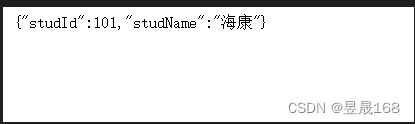
![[ Failed to transfer the external chain picture , The origin station may have anti-theft chain mechanism , It is suggested to save the pictures and upload them directly (img-EmWzYKGe-1655975436468)(img\1655882086172.png)]](/img/eb/9e7019b5bdbf6dd984d1438e6b13b0.png)
Thymeleaf attribute
Concept : Most attributes and html The same as , Just add one in front th Prefix , added th Properties of prefixes , It is processed by the template engine
1.th:action
Define the path of the background controller , similar <form> Labeled action attribute , Mainly combined with url expression , Get dynamic variables
<form id="login" th:action="@{/login}" th:method="post">...</form>
2.th:method
Set the request method
<form id="login" th:action="@{/login}" th:method="post">...</form>
3.th:href
Define hyperlinks , Mainly combined with url expression , Get dynamic variables
<a th:href="@{query/student}"> The relative address has no parameters </a>
4.th:src
Used to import external resources , such as <script> Labeled src attribute ,<img> Labeled src attribute , Often with @{} Expressions are used in conjunction with , stay SpringBoot The static resources of the project are put into resources Of static Under the table of contents , Put it in static The content of the path , When writing the path, you don't need to write static
script type="text/javascript" th:src="@{/js/jquery-3.4.1.js}"></script>
5.th:text
For text display , The text displayed by this attribute is in the label body , If the text box , The data will be displayed outside the text box , To display in a text box , Use th:value
<input type="text" id="realName" name="reaName" th:text="${realName}">
6.th:style
Set the style <a th:onclick="funl('+${user.id}+')" th:style="color:red"> Let me try </a>
7.th:each[ a key ]
This property is very, very , For example, if an object collection is passed from the background, you can use attributes to traverse the output , It is associated with jstl Medium <c:forEach> similar , This property can loop through the collection , You can also loop through arrays and Map
A.List aggregate
Case study :
The first 0 Step :
@NoArgsConstructor
@AllArgsConstructor
@ToString
public class Person {

    private Integer id;
    private String name;
    private String sex;
    private Integer age;
}
First step : Write controller
@Controller
@RequestMapping("/collection")
public class CollectionController {


    @RequestMapping("/list")
    public String list(Model model){

        List<Person> list = new ArrayList<>();
        list.add(new Person(101," zhanjiang "," male ",21));
        list.add(new Person(102," The sea, "," male ",21));
        list.add(new Person(103," nanning "," Woman ",21));

        //  towards request Storing data in a shared domain
        model.addAttribute("list",list);

        return "list";
    }
}
The second step : Write page
<div>
  <table>
    <tr>
      <th> Number </th>
      <th> full name </th>
      <th> Gender </th>
      <th> Age </th>
    </tr>
    <tr th:each="person:${list}">
      <td th:text="${person.id}"></td>
      <td th:text="${person.name}"></td>
      <td th:text="${person.sex}"></td>
      <td th:text="${person.age}"></td>
    </tr>
  </table>
</div>
The third step : test 
B. Array
Case study :
The first 0 Step :
@NoArgsConstructor
@AllArgsConstructor
@ToString
public class Person {

    private Integer id;
    private String name;
    private String sex;
    private Integer age;
}
First step : Write controller
    @RequestMapping("/arr")
    public String arr(Model model){

        Person[] people = new Person[3];
        people[0] = new Person(101," zhanjiang "," male ",21);
        people[1] = new Person(102," The sea, "," male ",21);
        people[2] = new Person(103," Xi'an "," Woman ",21);

        //  towards request Store data in domain
        model.addAttribute("arr",people);

        return "arr";
    }
The second step : Write page
<div>
  <table>
    <tr>
      <th> Number </th>
      <th> full name </th>
      <th> Gender </th>
      <th> Age </th>
    </tr>
    <tr th:each="person:${arr}">
      <td th:text="${person.id}"></td>
      <td th:text="${person.name}"></td>
      <td th:text="${person.sex}"></td>
      <td th:text="${person.age}"></td>
    </tr>
  </table>
</div>
The third step : test

grammar :
th:each=person,iterStat:${collection} Medium ${collection} It's a collection from the background
person: Defining variables , To receive traversal${collection}A data in a collectioniterStat${collection}Circular body information
- among
personAnditerStatYou can choose any name you like iterStatIs the information of the circular body , The following information can be obtained through this variableindex: Of the current iteration objectindex( from 0 Start calculating )count: Number of current iteration objects ( from 1 Start calculating )size: The size of the object being iteratedcurrent: The current iteration variableeven/odd: Boolean value , Is the current loop even / Odd number ( from 0 Start calculating )first: Boolean value , Whether the current loop is the firstlast: Boolean value , Whether the current cycle is the last
Be careful : Circular body information iterStat It can also be undefined , The iteration variable plus... Is used by default Stat suffix , namely personStat
Array and List Summary of set Syntax :
<div th:each=" Set loop members , The state variable of the loop :${key}">
    <p th:text="${ Set loop members }" ></p>
</div>

 Set loop members , The state variable of the loop : Both names are custom . “ The state variable of the loop ” This name can be undefined , The default is " Set loop members Stat"
C.Map aggregate
Case study :
The first 0 Step :
@NoArgsConstructor
@AllArgsConstructor
@ToString
public class Person {

    private Integer id;
    private String name;
    private String sex;
    private Integer age;
}
First step : Write controller
    @RequestMapping("/map")
    public String map(Model model){

        Map<String,Object> map = new HashMap<>();
        map.put("101",new Person(101," The sea, "," male ",21));
        map.put("102",new Person(102," zhanjiang "," male ",22));
        map.put("103",new Person(103," Xi'an "," Woman ",23));
        map.put("104",new Person(104," nanning "," Woman ",21));


        //  towards request Store data in domain
        model.addAttribute("map",map);

        return "map";
    }
The second step : Write page
<div>
  <table>
    <tr>
      <th> Number </th>
      <th> full name </th>
      <th> Gender </th>
      <th> Age </th>
    </tr>
    <tr th:each="perMap:${map}">
      <td th:text="${perMap.key}"></td>
      <td th:text="${perMap.value.name}"></td>
      <td th:text="${perMap.value.sex}"></td>
      <td th:text="${perMap.value.age}"></td>
    </tr>
  </table>
</div>
The third step : test

Map Summary of set Syntax
<div th:each=" Set loop members , The state variable of the loop :${key}">
    <p th:text="${ Set loop members .key}" ></p>
    <p th:text="${ Set loop members .value}" ></p>
</div>

 Set loop members , The state variable of the loop : Both names are custom . “ The state variable of the loop ” This name can be undefined , The default is " Set loop members Stat"

key:map In the collection key
value:map aggregate key Corresponding value value
8. conditional if-unless
grammar :
th:if="boolean Conditions "Condition is
trueDisplay body content
th:unlessyesth:ifAn opposite operation of
Note that : When th:if=${..} When grammar holds , Will display the contents in the label body 【 Namely if by true when , Show 】
Note that : When th:unless=${..} When grammar doesn't hold , Will display the contents in the label body 【 Namely unless by false when , Show 】
Minutiae :
- stay
th:if="${""}"In the sentence 【 An empty string 】 Representative istrue - stay
th:if="${null}"In the sentence 【nullRepresentative is false】
Case study :
First step : Write controller
    @RequestMapping("/MyIf")
    public String myIf(Model model){

        //  Store data in a shared domain
        model.addAttribute("sex"," Gender unknown ");

        //  Note that : stay `th:if` Statement empty string , Representative is true
        //  Note that : stay `th:unless` Statement empty string , Representative is true,true Do not show ,false Only show
        model.addAttribute("name","");

        //  Note that : stay `th:if` In the sentence `null`, Representative is false
        //  Note that : stay `th:unless` In the sentence `null`, Representative is false,false Is displayed
        model.addAttribute("old",null);


        return "MyIf";
    }
The second step : Write page
<div>
  <h3 style="color: green">IF Judgment statement </h3>

<!--  The following two ways are both correct  -->
    <p th:if="${sex==' Gender unknown '}"> Gender unknown </p>
    <p th:if="${sex}==' Gender unknown '"> Show gender </p>
<!--  Empty string in `th:if` Representative is true,true stay unless Not shown in  -->
    <p th:if="${name}"> stay th:if The empty string represents true</p>
<!-- null stay `th:if` Representative is false,false stay `th:unless` Is displayed -->
    <p th:unless="${old}"> stay `th:if` in null Representative is false,false The label is not displayed , stay nuless In, it shows </p>
</div>
The third step : test

9.th:switch
th:switch and java Medium swith Same
 grammar :
<div th:switch=" The value to compare ">
    <p th:case=" value 1">
         result 1
    </p>
    <p th:case=" value 2">
         result 2
    </p>
    <p th:case="*">
         Default results
    </p>
     The above case Only one statement executes

</div>
Note that :th:case="*" Represents the default value
Case study :
First step : Write controller
    @RequestMapping("/switch")
    public String switchCase(Model model){

        // request Storing data in a shared domain
        //  stay switch Is displayed only when it is matched in , If they do not match, you can use `th:switch="*"` Set default
        model.addAttribute("sex"," male ");

        return "switch";
    }
The second step : Write page
<div>
  <h3 style="color: green">switch Judgment statement </h3>
  <div th:switch="${sex}">
    <p th:case=" male "> Gender male </p>
    <p th:case=" Woman "> Gender female </p>
<!-- `th:case="*"` The expression is default -->
    <p th:case="*"> Gender unknown </p>
  </div>
</div>
The third step : test

10.th:inline
th:inline There are three value types {text javascript and none}
inline text
It can make Thymeleaf The expression does not depend on html label , You can get dynamic data directly by using inline expressions , It is required to add... To the parent label th:inline="text" attribute
inline javascript
Can be in js in , Get the data in the template
Case study :
First step : Write controller
    @RequestMapping("/inline")
    public String inline(Model model){


        // request Storing data in a shared domain
        model.addAttribute("name"," The sea, ");
        model.addAttribute("age","20");

        return "inline";
    }
The second step : Write page
  <style> * {
       width: 500px; margin: 0 auto; } </style>

  <script type="text/javascript" th:inline="javascript"> var name = [[${
      name}]]; function fun() {
       alert(" My name is :"+name+"\t My age is :"+[[${
      age}]]); } </script>
</head>
<body>
<div>
  <h3> Inline expressions </h3>

  <p> My name is :[[${name}]], Age is :[[${age}]]</p>

  <input type="button" value=" Let me try " onclick="fun()">
</div>
The third step : test
![[ Failed to transfer the external chain picture , The origin station may have anti-theft chain mechanism , It is suggested to save the pictures and upload them directly (img-NG6NCapt-1655975700898)(img\1655905775137.png)]](/img/71/158930febb05c999bd4687df2d72c4.png)

11. Literal
The literal amount of the text
single quote '..' The enclosed string is text literal
Case study :
<p th:text="' The city is '+${city}+' The user login '+${isLogin}"></p>
Number literal quantity
<p th:if="${age>10}">age>10</p>

<p th:if="20>5">20 Greater than 5</p>
boolean Literal
<p th:if="${isLogin==true}"> The user login </p>
12. String connection
Mode one : Use ''
Case study :
<p th:text="' The city is '+${city}+' The user login '+${isLogin}"></p>
Mode two : Use || 【 It is suggested to use mode 2 】
Case study :
<p th:text="| The city is ${city}, I am a ${name}|">
	 Display the data
</p>
Case study :
First step : Write controller
    @RequestMapping("/strJoin")
    public String strJoin(Model model){

        //  towards request Shared data in domain
        model.addAttribute("city"," The sea, ");
        model.addAttribute("name"," Tomorrow, ");
        model.addAttribute("age",23);

        //  View jump
        return "strJoin";
    }
The second step : Write page
<div>
    <h3 style="color: green"> String splicing method 1 : Use `'..'`</h3>
    <p th:text="' I am a '+${name}+', My city '+${city}+' My age is :'+${age}"> Display personal information </p>
    <br/>
    <br/>
    <h3 style="color: green"> String splicing mode 2 : Use `||`</h3>
    <p th:text="| I am a ${name}, My city ${city}, My age is : ${age}|"> Display personal information </p>
</div>
The third step : test

13. Operator
Arithmetic operations :
+-*/%The relationship is more :
><>=<=(gt lt ge le)Equal to the judge :
==!=(eq ne)Ternary operator :
expression ? true Result : false Result
Ternary operators can be nested
Case study :
First step : Write controller
    @RequestMapping("/operation")
    public String operation(Model model){

        //  Store data in a shared domain `request`
        model.addAttribute("name"," The sea, ");
        model.addAttribute("age",21);

        //  View jump
        return "operation";
    }
The second step : Write page
<div>
    <h3 style="color:green;"> Operator </h3>
    <p th:if="${name==' The sea, '}"> Expression for true, Is displayed </p>
    <p th:if="${age}>20 ? ' Older than 20' : ' Be no older than 20'"> Judge whether the age is older than 20</p>
</div>
The third step : test
![[ Failed to transfer the external chain picture , The origin station may have anti-theft chain mechanism , It is suggested to save the pictures and upload them directly (img-PZEWZnAV-1655975700900)(img\1655950053533.png)]](/img/a8/f908dc9916d170ec4720c7de9a64ca.png)
Thymeleaf The basic object
1. Common built-in objects
The template engine provides a set of objects , These built-in objects can be used directly in the template , These objects are made up of # No. begins to refer to , We often use built-in objects
requestobject
#requestPrototype :HttpServetRequestobject
sessionobject
#sessionPrototype :HttpSesssionobject
sessionPrototype :HttpSessionobject
Session Expressed as Map Object's , yes #session A simple representation of , Used to obtain session Specified in the key Value ,#session Is used to call related methods
Case study :
First step : controller
    @RequestMapping("/baseObject")
    public String baseObject(Model model, HttpSession session){

        //  towards request Store data in domain
        model.addAttribute("name"," zhanjiang ");
        //  towards session Store data in domain
        session.setAttribute("age",23);

        return "baseObject";
    }
The second step : Write page
<div>
      <h3 style="color: green"> Use of basic built-in objects </h3>
      <p th:text="${#request.getAttribute('name')}"></p>
      <p th:text="${#session.getAttribute('age')}"></p>
      <p th:text="${session.age}"></p>
      <h3 style="color: green">`#request` The use of built-in objects </h3>
      getServerPort: <span th:text="${#request.getServerPort()}"></span><br/>
      getRequestURI<span th:text="${#request.getRequestURI()}"></span><br/>
      getRequestURL<span th:text="${#request.getRequestURL()}"></span><br/>

      <h3 style="color: green">`#session` The use of built-in objects </h3>
      getId<span th:text="${#session.getId()}"></span>
</div>
The third step : test
![[ Failed to transfer the external chain picture , The origin station may have anti-theft chain mechanism , It is suggested to save the pictures and upload them directly (img-CvVvGl0K-1655976080280)(img\1655951532840.png)]](/img/03/a6bdfe31c1de4831f19c93db406d6d.png)
2. Based on built-in objects #ctx
grammar :
#ctx: context objectYou can get other built-in objects
Note that :#vars and #root Is the same object , and #ctx It does the same thing , It is recommended to use #ctx
/* * ====================================================================== * See javadoc API for class org.thymeleaf.context.IContext * ====================================================================== */

${
    #ctx.locale}
${
    #ctx.variableNames}

/* * ====================================================================== * See javadoc API for class org.thymeleaf.context.IWebContext * ====================================================================== */

${
    #ctx.request}
${
    #ctx.response}
${
    #ctx.session}
${
    #ctx.servletContext}
#locale # place : direct access to the : Go straight into
java.util.Localeassociated with current request. Related to the current request 【 Get information about the current location 】param : for retrieving request parameters. : Used to retrieve request parameters
${param.foo}is a It's aString[]with the values of the Valuefoorequest parameter, so Request parameters , therefore${param.foo[0]}will normally be used for getting the first value. Will usually be used to get the first value
/* * ============================================================================ * See javadoc API for class org.thymeleaf.context.WebRequestParamsVariablesMap * ============================================================================ */

${
    param.foo}              // Retrieves a String[] with the values of request parameter 'foo'
${
    param.size()}
${
    param.isEmpty()}
${
    param.containsKey('foo')}
...
- session meeting : for retrieving session attributes. : Used to retrieve session properties
/* * ====================================================================== * See javadoc API for class org.thymeleaf.context.WebSessionVariablesMap * ====================================================================== */

${
    session.foo}                 // Retrieves the session atttribute 'foo'
${
    session.size()}
${
    session.isEmpty()}
${
    session.containsKey('foo')}
...
- application apply : for retrieving application/servlet context attributes. Used to retrieve application/servlet Context properties
/* * ============================================================================= * See javadoc API for class org.thymeleaf.context.WebServletContextVariablesMap * ============================================================================= */

${
    application.foo}              // Retrieves the ServletContext atttribute 'foo'
${
    application.size()}
${
    application.isEmpty()}
${
    application.containsKey('foo')}
...
Note there is no need to specify a namespace for accessing request attributes (as opposed to request parameters) because all request attributes are automatically added to the context as variables in the context root:
Be careful , There is no need to specify a namespace for the access request attribute ( Contrary to the request parameters ) , Because all request attributes are automatically added to the context as variables in the context root :
${
    myRequestAttribute}
stay Web Environment , You can also directly access the following objects ( Be careful , These are objects , Not a map / The name space ) :
- #request # request : direct access to the : Go straight into
javax.servlet.http.HttpServletRequestobject associated with the current request. Associated with the current request
${
    #request.getAttribute('foo')}
${
    #request.getParameter('foo')}
${
    #request.getContextPath()}
${
    #request.getRequestName()}
...
- #session # meeting : direct access to the : Go straight into
javax.servlet.http.HttpSessionobject associated with the current request. Associated with the current request
${
    #session.getAttribute('foo')}
${
    #session.id}
${
    #session.lastAccessedTime}
...
- #servletContext # servletContext : direct access to the : Go straight into
javax.servlet.ServletContextobject associated with the current request. Associated with the current request
${
    #servletContext.getAttribute('foo')}
${
    #servletContext.contextPath}
...
3. Built in tool class
Built in tool types :Thymeleaf Some of their own classes , Provide right stringdate, Some processing methods of collection
#dates: Tool class for processing dates
#numbers: Dealing with digital tools
#lists: HandlelistCollection tool class
nullvalue : Handle , Add after object?, Indicates whether the current object isnull, IfnullThen the following values will not be takenfor example :
zoo?.dog?.name: Said ifzoobynull, Do not carry outdogThe value of , Ifdogbynull, Do not carry outnameThe value of , It can prevent error reporting
Case study :
The first 0 Step : Write entity class
@Data
@ToString
public class Cat {

    private String name;
}


@Data
@ToString
public class Dog {

    private String name;
}

@Data
@ToString
public class Zoo {

    private Dog dog;
    private Cat cat;
}
First step : Write the controller layer
    @RequestMapping("/utilObject")
    public String utilObject(Model model){


        //  towards request Domain stores data
        model.addAttribute("myDate",new Date());
        //  towards request Fields store numbers
        model.addAttribute("num",168.868);
        //  towards request Domain store string
        model.addAttribute("str","haikang168");

        //  towards request Domain storage list aggregate
        List<String> list = Arrays.asList("a","b","c","d","e");
        model.addAttribute("list",list);

        //  towards request Store objects in the domain
        Dog dog = new Dog();
        dog.setName(" Dog ");
        Cat cat = new Cat();
        cat.setName(" people of little importance ");
        Zoo zoo = new Zoo();
        zoo.setCat(cat);
        zoo.setDog(dog);

        model.addAttribute("zoo",zoo);

        return "utilObject";
    }
The second step : Write page
  <div>
    <h3 style="color: green"> Date tool class </h3>
    <!--  Note that : Pass in the property name directly in the method , Out of commission `${ Property name }`-->
    <p th:text="${#dates.format(myDate)}"></p>
    <p th:text="${#dates.format(myDate,'yyyy-MM-dd HH:mm:ss')}"></p>
    <p th:text="${#dates.year(myDate)}"></p>
    <p th:text="${#dates.month(myDate)}"></p>
<!-- createNow Create current time  -->
    <p th:text="${#dates.createNow()}"></p>

    <h3 style="color: red"> Digital tools </h3>
<!-- Currency Is to format the currency -->
    <p th:text="${#numbers.formatCurrency(num)}"></p>
<!-- formatDecimal Is to format numbers , The length is 5, And save 2 Decimal place -->
    <p th:text="${#numbers.formatDecimal(num,5,2)}"></p>

    <h3 style="color: mediumspringgreen"> String utility class </h3>
    <p th:text="${#strings.indexOf(str,'h')}"></p>
    <p th:text="${#strings.isEmpty(str)}"></p>
    <p th:text="${#strings.length(str)}"></p>

<!-- lists Tool class -->
    <h3 style="color: skyblue">list Collection tool class </h3>
    <p th:text="${#lists.size(list)}"></p>
    <p th:text="${#lists.toList(list)}"></p>
    <p th:text="${#lists.sort(list)}"></p>

<!-- null Value processing uses `?`-->
    <h3 style="color: blanchedalmond">null Value handling </h3>
    <p th:text="${zoo?.cat?.name}"></p>
    <p th:text="${zoo?.dog?.name}"></p>
  </div>
The third step : test
![[ Failed to transfer the external chain picture , The origin station may have anti-theft chain mechanism , It is suggested to save the pictures and upload them directly (img-1MA7wA8W-1655976080281)(img\1655970443367.png)]](https://img-blog.csdnimg.cn/4f181ecf29c24a08a35991959f12b725.png)
4. Template content reuse
Custom templates are reusable behaviors , You can put some content , Use repeatedly
First step : Define templates
grammar :
th:fragment="top": Represents the definition template , The custom name istop
for example :
<div th:fragment="top">
  <p> Dahaikang </p>
  <p> Welcome to our hotel !</p>
</div>
Define template method 2 : Don't use th:fragment="top", It means that the entire page can be referenced
<!DOCTYPE html>
<html lang="en" xmlns:th="http://www.thymeleaf.org">
<head>
    <meta charset="UTF-8">
    <title>Title</title>
</head>
<body>
<div>
  <p>all page </p>
  <p> Don't use `th:fragment` Syntax definition template , Indicates that the entire page can be used as a template </p>
</div>
</body>
</html>
The second step : How to reference a template 【 There are two kinds of 】
<body>

  ...

  <div th:insert="~{footer :: copy}"></div>

</body>
The top and bottom are identical
<body>

  ...

  <div th:insert="footer :: copy"></div>

</body>
Express ~{footer :: copy} Function and footer :: copy It works the same
The third step : We can use copy th:insert th:replace th:include Three ways to introduce public pages , Pay attention to thymeleaf3.0 It is no longer recommended to use th:include
th:insertth:replaceth:include Differences among the three
th:insertIt's the simplest , It inserts the public fragment into the specified fragmentth:replaceActually replace the specified fragment withth:includeSimilar to , But not an insert , Instead, just insert the content of this clip
Public segment :
<footer th:fragment="copy">
© 2011 The Good Thymes Virtual Grocery
</footer>
Three ways :
<body>

  ...

  <div th:insert="footer :: copy"></div>

  <div th:replace="footer :: copy"></div>

  <div th:include="footer :: copy"></div>

</body>
The effect of the action :
<body>
...
<div>
<footer>
© 2011 The Good Thymes Virtual Grocery
</footer>
</div>
<footer>
© 2011 The Good Thymes Virtual Grocery
</footer>
<div>
© 2011 The Good Thymes Virtual Grocery
</div>
</body>
Case study :
First step : Write a public page fragment.html page
<!DOCTYPE html>
<html lang="en" xmlns:th="http://www.thymeleaf.org">
<head>
    <meta charset="UTF-8">
    <title> Custom template </title>
</head>
<body>
<div th:fragment="top">
  <p> Dahaikang </p>
  <p> Welcome to our hotel !</p>
</div>
</body>
</html>
all.html page
<!DOCTYPE html>
<html lang="en" xmlns:th="http://www.thymeleaf.org">
<head>
    <meta charset="UTF-8">
    <title>Title</title>
</head>
<body>
<div>
  <p>all page </p>
  <p> Don't use `th:fragment` Syntax definition template , Indicates that the entire page can be used as a template </p>
</div>
</body>
</html>
Different levels of pages common.html
Note that :commont The folder is at the same level as the reference page
<!DOCTYPE html>
<html lang="en" xmlns:th="http://www.thymeleaf.org">
<head>
    <meta charset="UTF-8">
    <title> Public pages </title>
</head>
<body>
<div th:fragment="body">
  <p> Said is : How to reference public pages in different directories </p>
  <p>th:insert=" Destination address 【 Generally, relative paths are used 】 ::  Fragment name "</p>
</div>
</body>
</html>
The second step : Define reference pages and use syntax to reference public pages
<!DOCTYPE html>
<html lang="en" xmlns:th="http://www.thymeleaf.org">
<head>
    <meta charset="UTF-8">
    <title> Custom template reference </title>
  <style> * {
       width: 500px; margin: 0 auto; } </style>
</head>
<body>
<h3 style="color: mediumspringgreen"> How to introduce fragments </h3>
<!-- Mode one : Use insert and ~{fragment :: top} Way to introduce -->
<div th:insert="~{fragment :: top}"></div>
<!-- Mode two : Use include and `fragment :: top`-->
<div th:include="fragment :: top"></div>
<!-- Mode three : Use -->
<div th:replace="fragment :: top"></div>
<br/>
<br/>
<br/>
<h3 style="color: skyblue"> Introduce the whole page mode </h3>
<!-- Mode one : Presentation reference  `all` page ,`html` It refers to the whole page -->
<div th:insert="all :: html"></div>
<!-- Mode two : Don't write `html`-->
<div th:insert="~{all}"></div>
<br/>
<br/>
<br/>
<h3 style="color: green"> Reference the public pages under different layer directories </h3>
<div th:replace="common/common :: body"></div>
</body>
</html>
![[ Failed to transfer the external chain picture , The origin station may have anti-theft chain mechanism , It is suggested to save the pictures and upload them directly (img-oLz7w80w-1655976080282)(img\1655975158342.png)]](/img/f4/bc39d9138c7d2c2462aa8725c0ddf7.png)
边栏推荐
- Generate binary tree according to preorder & inorder traversal [partition / generation / splicing of left subtree | root | right subtree]
- #21Set经典案例
- Getting to know cloud native security for the first time: the best guarantee in the cloud Era
- GO语言-goroutine协程的使用
- 4个不可不知的“安全左移”的理由
- 不要小看了积分商城,它的作用可以很大
- Kunpeng arm server compilation and installation paddlepaddle
- unity 等高线创建方法
- Jerry's serial port receiving IO needs to set the digital function [chapter]
- pip uninstall all packages except builtin package
猜你喜欢

AntD checkbox,限制选中数量

Linux 安装 CenOS7 MySQL - 8.0.26
![Jerry's infrared filtering [chapter]](/img/6b/7c4b52d39a4c90f969674a5c21b2c7.png)
Jerry's infrared filtering [chapter]

markdown/LaTeX中在字母下方输入圆点的方法

Unity 热力图建立方法

厨卫电器行业B2B交易协同管理平台开发,优化企业库存结构

Google waymo proposed r4d: remote distance estimation using reference target

卷积核、特征图可视化

Idea connection MySQL custom generated entity class code

HarmonyOS-3
随机推荐
leetcode:1504. Count the number of all 1 sub rectangles
JS remove string spaces
Digital business cloud: strengthen supplier management and promote efficient collaboration between air transport enterprises and suppliers
P2PDB 白皮书
#21Set经典案例
4个不可不知的“安全左移”的理由
10_那些格調很高的個性簽名
ASCII code table extracted from tanhaoqiang's C program design (comparison table of common characters and ASCII codes)
[leetcode] 10. Regular expression matching
文本对比学习综述
Go语言三个高效编程的技巧
leetcode:1504. 统计全 1 子矩形的个数
Return to new list
记录一次Mongotemplate的And和Or的各种套
2022 recurrent training question bank and answers for hoisting signal Rigger (special type of construction work)
MySQL复合索引探究
Telecommuting: camping at home office gadgets | community essay solicitation
10 Ces autographes très stylisés.
Jericho may have some chips with fast music playing speed [chapter]
Kunpeng arm server compilation and installation paddlepaddle