当前位置:网站首页>Introduction to the upper computer software ns-scope of Tektronix oscilloscope
Introduction to the upper computer software ns-scope of Tektronix oscilloscope
2022-06-21 11:26:00 【namisoft123】
1、 Software overview
◆ In order to solve the complicated operation process of oscilloscope test 、 Complex parameter configuration and other problems ,Namisoft Developed NS-Scope Oscilloscope automatic test program control software , Through the program control of oscilloscope , Realize automatic parameter configuration 、 Data acquisition and data storage , The software has its own database storage , It is convenient for users to query historical detection data , Maximize the efficiency of the instrument .
2、 The main function
◆ Remote control of a single / Multiple oscilloscopes , Acquisition parameters 、 The waveform is fully automatic .
◆ Compatible with all on the market with USB、LAN Oscilloscope with any program-controlled interface , Such as : American Tektronix (Tektronix)、 The United States is German technology (Keysight)、 Puyuan et al .
◆ Automatically save acquisition parameters 、 Waveform to database , It is convenient to inquire at any time .
◆ Automatically generate collection report , The user can choose the data independently 、 Choose the path .
◆ The acquisition mode can be set 、 Waveform display mode 、 Measurement setup 、 Measurement display and other functions , Easy to use in different situations .
◆ Easy to operate , Increase of efficiency , Even users who do not understand oscillograph can directly control oscillograph with this system .

3、 Compatible instruments
◆ teck Tektronix、 It's German technology Keysight、 Puyuan Rigol、 Liko 、 Rod and Schwartz R&S And other brands .

4、 Software requirement
Software environment
l Windows/XP SP3 And above ;
l NI-VISA drive ;
l sqlite database .
Hardware environment
l The computer CPU requirement : Two threads ,2GHz Above the dominant frequency ;
l Computer memory requirements :1G;
l Computer hard disk requirements :4G The above space .
5、 Software flow chart

6、 Software function introduction
6.1、 Software main interface

NS-Oscilloscope Main interface of oscilloscope program control software
6.2、 Instrument connection interface
Before entering the test , Select the instrument to be connected .

6.3、 Storage setting interface
Click the storage settings button , Optional data storage or oscilloscope screenshot storage , And data type and storage path .

6.4、 Instrument setting interface
In this interface , Time base can be adjusted 、 passageway 、 Trigger 、 cursor 、 Set the measurement item . First set up , Click settings to select data plot or oscilloscope screenshot .

◆ Time base setting . Selectable gear 、 bias 、 Record the length and other parameters .

◆ Channel settings . Multiple channels can be selected , For channel color 、 gear 、 Probe factor 、 Terminal impedance 、 bias 、 Set the bandwidth limit parameters .

◆ Trigger settings . Trigger channel can be selected 、 Trigger edge 、 Trigger electrical equality parameter .

◆ cursor . Click the cursor to view the cursor keys corresponding to each channel .

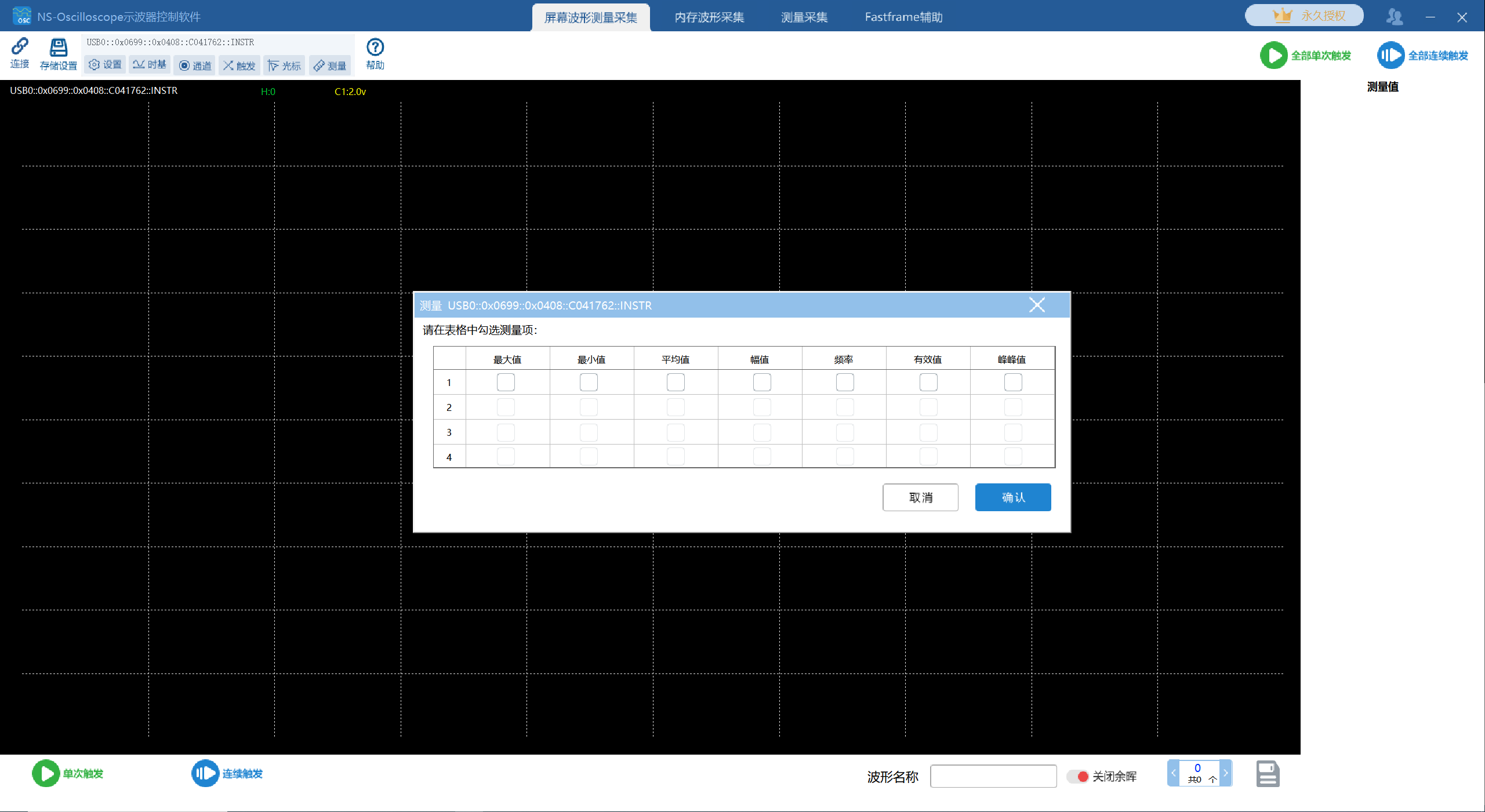
◆ Measurement setup . The measurement items can be selected in the table , Maximum 、 minimum value 、 Average value, etc. .
6.5、 Run the test interface
Normal triggering and with cursor and measurement item .

Running test interface diagram
6.6、 Storage of oscillograph
6.6.1、 Automatically saved screenshot of oscilloscope .

6.6.2、 Save manually . Click the Save button in the lower right corner , The waveform storage interface pops up , The number of storage screens can be selected , Storage type , Storage address , Click ok , It will be saved according to the set path .

Manually save the waveform storage interface
6.6.3、 Turn on the afterglow function . Click the all continuous trigger button , Waveform diagram interface .

6.7、 Data storage interface
The system can save TDMS and CSV Files in two formats .

TDMS file
6.8、FastFrame function
NS-Oscilloscope Oscilloscope program control software -FastFrame It is compatible with Tektronix (Tektronix) Oscilloscope ,4 series MSO Mixed signal oscilloscope 、MSO5B Series mixed signal oscilloscope 、MSO6B series Mixed signal oscilloscope .

◆ Trigger interface . After all the parameters are set , Click the start trigger button , The trigger interface is shown in the figure .

◆ Waveform read back interface . When the trigger is complete , The system starts waveform readback , As shown in the figure

◆ Waveform interface . After waveform readback , The waveform display page is shown in the figure .

The display mode of waveform can be arranged and displayed on the same screen , The system supports selecting the number of waveforms on the same screen , You can turn the page to view . Arrange the displayed pages as shown in the figure .

边栏推荐
- One article quick learning - playing with MySQL time operation function and detailed explanation of time matching operation + instance code
- 2022年安全员-C证上岗证题目及答案
- 【100个 Unity实用技能】| 游戏中使技能或装备跟随角色环绕,持续旋转
- 數據可視化入門
- C语言初阶(十)类型重命名typedef
- 一款完整开源的物联网基础平台
- DevSecOps:应当做好的十件事
- OpenGL学习笔记之坐标变换学习
- 2022年安全员-A证考试模拟100题及在线模拟考试
- New experience of cultural tourism! 3dcat helps Guangzhou intangible cultural heritage "yuancosmos" block make a cool appearance
猜你喜欢

The advanced process resistance of Intel and TSMC is increasing, and Chinese chips are expected to shorten the gap

Citus 11 for Postgres 完全开源,可从任何节点查询(Citus 官方博客)

You must get started with boost

WPF DataContext usage

Implementation of qcustomplot based on qtquick

數據可視化入門

fix libpng warning: iCCP: Not recognizing known sRGB profile ......

SMIC won the lawsuit in the United States, proving that independence can lead to more long-term development

One article quick learning - playing with MySQL time operation function and detailed explanation of time matching operation + instance code

Feature metric loss for self supervised learning of depth and egomotion
随机推荐
Feature metric loss for self supervised learning of depth and egomotion
Scholar magic changes QT creator plug-in framework (with examples)
C# Cannot access child value on Newtonsoft.Json.Linq.JProperty
运控入门到 Fang Si
高性能并行编程与优化 | 第01讲回家作业
QML introduction to advanced
五步成功完成威胁建模
【100个 Unity踩坑小知识点】| Unity中的 碰撞盒检测 Physics.OverlapBox、OverlapCaps
Ar manipulator of game console
普源示波器软件,Rigol示波器上位机软件NS-Scope介绍
Nature子刊 | 周集中团队揭示长期气候变暖导致草地土壤微生物多样性降低
Detailed explanation of connection pool parameter settings (view while adjusting)
C语言初阶(七)结构体
What securities does qiniu use to open an account? Is it safe to open an account
文旅新体验!3DCAT助力广州非遗“元宇宙”街区炫酷亮相
【哈尔滨工业大学】考研初试复试资料分享
The first question of leetcode -- sum of two numbers
Design and implementation of server security audit system
数据库主键一定要自增吗?有哪些场景不建议自增?
深水区涉入