当前位置:网站首页>laravel 创建 service层
laravel 创建 service层
2022-06-24 19:41:00 【王道长的编程之路】
一、生成及编辑 service文件
php artisan make:command AddService
执行该命令,将会在app\Console目录下生成Commands目录,同时在 app\Console\Commands 目录下生成 AddService.php 文件。
将AddService.php文件内容清空,并用如下替换
<?php

namespace App\Console\Commands;

use Illuminate\Console\GeneratorCommand;

class AddService extends GeneratorCommand
{

    /** * 控制台命令名称 * * @var string */
    protected $name = 'make:service';
    /** * 控制台命令描述 * * @var string */
    protected $description = 'Create a new service class';
    /** * 生成类的类型 * * @var string */
    protected $type = 'Services';
    /** * 获取生成器的存根文件 * * @return string */
    protected function getStub()
    {

        return __DIR__.'/stubs/service.stub';
    }

    /** * 获取类的默认命名空间 * * @param string $rootNamespace * @return string */

    protected function getDefaultNamespace($rootNamespace)
    {

        return $rootNamespace.'\Services';
    }
}
二、创建存根目录及文件
在app\Console\Commands目录下创建Stubs目录,可以直接右键新建文件夹,或使用命令行 mkdir app\Console\Commands\Stubs 在该目录下添加名为 services.stub 的文件,完整路径为app/Console/Commands/Stubs/service.stub
编辑services.stub并添加内容,将如下内容添加到services.stub文件中并保存。
<?php

namespace DummyNamespace;

class DummyClass
{

}
三、注册命令
将以下内容添加到app/Console/Kernel.php文件的 protected $commands = [] 属性数组中,使命令生效。
\App\Console\Commands\AddServices::class
protected $commands = [
  Commands\AddService::class
];
四、测试命令
php artisan make:service MusicService
边栏推荐
- 别再乱用了,这才是 @Validated 和 @Valid 的真正区别!!!
- 2022年高处安装、维护、拆除考试模拟100题及模拟考试
- 2022 safety officer-a certificate examination questions and answers
- [laravel series 7.9] test
- Epics record reference 3 -- fields common to all records
- 对抗训练理论分析:自适应步长快速对抗训练
- [postgraduate entrance examination English] prepare for 2023, learn list9 words
- Servlet
- China solar thermal market trend report, technical dynamic innovation and market forecast
- cat写多行内容到文件
猜你喜欢

shopee开店入驻流水如何提交?

Canvas to add watermark to pictures
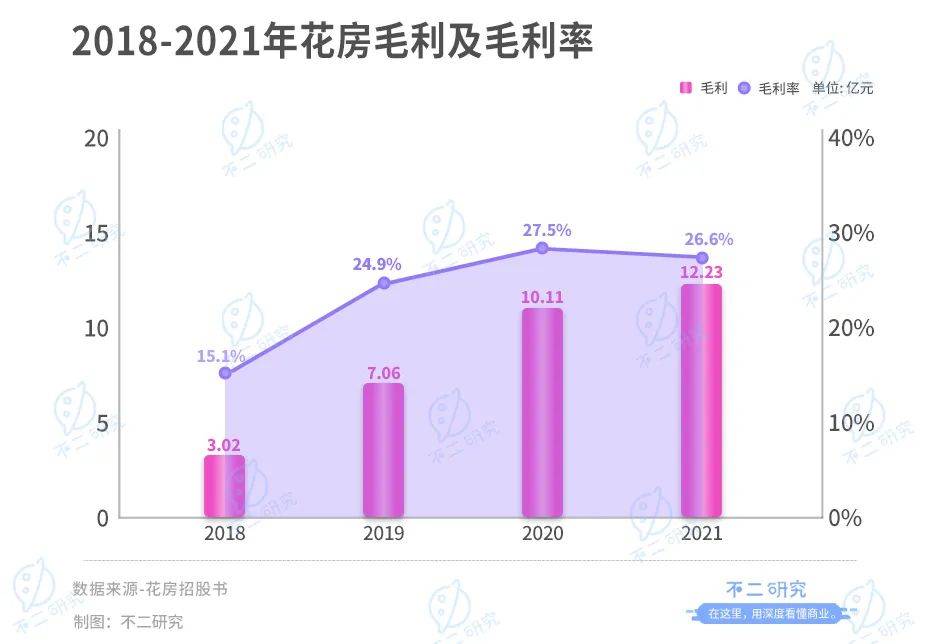
Second IPO of Huafang group: grown up in Zanthoxylum bungeanum, trapped in Zanthoxylum bungeanum

Development specification - parameter verification exception, exception return prompt section

See how sparksql supports enterprise level data warehouse

vulnhub DC: 2
开发规范~参数校验异常、异常返回提示切面

推送Markdown格式信息到钉钉机器人

Epics record reference 4 -- fields for all input records and fields for all output records
vulnhub DC: 2
随机推荐
Research Report on solar battery charger industry - market status analysis and development prospect forecast
Research and investment strategy report on China's building steel structure anticorrosive coating industry (2022 Edition)
结构体的内存对齐
C language operators and expressions
A big factory interview must ask: how to solve the problem of TCP reliable transmission? 8 pictures for you to learn in detail
EPICS记录参考4--所有输入记录都有的字段和所有输出记录都有的字段
Research Report on market supply and demand and strategy of China's solar charging controller industry
cat写多行内容到文件
Attention, postgraduate candidates! They are the easiest scams to get caught during the preparation period?!
See how sparksql supports enterprise data warehouse
推送Markdown格式信息到釘釘機器人
03_SpingBoot 核心配置文件
find your present (2)
Introduction to machine learning compilation course learning notes lesson 1 overview of machine learning compilation
[untitled]
剑指 Offer 13. 机器人的运动范围
Annotation
Learn more about the practical application of sentinel
2022 safety officer-a certificate examination questions and answers
Common sense of resolution