当前位置:网站首页>Spirng security (VIII) multiple filter chains coexist
Spirng security (VIII) multiple filter chains coexist
2022-07-25 04:00:00 【Who is Huang Huang】
I. project construction
pom.xml
<?xml version="1.0" encoding="UTF-8"?>
<project xmlns="http://maven.apache.org/POM/4.0.0" xmlns:xsi="http://www.w3.org/2001/XMLSchema-instance"
         xsi:schemaLocation="http://maven.apache.org/POM/4.0.0 https://maven.apache.org/xsd/maven-4.0.0.xsd">
    <modelVersion>4.0.0</modelVersion>
    <parent>
        <groupId>org.springframework.boot</groupId>
        <artifactId>spring-boot-starter-parent</artifactId>
        <version>2.7.1</version>
        <relativePath/> <!-- lookup parent from repository -->
    </parent>
    <groupId>com.example</groupId>
    <artifactId>twoConfig</artifactId>
    <version>0.0.1-SNAPSHOT</version>
    <name>twoConfig</name>
    <description>twoConfig</description>
    <properties>
        <java.version>1.8</java.version>
    </properties>
    <dependencies>
        <dependency>
            <groupId>org.springframework.boot</groupId>
            <artifactId>spring-boot-starter-security</artifactId>
        </dependency>
        <dependency>
            <groupId>org.springframework.boot</groupId>
            <artifactId>spring-boot-starter-web</artifactId>
        </dependency>

        <dependency>
            <groupId>org.springframework.boot</groupId>
            <artifactId>spring-boot-starter-test</artifactId>
            <scope>test</scope>
        </dependency>
        <dependency>
            <groupId>org.springframework.security</groupId>
            <artifactId>spring-security-test</artifactId>
            <scope>test</scope>
        </dependency>
    </dependencies>

    <build>
        <plugins>
            <plugin>
                <groupId>org.springframework.boot</groupId>
                <artifactId>spring-boot-maven-plugin</artifactId>
            </plugin>
        </plugins>
    </build>

</project>
application.properties
spring.security.user.name=zhangsan
spring.security.user.password=123
HelloController
package com.qfedu.security05;

import org.springframework.web.bind.annotation.GetMapping;
import org.springframework.web.bind.annotation.RestController;

@RestController
public class HelloController {


    /** *  If you visit this path , that  Spring Security  The filter chain will not contain  SessionManagementFilter * @return */
    @GetMapping("/phone/hello")
    public String phone() {

        return "phone";
    }

    /** *  If you visit this path , that  Spring Security  The filter chain will contain  SessionManagementFilter * @return */
    @GetMapping("/web/hello")
    public String web() {

        return "web";
    }
}
SecurityConfig
Is still the most important configuration , The following content is all around here
Two . Get login user information
First , The server must store user information in HttpSession.
1. First The front end initiates a login request , This request will after SpringSecurity A series of filters ,SecurityContextPersistenceFilter In the filter , It mainly uses To process the current user information . When the user logs in successfully , automatically Store user information in SecurityContextHolder in ,SecurutyContextHolder The bottom layer is ThreadLocal.
2. In the request After processing , Response data to the front end When , It will be after SecurityContextPersistenceFilter filter , here , System automatically take Just logged in successfully User information is stored in HttpSession in .
3. The next time the request comes , Still pass SecurityContextPersistenceFilter filter , At this time, the system will automatically start from HttpSession Read out the login information of the current login success , And save it to SecurityContextyHolder.( This means that only the information in the same thread can be obtained )
3、 ... and . Multiple filter chains coexist
Accumulation of knowledge :
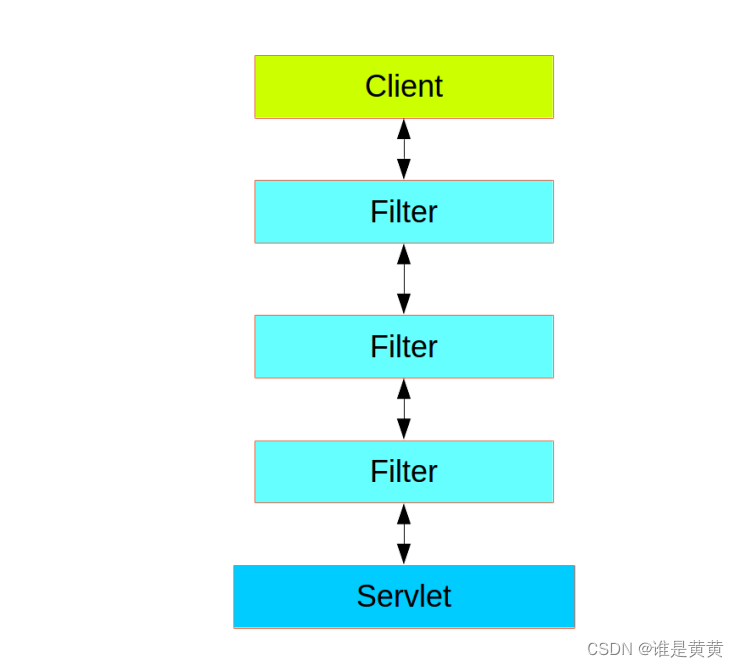
We mentioned that before Spring Security A total of 32 A filter , Among them, the default use is 15 individual , individual Web In the project , The request process is shown in the following figure :
The request is initiated from the client ( For example, browser ), And then through the layers Filter, Finally came Servlet On , By Servlet What to do with .
, that Spring Security In the default 15 This is how filters are nested in Client and Servlet Between ?
No, it isn't ! In the picture above Filter We can call it Web Filter,Spring Security Medium Filter We can call it Security
Filter, The relationship between them is as follows :
Spring Security Filter It's not embedded directly into Web Filter Medium , But through FilterChainProxy Laitong
I. management Spring Security Filter,FilterChainProxy Itself is through Spring Provided DelegatingFilterProxy generation
Management filter ( It's us SecurityConfig Proxy filter configured in ) Embedded in Web Filter In
.
Expand :DelegatingFilterProxy Many small partners should be familiar with , stay Spring In the manual integration Spring Session、Shiro
You can't wait for a tool without it , Now it's used Spring Boot, Many things Spring Boot Did it for us , So sometimes
Feeling DelegatingFilterProxy The sense of being has decreased , In fact, it has been .

2.1 Wrong way to handle multiple filter chains

Be careful : Filter chain , Not two worry chains , This is still a filter chain , The filters are all the same , Just different path judgment conditions are different nothing more
2.2 Correct handling of multiple filter chains ( Example of project configuration )

You can see , When the request arrives FilterChainProxy after ,FilterChainProxy According to the requested path , Forward requests to different Spring Security Filters The above to , Different Spring Security Filters Corresponding to different filters , That is to say Different requests will go through different filters .
securtyConfig
package com.twoconfig.config;

import org.springframework.context.annotation.Bean;
import org.springframework.context.annotation.Configuration;
import org.springframework.security.config.annotation.web.builders.HttpSecurity;
import org.springframework.security.core.userdetails.User;
import org.springframework.security.core.userdetails.UserDetailsService;
import org.springframework.security.provisioning.InMemoryUserDetailsManager;
import org.springframework.security.web.SecurityFilterChain;

@Configuration
public class SecurityConfig {


    UserDetailsService us1() {

        InMemoryUserDetailsManager manager = new InMemoryUserDetailsManager();
        manager.createUser(User.withUsername("lisi").password("{noop}123").roles("admin").build());
        return manager;
    }

    UserDetailsService us2() {

        InMemoryUserDetailsManager manager = new InMemoryUserDetailsManager();
        manager.createUser(User.withUsername("wangwu").password("{noop}123").roles("admin").build());
        return manager;
    }

    /** *  It doesn't contain  SessionManagementFilter  Of , The interception rule is  /phone/** * @param http * @return * @throws Exception */
    @Bean
    SecurityFilterChain securityFilterChain01(HttpSecurity http) throws Exception {

        http.antMatcher("/phone/**")
                .userDetailsService(us1())
                .authorizeRequests().anyRequest().authenticated()
                .and()
                .formLogin()
                .loginPage("/phone/login")
                .loginProcessingUrl("/phone/login")
                .successHandler((req,resp,auth)->{

                    resp.getWriter().write("phone login success");
                })
                .permitAll()
                .and()
                .sessionManagement().disable()
                .csrf().disable();
        return http.build();
    }

    /** *  contain  SessionManagementFilter  Of , The interception rule is  /web/** * @param http * @return * @throws Exception */
    @Bean
    SecurityFilterChain securityFilterChain02(HttpSecurity http) throws Exception {

        http.antMatcher("/web/**")
                .userDetailsService(us2())
                .authorizeRequests().anyRequest().authenticated()
                .and()
                .formLogin()
                .loginPage("/web/login")
                .loginProcessingUrl("/web/login")
                .successHandler((req,resp,auth)->{

                    resp.getWriter().write("web login success");
                })
                .and()
                .sessionManagement()
                .maximumSessions(1)
                .maxSessionsPreventsLogin(true)
                .and().and()
                .csrf().disable();
        return http.build();
    }


}
test result phone
test result web
2.3 Cite the example of Jiangnan boss
	@Configuration
 public class SecurityConfig
 {


	@Bean
	protected UserDetailsService userDetailsService() {

	InMemoryUserDetailsManager manager = new InMemoryUserDetailsManager();
	manager.createUser(User.withUsername("javaboy")
	.password(" {
    bcrypt}$2a$10$Sb1gAUH4wwazfNiqflKZve4Ubh
	.spJcxgHG8Cp29DeGya5zsHENqi")
	.roles("ad min", "aaa", "bbb").build());

	manager.createUser(User.withUsername("sang")
	.password(" {noop}123")
	.roles("admin").build());
	manager.createUser(User.withUsername(" A little rain in Jiangnan ")
	.password("{MD5} {Wucj/L8wMTMzFi3oBKWsETNeXbMFaHZW9vCK9mahMHc=}4d43db282b36d7f0421498fdc693f2a2")
	.roles("user", "aaa", "bbb").build());
	return manager; }


	@Configuration
	@Order(1)
	static class DefaultWebSecurityConfig extends WebSecurityConfigurerAdapter
	{
     @Override protected void configure(HttpSecurity http) throws Exception
	{
     http.antMatcher("/foo/**")
	.authorizeRequests()
	.anyRequest()
	.hasRole("admin")
	.and()
	.csrf()
	.disable()
	;
	}
	}


	@Configuration
	@Order(2)
	static class DefaultWebSecurityConfig2 extends WebSecurityConfigurerAdapter {

	@Override
	protected void configure(HttpSecurity http) throws Exception {

	http.antMatcher("/bar/**")
	.authorizeRequests()
	.anyRequest()
	.hasRole("user")
	.and()
	.formLogin()
	.permitAll()
	.and()
	.csrf()
	.disable();
	}
	}
	}
- First ,SecurityConfig No longer need to inherit from WebSecurityConfigurerAdapter 了 , Just as an ordinary
Configuration class , add @Configuration Annotations can be . - Provide UserDetailsService example , It's our data source .
- Create static inner class inheritance WebSecurityConfigurerAdapter class , Simultaneous use @Configuration Annotation marks static
The inner class is a configuration class , The code in the configuration class is the same as before , There is no need to repeat . - Each static inner class is equivalent to a filter chain configuration .
- Note that inside the static inner class , I didn't use it http.authorizeRequests() Start ,
http.authorizeRequests() The configuration indicates that the filtering path of the filter chain is /** . In a static inner class , I
It is used. http.antMatcher("/bar/") Open configuration , Indicates that the interception range of the current filter chain is limited to
/bar/ . - When there are multiple filter chains , There must be a priority issue , Therefore, the configuration class of each filter chain passes through
@Order(2) Comments to mark priorities .
You can see from the above code ,configure(HttpSecurity http) The method seems to be configuring the filter chain ? Yes that's right ! Our configuration in this method , It's all about adding / remove / modify Spring Security Filters are provided by default , So this method is
It's configuration Spring Security Filter chain in
Spring Security There can be multiple filter chains at the same time - A little rain in Jiangnan
FilterChainProxy How to deal with multiple filter chains
边栏推荐
- Deeply understand the connection state and reliable mechanism of TCP protocol
- Cluster clock synchronization configuration
- P100 MSSQL database penetration test of secondary vocational network security skills competition
- Memory leak due to improper handling of custom view
- Imeta | ggclusternet microbial network analysis and visualization nanny level tutorial
- Time complexity and space complexity
- Divide candy Huawei od JS
- Localization distillation for dense object detection cvpr2022
- Force deduction question 3
- 基于SSM实现后勤报修系统
猜你喜欢

Customized view considerations

Imeta | ggclusternet microbial network analysis and visualization nanny level tutorial

Modbus poll/slave simulator tutorial

Advantages and disadvantages of zero trust security

Uniapp picker select the effect demo of provinces and cities (finishing)
.net6 miniapi (V): Options

Implementation of logistics repair reporting system based on SSM

Implementing DDD based on ABP -- domain logic and application logic

Digital collections can go further without hype

Solve "nothing added to commit but untracked files present"“
随机推荐
Optimization of MySQL sorting index fields
MySQL select query part 2
292. Nim game
How to do a good job in safety development?
Table of contents of force deduction questions
MySQL
Moveit2 - 7. Scenario planning ROS API
Debezium series: optimize cluster parameters and support personalized settings of debezium connector
word怎么取消退出修订模式
Apache Doris series: in depth understanding of real-time analytical database Apache Doris
Niuke interview high frequency list (group 1) difficulty: simple & medium
You are only one SQL statement away from the tdengine Developer Conference!
Experience sharing of system architecture designers in preparing for the exam: how to prepare for the exam effectively
VMware installation
Network construction and application in 2020 -- the answer of samba in Guosai
Implementation of logistics repair reporting system based on SSM
Force deduction brush question 26. Delete duplicates in the ordered array
Student thinking vs workplace thinking
Yuntu says digital asset chain: your God of digital asset property protection
Postgraduate entrance examination experience