当前位置:网站首页>Common mouse events and keyboard events
Common mouse events and keyboard events
2022-07-23 13:48:00 【Hugging spinner】
Common mouse events

One . Disable text selection and right-click menu
1. Disable right mouse button menu
contextmenu It mainly controls when the context menu should be displayed , It is mainly used by programmers to cancel the default context menu

2. Disable mouse selection ( selectstart Start selecting )

Example :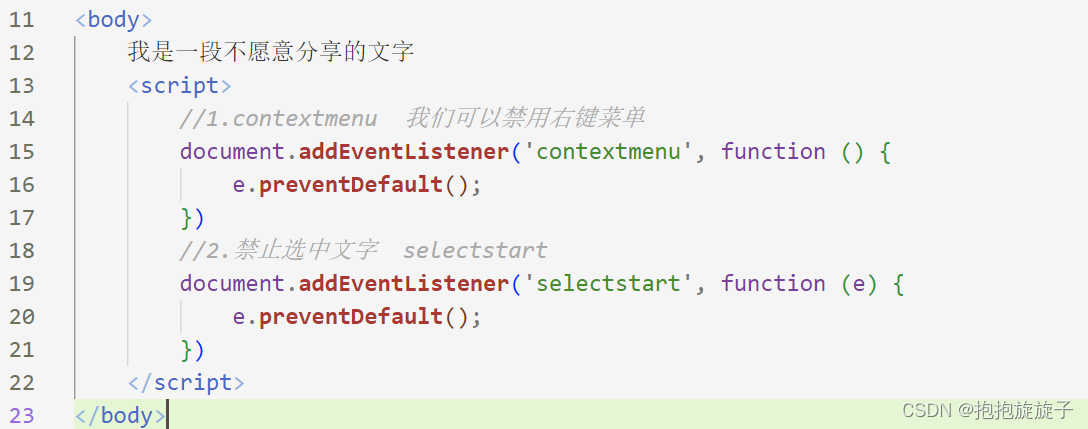
Two . Get the coordinates of the mouse in the page
Mouse event object
event Object represents the state of the event , A collection of information related to an event . At this stage, we mainly use the mouse event object MouseEvent And keyboard event objects KeyboardEvent.
Example : 
3、 ... and . Angel following the mouse
case analysis :
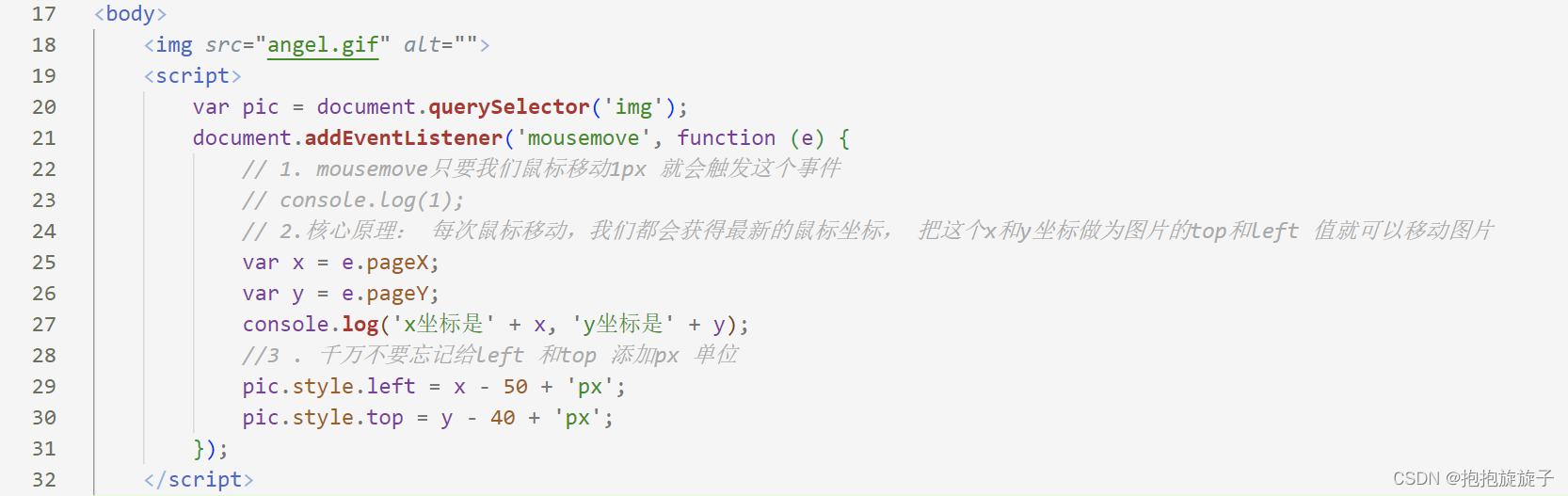
1. The mouse keeps moving , Use the mouse to move events : mousemove Move... In the page , to document Registration events
2. The picture should move a distance , And it doesn't take up a place , We can use absolute positioning
3. The core principle : Every time the mouse moves , We all get the latest mouse coordinates , Put this x and y The coordinates are the coordinates of the picture top and left Value to move the picture
Common keyboard events

Be careful :
1. If you use addEventListener No need to add on
2. onkeypress And the front 2 The difference is , It does not recognize function keys , For example, left and right arrows ,shift etc. .
3. The order of execution of the three events is :keydown -- keypress --- keyup

Four .keyCode Determine which key the user presses


Be careful :
onkeydown and onkeyup Case insensitive ,onkeypress Case sensitive . In our actual development , We use more keydown and keyup, It recognizes all the keys ( Including function keys )Keypress The function key is not recognized , however keyCode Properties are case sensitive , Return to a different ASCII value
5、 ... and . Simulate Jingdong key input content
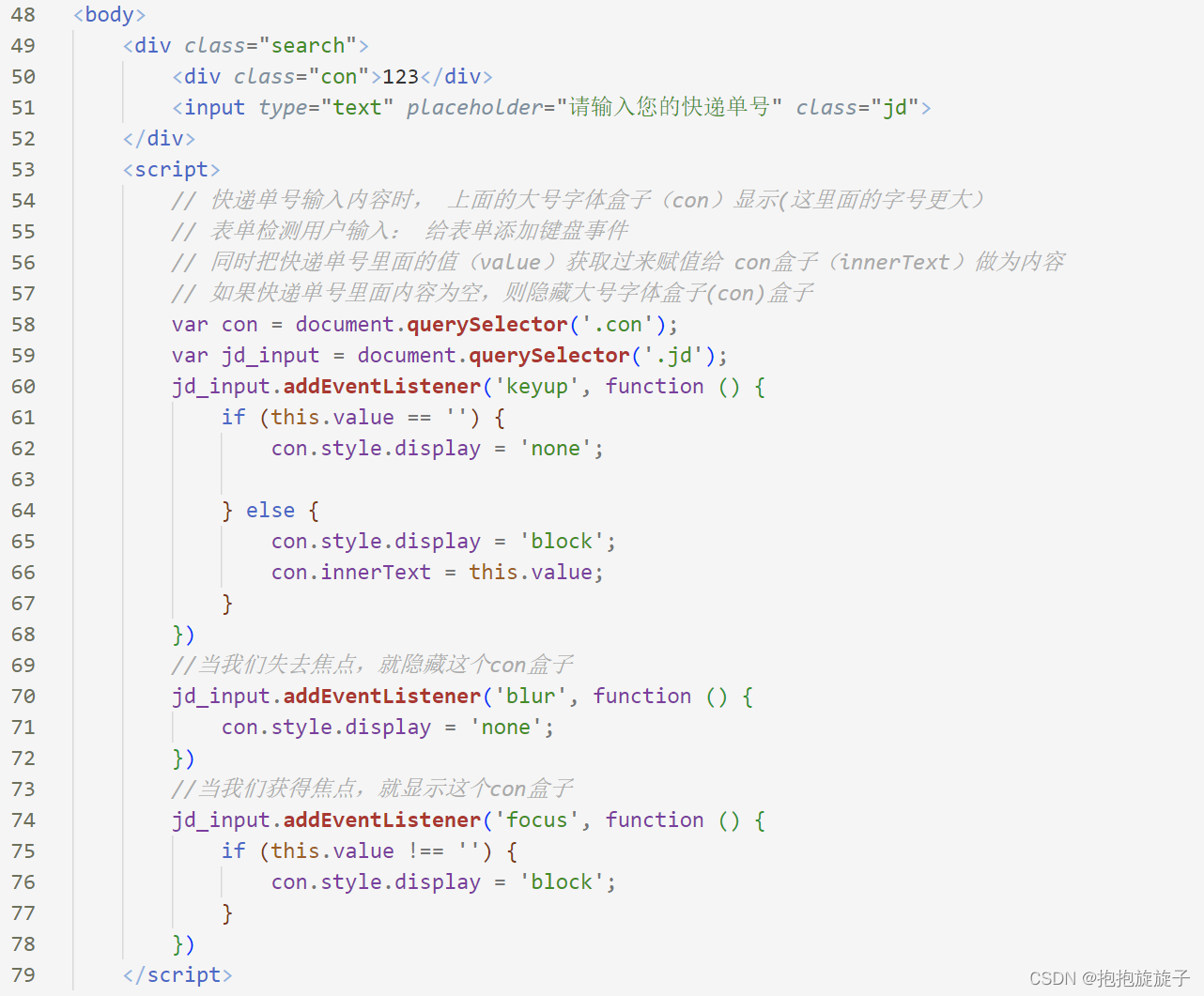
1. When you enter the content in the express order No , The big font box above (con) Show ( The words in this
2. At the same time, the value in the express order number ( value ) Get and assign to con The box ( innerText ) As content
3. If the content in the express order number is empty , Then hide the large font box (con) The box
4. Be careful ::keydown and keypress The features in the text box ∶ When both of them were triggered , The text has not yet fallen into the text box
5.keyup When the event is triggered , The text has fallen into the text box
6. When we lose focus , Just hide this con The box
7. When we get the focus , And the content of the text box is not empty , Just show this con The box
边栏推荐
- Special lecture 5 combinatorial mathematics learning experience (long-term update)
- 如何保证消息的可靠传输?如果消息丢了会怎么办
- 十大券商开户风险性大吗,安全吗?
- Point target simulation of SAR imaging (I) -- mathematical model
- 2022-07-22 review linked list operation and some problems
- [JS advanced] basics of regular expressions - about regular expressions you want to know_ 01
- SparkSQL设计及入门,220722,
- ModuleNotFoundError: No module named ‘setuptools_ rust‘
- 数据库系统原理与应用教程(040)—— MySQL 查询(二):设置要查询的列名或表达式
- 数据库系统原理与应用教程(052)—— MySQL 的数据完整性(十四):交叉表查询(行列转换)
猜你喜欢

Smart city infrastructure management based on bim+3dgis

专题讲座5 组合数学 学习心得(长期更新)

Qt Creator .pro文件根据kit添加对应库

docker redis
GLIB-CRITICAL g_file_test:assertion ‘filename != null‘ failed

"Computing beast" Inspur nf5468a5 GPU server open trial free application
Événements courants de la souris et du clavier

4D antenna array layout design

Elephant Swap的LaaS方案优势分析,致eToken表现强势

Method of entering mathematical formula into mark down document
随机推荐
Shell运算符、$((运算式))” 或 “$[运算式]、expr方法、条件判断、test condition、[ condition ]、两个整数之间比较、按照文件权限进行判断、按照文件类型进行判断
Chapter II relational database after class exercises
Learn to use canvas to build line chart, bar chart and pie chart
Interface test - simple interface automation test demo
[图形学]ASTC纹理压缩格式
做测试如何应对新的开发模式?
如何保证消息的可靠传输?如果消息丢了会怎么办
【cocos creator】spine动画,监听播放结束
Introduction to radar part vii 4 SAR system design
内存取证之NSSCTF-OtterCTF 2018(复现赛)
养老机构智能视频监控解决方案,用新技术助力养老院智慧监管
Reference and output message types in ROS
专题讲座5 组合数学 学习心得(长期更新)
解决MySQL向表中增加数据插入中文乱码问题
Introduction to radar part vii 1 radar and resolution
Qt Creator .pro文件根据kit添加对应库
智慧食堂数据分析系统
SparkSQL设计及入门,220722,
Unity关于本地加载图片涉及webrequest或者byte
数据库系统原理与应用教程(045)—— MySQL 查询(七):聚合函数