当前位置:网站首页>【ROS 入门学习 】CmakeList.txt 和Packages.xml释义
【ROS 入门学习 】CmakeList.txt 和Packages.xml释义
2022-06-22 20:30:00 【AMOV-ANUU】
文件系统
转载于 https://mp.weixin.qq.com/s/LwNUvFb5j5acsNkMYH46qQ
ROS 的文件系统 是只在硬盘上 ROS源代码的组织形式: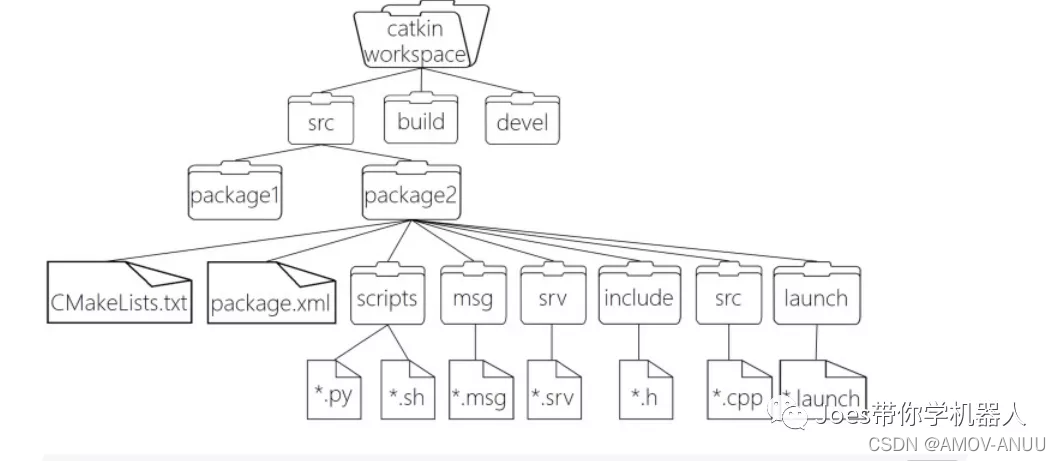
架构释义:
WorkSpace
workspace 自定义的工作空间
- build
build 编译空间 ,用于存放CMake 和 catkin 的缓存信息 、配置信息, 和其他中间文件
- devel
devel 开发空间 ,用于存放编译后生成的文件 ,包括头文件 ,动态 & 静态链接库,可执行文件
- src
src 源代码
- - package
package 功能包 (ROS的基本单元 ,包含多个节点 ,库与配置文件 ,包含所有字母小写,只能由字母 数字 与下划线组成)
- - - CmakeLists.txt
CmakeLists.txt 配置 编译规则 ,比如源文件,依赖项 目标文件
- - - package.xml
package.xml 包信息,比如 包名 版本 作者 依赖项
(以前版本是 manifest.xml)
- - - scripts
scripts 存储python文件
— include
include 头文件
- - - msg
msg 消息通信格式文件
- - - srv
srv 服务通信格式文件
- - - action
action 动作格式文件
- - - lanuch
lanuch 可一次运行多个节点
- - - config
config 配置信息
- - CMakeLists.txt
CMakeLists.txt – 编译的基本配置
CMakeLists.txt 文件释义 (基本配置 )1
cmake_minimum_required(VERSION 3.0.2)
# 所需 cmake 版本
project(ros02_hello_vscode)
  # 包名称,会被 ${PROJECT_NAME} 的方式调用
  ------------------------------------------------------

## Find catkin macros and libraries
## if COMPONENTS list like find_package(catkin REQUIRED COMPONENTS xyz)
## is used, also find other catkin packages

## `查找catkin宏和库
## 如果组件列表如find_package(catkin所需组件xyz)
## 是用过的,还可以找到其他的catkin包
-----------------------------------------------------------------


# 设置构建所需要的软件包
find_package(catkin REQUIRED COMPONENTS
  roscpp
  rospy
  std_msgs
  geometry_msgs
  message_generation
)
---------------------------------------------------------------
## System dependencies are found with CMake's conventions
# 默认添加系统依赖
# find_package(Boost REQUIRED COMPONENTS system)
----------------------------------------------------------------
## Uncomment this if the package has a setup.py. This macro ensures
## modules and global scripts declared therein get installed
## 如果包具有setup.py,则取消对此的注释。此宏确保安装其中声明的模块和全局脚本
## See http://ros.org/doc/api/catkin/html/user_guide/setup_dot_py.html
# 启动 python 模块支持
# catkin_python_setup()
-----------------------------------------------------------------
CMakeLists.txt 文件释义 (基本配置 )2
################################################
## Declare ROS messages, services and actions ##
## 声明 ROS 消息、服务、动作 ##
################################################
------------------------------------------------------------------------------

## To declare and build messages, services or actions from within this
## 要在此包中声明和生成消息、服务或操作,请执行以下步骤:
-----------------------------------------------------------------------------
## package, follow these steps:
## * Let MSG_DEP_SET be the set of packages whose message types you use in
## your messages/services/actions (e.g. std_msgs, actionlib_msgs, ...).
## * In the file package.xml:
## * add a build_depend tag for "message_generation"
## * add a build_depend and a exec_depend tag for each package in MSG_DEP_SET
## * If MSG_DEP_SET isn't empty the following dependency has been pulled in
## but can be declared for certainty nonetheless:
## * add a exec_depend tag for "message_runtime"

## *MSG_DEP_SET是您在中使用其消息类型的包集
## 您的消息/服务/操作(例如std_msgs、actionlib_msgs等)。
## *在package.xml文件中:
## *为“消息生成”添加构建依赖标记
## *为MSG_DEP_SET中的每个包添加build_depend和exec_depend标记
## *如果MSG_DEP_SET不为空,则已拉入以下依赖项
## 但可以肯定地宣布:
## *为“消息运行时”添加exec_dependen标记
-------------------------------------------------------------------
## * In this file (CMakeLists.txt):
## * add "message_generation" and every package in MSG_DEP_SET to
## find_package(catkin REQUIRED COMPONENTS ...)
## * add "message_runtime" and every package in MSG_DEP_SET to
## catkin_package(CATKIN_DEPENDS ...)
## * uncomment the add_*_files sections below as needed
## and list every .msg/.srv/.action file to be processed
## * uncomment the generate_messages entry below
## * add every package in MSG_DEP_SET to generate_messages(DEPENDENCIES ...)

## *在此文件(CMakeLists.txt)中:
## *添加“消息生成”并将MSG_DEP_中的每个包设置为
## 查找包装(catkin所需组件…)
## *添加“message_runtime”并将MSG_DEP_中的每个包设置为
## 柳絮包装(catkin包装视情况而定)
## *根据需要取消注释下面的“添加文件”部分
## 并列出要处理的每个.msg/.srv/.action文件
## *取消注释下面的generate_messages条目
## *在MSG_DEP_SET中添加每个包以生成_消息(依赖项…)
------------------------------------------------------------------------
# Generate messages in the 'msg' folder
# 在“msg”文件夹中生成消息
add_message_files(
  FILES
  Topic.msg
)

## Generate services in the 'srv' folder
## 在“srv”文件夹中生成服务
# add_service_files(
# FILES
# Service1.srv
# Service2.srv
# )

## Generate actions in the 'action' folder
## 在“action”文件夹中生成操作
# add_action_files(
# FILES
# Action1.action
# Action2.action
# )

## Generate added messages and services with any dependencies listed here
# 生成消息、服务时的依赖包
generate_messages(
  DEPENDENCIES
  geometry_msgs
  std_msgs
)

################################################
## Declare ROS dynamic reconfigure parameters ##
## 声明 ROS 动态参数配置 ##
################################################

## To declare and build dynamic reconfigure parameters within this
## package, follow these steps:
## * In the file package.xml:
## * add a build_depend and a exec_depend tag for "dynamic_reconfigure"
## * In this file (CMakeLists.txt):
## * add "dynamic_reconfigure" to
## find_package(catkin REQUIRED COMPONENTS ...)
## * uncomment the "generate_dynamic_reconfigure_options" section below
## and list every .cfg file to be processed
## 若要在此包范围内声明和生成动态重新配置参数,请执行以下操作:
## *在package.xml文件中:
## *为“动态重新配置”添加构建依赖和执行依赖标记
## *在此文件(CMakeLists.txt)中:
## *将“dynamic_reconfigure”添加到
## 查找包装(catkin所需组件…)
## *取消注释下面的“generate_dynamic_reconfigure_options”部分
## 并列出要处理的每个.cfg文件

## Generate dynamic reconfigure parameters in the 'cfg' folder
## 在“cfg”文件夹中生成动态重新配置参数
# generate_dynamic_reconfigure_options(
# cfg/DynReconf1.cfg
# cfg/DynReconf2.cfg
# )

###################################
## catkin specific configuration ##
## catkin 特定配置 ##
###################################
## The catkin_package macro generates cmake config files for your package
## Declare things to be passed to dependent projects
## INCLUDE_DIRS: uncomment this if your package contains header files
## LIBRARIES: libraries you create in this project that dependent projects also need
## CATKIN_DEPENDS: catkin_packages dependent projects also need
## DEPENDS: system dependencies of this project that dependent projects also need
## catkin_package宏为包生成cmake配置文件
## 声明要传递给依赖项目的内容
## INCLUDE_DIRS:如果packages包含头文件,请取消对此的注释
## 库:在此项目中创建的依赖项目也需要的库
## CATKIN_DEPENDS:依赖CATKIN_packages的项目也需要
## 依赖项:依赖项目也需要的此项目的系统依赖项

# 运行时依赖
catkin_package(
  INCLUDE_DIRS include
  LIBRARIES hello_vscode
  CATKIN_DEPENDS roscpp rospy std_msgs geometry_msgs
  DEPENDS system_lib
  message_runtime
)

###########
## Build ##
###########

## Specify additional locations of header files
## Your package locations should be listed before other locations
# 添加头文件路径,当前程序包的头文件路径位于其他文件路径之前
include_directories(
# include
  ${catkin_INCLUDE_DIRS}
)

## Declare a C++ library
# 声明 C++ 库
# add_library(${PROJECT_NAME}
# src/${PROJECT_NAME}/hello_vscode.cpp
# )

## Add cmake target dependencies of the library
## as an example, code may need to be generated before libraries
## either from message generation or dynamic reconfigure
# 添加库的 cmake 目标依赖
# add_dependencies(${PROJECT_NAME} ${${PROJECT_NAME}_EXPORTED_TARGETS} ${catkin_EXPORTED_TARGETS})

## Declare a C++ executable
## With catkin_make all packages are built within a single CMake context
## The recommended prefix ensures that target names across packages don't collide
# 声明 C++ 可执行文件
add_executable(hello_vs_c src/hello_vs_c.cpp)
add_executable(ssy_c src/ssy_c.cpp)

## Rename C++ executable without prefix
## The above recommended prefix causes long target names, the following renames the
## target back to the shorter version for ease of user use
## e.g. "rosrun someones_pkg node" instead of "rosrun someones_pkg someones_pkg_node"
# 重命名c++可执行文件
# set_target_properties(${PROJECT_NAME}_node PROPERTIES OUTPUT_NAME node PREFIX "")

## Add cmake target dependencies of the executable
## same as for the library above
# 添加可执行文件的 cmake 目标依赖
add_dependencies(ssy_c ${PROJECT_NAME}_generate_messages_cpp)

## Specify libraries to link a library or executable target against
# 指定库、可执行文件的链接库
target_link_libraries(hello_vs_c
  ${catkin_LIBRARIES}
)
target_link_libraries(ssy_c
  ${catkin_LIBRARIES}
)

#############
## Install 安装 ##
#############

# all install targets should use catkin DESTINATION variables
# See http://ros.org/doc/api/catkin/html/adv_user_guide/variables.html

## Mark executable scripts (Python etc.) for installation
## in contrast to setup.py, you can choose the destination
# 设置用于安装的可执行脚本
catkin_install_python(PROGRAMS
  scripts/hello_vscode_p.py
  DESTINATION ${CATKIN_PACKAGE_BIN_DESTINATION}
)

## Mark executables for installation
# 标记要安装的可执行文件
## See http://docs.ros.org/melodic/api/catkin/html/howto/format1/building_executables.html
# install(TARGETS ${PROJECT_NAME}_node
# RUNTIME DESTINATION ${CATKIN_PACKAGE_BIN_DESTINATION}
# )

## Mark libraries for installation
## 标记要安装的库
## See http://docs.ros.org/melodic/api/catkin/html/howto/format1/building_libraries.html
# install(TARGETS ${PROJECT_NAME}
# ARCHIVE DESTINATION ${CATKIN_PACKAGE_LIB_DESTINATION}
# LIBRARY DESTINATION ${CATKIN_PACKAGE_LIB_DESTINATION}
# RUNTIME DESTINATION ${CATKIN_GLOBAL_BIN_DESTINATION}
# )

## Mark cpp header files for installation
## 标记要安装的cpp头文件
# install(DIRECTORY include/${PROJECT_NAME}/
# DESTINATION ${CATKIN_PACKAGE_INCLUDE_DESTINATION}
# FILES_MATCHING PATTERN "*.h"
# PATTERN ".svn" EXCLUDE
# )

## Mark other files for installation (e.g. launch and bag files, etc.)
## 标记要安装的其他文件(例如,启动和打包文件等)
# install(FILES
# # myfile1
# # myfile2
# DESTINATION ${CATKIN_PACKAGE_SHARE_DESTINATION}
# )

#############
## Testing ##
#############

## Add gtest based cpp test target and link libraries
## 添加基于gtest的cpp测试目标和链接库
# catkin_add_gtest(${PROJECT_NAME}-test test/test_hello_vscode.cpp)
# if(TARGET ${PROJECT_NAME}-test)
# target_link_libraries(${PROJECT_NAME}-test ${PROJECT_NAME})
# endif()

## Add folders to be run by python nosetests
## 添加要由python测试运行的文件夹
# catkin_add_nosetests(test)
Package.xml文件释义
(功能包(ROS基本单元)包含多个节点、库与配置文件,包名所有字母小写,只能由字母、数字与下划线组成):
<?xml version="1.0"?>
<!-- 格式: 以前是 1,推荐使用格式 2 -->
<package format="2">
  <!-- 包名 -->
  <name>ros02_hello_vscode</name>
  <!-- 版本 -->
  <version>0.0.0</version>
  <!-- 描述信息 -->
  <description>The ros02_hello_vscode package</description>

  <!-- 需要一个维护人员标签,允许多个,每个标签一人 -->
  <!-- 例如: -->
  <!-- <maintainer email="[email protected]">Jane Doe</maintainer> -->
  <!-- 维护者 -->
  <maintainer email="[email protected]">joes</maintainer>


  <!-- 需要一个许可证标签,允许多个,每个标签一个许可证 -->
  <!-- 常用的许可证字符串 : -->
  <!-- BSD, MIT, Boost Software License, GPLv2, GPLv3, LGPLv2.1, LGPLv3 -->
  <!-- 许可证信息,ROS核心组件默认 BSD -->
  <license>TODO</license>


  <!-- Url标记是可选的,但允许多个,每个标记一个 -->
  <!-- 可选属性类型可以是:网站、bugtracker或存储库 -->
  <!-- 例如: -->
  <!-- <url type="website">http://wiki.ros.org/hello_vscode</url> -->


  <!-- 作者标记是可选的,允许多个,每个标记一个 -->
  <!-- 作者不必是维护者,但也可以是维护者 -->
  <!-- 例如: -->
  <!-- <author email="[email protected]">Jane Doe</author> -->


<!-- *依赖标记用于指定依赖项-->
<!-- 依赖项可以是catkin包或系统依赖项-->
<!-- 示例:-->
<!-- 使用depend作为生成依赖项和执行依赖项包的快捷方式-->
<!-- <depend>roscpp</depend>-->
<!-- 请注意,这相当于以下内容:-->
<!-- <build_depend>roscpp</build_depend>-->
<!-- <exec_depend>roscpp</exec_depend>-->
<!-- 对编译时需要的包使用build_depend:-->
<!-- <build_depend>message_generation</build_depend>-->
<!-- 对需要的包使用build_export_depend,以便根据此包进行生成:-->
<!-- <build_export_depend>message_generation</build_export_depend>-->
<!-- 使用buildtool_depend于构建工具包:-->
<!-- <buildtool_depend>catkin</buildtool_depend>-->
<!-- 对于运行时需要的包,请使用exec_depend:-->
<!-- <exec_depend>message_runtime</exec_depend>-->
<!-- 对仅用于测试的软件包使用test_depend:-->
<!-- <test_depend>gtest</test_depend>-->
<!-- 对仅用于生成文档的包使用doc_depend:-->
<!-- <doc_depend>doxygen</doc_depend>-->

  <!-- 依赖的构建工具,这是必须的 -->
  <buildtool_depend>catkin</buildtool_depend>

  <!-- 指定构建此软件包所需的软件包 -->
  <build_depend>roscpp</build_depend>
  <build_depend>rospy</build_depend>
  <build_depend>std_msgs</build_depend>
  <build_depend>geometry_msgs</build_depend>

  <!-- 指定根据这个包构建库所需要的包 -->
  <build_export_depend>roscpp</build_export_depend>
  <build_export_depend>rospy</build_export_depend>
  <build_export_depend>std_msgs</build_export_depend>
  <build_export_depend>geometry_msgs</build_export_depend>

  <!-- 运行该程序包中的代码所需的程序包 -->
  <exec_depend>roscpp</exec_depend>
  <exec_depend>rospy</exec_depend>
  <exec_depend>std_msgs</exec_depend>
  <exec_depend>geometry_msgs</exec_depend>
  <exec_depend>message_runtime</exec_depend>


<!-- 导出标记包含其他未指定的标记-->
  <export>
    <!-- 其他工具可以请求在此处放置其他信息-->

  </export>
</package>
边栏推荐
- CyCa children's physique etiquette Shenzhen training results assessment successfully concluded
- 6月PMP考试准考证问题及注意事项,考生必读
- Système de bibliothèque libre - service - cas de conception complète de l'interface tkinter et du formulaire openpyxl
- Lesson 030: file system: introduce a big thing | after class test questions and answers
- 牛客 52次月赛 B牛牛的身高 (思维题 模拟题)
- Redis usage scenario sharing (project practice)
- Lesson 021: functions: lambda expressions | after class test questions and answers
- 第016讲:序列 | 课后测试题及答案
- June 25 PMI certification examination site epidemic prevention requirements and examination room arrangement
- Linux安装Mysql(包成功!!)
猜你喜欢

British teddy bear joins the pubg mobile game
![Jerry's plug-in 4m flash to view the processing method with a size of only 1m on the PC [chapter]](/img/8a/49b23eb63ff7e8814d1d49282c9fa2.png)
Jerry's plug-in 4m flash to view the processing method with a size of only 1m on the PC [chapter]

6-5 图的深度遍历-邻接矩阵实现

HarmonyOS应用开发培训第二次
The third training of Hongmeng
6-6 图的广度遍历-邻接矩阵实现
6-3 non recursive traversal of binary tree

2022年朝阳区科技创新课之“产品创新与成果转化”训练营活动圆满结束

Microsoft edge browser will support network speed measurement, built-in calculator and unit conversion tool

第014-15讲:字符串 (见小甲鱼新版27讲-32讲)| 课后测试题及答案
随机推荐
Lesson 029: Documents: a task? After class test questions and answers
Implementation of breadth traversal adjacency matrix of 6-6 graph
第026讲:字典:当索引不好用时2 | 课后测试题及答案
二级造价工程师考前必备15个知识点来了!祝你旗开得胜!
6-7 图的深度遍历-邻接表实现
如何在物联网低代码平台中使用数据字典功能?
Kali2021 installing the rtl8188gu wireless network card [tl-wn726n] driver
《跟唐老师学习云网络》 - OpenStack网络实现
HarmonyOS应用开发培训第二次
7-9 超级玛丽
科研热点|官宣!2022年JCR分区和影响因子发布时间确定!
Microsoft edge browser will support network speed measurement, built-in calculator and unit conversion tool
In 2022, the "product innovation and achievement transformation" training camp of Chaoyang District Science and technology innovation class was successfully completed
322.零钱兑换
Ten thousand words long text | use RBAC to restrict access to kubernetes resources
第018讲:函数:灵活即强大 | 课后测试题及答案
IDC releases China Data Governance Report Yixin Huachen No. 1
为什么感觉中国人月薪过万已经很普遍了?
VS代码一键整理快捷键
CVPR2022 | 用于重采图像的特征解耦学习与动态融合