当前位置:网站首页>Adnroid activity screenshot save display to album view display picture animation disappear
Adnroid activity screenshot save display to album view display picture animation disappear
2022-06-23 05:52:00 【Muzi 102】
Today's project has a requirement , screenshots Activity Interface , Save to local , Then you can find this picture and send it when you send it instantly
technological process : screenshots -> Save to local -> Send broadcast notification to update gallery
First paste the effect picture
Screen capture process 
File saved after screen capture 
Screenshot pictures 
1、 Write a ScreenCaptureUtil Tools , Screen capture and save , The code is as follows
/** * Created by nxm on 2018/1/20. */

public class ScreenCaptureUtil {


    private static ScreenCaptureUtil instance = null;

    private ScreenCaptureUtil() {
    }

    public static ScreenCaptureUtil getInstance() {
        if (null == instance) {
            instance = new ScreenCaptureUtil();
        }
        return instance;
    }

    public Bitmap getScreen(Activity activity) {
        View dView = activity.getWindow().getDecorView();
        dView.setDrawingCacheEnabled(false);
        dView.buildDrawingCache();
        Bitmap bitmap = Bitmap.createBitmap(dView.getDrawingCache());
        if (bitmap != null) {
            try {
                //  First save the picture
                String storePath = Environment.getExternalStorageDirectory().getAbsolutePath() + File.separator + "HIS";
                File appDir = new File(storePath);
                if (!appDir.exists()) {
                    appDir.mkdir();
                }
                String fileName = System.currentTimeMillis() + ".jpg";
                File file = new File(appDir, fileName);

                BufferedOutputStream bos = new BufferedOutputStream(new FileOutputStream(file));
                bitmap.compress(Bitmap.CompressFormat.JPEG, 80, bos);
                bos.flush();
                bos.close();

                Intent intent = new Intent(Intent.ACTION_MEDIA_SCANNER_SCAN_FILE);
                Uri uri = Uri.fromFile(file);
                intent.setData(uri);
                activity.sendBroadcast(intent);
                dView.destroyDrawingCache();
                return bitmap;
            } catch (Exception e) {
                return null;
            }
        } else {
            return null;
        }
    }
}
a key :
1) obtain activity Screenshot generation Bitmap
   View dView = activity.getWindow().getDecorView();
   dView.setDrawingCacheEnabled(false);
   dView.buildDrawingCache();
   Bitmap bitmap = Bitmap.createBitmap(dView.getDrawingCache());
2) Create file path preservation bitmap( Save to album root ->File.separator)
     //  First save the picture
                String storePath = Environment.getExternalStorageDirectory().getAbsolutePath() + File.separator + "HIS";
                File appDir = new File(storePath);
                if (!appDir.exists()) {
                    appDir.mkdir();
                }
                String fileName = System.currentTimeMillis() + ".jpg";
                File file = new File(appDir, fileName);

                BufferedOutputStream bos = new BufferedOutputStream(new FileOutputStream(file));
                bitmap.compress(Bitmap.CompressFormat.JPEG, 80, bos);
                bos.flush();
                bos.close();
3) Send a broadcast to notify the album to refresh and add this picture
 Intent intent = new Intent(Intent.ACTION_MEDIA_SCANNER_SCAN_FILE);
 Uri uri = Uri.fromFile(file);
 intent.setData(uri);
 activity.sendBroadcast(intent);
4) Destroy cache ( Not destroyed , Always save the contents of the first page )
dView.destroyDrawingCache();2、 stay activity Use in ( The project requirement is after the screen capture , Show me , Then the animation exits and disappears )
 case R.id.btn_two:
                // screenshots
                Bitmap screen = ScreenCaptureUtil.getInstance().getScreen(MainActivity.this);
                String content = "";
                if (null != screen) {
                    show_screen.setVisibility(View.VISIBLE);
                    showImage.setImageBitmap(screen);
                    Animation animation = AnimationUtils.loadAnimation(MainActivity.this, R.anim.scaleanimation);
                    animation.setFillAfter(true);
                    showImage.startAnimation(animation);
                    content = " Screen capture successful ";
                } else {
                    content = " Screen capture failed ";
                }
                Toast.makeText(MainActivity.this, content, Toast.LENGTH_SHORT).show();
                break;
a key :
1) Loading animation , And display ( First, judge whether the save is successful bitmap Is it equal to null)
   Animation animation = AnimationUtils.loadAnimation(MainActivity.this, R.anim.scaleanimation);
            animation.setFillAfter(true);
            showImage.startAnimation(animation);
2) Animation scaleanimation.xml
<?xml version="1.0" encoding="utf-8"?>
<set xmlns:android="http://schemas.android.com/apk/res/android">
    <scale  android:duration="1000" android:fromXScale="1.0" android:fromYScale="1.0" android:interpolator="@android:anim/accelerate_interpolator" android:pivotX="5%" android:pivotY="5%" android:toXScale="0.0" android:toYScale="0.0" />
</set>
Remember to add read and write permissions
    <uses-permission android:name="android.permission.WRITE_EXTERNAL_STORAGE" />
<uses-permission android:name="android.permission.READ_EXTERNAL_STORAGE" />边栏推荐
- 使用链表实现两个多项式相加和相乘
- Raspberry pie assert preliminary exercise
- Oracle异常
- 工作积累-判断GPS是否打开
- jvm-05.垃圾回收
- [OWT] OWT client native P2P E2E test vs2017 build 6: modify script automatic generation vs Project
- AHA C language Chapter 8 game time is up (lesson 29)
- 制造业数字化转型存在问题及原因分析
- Real MySQL interview question (23) -- pinduoduo ball game analysis
- Leetcode topic analysis add binary
猜你喜欢

TCP/IP 详解(第 2 版) 笔记 / 3 链路层 / 3.4 网桥与交换机

jvm-04.对象的内存布局

jvm-06.垃圾回收器

Wechat applet: wechat can also send flash photos to create wechat applet source code download and customize flash time

阿里云对象存储oss+picgo+typora实现构建图床

The digital collection market has just begun

雷达图canvas

Advanced Mathematics (Seventh Edition) Tongji University exercises 1-8 personal solutions
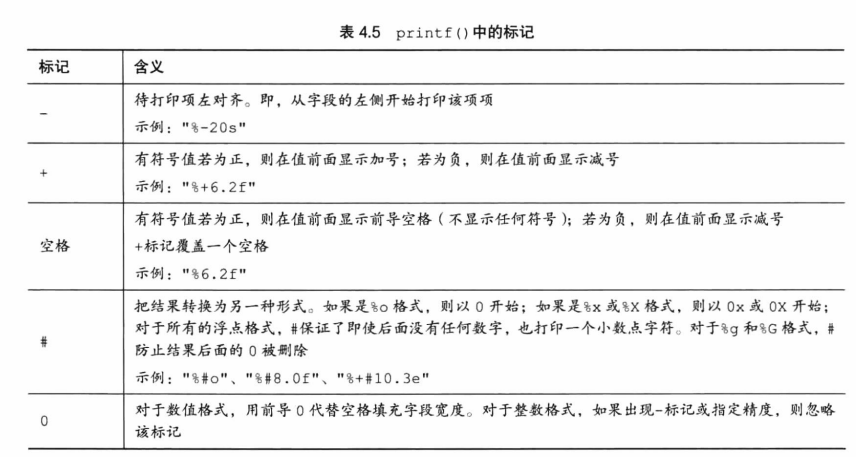
C primer plus學習筆記 —— 2、常量與格式化IO(輸入/輸出)

ssm项目搭建
随机推荐
Wechat applet: future wife query generator
制造业数字化转型存在问题及原因分析
线性表 链表结构的实现
数字藏品如何赋能经济实体?
ORB_SLAM2运行
What is the reason for the black screen of the computer monitor when the computer is turned on? What should I do about the black screen of the computer monitor
MySQL character set
华为软硬件生态圈成型,从根子上改变美国对软硬件体系的领导地位
HierarchyViewer工具找不到 HierarchyViewer位置
三项最高级认证,两项创新技术、两大优秀案例,阿里云亮相云原生产业大会
PAT 乙等 1023 组个最小数
True MySQL interview question (21) - Finance - overdue loan
MySQL面试真题(二十一)——金融-贷款逾期
Lottery DDD code
Dolphin scheduler dolphin scheduling upgrade code transformation -upgradedolphin scheduler
技术开发团队视角看到的数字藏品机遇与挑战
Adnroid activity截屏 保存显示到相册 View显示图片 动画消失
MySQL面试真题(二十三)——拼多多-球赛分析
MDM data cleaning function development description
Ansible 使用普通用户管理被控端