当前位置:网站首页>Use Tencent cloud lightweight application server to build an unlimited network disk -zpan building tutorial
Use Tencent cloud lightweight application server to build an unlimited network disk -zpan building tutorial
2022-06-23 20:56:00 【Qingyang】
Preface I have been looking for a simple interface , A fully functional unlimited network disk ,2021 Under the guidance of relevant departments , Finally let me see the hope , But a youth version , And then completely disappointed . If you want to be fast, you should build it yourself , Finally I found Zpan.「ZPan」 It is a simple and lightweight network disk program based on cloud storage , And it is dedicated to building “ Network disk system without speed limit ” Its biggest feature is the realization of the user 「 Direct cloud storage 」( For example, Tencent cloud COS etc. ), Not limited by the bandwidth and traffic of the server itself , Realization “ No speed limit ” And “ No server traffic consumption ” File upload and download . Let me show you how I use Tencent cloud's lightweight application server and cos Build an unlimited network disk .
brief introduction
The following is the official introduction :
Introduce
ZPan Committed to creating an unlimited network disk system , Therefore, we use the client-side direct cloud storage method to design .
at present ZPan Supports all compatibility S3 Protocol cloud storage platform , You can choose a familiar platform to drive ZPan.
Online experience ( Experience account :demo, password :demo)
How he works ?
ZPan It's essentially a URL Signature server + Visual file browser .
Because we use the direct link method to upload and download , So in order to ensure the security of uploading and downloading , The client is used to upload and download URL The server must sign .
Then in order to manage the files uploaded by users conveniently , We need to develop a visual pseudo file system to manage files .
features
- Completely free from server bandwidth constraints
- Supports all compatibility S3 Cloud storage protocol
- Support file and folder management
- Support file and folder sharing ( Not logged in to access )
- Support document preview and audio and video playback
- Support multi-user storage space control
- Support for multiple languages
course
preparation
1、 The server : Tencent cloud's lightweight application server ( Self built application server , Other public network servers can also )
The machine configuration used below is :2 nucleus 4G6M
2、 Apply image : pagoda Linux panel 7.6.0 Tencent cloud exclusive Edition
3、 Log in to the pagoda panel configuration LNMP Environmental Science ( Remind the login port of the pagoda before login )
4、 Tencent cloud object storage ( Of course :Zpan Supports all compatibility S3 Cloud storage protocol )
For long-term use, it is recommended to use compilation and installation
Linux install
#  Installation services
curl -sSf http://dl.saltbo.cn/install.sh | sh -s zpan

#  Start the service
systemctl start zpan

#  View service status
systemctl status zpan

#  Set boot up
systemctl enable zpan

#  Check the log
journalctl -xe -u zpan -f
Docker install
docker run -it -p 8222:8222 -v /etc/zpan:/etc/zpan --name zpan saltbo/zpan
You can install services through any of the above methods .
Firewall Management
Remember when you visit , Through the lightweight control panel , And the safety of the pagoda's panels , Put through two firewalls . Step screenshot .
New database
Because it is very simple for us to use pagoda to create new data . Add the database directly .
After the database is built , Access... Through a browser ip:8222 You can enter the configuration step .
We need to be in DSN Fill in the corresponding database information created above .
user name : Database password @tcp( Database address )/ Database name ?charset=utf8mb4&parseTime=True&loc=Local
If the database information is correct, the administrator account can be configured .
After configuration, you can see the success prompt .
Configure cloud storage ( Tencent cloud COS)
After logging in, you can see the menu bar , It's very simple .
First, go to Tencent cloud to create a cos Object storage
- Sign in Object Storage Console .
- In the left navigation , single click 【 Bucket list 】, After entering the bucket list , single click 【 Create buckets 】.
- In the pop-up create bucket dialog box , Configure the following information :
- essential information - The region : Please choose to do business with you ( Or number of users ) Corresponding to a relatively concentrated physical area COS regional , It cannot be modified after setting . - name : Please enter a custom bucket name . It cannot be modified after setting . - Access right : Buckets provide three access permissions by default : Private reading and writing 、 Public reading, private writing and public reading and writing , It can still be modified after setting . - Request domain name : Automatic generation . After creating the bucket , You can use this domain name to access the bucket .
- Confirm configuration Confirm the configuration information of the storage bucket . If you need to modify , single click 【 The previous step 】 that will do .
- After confirming the information is correct , single click 【 determine 】, You can create a bucket . In the bucket list interface , You can see the bucket you just created .
Be careful
The cloud storage associated with the network disk is set as private read , The cloud storage associated with the external chain disk is set as public read .
Create a api secret key
visit Tencent cloud api, establish SecretId
Get into zpan Console , Select storage management , Create storage , Fill in COS Name and access point of ,SecretId SecretKey
Note here , The access point needs to fill in the access domain name except cos Everything after the name , As shown in the figure
Advanced configuration can configure some personalized information .
You can upload files and use them normally ( Pay attention to adjusting the user's default space capacity , The default is 50M).
Reverse proxy , Domain access
After configuring the reverse proxy , When we resolve the domain name to the server, we can successfully access Zpan 了 .
Blogger site
The blogger's personal blog address is :https://www.hipyt.cn/
边栏推荐
- How do I open an account? Is it safe to open an account in Guohai Securities? What do you need to bring?
- Cobalt Strike Spawn & Tunnel
- Processing of purchase return in SAP mm preliminary transaction code Migo
- How to deal with product pictures? How to select mapping software?
- 【Golang】快速复习指南QuickReview(六)——struct
- 教你如何用网页开发APP
- 【Golang】快速复习指南QuickReview(一)——字符串string
- Development and code analysis of easycvr national standard user defined streaming address function
- How to use data warehouse to create time series
- Use of the vs2022scanf function. An error is reported when using scanf - the return value is ignored: Solutions
猜你喜欢

小程序开发框架推荐

JS高级程序设计第 4 版:生成器的学习

Syntaxe des requêtes fédérées SQL (inline, left, right, full)

重庆 奉节耀奎塔,建成后当地连中五名进士,是川江航运的安全塔

Importance and purpose of test

Rstudio 1.4 software installation package and installation tutorial
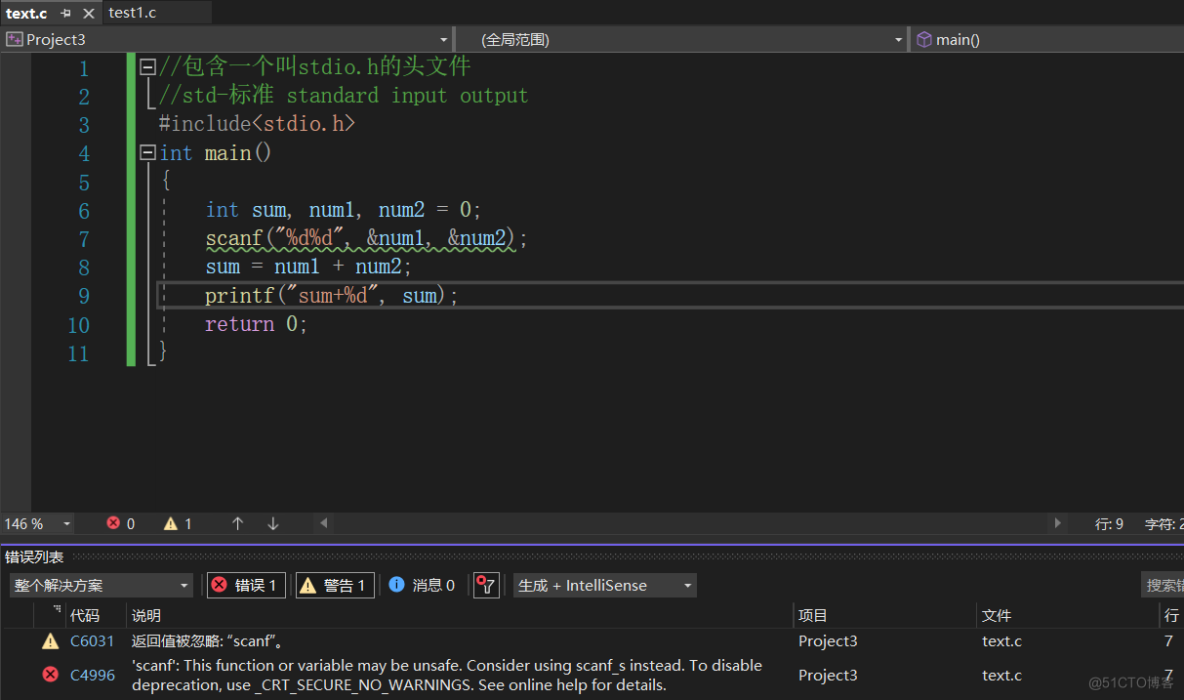
Use of the vs2022scanf function. An error is reported when using scanf - the return value is ignored: Solutions

Technology sharing | wvp+zlmediakit realizes streaming playback of camera gb28181

Eight misunderstandings, broken one by one (final): the cloud is difficult to expand, the customization is poor, and the administrator will lose control?
Yaokui tower in Fengjie, Chongqing, after its completion, will be the safety tower for Sichuan river shipping with five local scholars in the company
随机推荐
[SAP ABAP] call API interface instance
【Golang】在Go语言的角度重新审视闭包
Realize vscode to write markdown documents + pictures to be automatically uploaded to Tencent cloud cos
同花顺网上开户安全吗,佣金高不高
【Golang】来几道题以加强Slice
Ugeek's theory 𞓜 application and design of observable hyperfusion storage system
What is the process of setting up local cloud on demand? Can cloud on demand audit videos?
This article introduces you to the necessity of database connection pooling
Syntaxe des requêtes fédérées SQL (inline, left, right, full)
Is Guoyuan futures trading software formal? How to download safely?
The substring() method in. JS can be used to intercept all characters after the specified string
JS regular ignore case
[golang] quick review guide quickreview (VII) -- Interface
How to open a domestic futures account? Which futures company is safer to open an account?
What is the main content of short video audit? What is illegal?
Newbeecoder. UI new open source control library DataGrid instructions
Is it safe for Huatai Securities to open an account online for securities companies with low handling fees and commissions
Process injection
How do I view the server when I log in to the fortress machine? Operation guide for novice
Digital procurement transformation solution: SaaS procurement management platform promotes enterprise sunshine procurement