当前位置:网站首页>Overview and installation of scientific computing toolkit scipyscipy
Overview and installation of scientific computing toolkit scipyscipy
2022-07-24 20:59:00 【Hua Weiyun】
Scipy Introduce

scipy It's a python Open source mathematical calculation library , Can be applied to Mathematics 、 Science and Engineering , It is based on numpy Scientific Computing Library of .
Mainly consists of statistical 、 optimization 、 linear algebra 、 integral 、 The Fourier transform 、 signal processing and The image processing as well as Ordinary differential equations And other calculations used in science and engineering
scipy Module introduction
scipy Mainly through the following packages Mathematical algorithm and Scientific Computing , The back for scipy The explanation of is mainly based on these packages
- cluster: Inclusion clustering algorithm
- constants: Some constants in physics and Mathematics
- fftpack: The fast Fourier transform
- integrate: Solution of integral and ordinary differential equations
- interpolate: Interpolation and smoothing spline function
- io: Input and output
- linalg: linear algebra
- ndimage:N Dimensional image processing
- ord: Regression orthogonal distance
- optimize: Optimization and root seeking equations
- signal: signal processing
- sparse: sparse matrix
- spatial: Spatial data structures and algorithms
- special: Special functions
- stats: Statistical distribution and function
scipy Related information
- scipy Official website :https://scipy.org
- scipy file :https://docs.scipy.org/
- scipy Source code :https://github.com/scipy/scipy
- scipy Chinese Course :https://wizardforcel.gitbooks.io/scipy-lecture-notes/content/
Reading guide
Last article Python Mathematical calculation library of scipy Introduce Has been described in detail in scipy Use of , This article mainly introduces how to install scipy, This article installs Python The package approach applies to other packages
install Python There are usually three ways to package :
- adopt pip To install
- adopt conda To install
- adopt whl File to install
Now for scipy The installation is also based on the above three main methods
pip Installation package
Python In fact, it is very convenient to install libraries in , adopt pip It can be easily installed
pip install scipy
Sometimes through pip Installing packages from the default source will be very slow , At this point we can go through modify pip Source To provide the speed of downloading packages , Yes Tsinghua source 、 Aliyuan 、 Douban source Etc. can be used , What I use here is Tsinghua source The setting method is as follows :
- Temporary settings
About the command window, it will switch to the default pip Source
pip install -i https://pypi.tuna.tsinghua.edu.cn/simple some-package- Set to default
Permanent validity
python -m pip install --upgrade pippip config set global.index-url https://pypi.tuna.tsinghua.edu.cn/simpleadopt conda To install
adopt conda It is very convenient to manage different projects in a virtual environment , In this way, there will be no conflict between different versions of the same package between different projects , Therefore, it is suggested to adopt different virtual environments for different projects .
install anaconda
If you want to bycondaTo manage the virtual environment, we need to installanacondaperhapsminiconda, The difference between the two is thatanacondaAfter the installation, it will take up a lot of space , Because it also contains many other libraries . andminicondaIt will take up much less space , It will be installed later conda My orders and Python Some basic packages .anaconda Installation package download address:https://mirrors.tuna.tsinghua.edu.cn/anaconda/archive/miniconda Installation package download address:https://mirrors.tuna.tsinghua.edu.cn/anaconda/miniconda/
Download according toDifferent systemsAnd what is neededPython editionJust chooseCreating a virtual environment
adoptconda createTo create a virtual environment-nUsed to set the name of the virtual environment (py3.8), hinderpython==Virtual environment is used to create Python Version of
conda create -n py3.8 python==3.8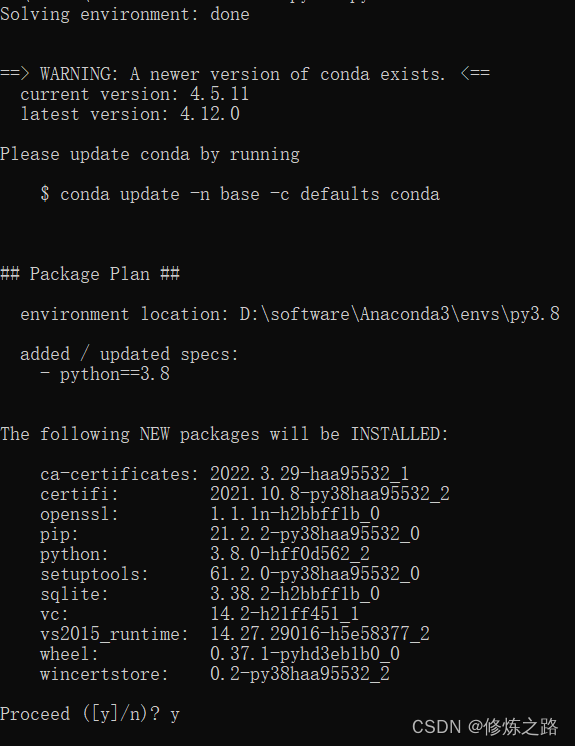
- Enter the virtual environment
activate py3.8- conda Installation package
conda install scipy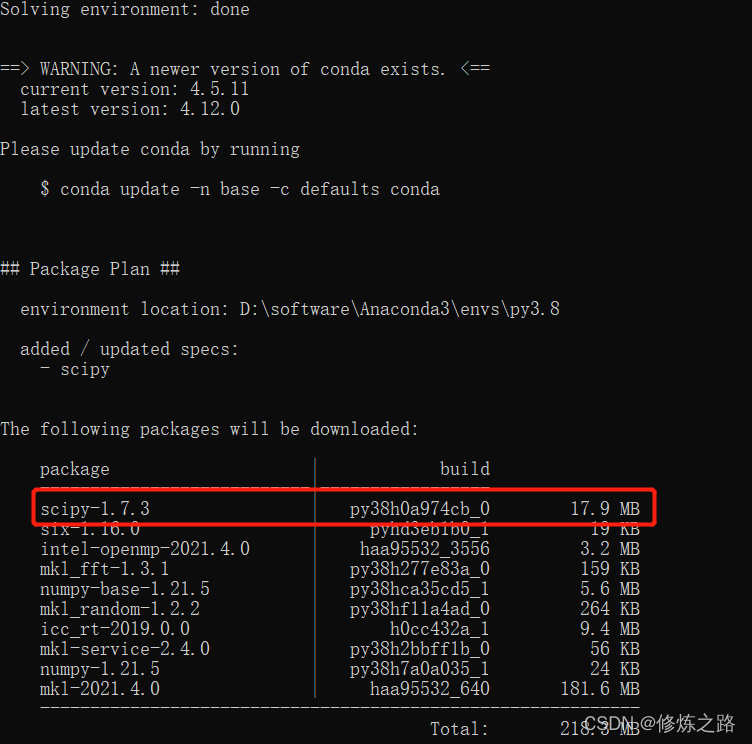
adopt whl File to install
whl The file is actually the file format compiled by the package , The students may have found it carefully pip install scipy The library was downloaded when it was whl File to install , Then why do you need to use it alone whl File to install the package ?
Download separately whl File to install , Because sometimes pip When installing the package , Download is not whl File instead Source code , After downloading the source code, you need to compile it locally into whl File and then install , however Sometimes, due to local environment problems, compilation errors will occur , Some mistakes are troublesome to solve , At this time, use whl File installation can avoid such problems .
whl File download website :https://www.lfd.uci.edu/~gohlke/pythonlibs/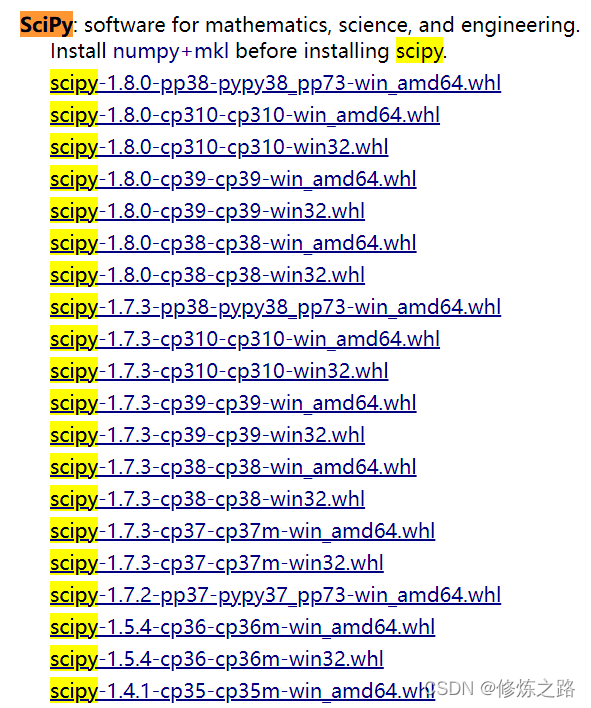
At this time, you can according to your local python The version and number of bits of the system whl file , take whl After the file is downloaded locally , Re pass python To install , The installation command is as follows
pip install scipy-1.8.0-cp38-cp38-win_amd64.whl边栏推荐
- [training Day10] linear [mathematics] [thinking]
- How to set appium script startup parameters
- Summary of yarn capacity scheduler
- Case analysis of building cross department communication system on low code platform
- [training Day6] triangle [mathematics] [violence]
- PC port occupation release
- ma.glasnost.orika. MappingException:No converter registered for conversion from Date to LocalDateTime
- Alibaba sentinel basic operation
- OpenGL (1) vertex buffer
- Is it safe for Hengtai securities to open an account?
猜你喜欢

Sword finger offer 15. number of 1 in binary

Chrome realizes automated testing: recording and playback web page actions

Upgrade appium automation framework to the latest 2.0
![[summary of Feature Engineering] explain what features are and the steps of feature engineering](/img/29/f9643affd3aaf9d83c5b81394d29a7.png)
[summary of Feature Engineering] explain what features are and the steps of feature engineering

90% of people don't know the most underestimated function of postman!
How does starknet change the L2 landscape?
![[training Day9] rotate [violence] [thinking]](/img/b9/598dd0dffb9c82230f43484f9c8a1e.png)
[training Day9] rotate [violence] [thinking]

What does software testing need to learn?
![[feature construction] construction method of features](/img/5c/c240d9d742f37cbc52afecf15b2ad1.png)
[feature construction] construction method of features

Fluoronisin peptide nucleic acid oligomer complex | regular active group alkyne, SH thiol alkynyl modified peptide nucleic acid
随机推荐
How to use named slots
Five digital transformation strategies of B2B Enterprises
Near infrared dye cy7.5 labeling PNA polypeptide experimental steps cy7.5-pna|188re labeling anti gene peptide nucleic acid (agpna)
Cloud native observability tracking technology in the eyes of Baidu engineers
92. Recursive implementation of exponential enumeration
[advanced data processing technology] data filtering, advanced data filling, initial and advanced data transformation
How to buy Xinke financial products in CICC securities? Revenue 6%
Processing of null value of Oracle notes
C synchronous asynchronous callback state machine async await demo
[training Day9] rotate [violence] [thinking]
APR learning failure problem location and troubleshooting
Lazily doing nucleic acid and making (forging health code) web pages: detained for 5 days
ma.glasnost.orika. MappingException:No converter registered for conversion from Date to LocalDateTime
Rce (no echo)
class file has wrong version 55.0, should be 52.0
OpenGL (1) vertex buffer
Smarter! Airiot accelerates the upgrading of energy conservation and emission reduction in the coal industry
Shengbang security rushes to the scientific innovation board: Qianxin is its largest customer (55.87 million); Its three-year revenue is 460 million, net profit is 95.04 million, and R & D investment
Baidu PaddlePaddle easydl helps improve the inspection efficiency of high-altitude photovoltaic power stations by 98%
Azide labeled PNA peptide nucleic acid | methylene blue labeled PNA peptide nucleic acid | tyrosine modified PNA | Tyr PNA Qiyue Bio