当前位置:网站首页>Delivery practice of private PAAS platform based on cloud native
Delivery practice of private PAAS platform based on cloud native
2022-07-25 04:59:00 【nginx】
This article will explain how to use cloud native to solve the problems in privatization delivery , And then build a PaaS platform , Improve the reusability of the business platform . Before we get to business , It is necessary to clarify two key words :
author : Niu yufu , Expert engineer of a well-known Internet company . Like open source / Share enthusiastically , Yes K8s And golang The gateway has a more in-depth study .
- PaaS platform : Multiple core business services are encapsulated as an overall platform , Provide services in the form of platform .
- Privatization delivery : The platform needs to be deployed in a private cloud environment , It can still work in the face of no network .

Pictured above : Private cloud will have clear security requirements
- Private cloud services cannot connect to the Internet , Data can only be ferried to the private cloud of the intranet through a one-way gateway .
- The source code can only be stored in the company computer room , Private cloud only deploys compiled files .
- The service will iterate irregularly , In addition, in order to ensure the stability of services, we need to build independent business monitoring .
- Poor architecture portability : The configuration between services is complex , Many heterogeneous languages need to modify the configuration file , No fixed service DNS.
- The cost of deployment, operation and maintenance is high : The service dependent environment needs to support offline installation , Service update needs to be completed manually by local operation and maintenance personnel , In a complicated scene , A complete deployment probably requires Several people / month Time for .
- The cost of monitoring operation and maintenance is high : Monitoring needs to support system level / Service level / Business level monitoring , The notification method needs to support SMS 、Webhook Etc .
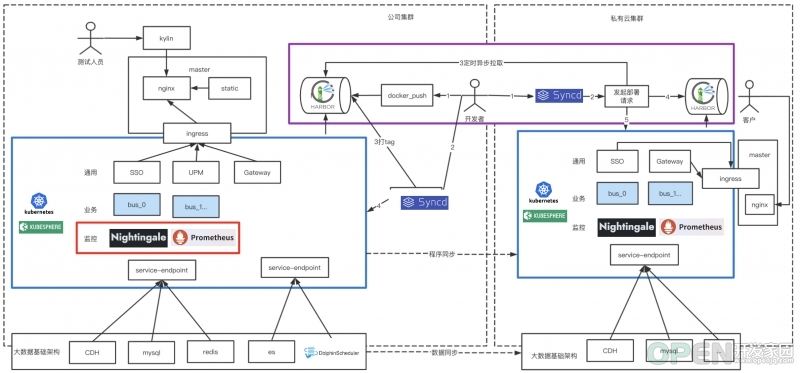
Our principle is Embrace cloud nativity and reuse existing capabilities , It is possible to use the existing and mature technical solutions in the industry . We use KubeSphere+K8S As a service choreography , In consideration of safety and simplicity Syncd Complete secondary development DevOps Ability , The monitoring system adopts Nightingale+Prometheus programme .
As shown in the above diagram
- Inside the blue box is our bottom PaaS colony , We have unified the service arrangement and upgrading of business services and General Services , To solve the problem of poor architecture migration .
- In the red frame , Monitoring system exists as a form of scheduling service , All monitoring items shall be configured before delivery . To solve the problem of high operation and maintenance cost of monitoring system .
- Inside the purple box , The service container can automatically pull and deploy across network segments . To solve the problem of high cost of service deployment .
Service Orchestration :KubeSphere
KubeSphere Our vision is to build a K8s Cloud native distributed operating system for kernel , Its architecture makes it very convenient for third-party applications to plug and play with cloud native ecological components (plug-and-play) Integration of , Support the unified distribution and operation and maintenance management of cloud native applications in multi cloud and multi cluster , It also has an active community .
KubeSphere The reasons for model selection are as follows :
Customize your own privatization delivery plan based on products
Privatize image file packaging
Create product list :
Then we can export by command .
apiVersion: kubekey.kubesphere.io/v1alpha2kind: Manifestmetadata:name: samplespec:arches:- amd64...- type: kubernetesversion: v1.21.5components:helm:version: v3.6.3cni:version: v0.9.1etcd:version: v3.4.13containerRuntimes:- type: dockerversion: 20.10.8crictl:version: v1.22.0harbor:version: v2.4.1docker-compose:version: v2.2.2images:- dockerhub.kubekey.local/kubesphere/kube-apiserver:v1.22.1...
Privatization deployment
$ ./kk artifact export -m manifest-sample.yaml -o kubesphere.tar.gz
Create deployment manifest :
Perform installation deployment :
apiVersion: kubekey.kubesphere.io/v1alpha2kind: Clustermetadata:name: samplespec:hosts:- {name: kubesphere01.ys, address: 10.89.3.12, internalAddress: 10.89.3.12, user: kubesphere, password: "Kubesphere123"}- {name: kubesphere02.ys, address: 10.74.3.25, internalAddress: 10.74.3.25, user: kubesphere, password: "Kubesphere123"}- {name: kubesphere03.ys, address: 10.86.3.66, internalAddress: 10.86.3.66, user: kubesphere, password: "Kubesphere123"}- {name: kubesphere04.ys, address: 10.86.3.67, internalAddress: 10.86.3.67, user: kubesphere, password: "Kubesphere123"}- {name: kubesphere05.ys, address: 10.86.3.11, internalAddress: 10.86.3.11, user: kubesphere, password: "Kubesphere123"}roleGroups:etcd:- kubesphere01.py- kubesphere02.py- kubesphere03.pycontrol-plane:- kubesphere01.py- kubesphere02.py- kubesphere03.pyworker:- kubesphere05.pyregistry:- kubesphere04.pycontrolPlaneEndpoint:internalLoadbalancer: haproxydomain: lb.kubesphere.localaddress: ""port: 6443kubernetes:version: v1.21.5clusterName: cluster.localnetwork:plugin: calicokubePodsCIDR: 10.233.64.0/18kubeServiceCIDR: 10.233.0.0/18multusCNI:enabled: falseregistry:type: harborauths:"dockerhub.kubekey.local":username: adminpassword: Kubesphere123...
There are a lot of complex K8s Deploy 、 High availability solution 、Harbor Privatize the image warehouse , Can complete automatic installation , It greatly simplifies the privatization delivery scenario K8s Difficulty of component deployment .
$ ./kk create cluster -f config-sample.yaml -a kubesphere.tar.gz --with-packages --with-kubesphere --skip-push-images
The visual interface greatly simplifies the operation process
- Create deployment : Pipeline creation of a container service deployment 、 Storage 、 Service access .
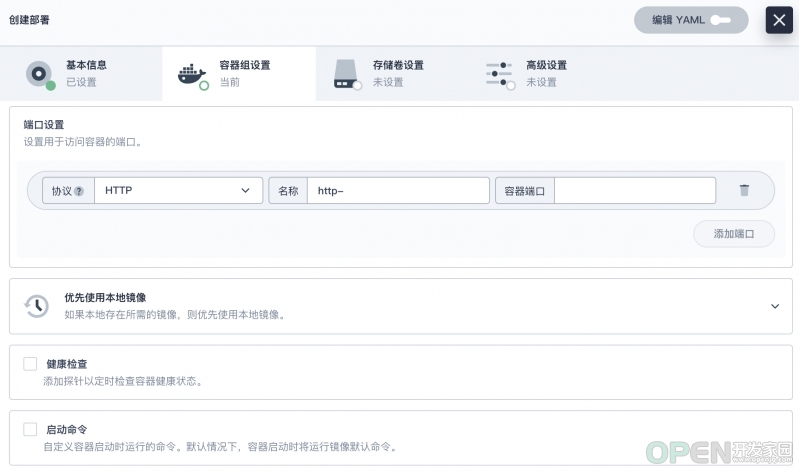
- Resource constraints : Limit the resource utilization of containers & Limit tenant resource utilization .

- Remote login : Container remote login function .

be based on KubeSphere Business deployment experience sharing
Build high availability service instance deployment in the privatization scenario , The hanging up of the guarantee form instance does not affect the overall use , We need to ensure the following .
1、 Because services need to have fixed network identification and storage , So we need to create “ Stateful replica set deployment ”.
2、 Stateful replica sets use host Anti affinity ensures that services are distributed to different host in .
apiVersion: apps/v1kind: StatefulSetmetadata:namespace: projectname: ${env_project_name}labels:app: ${env_project_name}spec:serviceName: ${env_project_name}replicas: 1selector:matchLabels:app: ${env_project_name}template:metadata:labels:app: ${env_project_name}spec:containers:- name: ${env_project_name}image: ${env_image_path}imagePullPolicy: IfNotPresent
3、 The mutual calls between services use K8s At the bottom DNS To configure .
....affinity:podAntiAffinity:preferredDuringSchedulingIgnoredDuringExecution:- weight: 100podAffinityTerm:labelSelector:matchExpressions:- key: appoperator: Invalues:- ${env_project_name}topologyKey: kubernetes.io/hostname....

4、 When the cluster depends on external resources, it needs to be set to Service, Then provide services internally .
5、 With the help of nip.io Domain name implementation service dynamic domain name resolution debugging . nip.io It can be automatically set according to the requested domain name IP Information , Complete the response IP Information mapping .
kind: EndpointsapiVersion: v1metadata:name: redis-clusternamespace: projectsubsets:- addresses:- ip: 10.86.67.11ports:- port: 6379---kind: ServiceapiVersion: v1metadata:name: redis-clusternamespace: projectspec:ports:- protocol: TCPport: 6379targetPort: 6379
So we can build Ingress Use this domain name directly :
$ nslookup abc-service.project.10.86.67.11.nip.ioServer: 169.254.25.10Address: 169.254.25.10:53Non-authoritative answer:Name: abc-service.project.10.86.67.11.nip.ioAddress: 10.86.67.11
6、 Mount the directory to the host , Sometimes, the container needs to be directly associated with the host directory. The specific operations are as follows .
---kind: IngressapiVersion: networking.k8s.io/v1metadata:name: gatekeepernamespace: projectspec:rules:- host: gatekeeper.project.10.86.67.11.nip.iohttp:paths:- path: /pathType: ImplementationSpecificbackend:service:name: gatekeeperport:number: 8000
7、 Stateful deployment workload , Mainly involves StatefulSet、Service、volumeClaimTemplates、Ingress, Examples are as follows :
...spec:spec:...volumeMounts:- name: vol-datamountPath: /home/user/data1volumes:- name: vol-datahostPath:path: /data0
DevOps: be based on Syncd Build automated service delivery
apiVersion: apps/v1kind: StatefulSetmetadata:namespace: projectname: gatekeeperlabels:app: gatekeeperspec:serviceName: gatekeeperreplicas: 1selector:matchLabels:app: gatekeepertemplate:metadata:labels:app: gatekeeperspec:containers:- name: gatekeeperimage: dockerhub.kubekey.local/project/gatekeeper:v362imagePullPolicy: IfNotPresentports:- name: http-8000containerPort: 8000protocol: TCP- name: http-8080containerPort: 8080protocol: TCPresources:limits:cpu: '2'memory: 4GivolumeMounts:- name: vol-datamountPath: /home/user/data1affinity:podAntiAffinity:preferredDuringSchedulingIgnoredDuringExecution:- weight: 100podAffinityTerm:labelSelector:matchExpressions:- key: appoperator: Invalues:- gatekeepertopologyKey: kubernetes.io/hostnamevolumeClaimTemplates:- metadata:name: vol-dataspec:accessModes: [ "ReadWriteOnce" ]resources:requests:storage: 10Gi---apiVersion: v1kind: Servicemetadata:name: gatekeepernamespace: projectlabels:app: gatekeeperspec:ports:- name: "http-8000"protocol: TCPport: 8000targetPort: 8000- name: "http-8080"protocol: TCPport: 8080targetPort: 8080selector:app: gatekeepertype: NodePort---kind: IngressapiVersion: networking.k8s.io/v1metadata:name: gatekeepernamespace: projectspec:rules:- host: gatekeeper.project.10.86.67.11.nip.iohttp:paths:- path: /pathType: ImplementationSpecificbackend:service:name: gatekeeperport:number: 8000- host: gatekeeper.project.10.86.68.66.nip.iohttp:paths:- path: /pathType: ImplementationSpecificbackend:service:name: gatekeeperport:number: 8080
DevOps There are many models , Here we do not use Jenkins、GitRunner wait , Instead, we used something familiar within our team Syncd Secondary development . For two reasons :
- On safety grounds : Our source code cannot be stored locally , So based on the gitlab Build packaged solutions , It's not very useful for us , Use is a waste of resources .
- Functional simplicity : although Syncd It's stopped 2 More than years, but , But its core CICD The functions are relatively complete and the front and back ends are highly expandable , We can easily expand the corresponding functions .
- Build packaged images from using local toolchains , Here we can put docker push As git push understand .
- adopt Syncd Pull the image package to complete the deployment process, package and go online , Set the version number during packaging to facilitate service rollback .
1、 Create a directory based on the project
2、 Import Dockerfile, You can create your own business . 3、 establish tool.sh file
# Create directorycd /Users/niuyufu/goproject/abc-servicemkdir -p devopscd devops
4、 Perform project packaging , Please make sure that the output is ./output in
cat >> tool.sh << EOF#!/bin/sh########### Configuration area ############### Module name , Changeablemodule=abc-service# Project nameproject=project1# Container namecontainer_name=${project}"_"${module}# Image nameimage_name=${project}"/"${module}# Service port mapping : Host port : Container port , Multiple comma intervalsport_mapping=8032:8032# Mirror image hub Addressimage_hub=dockerhub.kubekey.local# Mirror image tagimage_tag=latest########### Configuration area ############### Building toolsaction=$1case $action in"docker_push")image_path=${image_hub}/${image_name}:${image_tag}docker tag ${image_name}:${image_tag} ${image_path}docker push ${image_path}echo " Image push completed ,image_path: "${image_path};;"docker_login")container_id=$(docker ps -a | grep ${container_name} | awk '{print $1}')docker exec -it ${container_id} /bin/sh;;"docker_stop")docker ps -a | grep ${container_name} | awk '{print $1}' | xargs docker stopcontainer_id=`docker ps -a | grep ${container_name} | awk '{print $1}' | xargs docker rm`if [ "$container_id" != "" ];thenecho " Container closed ,container_id: "${container_id}fiif [ "$images_id" != "" ];thendocker rmi ${images_id}fi;;"docker_run")docker ps -a | grep ${container_name} | awk '{print $1}' | xargs docker stopdocker ps -a | grep ${container_name} | awk '{print $1}' | xargs docker rmport_mapping_array=(${port_mapping//,/ })# shellcheck disable=SC2068for var in ${port_mapping_array[@]}; doport_mapping_str=${mapping_str}" -p "${var}donecontainer_id=$(docker run -d ${port_mapping_str} --name=${container_name} ${image_name})echo " Container started ,container_id: "${container_id};;"docker_build")if [ ! -d "../output" ]; thenecho "../output Folder does not exist , Please perform ../build.sh"exit 1ficp -rf ../output ./docker build -f Dockerfile -t ${image_name} .rm -rf ./outputecho " Image compiled successfully ,images_name: "${image_name};;*)echo " You can run the command :docker_build Image compilation , rely on ../output Folderdocker_run Container start up , rely on docker_builddocker_login Container login , rely on docker_rundocker_push Image push , rely on docker_build"exit 1;;esacEOF
5、 utilize tool.sh Tools for service debugging
$cd ~/goproject/abc-service/$sh build.shabc-service build okmake output okbuild done
tools.sh The execution sequence is generally like this :./output Output →docker_build→docker_run→docker_login→docker_push
be based on Syncd Package and build services
$cd devops$chmod +x tool.sh# View the runnable commands$sh tool.shYou can run the command :docker_build Image compilation , rely on ../output Folderdocker_run Container start up , rely on docker_builddocker_login Container login , rely on docker_rundocker_push Image push , rely on docker_build#docker_build give an example :$sh tool.sh docker_build[+] Building 1.9s (10/10) FINISHED=> [internal] load build definition from Dockerfile 0.1s=> => transferring dockerfile: 37B 0.0s=> [internal] load .dockerignore 0.0s=> => transferring context: 2B... 0.0s=> exporting to image 0.0s=> => exporting layers 0.0s=> => writing image sha256:0a1fba79684a1a74fa200b71efb1669116c8dc388053143775aa7514391cdabf 0.0s=> => naming to docker.io/project/abc-service 0.0sUse 'docker scan' to run Snyk tests against images to find vulnerabilities and learn how to fix themImage compiled successfully ,images_name: project/abc-service#docker_run give an example :$ sh tool.sh docker_run6720454ce9b66720454ce9b6Container started ,container_id: e5d7c87fa4de9c091e184d98e98f0a21fd9265c73953af06025282fcef6968a5# have access to docker_login Log in to the container for code debugging :$ sh tool.sh docker_loginsh-4.2# sudo -i[email protected]:~$#docker_push give an example :$sh tool.sh docker_push 130 ↵The push refers to repository [dockerhub.kubekey.local/citybrain/gatekeeper]4f3c543c4f39: Pushed54c83eb651e3: Pushede4df065798ff: Pushed26f8c87cc369: Pushed1fcdf9b8f632: Pushedc02b40d00d6f: Pushed8d07545b8ecc: Pushedccccb24a63f4: Pushed30fe9c138e8b: Pushed6ceb20e477f1: Pushed76fbea184065: Pushed471cc0093e14: Pushed616b2700922d: Pushedc4af1604d3f2: Pushedlatest: digest: sha256:775e7fbabffd5c8a4f6a7c256ab984519ba2f90b1e7ba924a12b704fc07ea7eb size: 3251Image push completed ,image_path: dockerhub.kubekey.local/citybrain/gatekeeper:latest# Last landing Harbor Test whether the image is uploadedhttps://dockerhub.kubekey.local/harbor/projects/52/repositories/gatekeeper
1、 Project configuration
New projects

Set up tool.sh The image address generated in .

Set up the build script .
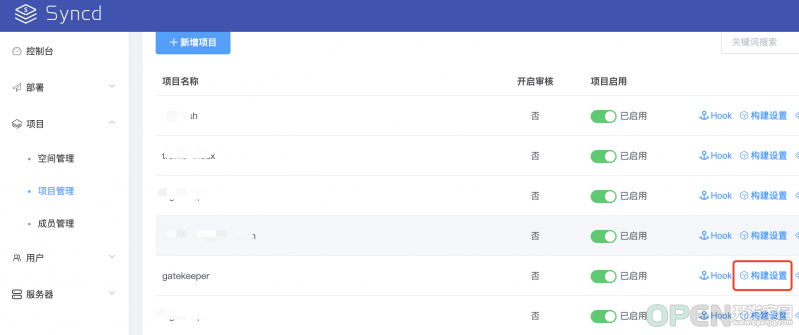
Fill in the build script with reference to the stateful workload .

2、 Create a launch order

3、 Build the deployment package and execute the deployment

4、 Switch to KubeSphere View the deployment effect .

This has been done DevOps And KubeSphere Get through the function of .
Service monitoring : be based on Nightingale Build enterprise level monitoring
Selection reasons
- Visualization engine : Built in templates , Open the box .

- Alarm analysis engine : Flexible management 、 Alarm self healing 、 Open the box .

- Support Helm Chart One click application and service deployment , In the privatization scenario, we only need to care about container fusion and localization .
Demonstration of actual rule configuration
$ git clone https://github.com/flashcatcloud/n9e-helm.git$ helm install nightingale ./n9e-helm -n n9e --create-namespace
- Configure alarm rules , Seamless support PromQL Write various rules flexibly .

- Configure the alarm receiving group

- Actually receive alarm messages and recovery messages


summary
Due to different business scenarios under privatization delivery , The selection of cloud native applications is also different . This article only introduces our own business scenarios , If you have any questions, please correct , In addition, cloud native applications in other scenarios are also welcome to communicate and discuss with me at any time .
This article by the blog one article many sends the platform OpenWrite Release !
边栏推荐
- Openworm project compilation
- 一篇文章带你读懂Redis的哨兵模式
- Introduction to fundamentals of operations research [1]
- [small program practice] first day
- 数据湖(十六):Structured Streaming实时写入Iceberg
- ESWC 2018 | R-GCN:基于图卷积网络的关系数据建模
- 小红书携手HMS Core,畅玩高清视界,种草美好生活
- In depth understanding of service
- Introduction to CpG control network
- Actual combat | record an attack and defense drill management
猜你喜欢
![[wechat applet] design and interactive implementation of auction product details page (including countdown and real-time update of bids)](/img/01/42de6280191b9c32a7f37d7727bd4f.png)
[wechat applet] design and interactive implementation of auction product details page (including countdown and real-time update of bids)

二、MySQL数据库基础
Forwarding and sharing function of wechat applet

Ora-01460: conversion request cannot be implemented or unreasonable

Androd releases jitpack open source project (gradle7.2)
Zhongchuang computing power won the recognition of "2022 technology-based small and medium-sized enterprises"

一篇文章带你读懂Redis的哨兵模式

Information System Project Manager --- Chapter IX examination questions of project human resource management over the years

Pyg builds GCN to realize link prediction

This low code reporting tool is needed for data analysis
随机推荐
Token value replacement of burpsuite blasting
Permanent magnet synchronous motor 36 question (1) -- what is the difference between salient pole motor and salient pole motor?
Paper:《Peeking Inside the Black Box: Visualizing Statistical Learning with Plots of Individual Condi
哪种网站适合物理服务器
I didn't expect Mysql to ask these questions
HMS Core Discovery第16期直播预告|与虎墩一起,玩转AI新“声”态
Redis的三个必知必会的问题
An article takes you to understand the sentinel mode of redis
Summary of UPR optimization suggestions of unity
Baklib: share some methods about building enterprise knowledge management (km)
Data link layer protocol -- Ethernet protocol
深入掌握Service
How can test / development programmers with 5 years of experience break through the technical bottleneck? Common problems in big factories
Luogu p4281 [ahoi2008] emergency gathering / gathering solution
Unity LOD
[live review] AI customer service "changes according to the situation", and man-machine dialogue can be easier
市场是对的
Forwarding and sharing function of wechat applet
小说抓取实战
Detailed explanation of security authentication of mongodb