当前位置:网站首页>Dynamics crm: mailbox configuration (III) - configure email server profiles and mailboxes
Dynamics crm: mailbox configuration (III) - configure email server profiles and mailboxes
2022-07-24 15:40:00 【Stone-hdj】
Introduce
Email Server Profiles Is the first step in configuring the mailbox , We need to configure the mailbox server first , Then you can go to the designated mailbox to receive mail .

This may be different from what we usually use on the mobile phone outlook perhaps gmail such APP Different , stay outlook,gmail such App In, we usually enter the commonly used email domain name (@qq,@163,@hotmail, @gmail,@outlook) It will automatically send your mailbox to the server , Port information is filled in by default .
And we are Dynamics CRM You need to configure the mailbox server information first , That is to say Email Server Profiles.
If you are Online Version and subscription , So enter Email Server Profiles There will be a default use Exchange Online Mail server configuration for .
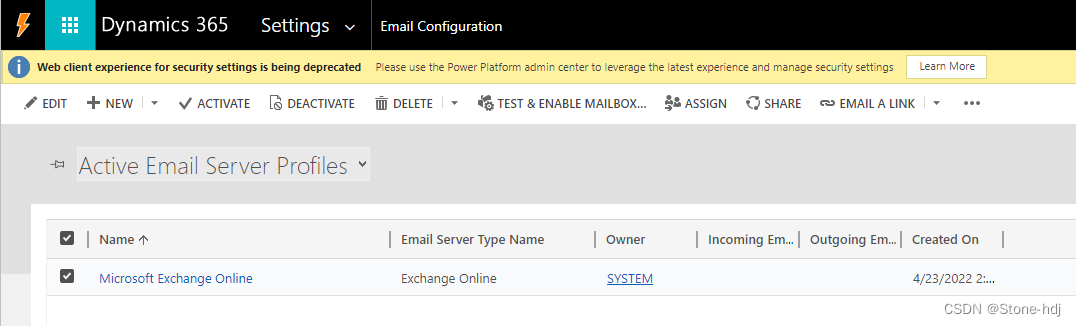
To configure
Next, let's talk about how to configure POP3/SMTP and IMAP/SMTP These two kinds of , First, we need to know the mailbox we want to configure and its mail server ? Let's take outlook Take the mail server of mailbox as an example :
Outlook The email server configuration of the mailbox can be set after logging in to the mailbox -> mail -> Auto sync found in message , Here's the picture :
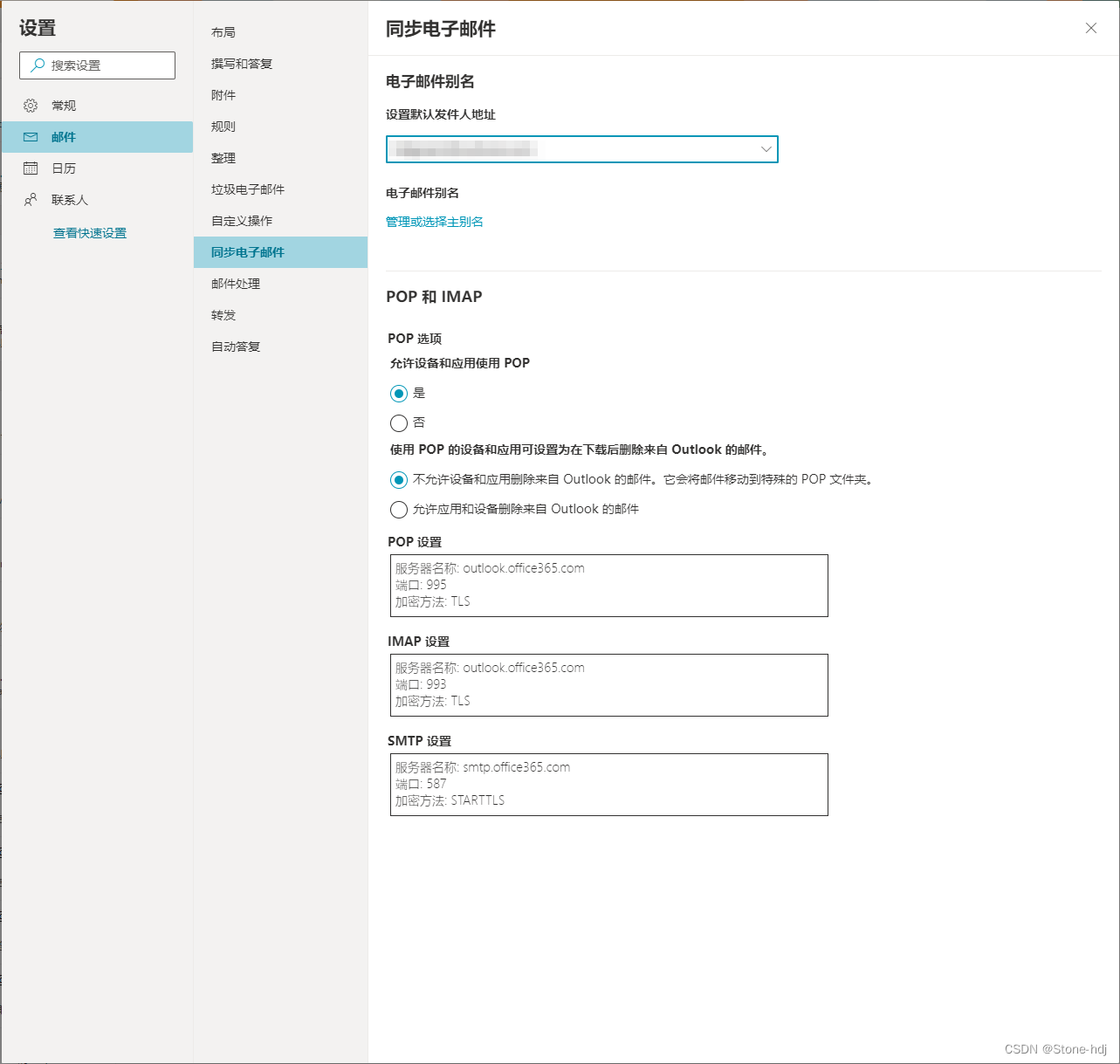
| POP | Server name | outlook.office365.com |
| port | 995 | |
| Encryption method | TLS | |
| IMAP | Server name | outlook.office365.com |
| port | 993 | |
| Encryption method | TLS | |
| SMTP | Server name | smtp.office365.com |
| port | 587 | |
| Encryption method | STARTTLS |
To configure POP3/IMAP Server
1. Create a POP3/SMTP The record of

2. Configure as follows , preservation 
To configure IMAP/SMTP Server
1. Create a IMAP/SMTP The record of 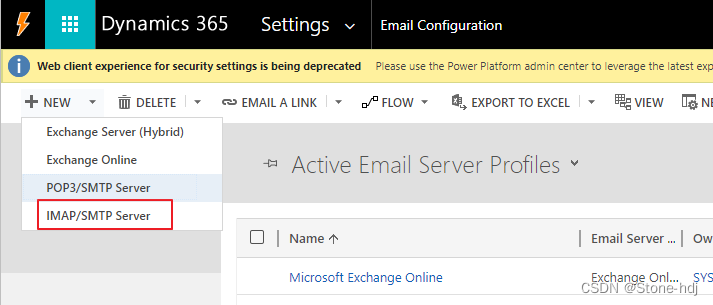
2. Configure as follows , preservation

Configure mailbox Mailboxes(Settings -> Email Configuration -> Mailboxes)
1. When we create a User Or a team When , Will create a by default Queue, It's all going to be Mailboxes It's shown here

2. We choose one that needs to be configured Mailbox, Then configure it as follows
| User Name | Email account |
| Password | Mailbox password |
| Server Profile | Configure in Email Server Profile The item . What I choose here is the one I just configured above , If your email needs to use POP Agreement to receive the letter , Then use your Email Server Profile Created POP3/SMTP That item , If it is to use IMAP To receive the letter , Also in the same way . |
Incoming Email | Choose according to your actual situation |
| Outgoing Email | Choose according to your actual situation |
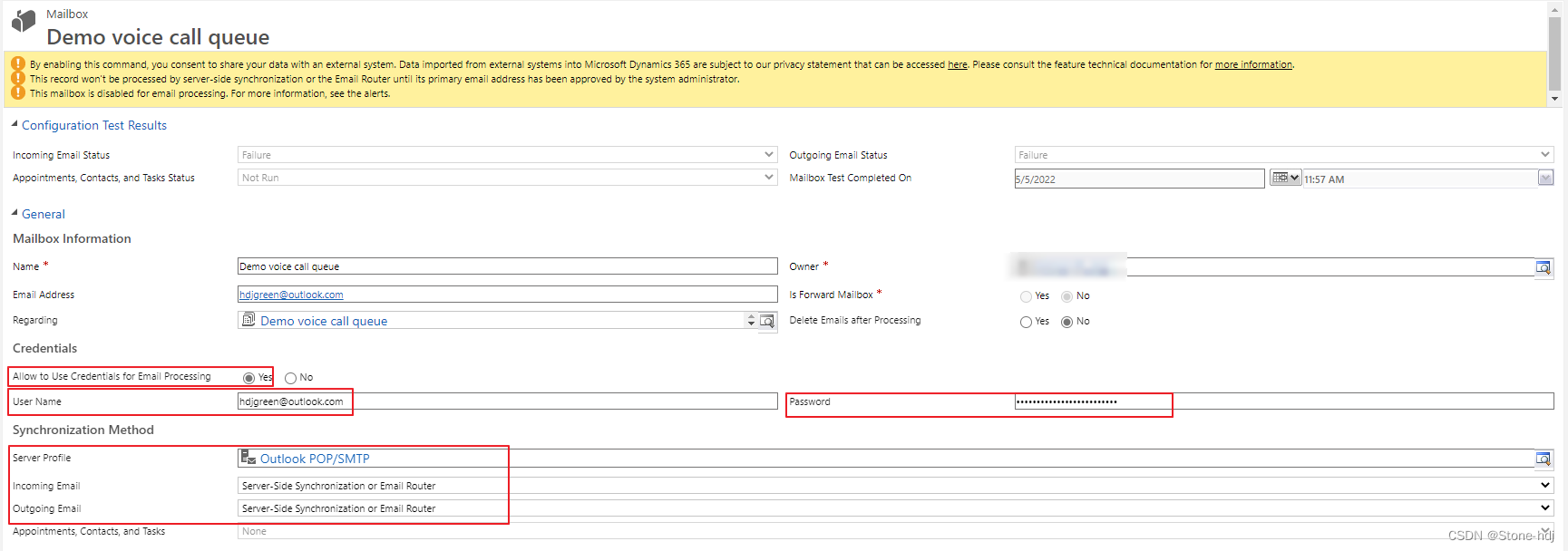
3. After the save , First click "Approve Email"

Then click "Test & Enable Mailbox", Check the options in the red box in the pop-up dialog box below , spot OK

If the configuration is OK , At this time, the system will send and receive an email
- This is the configuration outlook Test email received in mailbox

Note:
- Click on “Approve Email” Because the system is the default must Approve Before you can use this mailbox , But you can also change this configuration

- IMAP The agreement Dynamics 365 9.0 Before that includes 9.0 They don't support
- If someone doesn't understand POP,SMTP,IMAP What do they do , You can see my previous blog :
 https://blog.csdn.net/djstone/article/details/122073190?spm=1001.2014.3001.5501
边栏推荐
- Force button 31. Next arrangement -- double finger needling
- JMeter - call the interface for uploading files or pictures
- Introduction to single chip microcomputer: LED lights cycle to the left and turn on
- Lsyncd搭建同步镜像-用Lsyncd实现本地和远程服务器之间实时同步
- Mlx90640 infrared thermal imager temperature measurement module development notes (III)
- 2022 RoboCom 世界机器人开发者大赛-本科组(省赛)---第一题 不要浪费金币 (已完结)
- 15. Talk about these common multi-threaded interview questions
- 【AdaptiveAvgPool3d】pytorch教程
- Class assignment (6) - 575. Word division (word)
- Memorythrashing: Tiktok live broadcast to solve memory dithering practice
猜你喜欢

PyTorch的自动求导
![[shaders realize pixelate mosaic effect _shader effect Chapter 7]](/img/0f/3e8d9468d94b14217875c7e447aa15.png)
[shaders realize pixelate mosaic effect _shader effect Chapter 7]
![[machine learning basics] - another perspective to explain SVM](/img/da/3c379d225f9866ed1d3ca853920bd5.png)
[machine learning basics] - another perspective to explain SVM

MySQL learning notes (summary)

【Flutter -- 布局】流式布局(Flow和Wrap)
Dynamics crm: how to set the order of forms
Mlx90640 infrared thermal imager temperature measurement module development notes (III)

Kubectl_ Easy to use command line tool: Oh my Zsh_ Tips and tricks

各种Normalization的直观理解

matlab图像去雾技术GUI界面-全局平衡直方图
随机推荐
Simplified understanding: publish and subscribe
Is it safe for Huatai Securities to open an account? I don't know how to operate it
Memcache cache application (lnmp+memcache)
Small list of iptables common commands
[tf.keras]: a problem encountered in upgrading the version from 1.x to 2.x: invalidargumenterror: cannot assign a device for operation embedding_
[fluent -- layout] flow layout (flow and wrap)
Cloud development standalone image Jiugongge traffic main source code
MySQL学习笔记(总结)
Analysys analysis "2022 China data security market data monitoring report" was officially launched
什么是防火墙?防火墙能发挥什么样的作用?
IP protocol - network segment division
Huffman tree (optimal binary tree)
2022 RoboCom 世界机器人开发者大赛-本科组(省赛)-- 第二题 智能服药助手 (已完结)
维护香港服务器安全的9个关键措施
徽商期货平台安全吗?办理期货开户没问题吧?
Lsyncd 实时同步
R language Visual facet chart, multivariable grouping nested multilevel t-test, and specify reference level, visual multivariable grouping nested multilevel faceting boxplot, and add significance leve
R language ggplot2 visualization: ggplot2 visualization basic scatter plot, through in theme_ Specify the parameter base in BW_ Size to change the size of axis labels and control the size of gridlines
Error 1053: the service did not respond to the start or control request in a timely fashion
Feign for 20 minutes every day