当前位置:网站首页>Jenkins 镜像无法更新插件中心的3种解决方法
Jenkins 镜像无法更新插件中心的3种解决方法
2022-06-24 15:33:00 【独家雨天】
在通过Docker 镜像安装Jenkins的情况下,每次都会碰到在Jenkins插件无法安装的情况,导致所有的插件安装失败。

通过 Docker logs 容器名 来查看实际运行的日志。例如,docker logs myjenkins -f 来时实的输出myjenkins容器的日志, 提示如下:
Caused: java.io.IOException: Failed to load http://updates.jenkins-ci.org/download/plugins/antisamy-markup-formatter/1.6/antisamy-markup-formatter.hpi to /var/jenkins_home/plugins/antisamy-markup-formatter.jpi.tmp
	at hudson.model.UpdateCenter$UpdateCenterConfiguration.download(UpdateCenter.java:1217)
Caused: java.io.IOException: Failed to download from http://updates.jenkins-ci.org/download/plugins/antisamy-markup-formatter/1.6/antisamy-markup-formatter.hpi (redirected to: http://mirrors.jenkins-ci.org/plugins/antisamy-markup-formatter/1.6/antisamy-markup-formatter.hpi)
意思就是,docker 容器无法从 http://updates.jenkins-ci.org/download/plugins/ 链接处下载Jenkin 插件。
通过Jenkins 的 Github 可以看到(链接 jenkinsci/docker) ,官方提供了设置来让我们设置插件中心。
对于Jenkin插件中心设置,主要相关的几个Docker容器环境变量说明如下:
JENKINS_UC:主要的插件更新中心,会提供Jenkin 长期支持的版本。默认值就是 https://updates.jenkins.io.JENKINS_UC_EXPERIMENTAL:主要的插件开发/实验版本更新中心。JENKINS_UC_DOWNLOAD:从插件更新中心的下载链接,默认为$JENKINS_UC/downloads。
方案一:所以,很多用户,为了解决这个问题,会自己重新打一个Jenkins Images,然后覆盖这个 JENKINS_UC_DOWNLOAD 参数,或者在启动容器的时候, 重载这个 JENKINS_UC_DOWNLOAD 参数。
本人未试过,但是此法应该是可行的。(主要是懒不想这么做,因为大部分的安装都已经做完了,不想重新来一遍,所以主要试了如下的方案)
方案二:以root的用户进入容器,然后更新镜像源。等待更新完成,通常能够解决网络Jenkins插件中心网络不可达的问题。
docker exec -it -u root myjenkins bash
apt-get update
方案三: (推荐)在插件安装界面先继续,注册完Admin账户后登录,在 jenkins --> Manage Jenkins --> Manage Plugins --> Advanced 的选项中选中更新Update Site。 将更新源重 https://updates.jenkins-ci.org/update-center.json 替换成 http://mirror.esuni.jp/jenkins/updates/update-center.json。注意替换后的没有(https)。
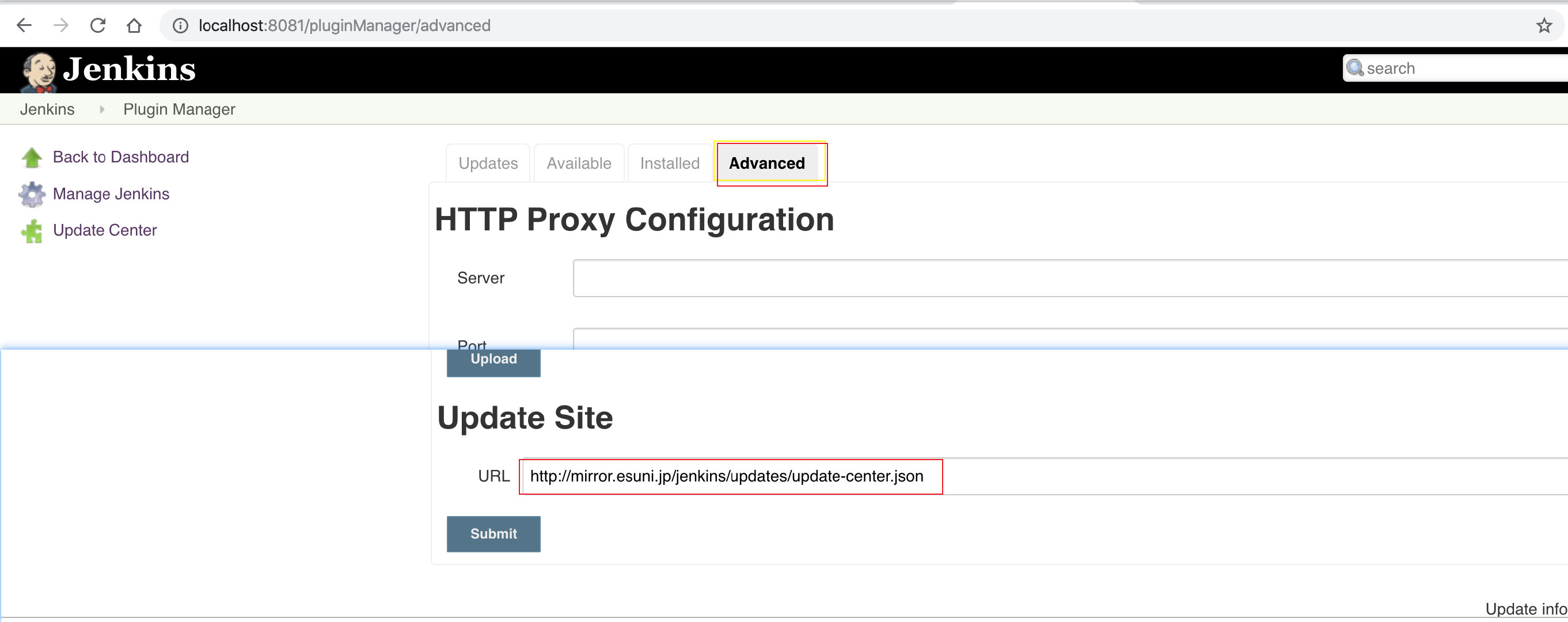
上面方法尝试完之后,可以在 Jenkins -> Update Center看到如下成功的界面:

虽然还是会有些许插件无法正常更新,但是已经无妨了。
参考文档:
边栏推荐
- This website teaches you to imitate more than 100 well-known websites!
- QTreeWidget作为单例模式以dll返回的两个问题
- How to efficiently transfer enterprise business data?
- Since the household appliance industry has entered the era of stock competition, why does Suning win the first channel for consecutive times?
- [sdx62] wcn685x IPA registration failure analysis and solution
- Ethical considerations
- Wi-Fi 7 来啦,它到底有多强?
- 期货公司开户安全吗
- Hardware security threats of cloud infrastructure
- An accident caused by a MySQL misoperation, and the "high availability" cannot withstand it!
猜你喜欢
Bitmap of redis data structure

A brief introduction to the lexical analysis of PostgreSQL

Wi-Fi 7 来啦,它到底有多强?
Step by step introduction to sqlsugar based development framework (9) -- Realizing field permission control with WinForm control

Two way combination of business and technology to build a bank data security management system
![clang: warning: argument unused during compilation: ‘-no-pie‘ [-Wunused-command-line-argument]](/img/f0/42f394dbc989d381387c7b953d2a39.jpg)
clang: warning: argument unused during compilation: ‘-no-pie‘ [-Wunused-command-line-argument]

Do you really know the difference between H5 and applet?

运营商5G用户渗透远远比4G慢,5G的普及还得看中国广电
Redis consistency hash and hash slot
Record the range of data that MySQL update will lock


随机推荐
还在担心漏测吗?快来使用jacoco统计下代码覆盖率
CIA security model - use PGP to describe privacy and integrity of network security CIA model
Special topic of IM code scanning login Technology (III): easy to understand. A detailed principle of IM code scanning login function is enough
Network engineers must know the network essence knowledge!
Two way combination of business and technology to build a bank data security management system
List of PostgreSQL
Actual combat | a tortuous fishing counteraction
Left hand code, right hand open source, part of the open source road
Working with collections
How to modify the login user name of easynvr video monitoring system?
实战 | 记一次曲折的钓鱼溯源反制
Is it safe to open an account for stock speculation in the top ten securities app rankings in China
设备通过国标GB28181接入EasyCVR平台,出现断流情况该如何解决?
Easynvr has been connected to the third-party supervision platform. How to achieve local Internet access
Logstash introduction and simple case
Precautions for using JMeter suite to build a pressure test environment
Stm32f1 and stm32cubeide programming examples -ws2812b full color LED driver (based on spi+dma)
Why is the blackmail virus that shut down half of America's energy system terrible? Interpretation of authoritative reports
Bosun query
Industry cases of successful digital transformation