当前位置:网站首页>Configuring FTP, enterprise official website, database and other methods for ECS
Configuring FTP, enterprise official website, database and other methods for ECS
2022-06-27 06:48:00 【Front end of brick moving】
ECS system configuration ftp、 Official website of the enterprise 、 Database and other methods
First contact with ECS , I'm sure I'll be confused . It will be easy to set up operation and maintenance , At least I will feel dizzy , Keep looking for various resources to summarize a little bit of operation , I don't say much nonsense , To look down
This article is based on : Aliyun server 、windows System as an example
【1】 Configure ECS Security group 8888 Port security rules
1.1. Enter the security group 
1.2. Configuration rules

1.3. newly added 8888 port ( If configured, ignore )
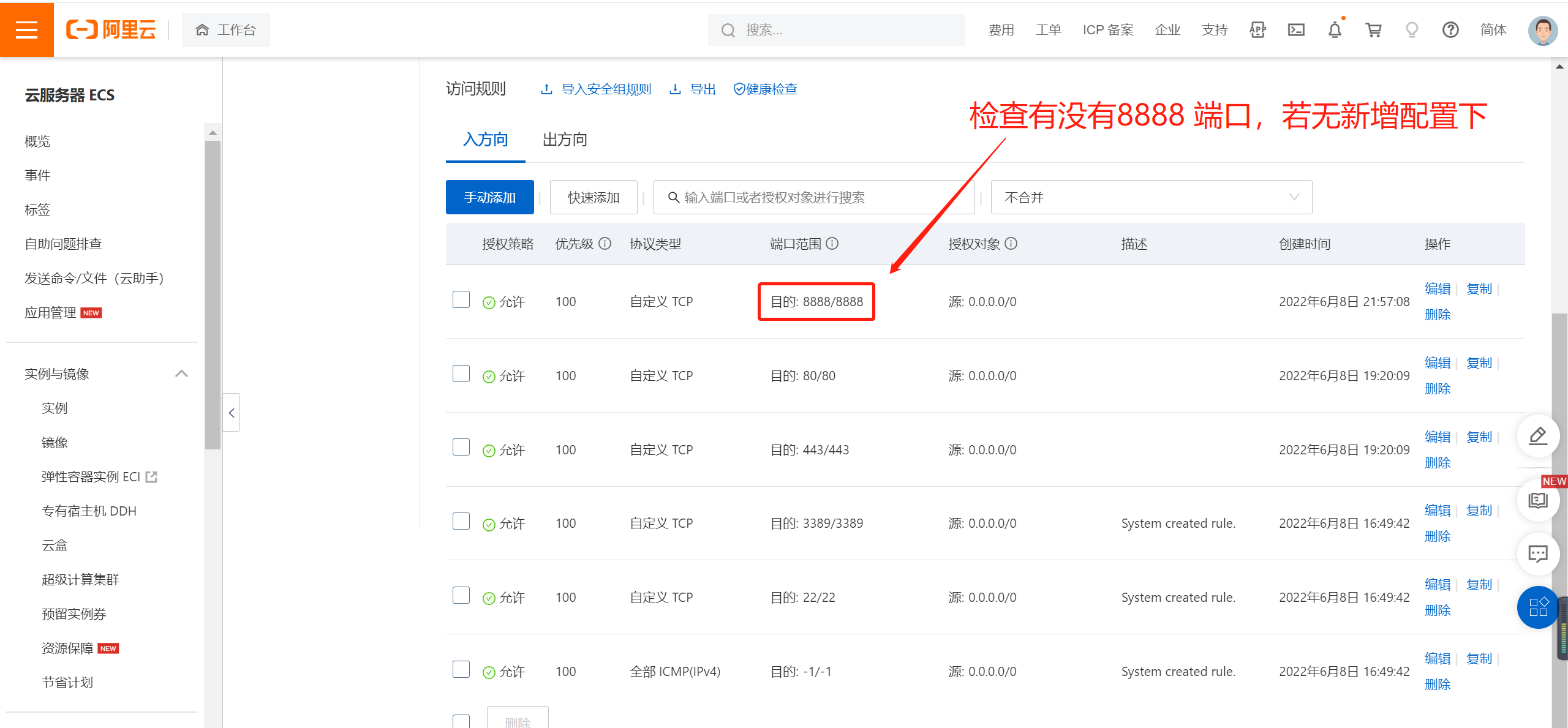
1.3. New configuration parameters 
【2】 Connect and configure ECs Environmental Software
2.1. Connect to the server remotely
See my other blog for details :win10 Remote connection to cloud server
mac Self bypass , I didn't mac
2.2. Control ECS download and installation pagoda
Address :https://www.bt.cn/new/download.html
pagoda : One click management server integration software , Yes Linux and windows Two system versions
2.3. Login username and password ( The pop-up page has the account and password , If you close it, you can see that the pagoda interface also has )


2.4. The logged in user ( If not, you need to register ), Bind the personal account to the server
2.5. Choose the installation kit ( Choose... According to your own needs , I choose the middle one for configuring the official website , If closed , The refresh page will come out again )
Pop ups like this , The new edition is 3 Recommended kits

2.6. Configure the website
If the domain name is configured , It needs to be in the domain name management , Resolve to the current ip Address . Then add the web site on the server , The two-way binding can be determined
If configured ip Projects visited , No other operation is required , Domain name location input ip that will do
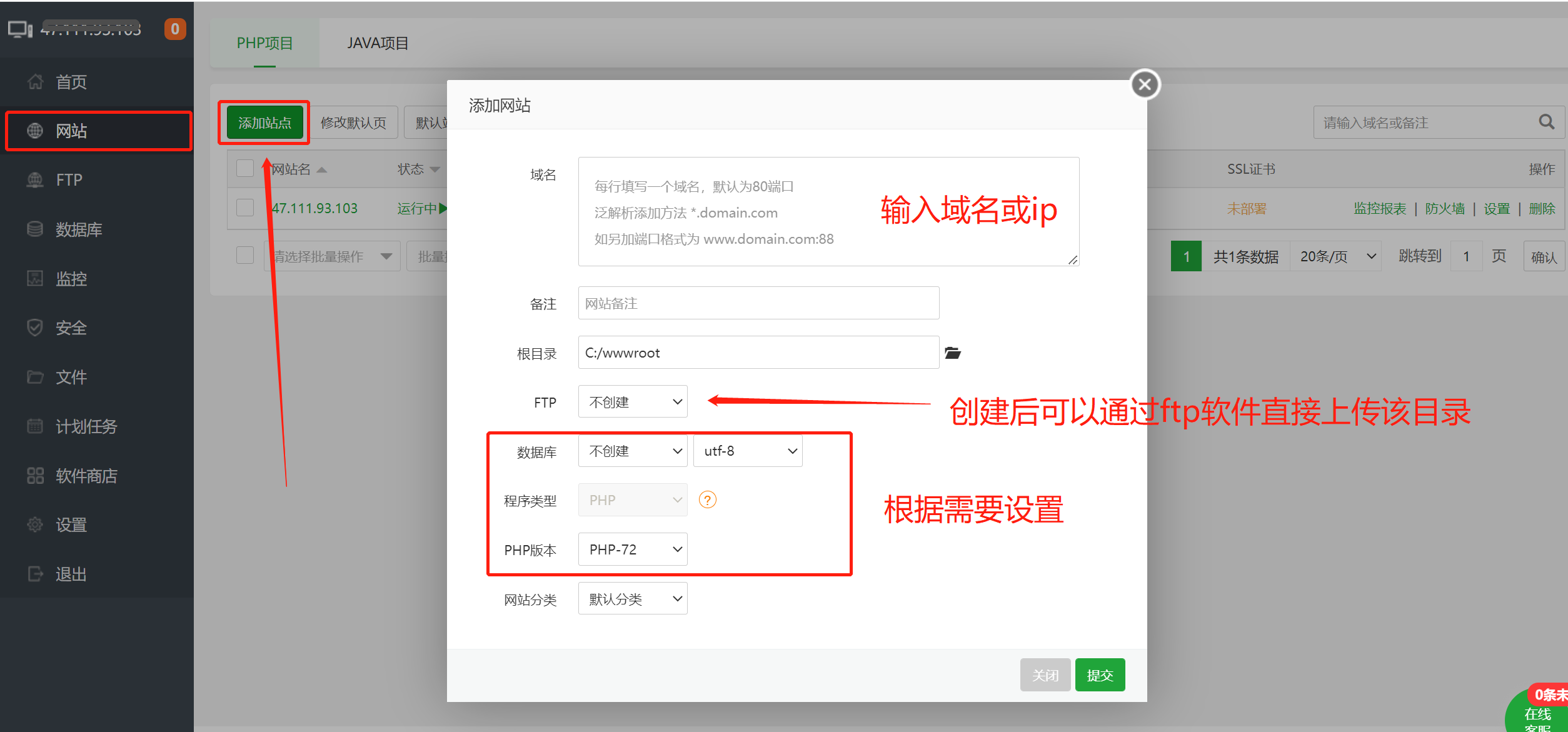
2.7. Upload files to the server
2.7.1. You can upload directly in the browser ,
2.7.2. It can also be used. ftp Tool upload
Browser upload Drag and drop to the corresponding folder , as follows :

ftp Tool upload
recommend :FileZilla Client( Than 8UFTP Easy to use, stable )
Download and install , Sign in ip、 account number 、 password 、 Ports can be ignored ( It's usually 21 perhaps 22)
such , Access the configured domain name or ip, You are ready to access the project . The situation outside this article , I don't know , Just record the steps of configuring the server yourself
边栏推荐
- Transaction overview of tidb
- Assembly language - Wang Shuang Chapter 9 Principles of transfer instructions - Notes
- Maxcompute SQL 的查询结果条数受限1W
- MPC control of aircraft wingtip acceleration and control surface
- LeetCode 0086. Separate linked list
- HTAP in depth exploration Guide
- Fast implementation of thread mesh networking
- Compatibility comparison between tidb and MySQL
- 卷积神经网络---CNN模型的应用(找矿预测)
- Instance Tunnel 使用
猜你喜欢


随机推荐
Crawler learning 5--- anti crawling identification picture verification code (ddddocr and pyteseract measured effect)
Fast realization of Bluetooth communication between MCU and mobile phone
可扩展哈希
TiDB 数据库快速上手指南
技术人员创业一年心得
从5秒优化到1秒,系统飞起来了...
el-select多个时,el-select筛选选中过的值,第二个el-select中过滤上一个选中的值
Transaction overview of tidb
记一次Spark报错:Failed to allocate a page (67108864 bytes), try again.
Basic SQL operations in tidb
Write an example of goroutine and practice Chan at the same time
2022 CISP-PTE(二)SQL注入
面试官:大量请求 Redis 不存在的数据,从而打倒数据库,你有什么方案?
[QT notes] basic use of qregularexpression in QT
tar: /usr/local:归档中找不到tar: 由于前次错误,将以上次的错误状态退出
2022 cisp-pte (I) document contains
POI 替换docx中的文字和图片
Spark SQL common time functions
TiDB的事务概览
研究生数学建模竞赛-无人机在抢险救灾中的优化应用