当前位置:网站首页>Maui uses Masa blazor component library
Maui uses Masa blazor component library
2022-06-24 07:01:00 【Dotnet cross platform】
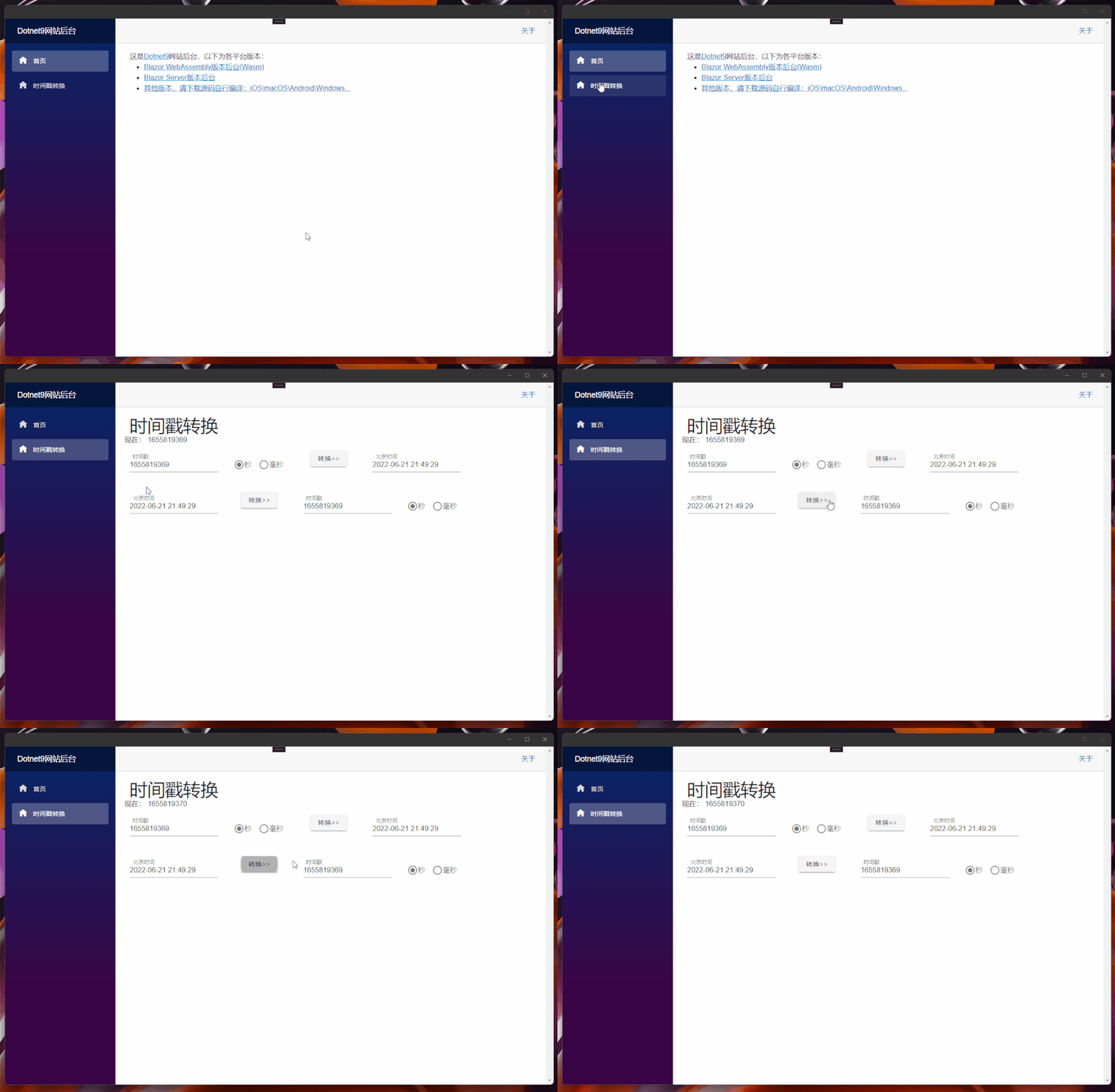
Last one ( Click here to read ) We did UI stay Web End (Blazor Server/Wasm) And the client (Windows/macOS/Android/iOS) share , I add Masa Blazor[2] Reference to component library , And convert the timestamps written in the previous months [3] Tools plus .
1. Pre knowledge
About Masa Blazor Please click on Masa Blazor Official website [4] understand :
MASA Blazor
be based on Material Design and BlazorComponent Provides a standard base component library . Provide such as layout 、 Bullet frame standard 、Loading、 Preset components for standard scenarios such as global exception handling .
2. Reference to component library
Add reference of component library Masa Official website [5], Write it here Dotnet9 backstage [6] Add records :
2.1 UI Modification of shared library -Dotnet9.WebApp
UI Shared library
Dotnet9.WebAppadd toMaas.Blazorpackage , Just today (21 Number )Masa Released0.5.0-preview.3edition , We download and use :
Install-Package Masa.Blazor -Version 0.5.0-preview.3
encapsulation
Maas.BlazorComponent references
Add files ./MasaExtensions/MasaSetup.cs, The code is as follows :
using Microsoft.Extensions.DependencyInjection;

namespace Dotnet9.WebApp.MasaExtensions;

public static class MasaSetup
{
    public static void AddMasaSetup(this IServiceCollection services)
    {
        if (services == null) throw new ArgumentNullException(nameof(services));

        services.AddMasaBlazor();   //  This key code
    }
}
There is only one line of critical code services.AddMasaBlazor();, The extension class is added for function extension , For the convenience of other projects ...
_Imports.razorintroduceMasa.BlazorNamespace
@using Masa.Blazor Is this 3 Step by step Dotnet9.WebApp Modification of .
2.2 Cross platform project modification -Dotnet9.MAUI
modify
MauiProgram.csfile , Add the extension method encapsulated aboveAddMasaSetup():
using Dotnet9.WebApp.MasaExtensions;    //  The first 1 It's about : Add this namespace

namespace Dotnet9.MAUI;

public static class MauiProgram
{
    public static MauiApp CreateMauiApp()
    {
        var builder = MauiApp.CreateBuilder();
        builder
            .UseMauiApp<App>()
            .ConfigureFonts(fonts => { fonts.AddFont("OpenSans-Regular.ttf", "OpenSansRegular"); });

        builder.Services.AddMauiBlazorWebView();
#if DEBUG
        builder.Services.AddBlazorWebViewDeveloperTools();
#endif
        builder.Services.AddMasaSetup();    //  The first 2 Outside : Add an extension method to introduce Masa Blazor

        return builder.Build();
    }
}
add to
Masa.BlazorResource file
modify wwwwroot/index.html file , Add the following styles ( Direct copy Masa.Blazor[7]Blazor WebAssembly Resource files used )
<link href="_content/Masa.Blazor/css/masa-blazor.css" rel="stylesheet" />
<link href="_content/Masa.Blazor/css/masa-extend-blazor.css" rel="stylesheet" />

<link href="https://cdn.masastack.com/npm/@mdi/[email protected]/css/materialdesignicons.min.css" rel="stylesheet">
<link href="https://cdn.masastack.com/npm/materialicons/materialicons.css" rel="stylesheet">
<link href="https://cdn.masastack.com/npm/fontawesome/v5.0.13/css/all.css" rel="stylesheet">

<script src="_content/BlazorComponent/js/blazor-component.js"></script>
2.3 Blazor WebAssembly Project modification -Dotnet9.Wasm
modify
Program.csfile , Add the extension method encapsulated aboveAddMasaSetup():
using Dotnet9.WebApp;
using Dotnet9.WebApp.MasaExtensions;        //  The first 1 It's about : Add this namespace
using Microsoft.AspNetCore.Components.Web;
using Microsoft.AspNetCore.Components.WebAssembly.Hosting;

var builder = WebAssemblyHostBuilder.CreateDefault(args);
builder.RootComponents.Add<Main>("#app");
builder.RootComponents.Add<HeadOutlet>("head::after");

builder.Services.AddMasaSetup();            //  The first 2 Outside : Add an extension method to introduce Masa Blazor
builder.Services.AddScoped(sp => new HttpClient { BaseAddress = new Uri(builder.HostEnvironment.BaseAddress) });

await builder.Build().RunAsync();
add to
Masa.BlazorResource file
Same as Dotnet9.MAUI
2.4 Blazor Server Project modification -Dotnet9.Server
modify
Program.csfile , Add the extension method encapsulated aboveAddMasaSetup():
using Dotnet9.WebApp.MasaExtensions;        //  The first 1 It's about : Add this namespace

var builder = WebApplication.CreateBuilder(args);

// Add services to the container.
builder.Services.AddRazorPages();
builder.Services.AddServerSideBlazor();
builder.Services.AddMasaSetup();            //  The first 2 Outside : Add an extension method to introduce Masa Blazor

var app = builder.Build();

// Configure the HTTP request pipeline.
if (!app.Environment.IsDevelopment())
{
    app.UseExceptionHandler("/Error");
    // The default HSTS value is 30 days. You may want to change this for production scenarios, see https://aka.ms/aspnetcore-hsts.
    app.UseHsts();
}

app.UseHttpsRedirection();

app.UseStaticFiles();

app.UseRouting();

app.MapBlazorHub();
app.MapFallbackToPage("/_Host");

app.Run();
add to
Masa.BlazorResource file
modify Pages/_Layout.cshtml file , Add the following styles ( Copy Masa.Blazor[8]Blazor Server Resource files used )
<!-- masa blazor css style -->
<link href="_content/Masa.Blazor/css/masa-blazor.css" rel="stylesheet" />
<link href="_content/Masa.Blazor/css/masa-extend-blazor.css" rel="stylesheet" />

<!--icon file,import need to use-->
<link href="https://cdn.masastack.com/npm/@("@mdi")/[email protected]/css/materialdesignicons.min.css" rel="stylesheet">
<link href="https://cdn.masastack.com/npm/materialicons/materialicons.css" rel="stylesheet">
<link href="https://cdn.masastack.com/npm/fontawesome/v5.0.13/css/all.css" rel="stylesheet">

<!--js(should lay the end of file)-->
<script src="_content/BlazorComponent/js/blazor-component.js"></script>
Be careful :MAUI Blazor and Blazor WebAssembly Two projects are introduced Masa Blazor The code of the resource file is the same ,Blazor Server The main difference from the former two is materialdesignicons.min.css file :

Here's about Masa.Blazor The introduction of , Summarize the three key steps :
add to
Masa.BlazorNuget package :Install-Package Masa.Blazor;Masa.BlazorComponent registration use :services.AddMasaBlazor();;add to
Masa.BlazorResource file :Wasm yeswwwwroot/index.html, blazor server yes_Layout.cshtml, Note the difference between adding resource files .
3. Add timestamp function
Doing it Blazor Server Version web site , There was an introduction to the development of timestamp function ( Click here to read [9]), The code is simple , I won't go into details here , No more water ....
4. summary
Masa.Blazor The component library has been added , And the timestamp function is restored , next step , Is to continue to build the website background , Use Masa.Blazor Build a framework .
this paper Blazor Server Site Preview :https://server.dotnet9.com/
this paper Blazor Wasm Site Preview :https://wasm.dotnet9.com/
MAUI(Android\Windows\macOS\iOS) preview :https://github.com/dotnet9/Dotnet9/tree/develop/src/Dotnet9.MAUI( No release document is made , You need to compile the source code yourself )
Reference material
[1]
Click here to read : https://dotnet9.com/2022/06/Share-razor-library-between-maui-and-blazor-server-or-client
[2]Masa Blazor: https://masa-blazor-docs-dev.lonsid.cn/
[3]Timestamp conversion : https://dotnet9.com/2022/02/Use-Blazor-to-be-a-simple-online-timestamp-conversion-tool
[4]Masa Blazor Official website : https://masa-blazor-docs-dev.lonsid.cn/
[5]Masa Official website : https://masa-blazor-docs-dev.lonsid.cn/
[6]Dotnet9 backstage : https://github.com/dotnet9/Dotnet9
[7]Masa.Blazor: https://masa-blazor-docs-dev.lonsid.cn/getting-started/installation
[8]Masa.Blazor: https://masa-blazor-docs-dev.lonsid.cn/getting-started/installation
[9]Click here to read : https://dotnet9.com/2022/02/Use-Blazor-to-be-a-simple-online-timestamp-conversion-tool
边栏推荐
- Free and easy-to-use screen recording and video cutting tool sharing
- Arduino融资3200万美元,进军企业市场
- Do you know about Statistics?
- Talk about how to dynamically specify feign call service name according to the environment
- 应用配置管理,基础原理分析
- Interpreting top-level design of AI robot industry development
- Nine unique skills of Huawei cloud low latency Technology
- 【JUC系列】Executor框架之CompletionFuture
- Deploy DNS server using dnsmasq
- Produce kubeconfig with permission control
猜你喜欢

With a goal of 50million days' living, pwnk wants to build a "Disneyland" for the next generation of young people

成为 TD Hero,做用技术改变世界的超级英雄 | 来自 TDengine 社区的邀请函
MAUI使用Masa blazor组件库

The data synchronization tool dataX has officially supported reading and writing tdengine

Record -- about the method of adding report control to virtual studio2017 -- reportview control

Application of intelligent reservoir management based on 3D GIS system
oracle sql综合运用 习题

你有一个机会,这里有一个舞台
![Command ‘[‘where‘, ‘cl‘]‘ returned non-zero exit status 1.](/img/2c/d04f5dfbacb62de9cf673359791aa9.png)
Command ‘[‘where‘, ‘cl‘]‘ returned non-zero exit status 1.

Application configuration management, basic principle analysis
随机推荐
成为 TD Hero,做用技术改变世界的超级英雄 | 来自 TDengine 社区的邀请函
目标5000万日活,Pwnk欲打造下一代年轻人的“迪士尼乐园”
项目Demo
C语言学生管理系统——可检查用户输入合法性,双向带头循环链表
Basic knowledge of wechat applet cloud development literacy chapter (I) document structure
Go excel export tool encapsulation
Surveying and mapping principle of GIS coordinate system: geoid / datum / reference ellipsoid /epsg/sri/wkt
机器人迷雾之算力与智能
Free and easy-to-use screen recording and video cutting tool sharing
FreeRTOS MPU使系统更健壮!
On BOM and DOM (2): DOM node hierarchy / attributes / Selectors / node relationships / detailed operation
Open source and innovation
RealNetworks vs. 微软:早期流媒体行业之争
智能视觉组A4纸识别样例
You have a chance, here is a stage
RealNetworks vs. Microsoft: the battle in the early streaming media industry
Localized operation on cloud, the sea going experience of kilimall, the largest e-commerce platform in East Africa
Let's talk about BOM and DOM (5): dom of all large Rovers and the pits in BOM compatibility
leetcode:84. 柱状图中最大的矩形
Nine unique skills of Huawei cloud low latency Technology