当前位置:网站首页>Unity realizes the function of playing Ogg format video
Unity realizes the function of playing Ogg format video
2022-06-23 14:09:00 【Poposwich】
Unity To play Ogg Format video function implementation
Preface
I have worked on projects before , It involves the development of the video playing function , I usually use it directly Unity Self encapsulated VideoPlayer Just develop ,VideoPlayer It's more powerful , At the same time, it is relatively stable . But in some older projects , Sometimes you can use play ogg Video format development function . I have done similar functions in several previous projects , So here is a record of the use Unity Develop and play Ogg Video features .
step
One 、 Create a new... In the scene RawImage Components , Used as a canvas for displaying video textures , As shown in the figure below :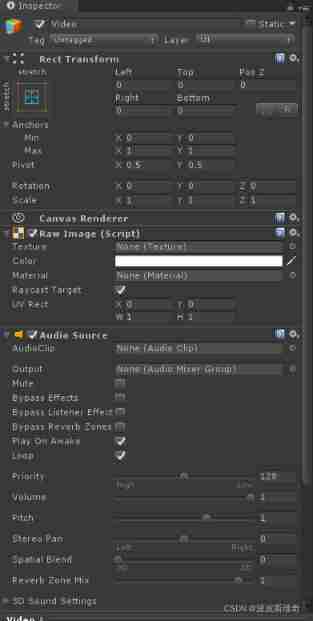
Two 、 newly build SpriteInfo.cs Script , The implementation will Ogg Video incoming function , The code is as follows :
using System.Collections;
using System.Collections.Generic;
using UnityEngine;
using System.IO;

public class SpriteInfo : MonoBehaviour
{

    public MovieTexture currentMov;// The movie
    private string videoFileName;
    private string videoName;
    public double startTime;
    // Profile class
    private ConfigTest configTest;
    // Use this for initialization

    private void Awake()
    {

        configTest = GameObject.Find("configTest").GetComponent<ConfigTest>();
        DontDestroyOnLoad(this.gameObject);

    }
    void Start ()
    {

        videoName = configTest.dic["MoiveName"]["Name0"];
        videoFileName = Application.streamingAssetsPath + "/moive/" + videoName;
        StartCoroutine(DownloadMovie());
	}
    /// <summary>
    ///  Loading the movie's coroutine
    /// </summary>
    /// <returns> return www</returns>
    IEnumerator DownloadMovie()
    {

        startTime = (double)Time.deltaTime;
        if (File.Exists(videoFileName))
        {

            WWW www = new WWW("file://" + videoFileName);
            currentMov = (MovieTexture)www.GetMovieTexture();
            while (!currentMov.isReadyToPlay)
                yield return www;
            //Debug.Log(" Movie loading time :" + startTime);
        }
    }
3、 ... and 、 newly build MoviePlayer.cs Script , Realize video playback function , The code is as follows :
using System.Collections;
//using System.Collections.Generic;
using UnityEngine;
using UnityEngine.UI;
using UnityEngine.SceneManagement;

[RequireComponent(typeof(AudioSource))]
public class MoviePlayer : MonoBehaviour
{

    public MovieTexture movieTexture;
    private AudioSource audio0;
    private string movieDir;
    public float time;
    private SpriteInfo spriteInfo;
    private float movieTime;
    private static MoviePlayer instance;
    public bool isPlaying = false;
    private RawImage ri;
    /// <summary>
    ///  Control the playback of the movie
    /// </summary>
    private BoFangManager boFangManager;
    public static MoviePlayer Instance
    {

        get
        {

            return instance;
        }
    }
    private void Awake()
    {

        audio0 = GetComponent<AudioSource>();
        ri = GetComponent<RawImage>();
        spriteInfo = GameObject.Find("spriteInfo").GetComponent<SpriteInfo>();
        boFangManager = GameObject.Find("pauseBackGround").GetComponent<BoFangManager>();
    }
    // Use this for initialization
    void Start ()
    {

        instance = this;
        Play0();
	}
	// Update is called once per frame
	void Update ()
    {

        MoiveTimeEnd();
#if !UNITY_EDITOR && (UNITY_IOS || UNITY_ANDROID)
        //ShowButton0();
#else
        //ShowButton();
#endif
    }
    /// <summary>
    ///  Initialize playback of movie
    /// </summary>
    void Play0()
    {

        ri.texture = spriteInfo.currentMov;
        audio0.clip = spriteInfo.currentMov.audioClip;
        movieTexture = (MovieTexture)ri.texture;
        isPlaying = true;
        movieTexture.Play();
        audio0.Play();
        //Debug.Log("Play");
    }
    /// <summary>
    ///  Play pause
    /// </summary>
    public void Pause()
    {

        boFangManager.ShowThis();
        isPlaying = false;
        audio0.Pause();
        movieTexture.Pause();
        //Debug.Log(" Pause ");
    }
    /// <summary>
    ///  Continue playing
    /// </summary>
    public void Play()
    {

        isPlaying = true;
        audio0.Play();
        movieTexture.Play();
        //Debug.Log(" Play ");
    }
    /// <summary>
    ///  Stop playing
    /// </summary>
    public void Stop()
    {

        isPlaying = false;
        audio0.Stop();
        movieTexture.Stop();
        SceneManager.LoadScene("Main");
        Destroy(spriteInfo.gameObject);
        //Debug.Log("Stop");
    }
    /// <summary>
    ///  The logic after the movie is played
    /// </summary>
    public void MoiveTimeEnd()
    {

        if (isPlaying)
        {

            if (!movieTexture.isPlaying)
            {

                Stop();
                StartCoroutine(ToTakePhoto());
            }
        }
    }
    /// <summary>
    ///  Jump to the cooperation process of the photographing interface
    /// </summary>
    /// <returns></returns>
    IEnumerator ToTakePhoto()
    {

        yield return new WaitForEndOfFrame();
        SceneManager.LoadScene("Main");
    }
    /// <summary>
    ///  Computer side pause
    /// </summary>
    private void ShowButton()
    {

        if (isPlaying)
        {

            if (Input.GetMouseButtonUp(0))
            {

                Pause();
            }
        }
    }
    /// <summary>
    ///  Android mobile pause
    /// </summary>
    private void ShowButton0()
    {

        if (isPlaying)
        {

            if (Input.touchCount <= 0)
            {

                return;
            }
            if (Input.touchCount == 1)// One finger touches the screen
            {

                if (Input.touches[0].phase == TouchPhase.Ended)
                {

                    Pause();
                }
            }
        }
    }
    /// <summary>
    ///  Continue playing
    /// </summary>
    public void ContinuePlay()
    {

        if (!isPlaying)
        {

            boFangManager.HideThis();
            audio0.Play();
            movieTexture.Play();
            StartCoroutine(SetIsPlay());
        }
    }
    /// <summary>
    ///  Set up isPlaying by true, Otherwise it will conflict
    /// </summary>
    /// <returns> Return the time of one frame </returns>
    IEnumerator SetIsPlay()
    {

        yield return new WaitForEndOfFrame();
        isPlaying = true;
    }
    /// <summary>
    ///  Replay function
    /// </summary>
    public void ReStart()
    {

        if (!isPlaying)
        {

            boFangManager.HideThis();
            audio0.Stop();
            movieTexture.Stop();
            StartCoroutine(ReStartPlay());
        }
    }
    /// <summary>
    ///  Replay the executed process
    /// </summary>
    /// <returns> Returns a frame time </returns>
    IEnumerator ReStartPlay()
    {

        yield return new WaitForEndOfFrame();
        isPlaying = true;
        audio0.Play();
        movieTexture.Play();
    }
    /// <summary>
    ///  Stop playing the movie and enter the scene of taking pictures
    /// </summary>
    public void StopPlay()
    {

        if (!isPlaying)
        {

            audio0.Stop();
            movieTexture.Stop();
            Destroy(spriteInfo.gameObject);
            SceneManager.LoadScene("Main");
        }
    }
}
Four 、 Mount the above two scripts to the objects in the scene , And assign it a value , Run the project , This function has been implemented , As shown in the figure below :
边栏推荐
- 2022 年以后,对AI开发人员意味着什么
- [Yunzhou said live room] - digital security special session will be officially launched tomorrow afternoon
- 智能数字看板解决方案
- Generics, generic defects and application scenarios that 90% of people do not understand
- KS007基于JSP实现人个人博客系统
- 微信小程序之在wx:for中绑定事件
- How to solve the task cache compilation problem caused by gradle build cache
- [deeply understand tcapulusdb technology] tmonitor module architecture
- Flutter Clip剪裁组件
- 栈和队列的基本使用
猜你喜欢

KDD 2022 | epileptic wave prediction based on hierarchical graph diffusion learning

AI reference kit

Quartus II 13.1 detailed installation steps

In depth analysis of mobilenet and its variants

Loss, duplication and backlog of message queues
![[deeply understand tcapulusdb technology] one click installation of tmonitor background](/img/0a/742503e96a9b51735f5fd3f598b9af.png)
[deeply understand tcapulusdb technology] one click installation of tmonitor background

php接收和发送数据

64 channel telephone +2-channel Gigabit Ethernet 64 channel PCM telephone optical transceiver voice telephone to optical fiber

Ks007 realizes personal blog system based on JSP

C语言的基本数据类型及其打印输出
随机推荐
Learning experiences on how to design reusable software from three aspects: class, API and framework
ExpressionChangedAfterItHasBeenCheckedError: Expression has changed after it was checked.
Loss, duplication and backlog of message queues
智能数字看板解决方案
Edge and IOT academic resources
How deci and Intel can achieve up to 16.8x throughput improvement and +1.74% accuracy improvement on mlperf
Quarkus+saas multi tenant dynamic data source switching is simple and perfect
Intelligent digital signage solution
微信小程序之input调整
KDD 2022 | epileptic wave prediction based on hierarchical graph diffusion learning
Win10 64位系统如何安装SQL server2008r2的DTS组件?
Go写文件的权限 WriteFile(filename, data, 0644)?
Quartus call & design D trigger Simulation & timing wave verification
[deeply understand tcapulusdb technology] transaction execution of document acceptance
利用XtraDiagram.DiagramControl进行流程图形的绘制和控制
微信小程序之在wx:for中绑定事件
Understand ADT and OOP
What are the conditions for a mature knowledge management?
【深入理解TcaplusDB技术】一键安装Tmonitor后台
Hexiaopeng: if you can go back to starting a business, you won't name the product in your own name