当前位置:网站首页>(14)[驱动开发]配置环境 VS2019 + WDK10 写 xp驱动
(14)[驱动开发]配置环境 VS2019 + WDK10 写 xp驱动
2022-07-25 05:43:00 【一口一个橘子】
参考: 参考博客
安装SDK和WDK
我这里用的是VS2019。环境其实是早就配好了,只不过写一下而已。后来VS2019不能被visual studio installer识别,又要装新东西,然后官网下了个vs下载器只有VS2022,想着要不干脆更新了吧,于是便重新配置了一遍,由于C盘紧缺,就把VS2019给完全卸载了。谁想,VS2022不再支持win10的WDK(那个扩展装不了),而2022的WDK驱动根本没有x86版本的,搞来搞去。好吧,又重新装了VS2019。
友情提示:版本不是越新越好的
安装器里把这个勾上
WDK安装链接
我用的好像是2004版的,下完居然还是10.19041.1,有点神奇
最后,VS20xx不重要,装哪个都不重要,重要的是记得把SDK和WDK版本对应上
装完WDK后提示是否安装VS2019扩展程序,点击安装即可
没弹窗也没关系,动手找一下
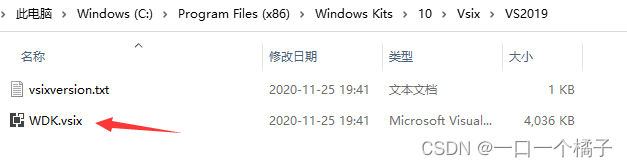
双击这个文件,安装即可(如果你没有用默认安装位置的话,那就自己想想放哪了吧)
创建项目
新建一个 Kernel Mode Driver, empty (KMDF) 的项目
名字随便起起就行

右键==>属性,那个菜单太长了,不截图了
新建一个xxx.c文件,千万不要xxx.cpp

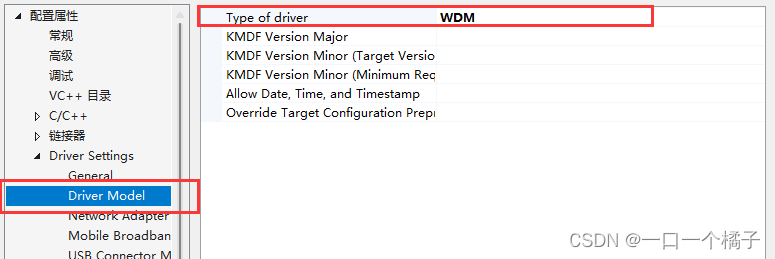

如果报错说:此项目需要缓解了 Spectre 漏洞的库
那么请勾选
如果你非要折腾,那么请移步vs安装器里找一个对应版本的缓解库装上,反正我装了好几个没对上版本,懒得弄了
编写程序
//相当于普通程序的 windows.h
#include <ntddk.h>

//卸载函数
void DriverUnload(PDRIVER_OBJECT object) {

	//打印一句话,方便观察
    DbgPrint("hello world: driver is unloading...");
}

//主函数,相当于main
//driver里有些信息,就是关于本驱动的
NTSTATUS DriverEntry(PDRIVER_OBJECT driver, PUNICODE_STRING reg_path) {

	//驱动使用DbgPrint(),普通程序用printf(),你懂我意思
    DbgPrint("hello world");
    //你可以认为我们赋值给了一个回调函数指针
    //恰当的时机(在卸载这个驱动的时候),就会调用这个函数指针
    driver->DriverUnload = DriverUnload;
    //就是return 0而已,只是好看点
    return STATUS_SUCCESS;
}
编译,然后拉到winxp里试试
dbgView我也勾选了监视核心,但是时灵时不灵的,就不献丑了
反正不灵的时候windbg也会打印的
我勾选了监视核心,但是俩都没打印,真实怪异
其他工具
有个双机调试工具叫做VirtualKD-Reduxz,比windbg裸连快很多,github上就有,直接搜就完事了
安装教程和使用教程也有的,傻瓜式操作,就不细说了
如果配置的时候出了问题,可以参考一下我之前写的
Virtual KD 出现 Still cannot find RPC dispatcher table
好久没更新了,没人看,没动力了。就写给自己看吧
边栏推荐
- Get URL of [url reference]? For the following parameters, there are two ways to get the value of the corresponding parameter name and convert the full quantity to the object structure
- Please stop using system The currenttimemillis() statistical code is time-consuming, which is really too low!
- idea常用10个快捷键
- School day (summer vacation daily question 2)
- systemverilog中function和task区别
- 聊聊 Redis 是如何进行请求处理
- Flexible layout summary
- CCID released the "Lake warehouse integrated technology research report", and Jushan database was selected as a typical representative of domestic enterprises
- uniapp手机端uView的u-collapse组件高度init
- Difference between NPX and NPM
猜你喜欢

HTB-Granpa
HTB-Granpa

50:第五章:开发admin管理服务:3:开发【查询admin用户名是否已存在,接口】;(这个接口需要登录时才能调用;所以我们编写了拦截器,让其拦截请求,判断用户是否是登录状态;)

10、渲染基础

Airserver 7.3.0 Chinese version mobile device wireless transmission computer screen tool

Sword finger offer 05. replace spaces

C编程 --“最大子数组的和” 的动态规划的解法

Softing pngate series gateway: integrate PROFIBUS bus into PROFINET network

Difference between NPX and NPM
sqlilabs less-29
随机推荐
编程大杂烩(二)
HTB-Arctic
Sword finger offer 05. replace spaces
The selection reference of Junzheng T41, T40 and T31 versions are all here
Terminate 5g chip cooperation! The official response of Intel and zhanrui came
Openfegin remote call lost request header problem
Difference between NPX and NPM
What are the ways to realize web digital visualization?
Introduction to interface in SystemVerilog
Y76. Chapter IV Prometheus large factory monitoring system and practice -- Prometheus advanced (VII)
R language obtains the data row where the nth maximum value of the specified data column is located in the data.table data
The u-collapse component of uniapp mobile uview is highly init
剑指 Offer 45. 把数组排成最小的数
Linear algebra (3)
MATLAB作图实例:5:双轴图
SystemVerilog中$write与$display区别
C Programming -- the solution of dynamic programming of "the sum of the largest subarray"
Calculate BDP value and wnd value
PMP Exam is easy to confuse concept discrimination skills! Don't lose points after reading!
HTB-Devel