当前位置:网站首页>【Unity】插件TextAnimator 新手使用说明
【Unity】插件TextAnimator 新手使用说明
2022-06-23 16:53:00 【C#李哪托#C】
新手购买玩TextAnimator不知道如何上手,使用文档不知道从何处看起(没错就是我),简单介绍一下该如何使用,不是太严谨的使用说明,如有问题欢迎指正。
1.添加组件
TMP Text文件添加组件
添加了TextAnimatorPlayer会自动帮你添加TextAnimator
2.
添加相应的标签到富文本中
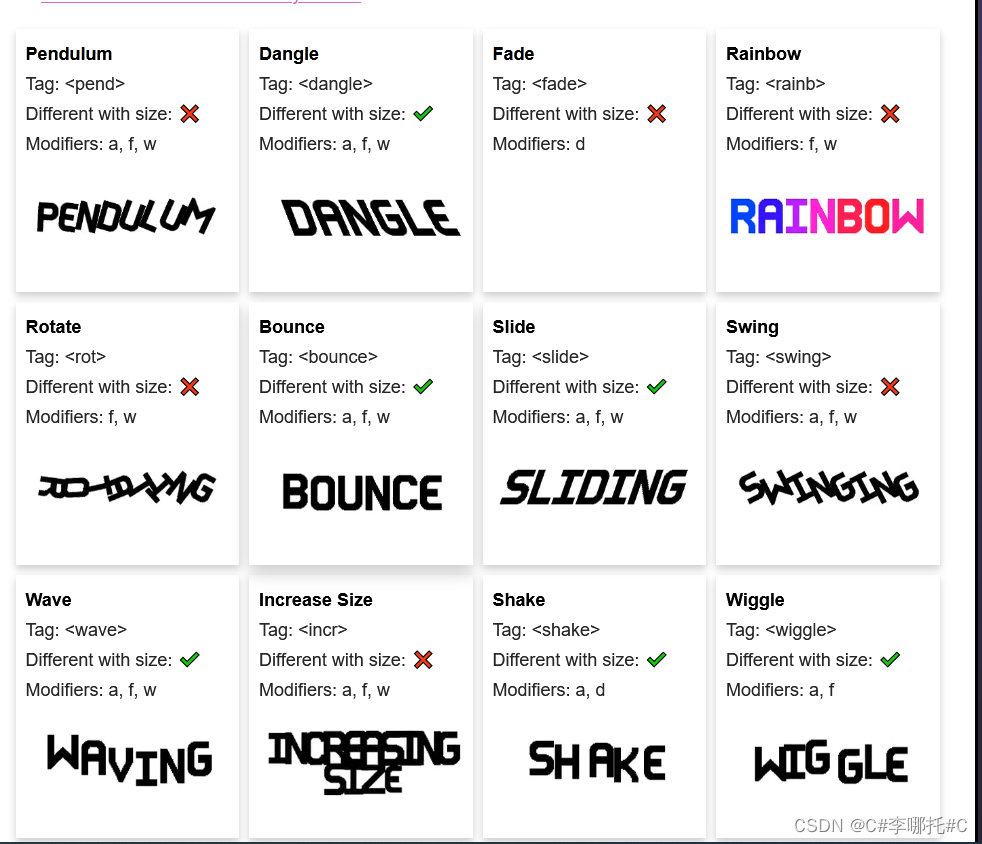

3. 通过代码控制其显示和关闭
    /// <summary>
    /// 显示文本
    /// </summary>
    /// <param name="_text">_text</param>
    public static void ShowText(TMP_Text _text)
    {
        if (_text.GetComponent<TextAnimatorPlayer>() !=null)
        {
            TextAnimatorPlayer textAnimatorPlayer = _text.GetComponent<TextAnimatorPlayer>();
            textAnimatorPlayer.StartShowingText(true);
        }
        else
        {
            Debug.LogError("TextAnimatorPlayer is NULL");
        }
    }
    /// <summary>
    /// 文本消失
    /// </summary>
    /// <param name="_text"></param>
    public static void DisappearingText(TMP_Text _text)
    {
        if (_text.GetComponent<TextAnimatorPlayer>() != null)
        {
            TextAnimatorPlayer textAnimatorPlayer = _text.GetComponent<TextAnimatorPlayer>();
            textAnimatorPlayer.StartDisappearingText();
        }
        else
        {
            Debug.LogError("TextAnimatorPlayer is NULL");
        }
    }
这样就可以控制它的显示和关闭了,剩下的API文档都写的有,可以自己去查
边栏推荐
- Self taught programming introduction, what language to learn first?
- Read the typical application circuit of microphone
- [WebSocket] 开发在线客服系统知识点-websocket返回状态码的含义
- Pause update Bulletin - walking Pikachu
- 论文阅读 (55):Dynamic Multi-Robot Task Allocation under Uncertainty and Temporal Constraints
- What is the problem with TS File Error 404 when easynvr plays HLS protocol?
- Programmers are very useful ten tool websites, which are worth collecting
- Postgresql_根据执行计划优化SQL
- 6 steps to teach you financial data mining preprocessing
- 微信小程序startLocationUpdateBackground()简单实现骑手配送位置
猜你喜欢

Customer service system building tutorial_ Installation and use mode under the pagoda panel_ Docking with official account_ Support app/h5 multi tenant operation

Paper reading (47):dtfd-mil: double tier feature interpretation multiple instance learning for histopathology

2022年T电梯修理考试题库及模拟考试

【win10 VS2019 opencv4.6 配置参考】

Pause update Bulletin - walking Pikachu

CRMEB 二开短信功能教程

论文阅读 (50):A Novel Matrix Game with Payoffs of Maxitive Belief Structure

论文阅读 (48):A Library of Optimization Algorithms for Organizational Design

【C工具】------点阵模拟测试2
[tool C] - lattice simulation test 2
随机推荐
Latex编译成功但是无法输出到PDF
An error is reported when latex uses \usepackage{hyperref}: paragraph ended before [email protected] @link was complete
org. apache. ibatis. binding. BindingException: Invalid bound statement (not found):...
Paper reading (50):a novel matrix game with payoffs of maximal belt structure
Kotlin invoke convention makes kotlin code more concise
JS custom error
Method of copying web page content and automatically adding copyright information (compatible with ie, Firefox and chrome)
iMeta | 南农沈其荣团队发布微生物网络分析和可视化R包ggClusterNet
Goframe framework: fast implementation of service end flow limiting Middleware
Deploy LNMP environment and install Typecho blog
如何设计一个秒杀系统?
【剑指Offer】46. 把数字翻译成字符串
Async/await
Drawing black technology - easy to build a "real twin" 2D scene
README
How to use R language to draw scatter diagram
Single fire wire design series article 10: expanding application - single fire switch realizes double control
7、VLAN-Trunk
12. Manage network environment
Add new members to the connector family! Scenario connector helps enterprises comprehensively improve the operational efficiency of business systems