当前位置:网站首页>ROS知识:librviz库的调用实践
ROS知识:librviz库的调用实践
2022-06-23 11:53:00 【无水先生】
一、说明
必须明确一个概念:rviz是个啥?它是一个显示工具,只限于观看,内部没有物理量虚拟。不过rviz有一些ros通信的能力,可以和用户定制节点进行通信(变量传递),并显示出来。
本实验告诉大家,如何实现用户定义的窗口显示?
二、环境设置
2.1 定制工作空间
mkdir -p ~/catkin_ws/src
cd ~/catkin_ws
catkin_init_workspace
2.2 包生成
注意:包生成的最大难点就是【如何确定依赖包?】这个问题我也很困惑,一个笨方法就是多看看教程中每个包的package.xml文件,增加见识。
cd ~/catkin_ws/src生成教程包
catkin_create_pkg librviz_tutorial qtbase5-dev roscpp rviz libqt5-core libqt5-gui libqt5-widgets
三、原始代码文件
3.1 头文件-myviz.h
#ifndef MYVIZ_H
#define MYVIZ_H

#include <QWidget>

namespace rviz
{
class Display;
class RenderPanel;
class VisualizationManager;
}

// BEGIN_TUTORIAL
// Class "MyViz" implements the top level widget for this example.
class MyViz: public QWidget
{
Q_OBJECT
public:
  MyViz( QWidget* parent = 0 );
  virtual ~MyViz();

private Q_SLOTS:
  void setThickness( int thickness_percent );
  void setCellSize( int cell_size_percent );

private:
  rviz::VisualizationManager* manager_;
  rviz::RenderPanel* render_panel_;
  rviz::Display* grid_;
};
// END_TUTORIAL
#endif // MYVIZ_H
3.2 执行文件myiz.cpp
#include <QColor>
#include <QSlider>
#include <QLabel>
#include <QGridLayout>
#include <QVBoxLayout>

#include "rviz/visualization_manager.h"
#include "rviz/render_panel.h"
#include "rviz/display.h"

#include "myviz.h"

// BEGIN_TUTORIAL
// Constructor for MyViz.  This does most of the work of the class.
MyViz::MyViz( QWidget* parent )
  : QWidget( parent )
{
  // Construct and lay out labels and slider controls.
  QLabel* thickness_label = new QLabel( "Line Thickness" );
  QSlider* thickness_slider = new QSlider( Qt::Horizontal );
  thickness_slider->setMinimum( 1 );
  thickness_slider->setMaximum( 100 );
  QLabel* cell_size_label = new QLabel( "Cell Size" );
  QSlider* cell_size_slider = new QSlider( Qt::Horizontal );
  cell_size_slider->setMinimum( 1 );
  cell_size_slider->setMaximum( 100 );
  QGridLayout* controls_layout = new QGridLayout();
  controls_layout->addWidget( thickness_label, 0, 0 );
  controls_layout->addWidget( thickness_slider, 0, 1 );
  controls_layout->addWidget( cell_size_label, 1, 0 );
  controls_layout->addWidget( cell_size_slider, 1, 1 );

  // Construct and lay out render panel.
  render_panel_ = new rviz::RenderPanel();
  QVBoxLayout* main_layout = new QVBoxLayout;
  main_layout->addLayout( controls_layout );
  main_layout->addWidget( render_panel_ );

  // Set the top-level layout for this MyViz widget.
  setLayout( main_layout );

  // Make signal/slot connections.
  connect( thickness_slider, SIGNAL( valueChanged( int )), this, SLOT( setThickness( int )));
  connect( cell_size_slider, SIGNAL( valueChanged( int )), this, SLOT( setCellSize( int )));

  // Next we initialize the main RViz classes.
  //
  // The VisualizationManager is the container for Display objects,
  // holds the main Ogre scene, holds the ViewController, etc.  It is
  // very central and we will probably need one in every usage of
  // librviz.
  manager_ = new rviz::VisualizationManager( render_panel_ );
  render_panel_->initialize( manager_->getSceneManager(), manager_ );
  manager_->initialize();
  manager_->startUpdate();

  // Create a Grid display.
  grid_ = manager_->createDisplay( "rviz/Grid", "adjustable grid", true );
  ROS_ASSERT( grid_ != NULL );

  // Configure the GridDisplay the way we like it.
  grid_->subProp( "Line Style" )->setValue( "Billboards" );
  grid_->subProp( "Color" )->setValue( QColor( Qt::yellow ) );

  // Initialize the slider values.
  thickness_slider->setValue( 25 );
  cell_size_slider->setValue( 10 );
}

// Destructor.
MyViz::~MyViz()
{
  delete manager_;
}

// This function is a Qt slot connected to a QSlider's valueChanged()
// signal.  It sets the line thickness of the grid by changing the
// grid's "Line Width" property.
void MyViz::setThickness( int thickness_percent )
{
  if( grid_ != NULL )
  {
    grid_->subProp( "Line Style" )->subProp( "Line Width" )->setValue( thickness_percent / 100.0f );
  }
}

// This function is a Qt slot connected to a QSlider's valueChanged()
// signal.  It sets the cell size of the grid by changing the grid's
// "Cell Size" Property.
void MyViz::setCellSize( int cell_size_percent )
{
  if( grid_ != NULL )
  {
    grid_->subProp( "Cell Size" )->setValue( cell_size_percent / 10.0f );
  }
}
3.3 主文件main.cpp
// BEGIN_TUTORIAL

// The main() for this "myviz" example is very simple, it just
// initializes ROS, creates a QApplication, creates the top-level
// widget (of type "MyViz"), shows it, and runs the Qt event loop.

#include <QApplication>
#include <ros/ros.h>
#include "myviz.h"

int main(int argc, char **argv)
{
  if( !ros::isInitialized() )
  {
    ros::init( argc, argv, "myviz", ros::init_options::AnonymousName );
  }

  QApplication app( argc, argv );

  MyViz* myviz = new MyViz();
  myviz->show();

  app.exec();

  delete myviz;
}
四、编译
cd ~/catkin_ws
catkin_make
五、执行测试
51 打开一个终端
roscore
5.2 打开第二终端
rosrun librviz_tutorial myviz
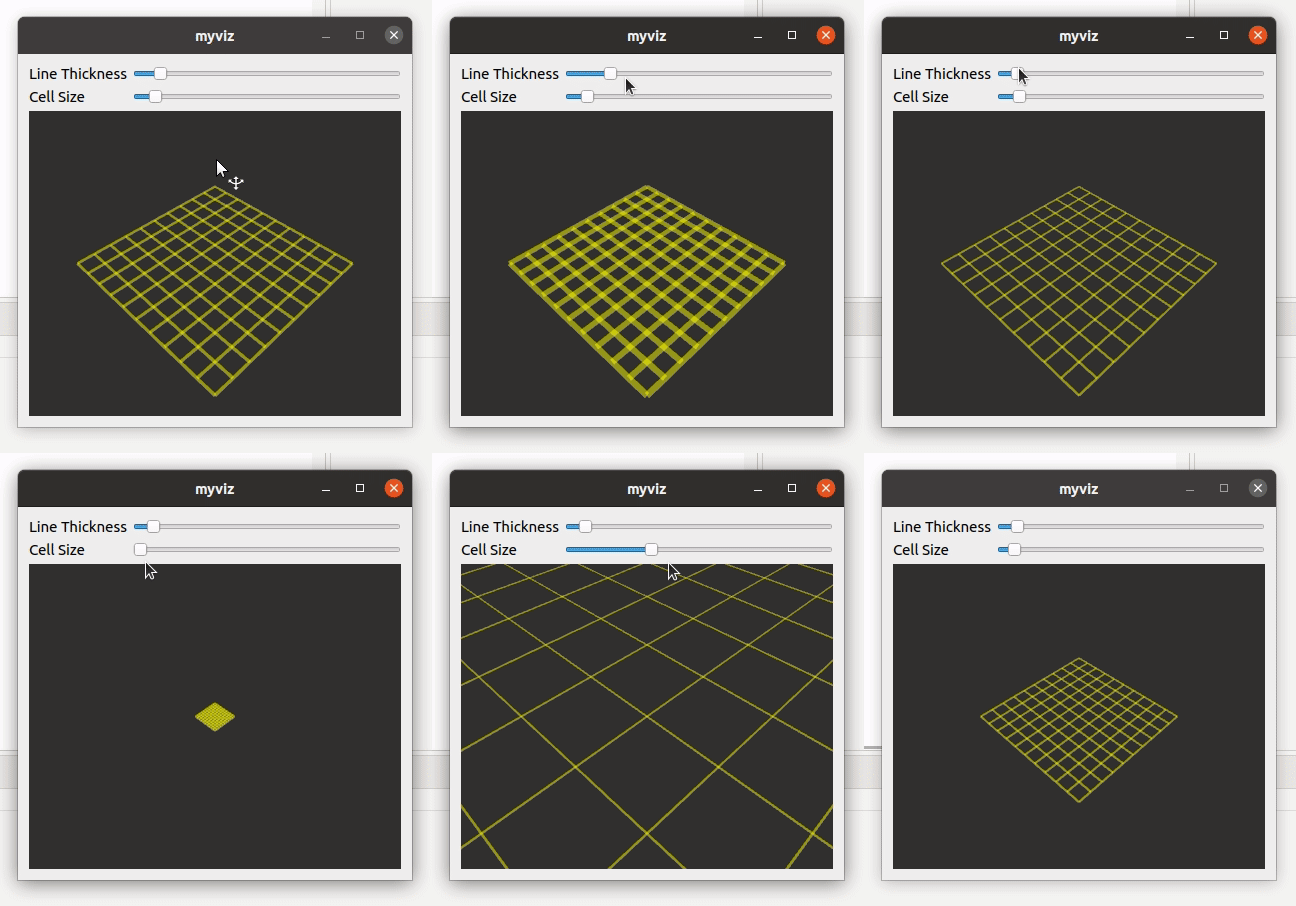
显示结果如下:
边栏推荐
- MySQL在一个字段中匹配多个值
- Where is the safest and most formal way to open an account at present?
- [comprehensive written test questions] 30 Concatenate substrings of all words
- 16路HD-SDI光端机多路HD-SDI高清视频光端机16路3G-SDI高清音视频光端机
- 我在佛山,到哪里开户比较好?手机开户安全么?
- 请问连接oracle时,这个version 1.54 是什么的version?
- [processes and threads]
- 基本数据类型和对应的包装类
- 股票网上开户及开户流程怎样?手机开户安全么?
- Leetcode 1209. 删除字符串中的所有相邻重复项 II(初版本没过)
猜你喜欢

32路电话+2路千兆以太网32路PCM电话光端机支持FXO口FXS语音电话转光纤

2022年全国最新消防设施操作员(初级消防设施操作员)模拟题及答案

Halcon知识:binocular_disparity 知识
Getting started with redis - Chapter 4 - data structures and objects - jump table

ROS2知识(2):网络设施

年薪中位数超30万,南大AI专业首届毕业生薪资曝光
QT5知识:信号和槽的一些要点
How Huawei cloud implements a global low latency network architecture for real-time audio and video

4路电话+1路千兆以太网4路PCM电话光端机

杜邦分析法解读:安阳钢铁股份有限公司企业投资价值何在?
随机推荐
QT5知识:信号和槽的一些要点
@黑马粉丝,这份「高温补贴」你还没领?
哪个券商公司开户是最靠谱安全的
汉源高科USB3.0光端机USB工业触摸屏光端机USB3.0光纤延长器USB3.0光纤传输器
利用XtraDiagram.DiagramControl进行流程图形的绘制和控制
Ppt makes 3D rotation animation from beginner to advanced
蓝桥杯单片机(一)——关闭外设及熄灭LED
MySQL在一个字段中匹配多个值
简单易懂的软路由刷机使用教程
Meta said that the UK security law may "scan all private information" or infringe privacy
On the structure of annotation platform
“梦想童行” 2022年广汽本田儿童道路安全公益行走进东北
QT知识:Qt Widgets小部件类【01】
Vous comprenez vraiment la capacité de sortie de LDO!?
得物多活架构设计之路由服务设计
『忘了再学』Shell流程控制 — 39、特殊流程控制语句
【云原生&微服务八】Ribbon负载均衡策略之WeightedResponseTimeRule源码剖析(响应时间加权)
【进程和线程】
Redis 入门-第二篇-数据结构与对象-链表
手机证券开户交易?现在网上开户安全么?