当前位置:网站首页>【云原生】2.3 Kubernetes 核心实战(上)
【云原生】2.3 Kubernetes 核心实战(上)
2022-06-27 08:08:00 【程序猿追】
哈喽~大家好呀,前面一篇我们部署了集群并且设置好了可视化界面,接下来我们进入到核心实战部分吧。
个人主页:个人主页
系列专栏:【云原生系列】
与这篇相关的文章:
1.5【云原生】 Docker 进阶实战 【云原生】1.5 Docker 进阶实战_程序猿追的博客-CSDN博客_idea 链接docker 2.1【云原生】 Kubernetes基础概念 【云原生】2.1 Kubernetes基础概念_程序猿追的博客-CSDN博客 2.2【云原生】 kubeadm创建集群 【云原生】2.2 kubeadm创建集群_程序猿追的博客-CSDN博客
目录
一、操作Namespace
我们资源创建的方式有命令行和 YAML。Namespace(名称空间)是用来隔离资源的。注:名称空间,用来对集群资源进行隔离划分。默认只隔离资源,不隔离网络。一般系统自带的有:kube-node-lease、kube-public、kube-system 等,默认的是 default。当然我们使用命令行也可以看到(kubectl get ns 与 kubectl get pods -A)。操作前一般我们要建一个 .yaml 文件。
创建空间
kubectl create ns hello删除空间
kubectl delete ns hello
二、理解 Pod
Pod 是运行中的一组容器,是 kubernetes中应用的最小单位。
Pod 与容器有什么关系呢?
我们有三个节点,同样装上 Docker(提供容器化的运行环境,我们称之为 CRI【Container Runtime Interface】),加上了三个应用(都是以容器化的方式),k8s就是管理这些容器的,然后将应用加上 Pod,可以理解为将它们封装起来,所以才有了一句——是 kubernetes中应用的最小单位。(Pod 里面可以运行多个容器)

三、创建Pod
有了上面的概念,这是我们就来创建 Pod,那么和以前一样,我们使用命令。
kubectl run mynginx --image=nginx详细大家看了这么多,这个格式大家都熟了吧?kubectl run +名字 +镜像名
创建好了之后可以用 kubectl get pod 来查看(-A 是查看所有的)

检查正在运行中的容器(在批量输入里面使用)
docker ps|grep mynginx

描述 Pod
kubectl describe pod 你自己的Pod名字
删除 Pod
kubectl delete pod Pod名字
查看Pod的运行日志
kubectl logs Pod名字如何用配置文件方式创建一个Pod呢?
输入 vi pod. yaml,然后再输入以下代码 (记得退出并保存)
apiVersion: v1
kind: Pod
metadata:
  labels:
    run: mynginx
  name: mynginx
#  namespace: default
spec:
  containers:
  - image: nginx
    name: mynginx
kubectl apply -f pod. yaml 我们应用一下
每个 Pod - k8s 都会分配一个ip
kubectl get pod -owide
使用 Pod 的 ip + pod 里面运行容器的端口
curl 192.168.169.136四、多容器 Pod 细节
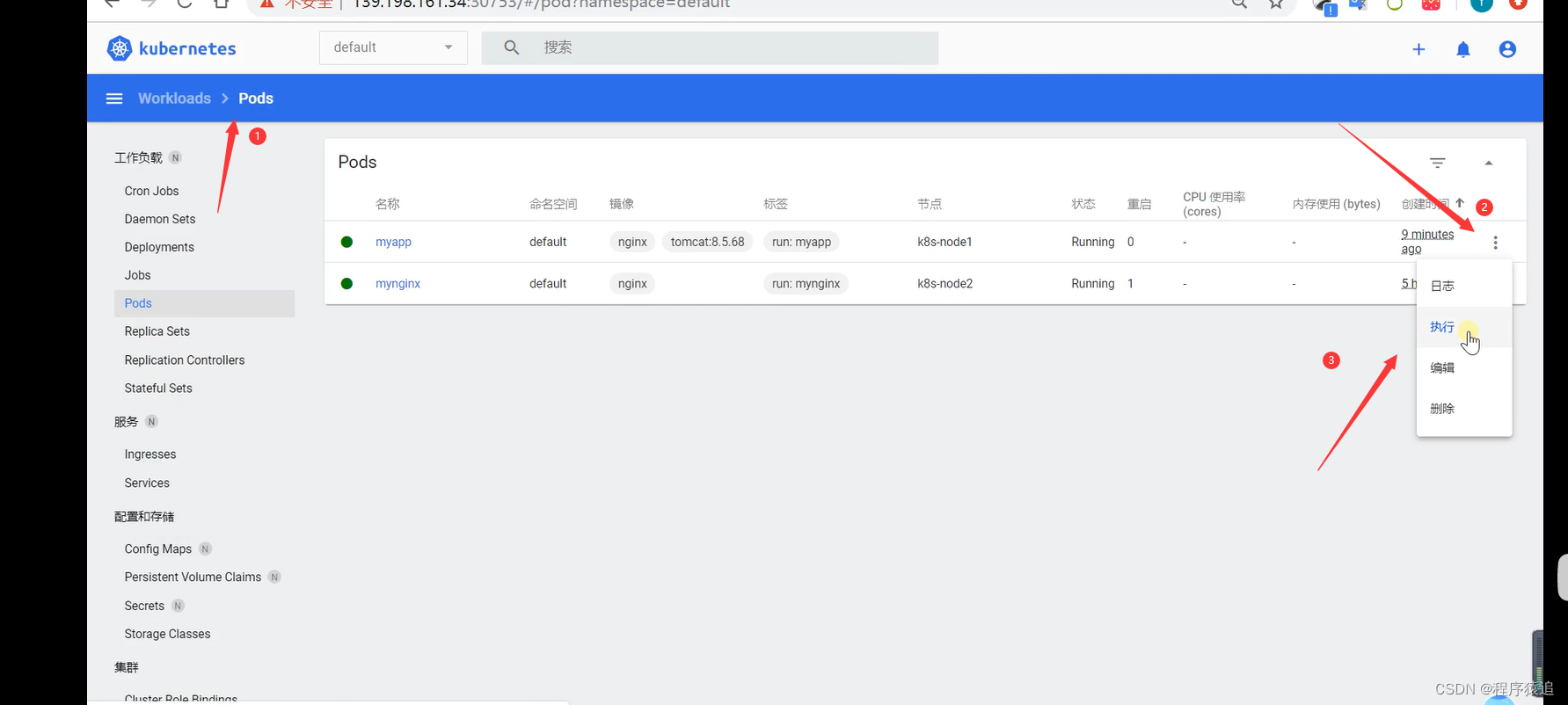
我们上一篇讲述了使用可视化界面,这里呢我们来看看命令行与界面的使用吧。
同样我们创建一个 yaml文件——vi mul ticontainer-pod.yaml,那么直接粘贴。
apiVersion: v1
kind: Pod
metadata:
  labels:
    run: mynginx
  name: mynginx
#  namespace: default
spec:
  containers:
  - image: nginx
    name: mynginx

可视化界面操作起来十分的友好,例如可以非常方便查看资源信息、状态、事件等。 下载好了之后,使用 curl + ip 就可以打印一些 htnl 代码。

我们进入到 nginx 容器来,访问tomcat——curl + 本机地址:8080,同理在tomcat里面访问nginx只需要tomcat——curl + 本机地址:80,就可以了
(非常的银杏化)。

五、使用Deployment部署应用
Deployment 作用:控制 Pod,使 Pod 拥有多副本,自愈,扩缩容等能力(不怕机器崩溃、荡机,具有自我恢复功能)。
一句话,它是用来控制 Pod 的。
创建部署
kubectl create deployment mytomcat --image=tomcat:8.5.68创建 3 份副本
kubectl create deployment my-dep --image=nginx --replicas=3 
下一篇预告继续 2.4 Kubernetes 核心实战
(求关注)持续更新中……

边栏推荐
- Mysql事务中MVCC理解超简单
- js例题打印1-100之间所有7的倍数的个数及总和
- c#的初步认识
- Redis五种基本类型
- 關聯GIS:條條道路通UE5城
- Etcd tutorial - Chapter 5 etcd etcdctl usage
- JS use the switch statement to output the corresponding English day of the week according to 1-7
- Common operation and Principle Exploration of stream
- Linux下Redis的安装
- Programming life - what do you think of the 35 year old bottleneck of programmers?
猜你喜欢

Mapping of Taobao virtual product store opening tutorial
盲測調查顯示女碼農比男碼農更優秀
![[12. maximum continuous non repeating subsequence]](/img/eb/230cd6062e28374c86863f2122e43b.png)
[12. maximum continuous non repeating subsequence]

Redis的持久化机制

Rust async: SMOL source code analysis -executor

JS use switch to output whether the result is qualified

JS to determine whether the number entered by the user is a prime number (multiple methods)

JS performance reward and punishment examples

How to view program running time (timer) in JS

Testing network connectivity with the blackbox exporter
随机推荐
2. QT components used in the project
2022 love analysis · panoramic report of it operation and maintenance manufacturers
洛谷刷题心得记录
Is futures reverse documentary reliable?
Reference | upgrade win11 mobile hotspot can not be opened or connected
University database mysql
Binary tree structure and heap structure foundation
js成绩奖惩例题
log4j:WARN No such property [zipPermission] in org. apache. log4j. RollingFileAppender.
關聯GIS:條條道路通UE5城
Preliminary understanding of C #
JS output shape
js中判断成绩是否合格,范围在0-100,否则重新输入
SQL Sever column name or number of supplied values does not match the table definition
The 6th Blue Bridge Cup
期货反向跟单—交易员的培训问题
JS output all prime numbers between 1-100 and calculate the total number
正确的理解MySQL的MVCC
Publications under nature, science and cell
MySQL环境变量配置的教程