当前位置:网站首页>Preliminary exploration of Flink principle and flow batch integration API (II) V2
Preliminary exploration of Flink principle and flow batch integration API (II) V2
2022-07-24 03:25:00 【Hua Weiyun】
Today's goal
- Stream processing concept ( understand )
- Data source of program structure Source( master )
- Data conversion of program structure Transformation( master )
- Data implementation of program structure Sink( master )
- Flink The connector Connectors( understand )
### Kafka
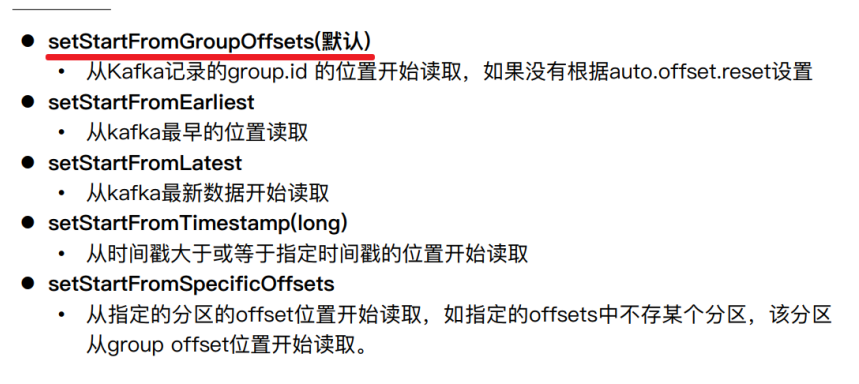
+ The starting position of consumption
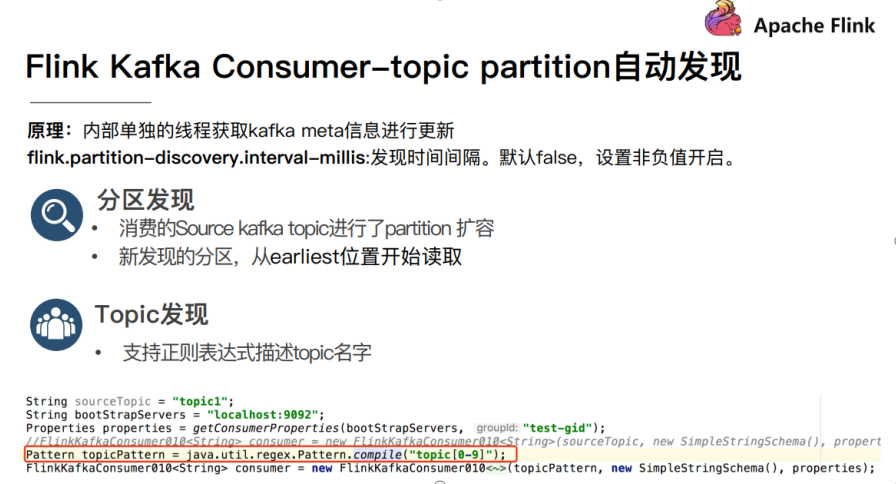
+ Consumers automatically discover partitions and topic
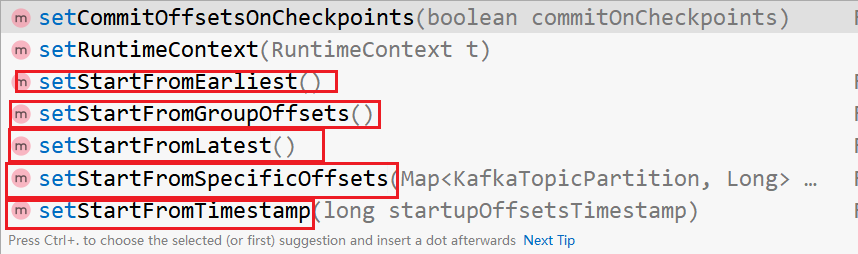
+ Set up FlinkKafkaConsumer attribute
~~~java
package cn.itcast.sz22.day02;
import org.apache.flink.api.common.serialization.SimpleStringSchema;
import org.apache.flink.streaming.api.datastream.DataStreamSource;
import org.apache.flink.streaming.api.environment.StreamExecutionEnvironment;
import org.apache.flink.streaming.connectors.kafka.FlinkKafkaConsumer;
import java.util.Properties;
/**
* Author itcast
* Date 2021/5/5 17:23
* demand : Use flink-connector-kafka_2.12 Medium FlinkKafkaConsumer consumption Kafka Do the data in WordCount
* The following parameters need to be set :
* 1. Subscribed topics
* 2. Deserialization rules
* 3. Consumer attributes - The cluster address
* 4. Consumer attributes - Consumer group id( If not set , There will be default , But the default is not easy to manage )
* 5. Consumer attributes -offset Reset rules , Such as earliest/latest...
* 6. Dynamic partition detection ( When kafka The number of partitions changed / increases ,Flink Can detect !)
* 7. If not set Checkpoint, Then you can set up automatic submission offset, Follow up study Checkpoint Will be able to offset As you do Checkpoint Submit to Checkpoint And the default theme
*/
public class FlinkKafkaConsumerDemo {
public static void main(String[] args) throws Exception {
//1.env
StreamExecutionEnvironment env = StreamExecutionEnvironment.getExecutionEnvironment();
// Turn on checkpoint
env.enableCheckpointing(5000);
//2.Source
Properties props = new Properties();
props.setProperty("bootstrap.servers", "node1:9092");
props.setProperty("group.id", "flink");
props.setProperty("auto.offset.reset","latest");
props.setProperty("flink.partition-discovery.interval-millis","5000");// Will open a background thread every 5s Check it out Kafka Partition of
props.setProperty("enable.auto.commit", "true");
props.setProperty("auto.commit.interval.ms", "2000");
FlinkKafkaConsumer<String> consumer = new FlinkKafkaConsumer<>("flink_kafka"
, new SimpleStringSchema(), props);
consumer.setStartFromEarliest();
DataStreamSource<String> source = env.addSource(consumer).setParallelism(1);
source.print();
env.execute();
}
}
~~~
+ kafka Consumption data
~~~java
package cn.itcast.sz22.day02;
import org.apache.flink.api.common.serialization.SimpleStringSchema;
import org.apache.flink.streaming.api.datastream.DataStreamSource;
import org.apache.flink.streaming.api.environment.StreamExecutionEnvironment;
import org.apache.flink.streaming.connectors.kafka.FlinkKafkaConsumer;
import java.util.Properties;
/**
* Author itcast
* Date 2021/5/5 17:23
* demand : Use flink-connector-kafka_2.12 Medium FlinkKafkaConsumer consumption Kafka Do the data in WordCount
* The following parameters need to be set :
* 1. Subscribed topics
* 2. Deserialization rules
* 3. Consumer attributes - The cluster address
* 4. Consumer attributes - Consumer group id( If not set , There will be default , But the default is not easy to manage )
* 5. Consumer attributes -offset Reset rules , Such as earliest/latest...
* 6. Dynamic partition detection ( When kafka The number of partitions changed / increases ,Flink Can detect !)
* 7. If not set Checkpoint, Then you can set up automatic submission offset, Follow up study Checkpoint Will be able to offset As you do Checkpoint Submit to Checkpoint And the default theme
*/
public class FlinkKafkaConsumerDemo {
public static void main(String[] args) throws Exception {
//1.env
StreamExecutionEnvironment env = StreamExecutionEnvironment.getExecutionEnvironment();
// Turn on checkpoint
env.enableCheckpointing(5000);
//2.Source
Properties props = new Properties();
props.setProperty("bootstrap.servers", "node1:9092");
props.setProperty("group.id", "flink");
props.setProperty("auto.offset.reset","latest");
props.setProperty("flink.partition-discovery.interval-millis","5000");// Will open a background thread every 5s Check it out Kafka Partition of
props.setProperty("enable.auto.commit", "true");
props.setProperty("auto.commit.interval.ms", "2000");
FlinkKafkaConsumer<String> consumer = new FlinkKafkaConsumer<>("flink_kafka"
, new SimpleStringSchema(), props);
consumer.setStartFromEarliest();
DataStreamSource<String> source = env.addSource(consumer).setParallelism(1);
source.print();
env.execute();
}
}
~~~
### redis
+ Flink-Sink-Redis
+ Case study - Save statistics to redis
~~~java
package cn.itcast.sz22.day02;
import org.apache.flink.api.common.typeinfo.Types;
import org.apache.flink.api.java.tuple.Tuple2;
import org.apache.flink.streaming.api.datastream.DataStream;
import org.apache.flink.streaming.api.datastream.DataStreamSource;
import org.apache.flink.streaming.api.datastream.SingleOutputStreamOperator;
import org.apache.flink.streaming.api.environment.StreamExecutionEnvironment;
import org.apache.flink.streaming.connectors.redis.RedisSink;
import org.apache.flink.streaming.connectors.redis.common.config.FlinkJedisPoolConfig;
import org.apache.flink.streaming.connectors.redis.common.mapper.RedisCommand;
import org.apache.flink.streaming.connectors.redis.common.mapper.RedisCommandDescription;
import org.apache.flink.streaming.connectors.redis.common.mapper.RedisMapper;
import org.apache.flink.util.Collector;
import java.util.Arrays;
/**
* Author itcast
* Date 2021/5/5 18:03
* Desc TODO
*/
public class FlinkRedisSink {
public static void main(String[] args) throws Exception {
//1.env
StreamExecutionEnvironment env = StreamExecutionEnvironment.getExecutionEnvironment();
//2.Source adopt socket Acquisition data source
DataStreamSource<String> source = env.socketTextStream("node1", 9999);
//3.Transformation
//3.1 Cut and record as 1
DataStream<String> faltMapDS = source.flatMap((String value, Collector<String> out) ->
Arrays.stream(value.split(" "))
.forEach(out::collect))
.returns(Types.STRING);
//O map(T value)
SingleOutputStreamOperator<Tuple2<String, Integer>> mapDS = faltMapDS
.map((word) -> Tuple2.of(word, 1))
.returns(Types.TUPLE(Types.STRING, Types.INT));
SingleOutputStreamOperator<Tuple2<String, Integer>> result = mapDS.keyBy(t -> t.f0).sum(1);
//4.Sink
FlinkJedisPoolConfig config = new FlinkJedisPoolConfig.Builder()
.setHost("node1").build();
result.addSink(new RedisSink<Tuple2<String, Integer>>(config, new RedisMapperEx()));
env.execute();
// * Finally, save the results to Redis Realization FlinkJedisPoolConfig
// * Be careful : Store in Redis Data structure of : Use hash That is to say map
// * key value
// * WordCount ( word , Number )
//-1. establish RedisSink You need to create RedisConfig
// Connect stand-alone Redis
//5.execute
}
public static class RedisMapperEx implements RedisMapper<Tuple2<String, Integer>> {
@Override
public RedisCommandDescription getCommandDescription() {
return new RedisCommandDescription(RedisCommand.HSET, "hashOpt");
}
@Override
public String getKeyFromData(Tuple2<String, Integer> data) {
return data.f0;
}
@Override
public String getValueFromData(Tuple2<String, Integer> data) {
return data.f1 + "";
}
}
}
oolConfig config = new FlinkJedisPoolConfig.Builder()
.setHost("node1").build();
result.addSink(new RedisSink<Tuple2<String, Integer>>(config, new RedisMapperEx()));
env.execute();
// * Finally, save the results to Redis Realization FlinkJedisPoolConfig
// * Be careful : Store in Redis Data structure of : Use hash That is to say map
// * key value
// * WordCount ( word , Number )
//-1. establish RedisSink You need to create RedisConfig
// Connect stand-alone Redis
//5.execute
}
public static class RedisMapperEx implements RedisMapper<Tuple2<String, Integer>> {
@Override
public RedisCommandDescription getCommandDescription() {
return new RedisCommandDescription(RedisCommand.HSET, "hashOpt");
}
@Override
public String getKeyFromData(Tuple2<String, Integer> data) {
return data.f0;
}
@Override
public String getValueFromData(Tuple2<String, Integer> data) {
return data.f1 + "";
}
}
}
~~~
边栏推荐
猜你喜欢
Talk about the application of FIFO

MySQL learning - MySQL software installation and environment configuration (Windows) details!

Simulink代码生成: 可变子系统及其代码

数据湖:Apache Hudi简介

08 reptile project

JIRA automation experience sharing for 2 years
4.合宙Air32F103_LCD

Internet of things installation and debugging personnel let "smart" life come early

Regular expression \b \b understand word boundary matching in simple terms
正則錶達式 \b \B 深入淺出理解單詞邊界的匹配
随机推荐
Secondary development of ArcGIS JS API -- loading national sky map
轮播图van-swipe的报错:cannot read a properties of null(reading width)
Leetcode Hot 100 (topic 8) (232/88/451/offer10/offer22/344/)
Realize the communication before two pages (using localstorage)
Emqx v4.4.5 Publishing: new exclusive subscriptions and mqtt 5.0 publishing attribute support
水题: 接雨水
198. House raiding
C. Minimum Ties-Educational Codeforces Round 104 (Rated for Div. 2)
FTP服务与配置
FTP service and configuration
MariaDB related instructions
New definition of mobile communication: R & scmx500 will improve the IP data throughput of 5g devices
Binary tree traversal
Industrial controller, do you really know your five insurances and one fund?
STL set容器
Ue5 split screen (small map) solution
Outlook client outlook.com mailbox setting method
数据湖:开源数据湖方案DeltaLake、Hudi、Iceberg对比分析
idea写web项目时报错Failed to load resource: the server responded with a status of 404 (Not Found)
JS Array isaarray () Type of