当前位置:网站首页>Esp32-cam, esp8266, WiFi, Bluetooth, MCU, hotspot create embedded DNS server
Esp32-cam, esp8266, WiFi, Bluetooth, MCU, hotspot create embedded DNS server
2022-06-23 10:59:00 【daodanjishui】
ESP32-CAM ArduinoIDE Development series article catalog
Chapter one :ESP32-CAM High cost performance WIFI Quick start tutorial of image transmission scheme
Second articles :ESP32-CAM The first wireless lighting program
Third articles :ESP32-CAM Design and implementation of intelligent gateway
Fourth articles :ESP32-CAM Create a hot spot composition and style DNS The server
List of articles
Preface
daodanjishui The core original technology of the Internet of things ESP32 Arduino IDE Development of embedded web server setup 、http Request sending, receiving and parsing 、 Single chip microcomputer IO Oral reading and writing operation 、AJAX technology 、 Concurrent server technology and DNS Technology integration constitutes :ESP32-CAM Create a hot spot composition and style DNS The server
One 、ESP32-CAM Create a hot spot composition and style DNS What is the server ?
The style of the code has changed ( I also used another foreigner's code for reference and tried it out new arduino library ESPAsyncWebServer), The expansion degree becomes higher when the function remains roughly the same , Added two popular features :
(1) Constitute a parallel server , The servers in the first three articles can only respond to the requests of one client , All are modifications to the original official procedures , Now the server in Chapter 4 can receive requests from multiple clients at the same time , Concurrent response to client requests , Another unofficial program is used . This new library is very powerful , Support WebSocket function , I will use it later WebSocket Make a cluster control robot system .
(2) LAN DNS Domain name resolution , That is to say ESP32-cam As a AP Hotspot sharing WIFI Resources and as an embedded server of the Internet of things , Even on WIFI Mobile devices in the browser input :http://daodanjishui.com You can view the home page of the server , The first three phases of the design can only input the web address printed out by the module serial port assistant to connect to the server . In this issue, you only need to enter the domain name , After successfully opening the server home page, you can view the server's IP Address , Mom no longer has to worry that I have to use the serial port debugging assistant to connect to the server . If the students want to make a wireless remote control car without adding a display screen , I strongly recommend learning this code !
(3) Because I don't want to complicate things , There is no integrated video function and STA The function of mode , Because the video function involves image transmission , It is impossible to simply use
new arduino library ESPAsyncWebServer Complete the graphic design , The same goes for foreigners . Generally, this embedded server has a large amount of code , At least there are tens of thousands of lines ,
The following is the interface display , But I replaced all the server code , Because I have higher needs in the future :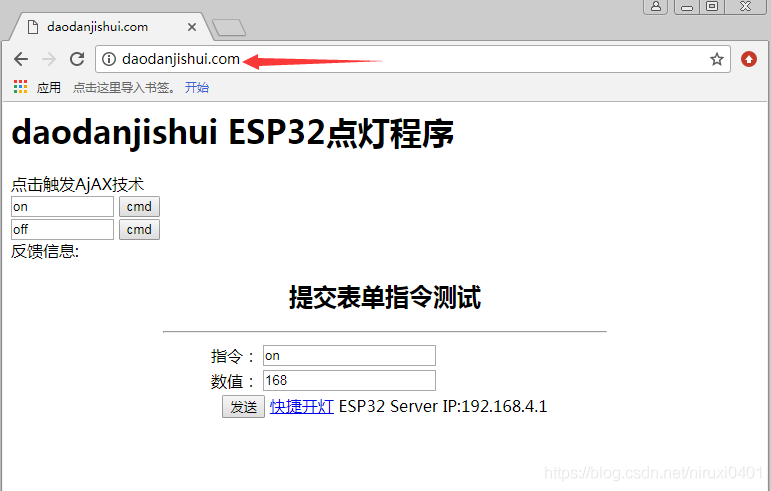
The following is the video address for the operation and debugging of the system :https://v.youku.com/v_show/id_XNTE3OTAyNzUwNA==.html
Watch the video directly
ESP32-CAM Create a hot spot composition and style DNS The server
Two 、 The system design
1. Import and stock in
#include <AsyncTCP.h> and #include <ESPAsyncWebServer.h> and #include <FS.h> and #include <DNSServer.h>
After importing and warehousing, the server logic is designed , At first glance, the code is not complicated :
void setup()
{

   Serial.begin(115200);
   // WiFi.mode(WIFI_AP_STA);// Set mode to AP+STA
    WiFi.mode(WIFI_AP); // Set to AP Pattern
    WiFi.softAP("DNSServer");
    Serial.println("AP Setup completed ");
    IPAddress myIP = WiFi.softAPIP();
    Serial.print("AP IP address: ");
    Serial.println(myIP);
   dnsserver.start(DNS_PORT, "daodanjishui.com",myIP); // start-up DNS service ,daodanjishui Is the registered domain name
   server.on("/", HTTP_GET, [](AsyncWebServerRequest *request){
    // Login home
    request->send(200, "text/html", index_html(WiFi.softAPIP().toString()) );
  });
Load a string after the server is started index_html As an embedded home page , Enter the server's IP The address can trigger the loading of the home page :
String  index_html(String WiFiAddr){
return  String("")+"<html> <meta http-equiv=\"Content-Type\" content=\"text/html; charset=utf-8\" /"+
"  <head>  "+
// Some of the JavaScript Code
"  <body>  "+
"    <h1>daodanjishui ESP32 Lighting procedure </h1><p>     "+
"        <form action=\"\" method=\"\" name=\"\" >"+
"         Click on the trigger AjAX technology <br>   "+
"         <input type=\"text\" value=\"on\" name=\"inputcmd\" id=\"cmd\" size=\"10\" maxlength=\"20\" >                                   "+
"         <input type=\"button\" value=\"cmd\" οnclick=\"checkCmd(this.form.inputcmd.value)\" ><br>   "+
"        "+
"         <input type=\"text\" value=\"off\" name=\"inputcmd1\" id=\"cmd1\" size=\"10\" maxlength=\"20\" >                                   "+
"         <input type=\"button\" value=\"cmd\" οnclick=\"checkCmd(this.form.inputcmd1.value)\" ><br> "+
"               "+
"          Feedback :"+
"         <span id=\"result\"></span>  "+
"        </form> "+
"        "+
"        "+
"     <form action=\"control\" method=\"get\">"+
"   <table align=\"center\" width=\"450\">"+
"     <tr>"+
"       <td align=\"center\" colspan=\"2\">"+
"         <h2> Submit form instruction test </h2>"+
"         <hr>"+
"       </td>"+
"     </tr>"+
"     <tr>"+
"       <td align=\"right\"> Instructions :</td>"+
"       <td><input type=\"text\" name=\"var\" value=\"on\" /></td>"+
"     </tr>"+
"     <tr>"+
"       <td align=\"right\"> The number :</td>"+
"       <td><input type=\"text\" name=\"val\" value=\"168\"/></td>"+
"     </tr>"+
""+
"     <tr>"+
"       <td align=\"center\" colspan=\"2\">"+
"         <input type=\"submit\" value=\" send out \">"+
"         <a href=\"/control?var=on&val=888\"> Turn on the light quickly </a> "+
"          <a >ESP32 Server IP:"+ WiFiAddr+"</a> "+
"       </td>"+
"     </tr>"+
"   </table>"+
" </form>"+
"     "+
"  </body>"+
"</html>";
}
2. Read in the data submitted by the client
Read the... Submitted by the client get Request to judge whether the light is on or off .
The code is as follows ( Example ):
 server.on("/control", HTTP_GET, [](AsyncWebServerRequest *request){
    // Respond to the logic of turning on the light
    int paramsNr = request->params();
    Serial.println(paramsNr);
    for(int i=0;i<paramsNr;i++){

    AsyncWebParameter* p = request->getParam(i);
    Serial.print("Param name: ");
    Serial.println(p->name());
    Serial.print("Param value: ");
    Serial.println(p->value());
    Serial.println("------");
    int value_length=p->value().length();
    char value_buf[value_length];
    strcpy(value_buf,p->value().c_str());
         if(!strcmp(value_buf, "on")){
    // If the received string is "on"
          controlLamp(true);// turn on the light
          return request->send(200, "text/plain", "on ok");
          }else if(!strcmp(value_buf, "off")){

          controlLamp(false);// Turn off the lights
          return request->send(200, "text/plain", "off ok");
         }else if(!strcmp(value_buf, "check")){
    // Check the status of the lamp
          int LAMP_flag= digitalRead(LAMP_PIN);// Read the status of the pin , And back to HIGH  or LOW
           if(LAMP_flag==HIGH){

              return request->send(200, "text/plain", "LAMP is on");
           }else if(LAMP_flag==LOW){

             return request->send(200, "text/plain", "LAMP is off");
            }
         }
    }
    request->send(200, "text/plain", "message received");
  });
3、 ... and 、 Simulation and debugging
Load source code :
Even on ESP32CAM Emitted AP hotspot 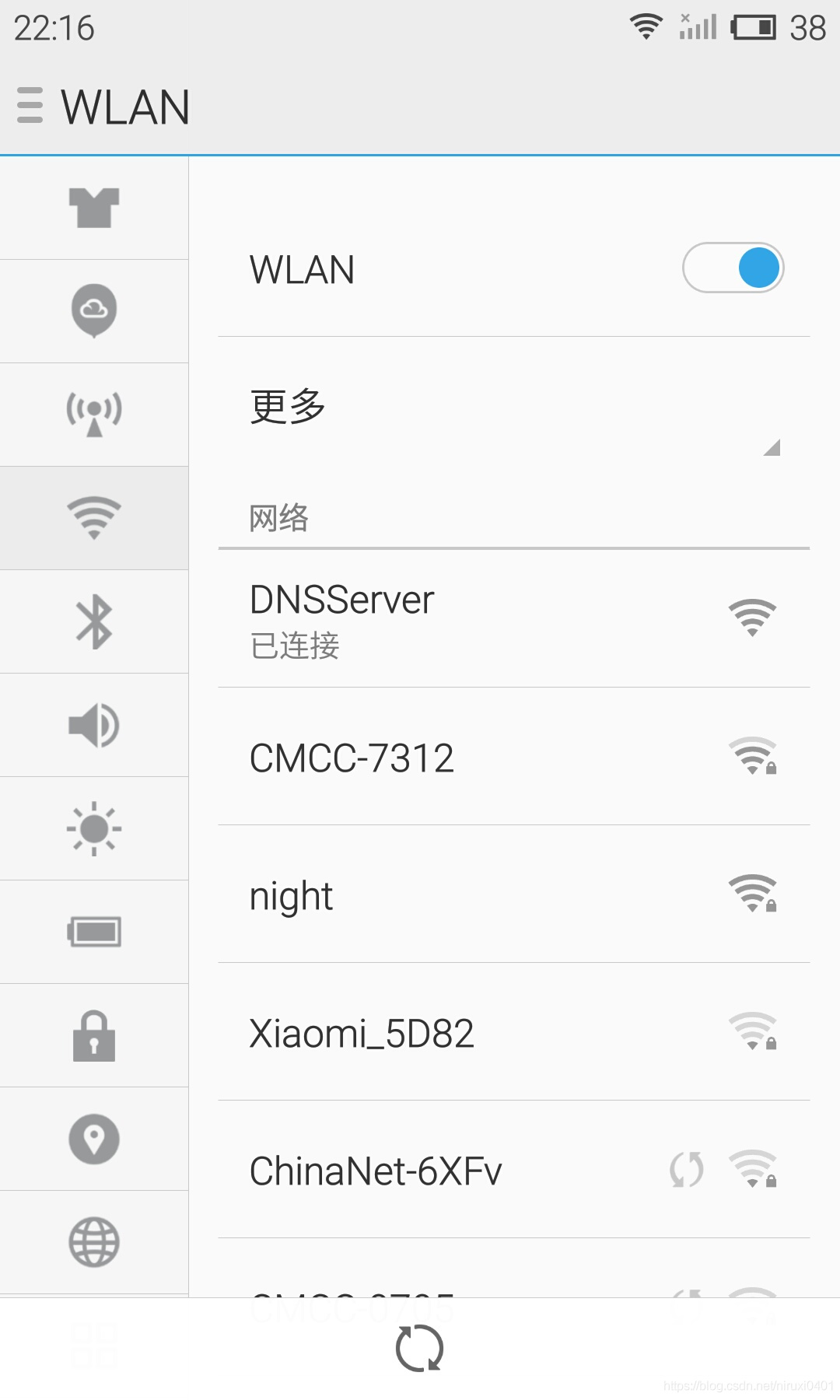
Mobile phone login ESP32CAM Home page 
Mobile browser controls lighting 
summary
This paper mainly does the LAN domain name resolution (DNS), Using library functions to achieve , Not much code , But the scalability is very high , If the reader has studied the code in Articles 3 and 4 , Then you can definitely learn two styles of coding , It's definitely worth it . With this function , Internet of things devices can achieve wireless control and access , And mine can also display servers IP Address . The code has been debugged for a long time , I have tried many schemes , Finally, a different scheme from the previous three projects was adopted , It can also be said to have grown out of nothing , The official source code has been changed beyond recognition , What comes out is the essence . In the next phase, add the wireless distribution network function of the server , Total use AP Pattern , No, STA Pattern , This ESP32-cam Still can't be in line with the world .ESP32 There are many ways to play after connecting to the Internet , such as MQTT Biography 、 mobile phone app Remote control 、 Voice Announcements 、VR Image transmission and somatosensory control , Coming soon .
Code and data download address :https://www.cirmall.com/circuit/19386/
Point, I'll jump
边栏推荐
- UWA new | real person real machine test new overseas model zone
- Noi OJ 1.3 14: elephant drinking water C language
- Implementing Domain Driven Design - using ABP framework - General guidelines
- 程序中创建一个子进程,然后父子进程各自独自运行,父进程在标准输入设备上读入小写字母,写入管道。子进程从管道读取字符并转化为大写字母。读到x结束
- list的深度剖析及模拟实现
- Interview Manual of social recruitment Tencent high P (Senior Product Manager)
- PHP regular expression
- Explain in detail the method of judging the size end
- 社招腾讯高P(高级产品经理)的面试手册
- Weidongshan equipment information query routine learning
猜你喜欢

UWA上新|真人真机测试新增海外机型专区

TTY drive frame

Stm32f1 and stm32subeide programming example - infrared tracking sensor driver

The problem of C language structure byte alignment

flutter系列之:flutter中的Wrap
当 Pandas 遇见 SQL,一个强大的工具库诞生了

Experience of using thread pool in project

最简单DIY基于STM32的远程控制电脑系统②(无线遥杆+按键控制)

最简单DIY基于蓝牙、51单片机和舵机的钢铁爱国者机关枪控制器

Not satisfied with the effect of the smart park? Please accept this secret script of thingjs
随机推荐
安卓安全/逆向面试题
Golang quick start (3)
实战监听Eureka client的缓存更新
SPI与IIC异同
最简单DIY基于STM32的远程控制电脑系统①(电容触摸+按键控制)
Parity of UART
Unity technical manual - shape sub module - Sprite, spriterenderer and velocity over lifetime
Google Earth Engine(GEE)——GEDI L2A Vector Canopy Top Height (Ver
连番承压之后,苹果或将大幅提高iPhone14的售价
Win10 微软输入法(微软拼音) 不显示 选字栏(无法选字) 解决方法
NOI OJ 1.4 04:奇偶ASCII值判断 C语言
Pycharm installation tutorial, super detailed
为什么指针做形参没有改变对应的值
AI芯片技术-2022年
Description of directory files of TLBB series of Tianlong Babu - netbill server [ultra detailed]
ESP32-CAM无线监控智能网关的设计与实现
Picture storage -- Reference
What does NFTs, Web3 and metauniverse mean for digital marketing?
UART的奇偶校验
Mysql-03.工作中对SQL优化的心得体会