当前位置:网站首页>Docker builds redis cluster
Docker builds redis cluster
2022-06-23 18:54:00 【Suqi QAQ】
1. Use docker newly build 6 individual redis Container instance , Before that , You need to open the security group on the Alibaba cloud server and pagoda interfaces (redis Client connection port and cluster bus port )
redis The cluster not only needs to be opened redis Port of client connection ( Such as 6381), And the cluster bus port needs to be opened (16381).
Cluster bus port =redis Port of client connection +10000
docker run -d --name redis-node-1 --net host --privileged=true -v /docker/redis/share/redis-node-1:/data redis:6.2.6 --cluster-enabled yes --appendonly yes --port 6381
docker run -d --name redis-node-2 --net host --privileged=true -v /docker/redis/share/redis-node-2:/data redis:6.2.6 --cluster-enabled yes --appendonly yes --port 6382
docker run -d --name redis-node-3 --net host --privileged=true -v /docker/redis/share/redis-node-3:/data redis:6.2.6 --cluster-enabled yes --appendonly yes --port 6383
docker run -d --name redis-node-4 --net host --privileged=true -v /docker/redis/share/redis-node-4:/data redis:6.2.6 --cluster-enabled yes --appendonly yes --port 6384
docker run -d --name redis-node-5 --net host --privileged=true -v /docker/redis/share/redis-node-5:/data redis:6.2.6 --cluster-enabled yes --appendonly yes --port 6385
docker run -d --name redis-node-6 --net host --privileged=true -v /docker/redis/share/redis-node-6:/data redis:6.2.6 --cluster-enabled yes --appendonly yes --port 6386
Command interpretation :

2. Into the container redis-node-1, Build cluster relationships for six containers
2.1 docker exec -it redis-node-1 /bin/bash
2.2 redis-cli --cluster create 8.136.84.238:6381 8.136.84.238:6382 8.136.84.238:6383 8.136.84.238:6384 8.136.84.238:6385 8.136.84.238:6386 --cluster-replicas 1
--cluster-replicas 1 Indicates how many slave nodes the cluster master node needs , We use the 6 platform , namely 3 Servers form a cluster , Each server is set 1 Two slave servers
3. The entry port is 6381 Of redis Containers , And check the cluster status
3.1 docker exec -it redis-node-1 /bin/bash
3.2 redis-cli -p 6381
3.3 cluster info
3.4 cluster nodes ( This command is to see which node is the primary node , Which node is the slave node , And groove point range )

4. Test the master-slave failover migration
4.1 The entry port is 6381 The container of , Add two key, We need to add -c, Cluster operation , Can be key-value Put it in another container

Redis There's a built-in... In the cluster 16384 Hash slot ,redis The hash slot will be mapped to different nodes approximately equally according to the number of nodes . When need is in Redis Place one in the cluster key-value when ,redis First pair key Use crc16 The algorithm works out a result , Then get the result right 16384 Mod , So each of them key They all have a number in 0-16383 The Hashi trough between , That is, mapping to a node . The following code ,key And A 、B stay Node2, key And C Fall in the Node3 On

therefore , You can see the first one k1 v1 The scope will include 12706 In this slot , That is to say 6383 In this container ,
k2 v2 Will fall to include 449 In the slot points of this range , That is to say 6386 In this container
4.2 ctrl+c, sign out redis-cli
4.3 View cluster information redis-cli --cluster check 8.136.84.238:6381

4.4 The test will 6386(master) Container stop ,6381 From the opportunity to replace the host 6386 The position of , become master host
5. Master slave capacity expansion
5.1 Create a new cluster 6387、6388 Two nodes
docker run -d --name redis-node-7 --net host --privileged=true -v /docker/redis/share/redis-node-7:/data redis:6.2.6 --cluster-enabled yes --appendonly yes --port 6387
docker run -d --name redis-node-8 --net host --privileged=true -v /docker/redis/share/redis-node-8:/data redis:6.2.6 --cluster-enabled yes --appendonly yes --port 6388
5.2 Get into 6387 Inside of container
docker exec -it redis-node-7 /bin/bash
5.3 Will add 6387 Node as master The node joins the original cluster ( I'm here through 6381 establish redis Clustered ,
6381 The container is the guide in the original cluster node , amount to 6387 Bye-bye 6381 So as to find organizations to join the cluster )
redis-cli --cluster add-node 8.136.84.238:6387 8.136.84.238:6381

5.4 Check whether to add this redis colony
redis-cli --cluster check 8.136.84.238:6381

5.5 Reassign slot numbers
redis-cli --cluster reshard 8.136.84.238:6381
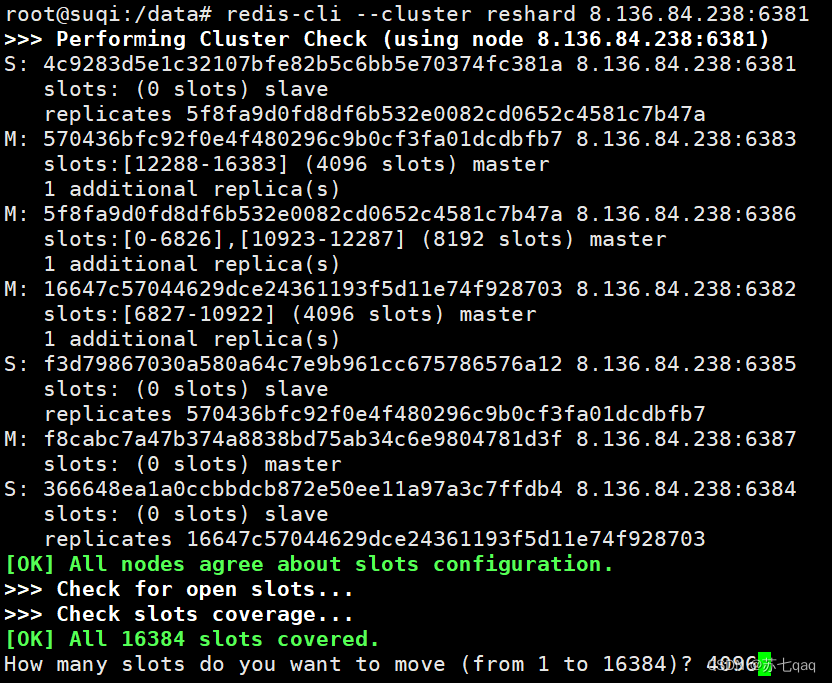
The number of slots allocated here =16384/ Number of machines =》 Number of slots allocated =16384/4=4096

Here, the node's id Number , Should be a new node 6387 Node number of

Here, all nodes are allocated 4096 A slot , So for all
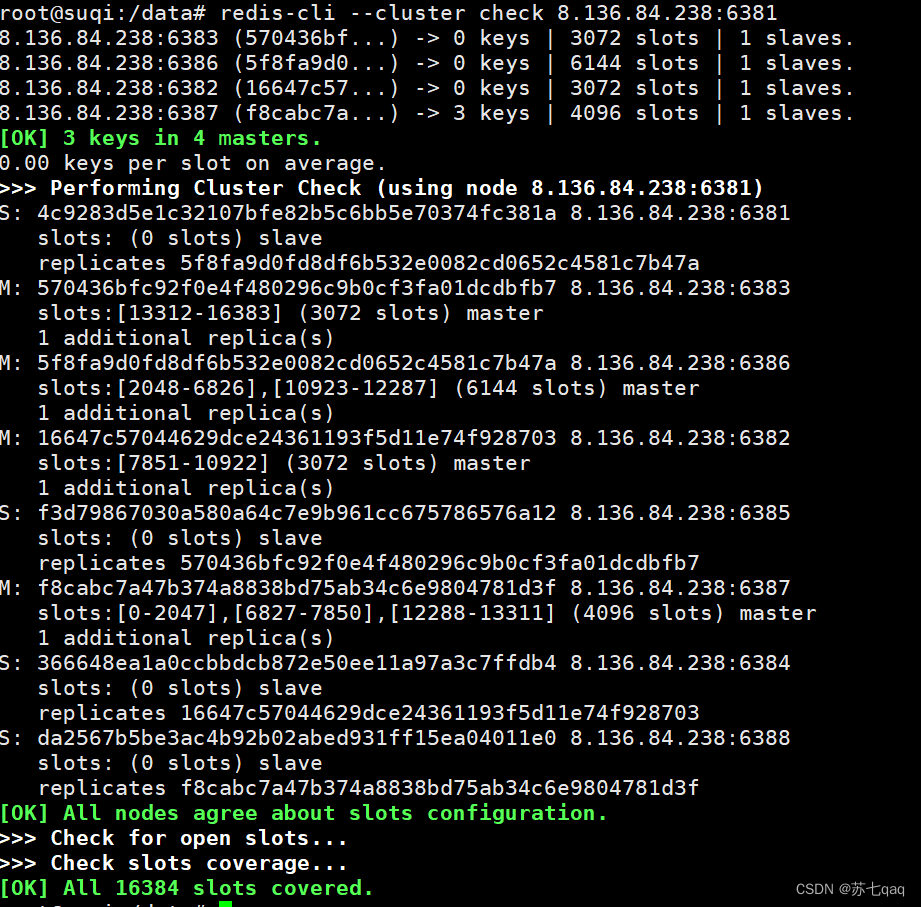
5.6 View slot point assignment
redis-cli --cluster check 8.136.84.238:6381

Why? 6387 The slot points allocated to the container are 3 A new interval , Because reallocation costs are too high , So the first three companies set aside a portion ,
from 6381/6382/6383 Separate out the three old nodes 1364 A pit for the new node 6387
5.7 Master node 6387 Assign slave nodes 6388
redis-cli --cluster add-node 8.136.84.238:6388 8.136.84.238:6387 --cluster-slave --cluster-master-id f8cabc7a47b374a8838bd75ab34c6e9804781d3f

5.8 Check the cluster I found that it has been divided
6. Master slave volume reduction
6.1 take 6387 6388 Two nodes are offline
6.2 Check the cluster , get 6388 The node of id
redis-cli --cluster check 8.136.84.238:6388 |

6.4 From the cluster 6388 The node to delete
redis-cli --cluster del-node 8.136.84.238:6388 da2567b5be3ac4b92b02abed931ff15ea04011e0

6.5 take 6387 Empty the slot number , Reassign slot numbers , And give them to the host ( It must be the host , Instead of a slave )6381
redis-cli --cluster reshard 8.136.84.238:6381

6.6 Check the cluster
redis-cli --cluster check 8.136.84.238:6381

Find out 6387 The node has no slots assigned to it , Instead, all of them are distributed to other container nodes
6.7 take 6387 Remove the cluster
redis-cli --cluster del-node 8.136.84.238:6387 f8cabc7a47b374a8838bd75ab34c6e9804781d3f
6.8 Review the cluster , It is found that both nodes have been eliminated , And realized volume reduction

边栏推荐
- 亚香香料深交所上市:市值40亿 鼎龙博晖与涌耀投资是股东
- User analysis aarrr model (pirate model)
- Heavyweight: the domestic ide was released, developed by Alibaba, and is completely open source! (high performance + high customization)
- 在Microsoft Exchange Server 2007中安装SSL证书的教程
- [QT] Chapter 10: Database
- 企业如何做好业务监控?
- 嵌入式开发基础之任务管理(线程管理)
- 【翻译】具有时间结构的特定信号的鲁棒提取(上)
- Graffiti intelligence passed the hearing: Tencent is an important shareholder planning to return to Hong Kong for listing
- 又一家破产清算:那些在时代和资本裹挟下风雨飘摇的游戏公司
猜你喜欢

Leetcode question brushing: hash table 03 (happy number)

Heavyweight: the domestic ide was released, developed by Alibaba, and is completely open source! (high performance + high customization)

亚香香料深交所上市:市值40亿 鼎龙博晖与涌耀投资是股东

渗透测试基础,初识渗透测试

【Qt】第三、四章:窗口部件、布局管理

Js25 topic

NetCF总结

诺亚财富通过聆讯:年营收43亿 汪静波有49%投票权,红杉是股东

Dataease template market officially released

What does logistics service and management mainly learn
随机推荐
杰理之添加定时器中断【篇】
汇编语言(1)基础知识
【NOI2014】15.起床困难综合症【二进制】
测试
高级计网笔记(四)
在Microsoft Exchange Server 2007中安装SSL证书的教程
吃顿饭的时间,学会simulink之BLDC基本原理
This year, Anhui master fund exploded
对比学习(Contrastive Learning)综述
VirtP4笔记
Dataease template market officially released
Jerry's broadcast MP3 prompt sound function [chapter]
学习编程只需要这三条建议!
可编程数据平面(论文阅读)
矩阵分析笔记(三-1)
Operation of simulated test platform for elevator driver test questions in 2022
南芯半导体冲刺科创板:年营收9.8亿 顺为红杉小米OPPO是股东
可编程交换机上的近似公平排队阅读笔记
DigiCert和GlobalSign单域名OV SSL证书对比评测
杰理之进入 soft off 后插拔 sd 卡会复位【篇】