当前位置:网站首页>[code case] website confession wall & to do list (including complete source code)
[code case] website confession wall & to do list (including complete source code)
2022-07-24 01:28:00 【Stella_ sss】
Webpage confession wall
hi ~~ Today I want to share two uses html、css and js Web page cases implemented . They are confession wall and to-do list .
Confession wall
1. Create content
<!DOCTYPE html>
<html lang="en">
<head>
    <meta charset="UTF-8">
    <meta http-equiv="X-UA-Compatible" content="IE=edge">
    <meta name="viewport" content="width=device-width, initial-scale=1.0">
    <title> Confession wall </title>
</head>
<body>
		<!--  Create a confession wall  -->
		<h1> Confession wall </h1>
        <p> Click Submit after entering , The information will be displayed in the table </p>
        <span> who :</span>
        <input type="text">
        <span> To whom :</span>
        <input type="text">
        <span> what did you say? :</span>
        <input type="text">
        <input type="button" value=" Submit ">

</body>
</html>

2. Adjust the style
The above effect is not very good , So let's adjust its style .
First, put each html Put the labels in place . as follows :
		<div class="container">
        <h1> Confession wall </h1>
        <p> Click Submit after entering , The information will be displayed in the table </p>
        <div class="row">
            <span> who :</span>
            <input class="edit" type="text">
        </div>
        <div class="row">
            <span> To whom :</span>
            <input class="edit" type="text">
        </div>
        <div class="row">
            <span> what did you say? :</span>
            <input class="edit" type="text">
        </div>
        <div class="row">
            <input type="button" value=" Submit " class="submit">
        </div>
    </div>
And then use style Labels and CSS Selector to adjust the style .
    <!--  Adjust the style  -->
    <style>
        * {

            margin: 0;
            padding: 0;
        }

        .container {

            width: 400px;
            margin: 0 auto;
        }

        h1 {

            text-align: center;
            padding: 20px 0;
        }

        p {

            color: #666;
            text-align: center;
            font-size: 14px;
            padding: 10px 0;
        }

        .row {

            height: 40px;
            display: flex;
            justify-content: center;
            align-items: center;
        }

        span {

            width: 100px;
            line-height: 40px;
        }

        .edit {

            width: 200px;
            height: 30px;
        }

        .submit {

            width: 304px;
            height: 40px;
            color: white;
            background-color: orange;
            border: none;
        }

    </style>

3. Implementation submission
    <!--  Implementation submission  -->
    <script>
        //  Register click events for click buttons
        var submit = document.querySelector('.submit');
        submit.onclick = function() {

            //1.  Get the contents of the edit box
            var edits = document.querySelectorAll('.edit');
            var from = edits[0].value;
            var to = edits[1].value;
            var message = edits[2].value;
            console.log(from + "," + to + "," + message);
            if (from == '' || to == '' || message == '') {

                return;
            }
            //2.  Construct new elements
            var row = document.createElement('div');
            row.className = 'row';
            row.innerHTML = from + ' Yes ' + to + ' say :' + message;
            //3.  Add a new element
            var container = document.querySelector('.container');
            container.appendChild(row);
            //4.  At the same time, clear the contents of the previous input box
            for (var i = 0; i < 3; i++) {

                edits[i].value = '';
            }
        }
    </script>
Try submitting a :
The final pattern

To do list
1. Add content
<!DOCTYPE html>
<html lang="en">
<head>
    <meta charset="UTF-8">
    <meta http-equiv="X-UA-Compatible" content="IE=edge">
    <meta name="viewport" content="width=device-width, initial-scale=1.0">
    <title> My to-do list </title>
</head>
<body>
    <div class="nav">
        <input type="text" class="task">
        <button> A new task </button>
    </div>
    <div class="container">
        <div class="todo">
            <h3> Hang in the air </h3>
        </div>
        <div class="done">
            <h3> Completed </h3>
        </div>
    </div>

</body>
</html>

It's very ugly here, isn't it ! So we need to adjust it ~
2. Adjust the style
    <style>
        * {

            margin: 0;
            padding: 0;
            box-sizing: border-box;
        }

        .container {

            width: 800px;
            margin: 0 auto;
            display: flex;
        }

        .todo, .done {

            width: 50%;
            height: 100%;
        }

        .container h3 {

            height: 50px;
            text-align: center;
            line-height: 50px;
            background-color: #333;
            color: #fff;
        }

        .nav {

            width: 800px;
            height: 100px;
            margin: 0 auto;
            display: flex;
            align-items: center;
        }

        .nav input {

            width: 600px;
            height: 50px;
        }

        .nav button {

            width: 200px;
            height: 50px;
            border: none;
            background-color: orange;
            color: #fff;
        }

    </style>
Realization function
Add a new to-do
    <!--  Realization function  -->
    <script>
        //  Add a new to-do
        var addTaskBtn = document.querySelector('.nav button');
        addTaskBtn.onclick = function() {

            //1.  Get task content
            var input = document.querySelector('.nav input');
            var task = input.value;
            //2.  Create new elements according to the task content
            var row = document.createElement('div');
            row.className = 'row';
            var checkbox = document.createElement('input');
            checkbox.type = 'checkbox';
            var span = document.createElement('span');
            span.innerHTML = task;
            var button = document.createElement('button');
            button.innerHTML = ' Delete ';
            row.appendChild(checkbox);
            row.appendChild(span);
            row.appendChild(button);
            //3.  Put the new node in the unfinished list
            var todo = document.querySelector('.todo');
            todo.appendChild(row);
            //4.  Clear the input box
            input.value = '';
        }
    </script>

You can see , The newly added layout is crowded , So we adjust its style , Sure Directly above style tag Set the style .
        .row {

            height: 50px;
            display: flex;
            align-items: center;
        }

        .row input {

            margin: 0 10px;
        }

        .row span {

            width: 300px;
        }

        .row button {

            width: 50px;
            height: 40px;
        }
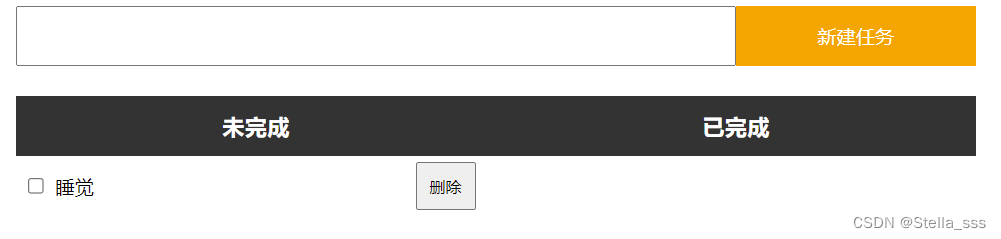
After the change , Overall, it looks more comfortable .
Completed items
Be careful , This should be when the user clicks the check box in front of the unfinished item , The page then puts the elements into the completed items .
			//  The code here is still written in addTaskBtn In the click event of
            //  Completed
            // 1. to checkbox Register click events
            checkbox.onclick = function() {

                //  Get parent element
                var row = this.parentNode;
                //  Let's go first checked by true, Calling onclick function
                if (this.checked) {

                    var target = document.querySelector('.done');
                } else {

                    var target = document.querySelector('.todo');
                }
                target.appendChild(row);
            }

You can see , Click the check box in front of the to-do list , Items moved to completed , Then click the checkbox in completed , Then the matter returns to the unfinished list .

Delete task
Last , We click on the event to register the deletion after the event , Complete the function of deleting tasks .
The same is to add the code directly in addTaskBtn In the click event of .
            //  Delete task
            button.onclick = function() {

                var row = this.parentNode;
                var grandParent = row.parentNode;
                grandParent.removeChild(row);
            }
The effect is left to everyone to try ~
Last
Today's two cases are shared here ~
I believe it's not difficult for you !
Through the practice of these two cases , You must have mastered the content introduced earlier and become more proficient !
Last , The full code has been uploaded to gitee La ~
If you don't understand the code given in the previous paragraph , Welcome to my code cloud and get it yourself !
Link to the complete code of the confession wall
If you think this article will help you , Remember to give me one button three times ~~
边栏推荐
- Introduction and environment construction of little bear sect
- 国产MCU和SOC崛起但特殊领域仍落后
- Hcip second day notes
- 网络类型(第三天笔记)
- Polymer synthesis technology
- Use and understanding of string functions (2)
- Hcip day 10 notes
- How safe is Volvo XC90? 5 seats and 7 seats are available
- 1000 okaleido tiger launched binance NFT, triggering a rush to buy
- HCIP第四天笔记
猜你喜欢

Sublime text 3 Chinese + add common plug-ins
Hcip day 6 notes
MGRE实验

Matlab extracts the original data in the illustrations of the paper - fig2data tool

1000 okaleido tiger launched binance NFT, triggering a rush to buy

面试了二三十家公司所总结的问题,Android面试吃完这一套没有拿不到的Offer......

128. 最长连续序列

Good doctor consultation - Yu Chi - oral information
Arm architecture and programming 3 -- key control LED (based on Baiwen arm architecture and programming tutorial video)

SCM learning notes 6 -- interrupt system (based on Baiwen STM32F103 series tutorials)
随机推荐
国产MCU和SOC崛起但特殊领域仍落后
Just started to use, ask some questions and tutorials or share posts
Interview question: what are the differences between ArrayList and LinkedList
网络类型(第三天笔记)
Vessel Segmentation in Retinal Image Based on Retina-GAN
B tree and b+ tree
HCIP第六天_特殊区域综合实验
Hcip first day notes
Good doctor consultation - Yu Chi - oral information
Idea setting automatic package import and useless package deletion
1000个Okaleido Tiger首发上线Binance NFT,引发抢购热潮
OSPF (fifth day notes)
SCM learning notes 8 -- keys and external interrupts (based on Baiwen STM32F103 series tutorials)
win11之缺点
HCIP第九天笔记
HCIP第二天笔记
How to solve cnpm stuck during execution?
IP address and subnet division (A2)
Network type
Hcip day 11 notes