当前位置:网站首页>ggplot2颜色设置总结
ggplot2颜色设置总结
2022-06-24 08:16:00 【qq_45759229】
参考
http://www.sthda.com/english/wiki/ggplot2-colors-how-to-change-colors-automatically-and-manually
http://www.cookbook-r.com/Graphs/Colors_(ggplot2)/
查看颜色
col.set.update <- c("#c10023", "#008e17", "#fb8500", "#f60000", "#FE0092", "#bc9000","#4ffc00", "#00bcac", "#0099cc",
                    "#D35400", "#00eefd", "#cf6bd6", "#99cc00", "#aa00ff", "#ff00ff", "#00896e",
                    "#f2a287","#ffb3ff", "#800000", "#77a7b7", "#0053c8", "#00cc99", "#007CC8")
image(1:length(col.set.update),1, as.matrix(1:length(col.set.update)),col=col.set.update,xlab = "", ylab = "")
结果如下
prepare data
# Convert dose and cyl columns from numeric to factor variables
ToothGrowth$dose <- as.factor(ToothGrowth$dose)
mtcars$cyl <- as.factor(mtcars$cyl)
head(ToothGrowth)
结果如下
head(mtcars)

basic plot
library(ggplot2)
# Box plot
ggplot(ToothGrowth, aes(x=dose, y=len)) +geom_boxplot()
# scatter plot
ggplot(mtcars, aes(x=wt, y=mpg)) + geom_point()
结果如下

颜色使用案例1
# box plot
ggplot(ToothGrowth, aes(x=dose, y=len)) +
  geom_boxplot(fill='#A4A4A4', color="darkred")
# scatter plot
ggplot(mtcars, aes(x=wt, y=mpg)) +
  geom_point(color='darkblue')
结果如下

颜色使用案例2
# Box plot
bp<-ggplot(ToothGrowth, aes(x=dose, y=len, fill=dose)) +
  geom_boxplot()
bp
# Scatter plot
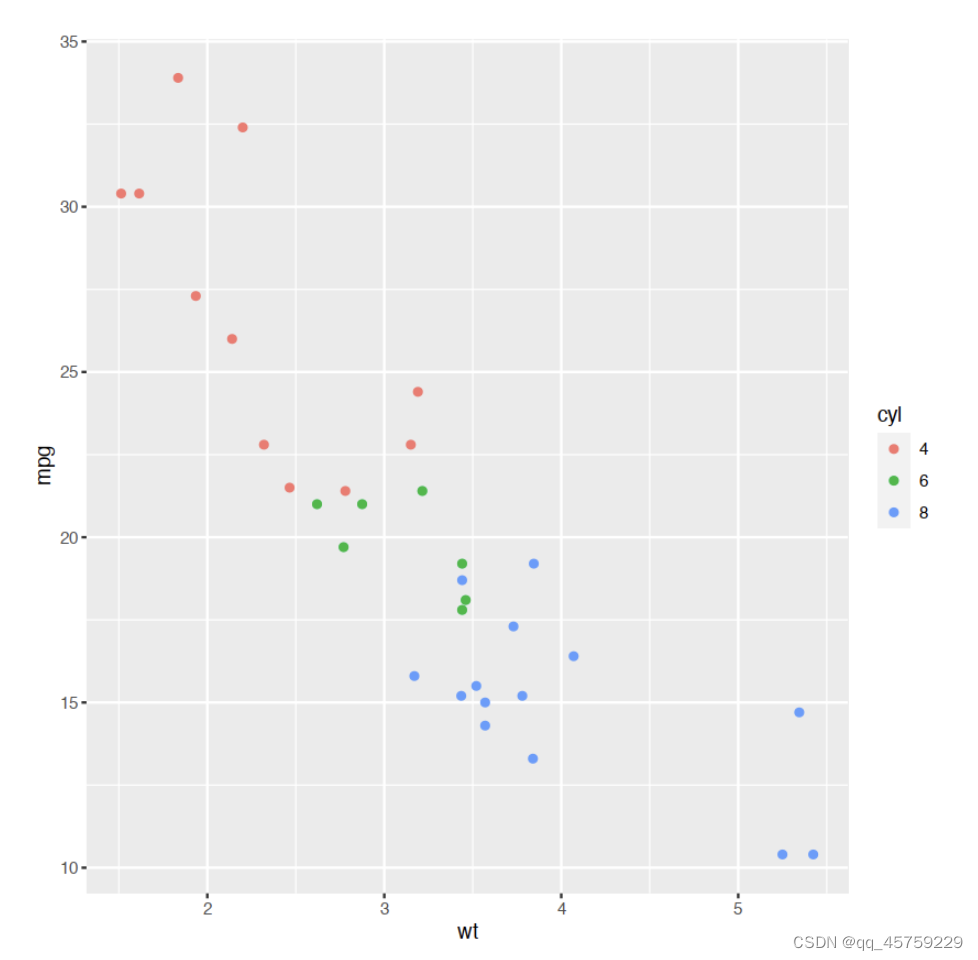
sp<-ggplot(mtcars, aes(x=wt, y=mpg, color=cyl)) + geom_point()
sp
结果如下
颜色使用案例3
# Box plot
bp + scale_fill_hue(l=40, c=35)
# Scatter plot
sp + scale_color_hue(l=40, c=35)


颜色使用案例4
# Box plot
bp + scale_fill_manual(values=c("#999999", "#E69F00", "#56B4E9"))
# Scatter plot
sp + scale_color_manual(values=c("#999999", "#E69F00", "#56B4E9"))
结果如下

颜色使用案例5
# Box plot
bp + scale_fill_manual(breaks = c("2", "1", "0.5"),
                       values=c("red", "blue", "green"))
# Scatter plot
sp + scale_color_manual(breaks = c("8", "6", "4"),
                        values=c("red", "blue", "green"))
结果如下

颜色使用案例6
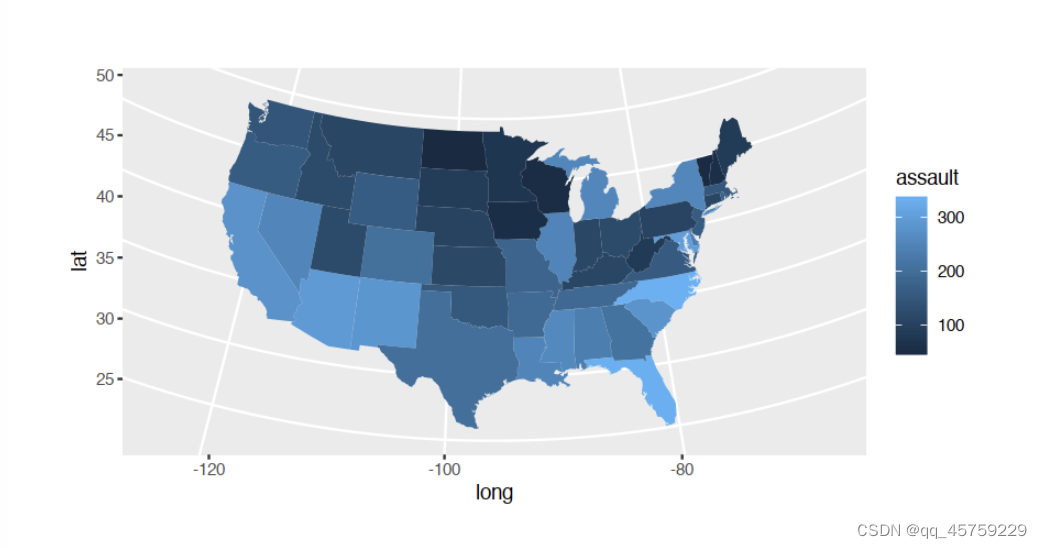
library(ggplot2)
if (require("maps")) {

states <- map_data("state")
arrests <- USArrests
names(arrests) <- tolower(names(arrests))
arrests$region <- tolower(rownames(USArrests))

choro <- merge(states, arrests, sort = FALSE, by = "region")
choro <- choro[order(choro$order), ]
p=ggplot(choro, aes(long, lat)) +
  geom_polygon(aes(group = group, fill = assault)) +
  coord_map("albers",  lat0 = 45.5, lat1 = 29.5)
print(p)
}

# if (require("maps")) {

# p=ggplot(choro, aes(long, lat)) +
# geom_polygon(aes(group = group, fill = assault / murder)) +
# coord_map("albers", lat0 = 45.5, lat1 = 29.5)
# }
# print(p)
颜色使用案例7
# Two variables
df <- read.table(header=TRUE, text='
 cond yval
    A 2
    B 2.5
    C 1.6
')

# Three variables
df2 <- read.table(header=TRUE, text='
 cond1 cond2 yval
    A      I 2
    A      J 2.5
    A      K 1.6
    B      I 2.2
    B      J 2.4
    B      K 1.2
    C      I 1.7
    C      J 2.3
    C      K 1.9
')

library(ggplot2)
# Default: dark bars
ggplot(df, aes(x=cond, y=yval)) + geom_bar(stat="identity")
# Bars with red outlines
ggplot(df, aes(x=cond, y=yval)) + geom_bar(stat="identity", colour="#FF9999")
# Red fill, black outlines
ggplot(df, aes(x=cond, y=yval)) + geom_bar(stat="identity", fill="#FF9999", colour="black")


# Standard black lines and points
ggplot(df, aes(x=cond, y=yval)) +
    geom_line(aes(group=1)) +     # Group all points; otherwise no line will show
    geom_point(size=3)
# Dark blue lines, red dots
ggplot(df, aes(x=cond, y=yval)) +
    geom_line(aes(group=1), colour="#000099") +  # Blue lines
    geom_point(size=3, colour="#CC0000")         # Red dots
结果如下


颜色使用案例8
# Box plot
bp + scale_fill_brewer(palette="Dark2")
# Scatter plot
sp + scale_color_brewer(palette="Dark2")
结果如下

颜色使用案例9
# Install
#install.packages("wesanderson")
# Load
library(wesanderson)
# Box plot
bp+scale_fill_manual(values=wes_palette(n=3, name="Royal1"))
# Scatter plot
sp+scale_color_manual(values=wes_palette(n=3, name="Royal1"))
结果如下

颜色使用案例10
# Box plot
bp + scale_fill_grey() + theme_classic()
# Scatter plot
sp + scale_color_grey() + theme_classic()
结果如下

颜色使用案例11
# Box plot
bp + scale_fill_grey(start=0.8, end=0.2) + theme_classic()
# Scatter plot
sp + scale_color_grey(start=0.8, end=0.2) + theme_classic()


颜色使用案例12
# Color by qsec values
sp2<-ggplot(mtcars, aes(x=wt, y=mpg, color=qsec)) + geom_point()
sp2
# Change the low and high colors
# Sequential color scheme
sp2+scale_color_gradient(low="blue", high="red")
# Diverging color scheme
mid<-mean(mtcars$qsec)
sp2+scale_color_gradient2(midpoint=mid, low="blue", mid="white",
                     high="red", space ="Lab" )
结果如下


颜色使用案例13
set.seed(1234)
x <- rnorm(200)
# Histogram
hp<-qplot(x =x, fill=..count.., geom="histogram")
hp
# Sequential color scheme
hp+scale_fill_gradient(low="blue", high="red")


颜色使用案例14
# Scatter plot
# Color points by the mpg variable
sp3<-ggplot(mtcars, aes(x=wt, y=mpg, color=mpg)) + geom_point()
sp3
# Gradient between n colors
sp3+scale_color_gradientn(colours = rainbow(5))


颜色使用案例15
# Bars: x and fill both depend on cond2
ggplot(df, aes(x=cond, y=yval, fill=cond)) + geom_bar(stat="identity")

# Bars with other dataset; fill depends on cond2
ggplot(df2, aes(x=cond1, y=yval)) +
    geom_bar(aes(fill=cond2),   # fill depends on cond2
             stat="identity",
             colour="black",    # Black outline for all
             position=position_dodge()) # Put bars side-by-side instead of stacked

# Lines and points; colour depends on cond2
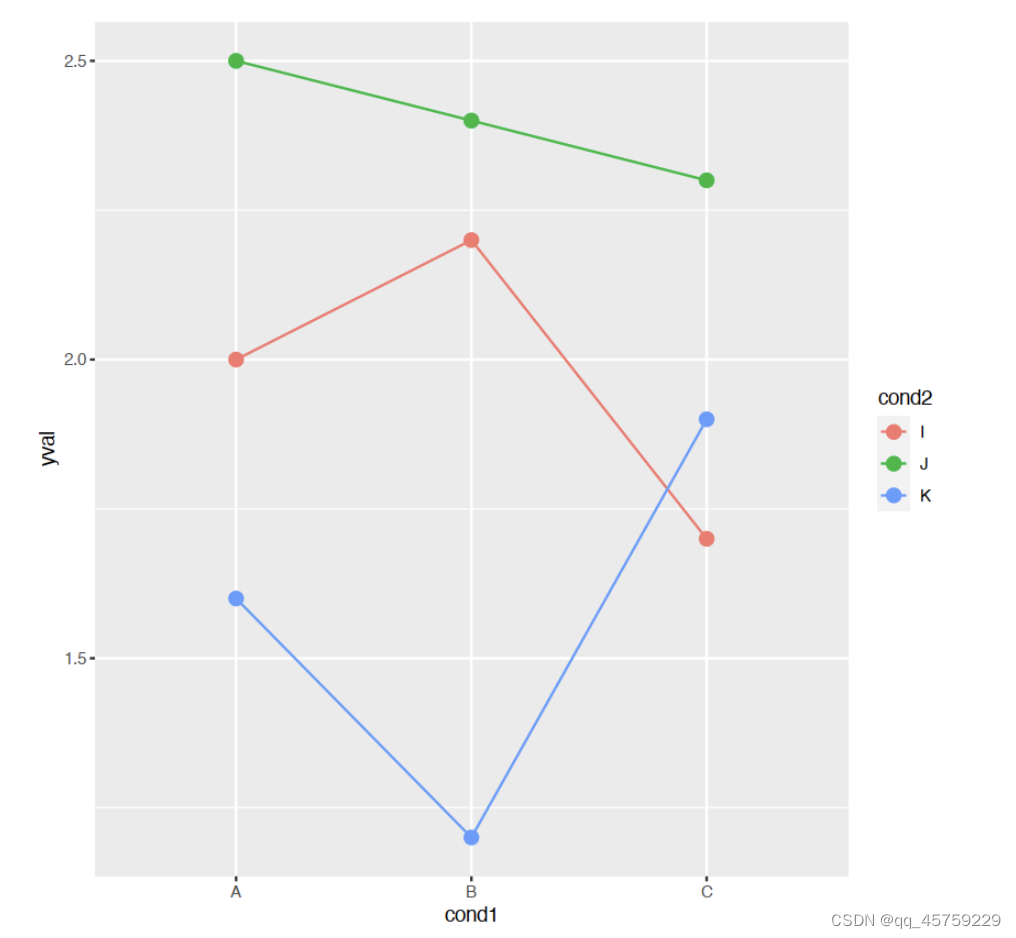
ggplot(df2, aes(x=cond1, y=yval)) +
    geom_line(aes(colour=cond2, group=cond2)) + # colour, group both depend on cond2
    geom_point(aes(colour=cond2),               # colour depends on cond2
               size=3)                          # larger points, different shape
## Equivalent to above; but move "colour=cond2" into the global aes() mapping
# ggplot(df2, aes(x=cond1, y=yval, colour=cond2)) +
# geom_line(aes(group=cond2)) +
# geom_point(size=3)


边栏推荐
- 嵌入式 | 硬件转软件的几条建议
- The list of open source summer winners has been publicized, and the field of basic software has become a hot application this year
- 零基础自学SQL课程 | 相关子查询
- Support vector machine (SVC, nusvc, linearsvc)
- EasyExcel单sheet页与多sheet页写出
- Applet cloud data, data request a method to collect data
- RISC-V架构下 FPU Context 的动态保存和恢复
- 小白学习MySQL - 增量统计SQL的需求
- 【输入法】迄今为止,居然有这么多汉字输入法!
- Lu Qi: I am most optimistic about these four major technology trends
猜你喜欢

支持向量机(SVC,NuSVC,LinearSVC)

Yolox backbone -- implementation of cspparknet

L01_ How is an SQL query executed?

CF566E-Restoring Map【bitset】

Redis实现全局唯一ID

Cdga | how can we do well in data governance?
Netrca: an effective network fault cause localization

eBanb B1手环刷固件异常中断处理

【LeetCode】541. Reverse string II

In depth analysis of Apache bookkeeper series: Part 3 - reading principle
随机推荐
L01_ How is an SQL query executed?
解决:jmeter5.5在win11下界面上的字特别小
RISC-V架构下 FPU Context 的动态保存和恢复
带文字的seekbar : 自定义progressDrawable/thumb :解决显示不全
leetcode--链表
Installation of sophus package in slam14 lecture
十二、所有功能实现效果演示
MySQL - SQL statement
[e325: attention] VIM editing error
[noi simulation] pendulum (linear algebra, Du Jiao sieve)
Get post: do you really know the difference between requests??????
Squid proxy application
June 13-19, 2022 AI industry weekly (issue 102): career development
【LeetCode】541. Reverse string II
Digital cloud released the 2022 white paper on digital operation of global consumers in the beauty industry: global growth solves marketing problems
Framework tool class obtained by chance for self use
每周推荐短视频:谈论“元宇宙”要有严肃认真的态度
Cmake命令之target_compile_options
NLP-D59-nlp比赛D28—我想,也好—阶段总结—心态调整
How to import MDF and LDF files into MySQL workbench