当前位置:网站首页>Several methods of transferring parameters from child components to parent components
Several methods of transferring parameters from child components to parent components
2022-07-23 13:55:00 【I can't type code】
Several methods of transferring parameters from child components to parent components
In use vue When the framework writes a project , More or less, you will encounter the method of transferring parameters from a child component to a parent component . As a novice , It's really a headache , So there is this summary written by Xiaobai , Don't talk much , Start !
The following methods are all implemented based on these two parent-child component structures :
- Parent component
<template>
  <div class="parent">
    <div> I am the parent component </div>
    <div> The message I received is :<span class="msg">{
   {msgP}}</span></div>
    <div> In the warehouse msg: <span class="msg">{
   {this.$store.state.msg}}</span></div>
    <Child :testProps='testProps' @child='handlerChild'/>
  </div>
</template>

export default {
  name: 'ParentView',

  data() {
    return {
      msgP:'',
    };
  },

  mounted() {

  },

  methods: {

  },
};

<style scoped>
.parent {
  width: 400px;
  height: 100px;
  /* background: pink; */
}
.msg {
  color: red;
}
</style>
- Child components
<template>
  <div class="child">
    <div> I am a subcomponent </div>
    <button class="button" >porps Transfer function </button>
    <button class="button" > Custom events </button>
    <button class="button" > Global event bus </button>
    <button class="button" > News subscription and Publishing </button>
    <button class="button" >vuex Warehouse </button>
  </div>
</template>

<script>
export default {
  name: 'ChildView',

  data() {
    return {

    };
  },

  mounted() {

  },

  methods: {

  },
};
</script>

<style scoped>
.child {
  width: 400px;
  height: 100px;
  /* background-color: skyblue; */
}
</style>
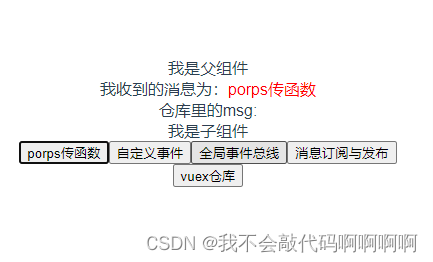
1、props Transfer function
Ideas : Define a function in the parent component , adopt props Pass to subcomponent , Then call the function of the parent component in the child component , To pass the parameters of the child component to the parent component .
Realization :
Define a function in the parent component to msg assignment ( There are parameters !), Re pass props Pass to subcomponent , In the subcomponent call
Parent component :
methods: {
    //  The test uses the function props Pass to subcomponent , Call through subcomponents
    testProps(msg){
      this.msgP = msg
    },
  },
Child components :
//  receive
props:['testProps'],
//  stay click Call in event
<button class="button" @click="testProps(msg1)">porps Transfer function </button>
2、 Custom events
Ideas : Define custom events in the parent component , Its content is for the parent component msg assignment , Pass in subcomponent emit Trigger custom events in the parent component .
Parent component :
//  Define custom events
<Child :testProps='testProps' @child='handlerChild'/>

methods: {
    //  Custom events , stay child Called when the event is triggered
    handlerChild(msg){
    	this.msgP = msg
    }
},
Child components :
//  adopt click Function , use emit Trigger custom event
<button class="button" @click="testEmit"> Custom events </button>

methods: {
    //  adopt emit Start custom events child
    testEmit(){
    	this.$emit('child',this.msg2)
    },
},

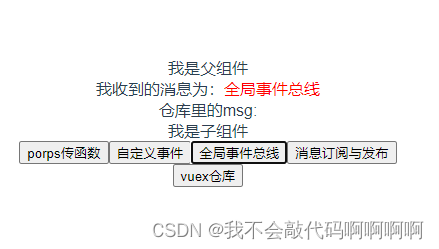
3、 Global event bus
Ideas : to vue Bind one to the prototype chain $bus, stay bus Bind events and trigger events on , You can communicate freely in various components
main.js:
new Vue({
  render: h => h(App),
  //  Bind on the prototype chain bus
  beforeCreate(){
    Vue.prototype.$bus = this
  }
}).$mount('#app')
Parent component :
  //  Bind to the lifecycle function
  mounted() {
    //  Global event bus , Bind events to vue The prototype chain $bus On
    this.$bus.$on('testBus',(msg) =>{
      this.msgP = msg
    })
  },
Child components :
//  adopt click Function , use emit Trigger bus Events on the
<button class="button" @click="Bus"> Global event bus </button>

methods: {
    //  adopt emit Events come and go $bus Events on the
    Bus(){
      this.$bus.$emit('testBus',this.msg3)
    },
  },
4、 News subscription and Publishing
Ideas : adopt pubsub-js Plug-in implementation , Publish messages in subcomponents , Receive messages in the parent component
Realization :
//  download pubsub-js
npm -i pubsub-js
Parent component :
//  Import pubsub
import pubsub from 'pubsub-js'

//  Subscribe in the lifecycle function testpubsub Information about
  mounted() {
    //  News subscription , subscribe testpubsub Published messages
    this.pubId = pubsub.subscribe('testPubsub',(msgName, data) => {
      this.msgP = data
    })
  },
Child components :
//  Trigger by clicking on the function
<button class="button" @click="publish"> News subscription and Publishing </button>

  methods: {
    //  Message publishing function , When the message is released , Where you subscribe, you will receive
    publish(){
      pubsub.publish('testPubsub',this.msg4)
    },
  },

5、vuex Warehouse
Ideas : adopt vuex plug-in unit , Store data to vuex Each component inside can call , It naturally solves the problem of transferring parameters from child components to parent components
Realization :
//  download vuex(vue2, Use 3 The version will not report errors
npm -i vuex(@3)
main.js initialization :
import store from './store/index'

new Vue({
  render: h => h(App),
  store,
  //  Bind on the prototype chain bus
  beforeCreate(){
    Vue.prototype.$bus = this
  }
}).$mount('#app')
New folder store, New file index.js initialization
store/index.js:
//  introduce vue
import Vue from 'vue'
//  introduce vuex
import Vuex from 'vuex'

//  stay vue Use on your body vuex
Vue.use(Vuex)

//  Create a new one store Warehouse , And expose it
export default new Vuex.Store({
  // vuex Where to store data
  state: {
    msg:'',
  },
  //  Can be interpreted as vuex Of computed?
  getters: {
  },
  //  Yes state Data modification in
  mutations: {
    updateMsg(state,msg){
      state.msg = msg
    }
  },
  //  Preprocess the data , Or asynchronous processing ?
  actions: {
  },
  //  The warehouse can be decomposed into small warehouses
  modules: {
  }
})
Parent component :
<div> In the warehouse msg: <span class="msg">{
   {this.$store.state.msg}}</span></div>
Child components :
<button class="button" @click="updatemsg">vuex Warehouse </button>

methods: {
    //  Use this function to update the data in the warehouse , Other components can call
    updatemsg(){
    	this.$store.commit('updateMsg', this.msg5);
    }
}
[ Failed to transfer the external chain picture , The origin station may have anti-theft chain mechanism , It is suggested to save the pictures and upload them directly (img-GN8oQdy7-1658239941556)(C:\Users\VK\AppData\Roaming\Typora\typora-user-images\image-20220719221054205.png)]
Child components :
<button class="button" @click="updatemsg">vuex Warehouse </button>

methods: {
    //  Use this function to update the data in the warehouse , Other components can call
    updatemsg(){
    	this.$store.commit('updateMsg', this.msg5);
    }
}

My little white , If there is any wrong , Welcome to correct .
Last , Enclosed Source warehouse address
source address :https://github.com/2019VK/child-parent.git
边栏推荐
- 解决报错:Uncaught (in promise) NavigationDuplicated: Avoided redundant navigation to current location: “
- LeetCode_ 491_ Longest increasing subsequence
- 数据库系统原理与应用教程(046)—— MySQL 查询(八):分组查询(GROUP BY)
- 子组件向父组件传参的几种方法
- 2022暑假软件创新实验室集训 项目实战1
- [JS advanced] basics of regular expressions - about regular expressions you want to know_ 01
- 图形管线(一)后处理阶段 alpha测试 模版测试 深度测试 混合
- C: readonly and Const
- MATLAB:将PNG图片转成txt文件
- 【STM32】串口通信基础知识
猜你喜欢

去除标题栏
Common mouse events and keyboard events

Unity makes simple intercepting close range artillery - how to predict the strike target
解决报错:Uncaught (in promise) NavigationDuplicated: Avoided redundant navigation to current location: “

欧洲“气荒”对中国有哪些影响?

Learn to use canvas to build line chart, bar chart and pie chart

Parameters of high-performance JVM

QT creator.Pro file adds the corresponding library according to the kit
Unity制作简单拦截近防炮——如何预测打击目标

微服务重点
随机推荐
回溯法解决 八皇后问题
High school Chinese teaching material examination outline
[Muduo] poller abstract class
Redis常用命令
Unity关于本地加载图片涉及webrequest或者byte
解决报错:Uncaught (in promise) NavigationDuplicated: Avoided redundant navigation to current location: “
数据库系统原理与应用教程(043)—— MySQL 查询(五):对查询结果排序
These five points should be considered in the production of enterprise science and technology exhibition hall
QNX modify system time
CenterNet目标检测模型及CenterFusion融合目标检测模型
【STM32】串口通信基础知识
[机缘参悟-50]:鬼谷子-第十二符言篇-当好领导者的艺术:守其位,观四方,洞危险,广言路,虚谏言,定规则,明赏罚,符名实,得民心。
概率沉思录:2.The quantitative rules
图像处理5:膨胀
第四次作业
Remove title block
Learn to use canvas to build line chart, bar chart and pie chart
单例模式实现及防止反射与序列化
Starfish OS:以现实为纽带,打造元宇宙新范式
[play with FPGA in simple terms to learn 10 ----- simple testbench design]