当前位置:网站首页>CANN训练营学习2022第二季 模型系列 动漫风格化和AOE ATC调优
CANN训练营学习2022第二季 模型系列 动漫风格化和AOE ATC调优
2022-07-24 16:51:00 【irrationality】
1、unzip -O GBK *.zip
这个命令可以解包中文压缩包 (特别是由windows系统传到linux系统上面的)
2、迁移脚本
跑通之后
cd ..
git clone https://gitee.com/ascend/tensorflow.git
cd tensorflow/convert_tf2npu #进入工具包
pip3 install pandas
pip3 install xlrd==1.2.0
pip3 install openpyxl
pip3 install tkintertable
pip3 install google_pasta
python3 main.py -i ~/competition/LeNet
job configure 如下

注意这两个路径不能为桶根目录
运行代码
报错:ImportError: cannot import name ‘tutorials’ from ‘tensorflow_core.examples’
这里的MNIST数据集是利用tensorflow的库来下载的。需要改一下Train.py中的import方式。
import tensorflow as tf
from tensorflow.examples.tutorials.mnist import input_data
同时data作相应修改
mnist = input_data.read_data_sets(“/home/ma-user/modelarts/user-job-dir/code/MNIST_data/”, one_hot=True)

3、更换模型
下载一个resnet101模型
上传到model文件夹
src/sample_process.cpp 文件中定制代码。修改第82行如下图。
在 src/sample_process.cpp 文件中定制代码。修改第82行如下图。
修改第95~98行为需要的文件,如下图。如果与下图相符,则不用修改。

4、动漫风格化
参考:https://gitee.com/ascend/samples/tree/master/python/contrib/cartoonGAN_picture
https://www.hiascend.com/document/detail/zh/CANNCommunityEdition/51RC2alpha005/developmenttools/devtool/aoe_16_002.html
cd ~/samples/python/contrib/cartoonGAN_picture
cd model
# 为了方便下载,在这里直接给出原始模型下载及模型转换命令,可以直接拷贝执行。也可以参照上表在modelzoo中下载并手工转换,以了解更多细节。
cd ${
    HOME}/samples/python/contrib/cartoonGAN_picture/model
wget https://modelzoo-train-atc.obs.cn-north-4.myhuaweicloud.com/003_Atc_Models/AE/ATC%20Model/cartoonization/cartoonization.pb
wget https://modelzoo-train-atc.obs.cn-north-4.myhuaweicloud.com/003_Atc_Models/AE/ATC%20Model/cartoonization/insert_op.cfg
使用AOE调优
修改HwHiAiUser的用户密码
su -
passwd HwHiAiUser
apt-get install pciutils
cd ${
    HOME}/samples/python/contrib/cartoonGAN_picture/model

aoe --model="./cartoonization.pb" --output_type=FP32 --input_shape="train_real_A:1,256,256,3" --input_format=NHWC --output="cartoonizationv2_256" --framework=3 --precision_mode=allow_fp32_to_fp16 --insert_op_conf=insert_op.cfg --job_type=2

atc --model="./cartoonization.pb" --output_type=FP32 --input_shape="train_real_A:1,256,256,3" --input_format=NHWC --output="cartoonizationv2_256" --framework=3  --precision_mode=allow_fp32_to_fp16 --soc_version=Ascend310 --insert_op_conf=insert_op.cfg


cd ~
mkdir AscendProjects
cd AscendProjects
git clone https://gitee.com/ascend/tools.git
export DDK_PATH=/home/HwHiAiUser/Ascend/ascend-toolkit/latest
export NPU_HOST_LIB=/home/HwHiAiUser/Ascend/ascend-toolkit/latest/acllib/lib64/stub
cd $HOME/AscendProjects/tools/msame/
./build.sh g++ $HOME/AscendProjects/tools/msame/out

cd ${
    HOME}/samples/python/contrib/cartoonGAN_picture/model

cd ~/AscendProjects/tools/msame/out
./msame --model ${
    HOME}/samples/python/contrib/cartoonGAN_picture/model/cartoonizationv2_256.om --output output/ --loop 100

但是调优大概持续了一个多小时,三千多秒

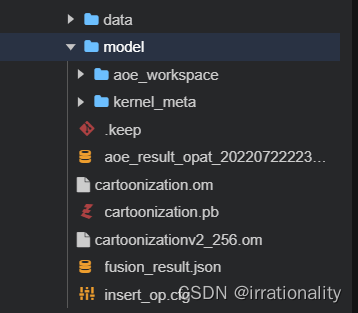


可以看到我们新生成的om文件
重新编译
cd $HOME/samples/python/contrib/cartoonGAN_picture/data
wget https://c7xcode.obs.cn-north-4.myhuaweicloud.com/models/cartoonGAN_picture/scenery.jpg
cd ../src
python3.6 cartoonization.py ../data/
在安装numpy时,遇到了一个问题
FileNotFoundError: [Errno 2] No such file or directory: ‘/usr/local/python3.7.5/bin/pip’
 which pip
     /home/HwHiAiUser/.local/bin/pip
 sudo ln -s /home/HwHiAiUser/.local/bin/pip /usr/local/python3.7.5/bin/pip

这样pip安装就装在的python3.7.5
现在就可以了
pip install --upgrade pip
先配置源
pip config set global.index-url https://pypi.tuna.tsinghua.edu.cn/simple
然后修改为
[global]
index-url = https://repo.huaweicloud.com/repository/pypi/simple
trusted-host = repo.huaweicloud.com
timeout = 120

pip install numpy
pip install opencv-python
find ../../../ -name "acllite_utils*"
cp ../../../common/acllite/* ./
python3.7.5 cartoonization.py ../data/

转换成功,去out下看看
就得到了生成的图像。
边栏推荐
- What does Baidu promote "delete and recall" mean?
- ARP 入门
- 安全的证券公司有哪些?我想在手机上买股票
- Causes and solutions of QT signal and slot connection failure
- [Nanjing Agricultural University] information sharing of postgraduate entrance examination and re examination
- 【技术】uniapp之聊天室 demo
- VSCode如何鼠标滚轮放大界面
- 709. Convert to lowercase letters
- Unity camera free movement control
- QT keyboard event (II) -- long press the key to trigger the event event repeatedly, and the problem is solved
猜你喜欢
EF LINQ Miscellany

ARP 入门

EMQ Yingyun technology was listed on the 2022 "cutting edge 100" list of Chinese entrepreneurs

我们为什么要推出Getaverse?

Development dynamics | stonedb 2022 release milestone

15、ARM嵌入式系统:如何用PC调试单板

Meeting OA project progress (II)

小端格式和大端格式(Little-Endian&Big-Endian)

thinkphp3.2.5无法跳转到外部链接

IP day 13 notes
随机推荐
IP第十三天笔记
Qsqldatabase: solution of qmmysql driver not loaded
Axi protocol (1): introduction to AMBA bus, introduction to Axi concept and background, characteristics and functions of Axi protocol
【技术】uniapp 之 在线选座 demo
The differences of several deletions in SQL
1163: SongGe's score splitting (C language)
Getting started with ARP
Summary of experience in using.Net test framework xUnit, mstest, specflow
Parental delegation mechanism
[sequential logic circuit] - counter
Mcd12q1 data shows multiple classifications in envi
GEO satellite data download
QT design robot simulation controller -- key control robot joint rotation
Jenkins cli command details
Meeting OA project progress (I)
[machine learning basics] - another perspective to explain SVM
How to realize seamless rotation map? Write it again with native JS
OS Experiment 5 process switching based on kernel stack switching
Sword finger offer 48. the longest substring without repeated characters
CPU comparison