当前位置:网站首页>Data analysis of time series (III): decomposition of classical time series
Data analysis of time series (III): decomposition of classical time series
2022-07-23 12:19:00 【-Send gods-】
I have completed the previous two blogs , Readers who haven't read it yet please read it first :
5、 ... and . Time series decomposition
It has been introduced before that the seasonal characteristics of time series data can be divided into additive seasonality and multiplicative seasonality , Therefore, there are two methods to decompose time series data: additive decomposition and multiplicative decomposition . The following methods are manual and automatic ( call statsmodes.seasonal_decompose) To achieve decomposition , The reason for using manual method is to let readers thoroughly understand the built-in logic of time series decomposition .
5.1 Judgment of seasonal cycle
The data of time series often show the law of periodic change , This cyclical change law is often brought about by seasonal factors , If the time granularity of your time series data is time ( Such as hours ), Then its seasonal cycle may be 24, If the granularity of time is days , The seasonal cycle may be 7, If the time granularity is month , The seasonal cycle may be 12, If the time granularity is quarterly , Then its seasonal cycle may be 4. Now let's look at the trend chart of the data set of the number of international airlines .
df=pd.read_csv("airline_Passengers.csv")
df['Period']=pd.to_datetime(df['Period'])
df.plot(x='Period',y='#Passengers',title="Airline passengers",figsize=(10,6));
xcoords = ['1950-01', '1951-01', '1952-01', '1953-01', '1954-01',
           '1955-01', '1956-01', '1957-01', '1958-01', '1959-01-01','1960-01']
for xc in xcoords:
    plt.axvline(x=xc, color='blue', linestyle='--')
The time range of this data set ranges from 1949-1960 common 12 year , The granularity of time is month , That is, every month 1 Data 12 Year total 144 Monthly data , Because there are 12 Months , Therefore, it is generally believed that the seasonal cycle of this data set is 12, That is, every 12 Monthly data will fluctuate periodically , This can be seen from the variation law of the data within the blue vertical lines in the above figure ( The blue vertical line is at the beginning of each year ), The data in the above figure is every 12 There are periodic fluctuations in months and the annual fluctuation range will gradually increase , This shows the seasonal characteristics of multiplication .
5.2 Additive decomposition ( Manual method )
step 1: Calculate the trend period term
If the seasonal cycle m When it is an odd number, we use the simple moving average method to calculate the trend periodic term , The box m-MA To calculate the trend period term , If seasonal cycle m For even numbers 2×m-MA To calculate the trend period term , In the above example, the seasonal cycle is 12 Is an even number, so you need to use 2×m-MA To calculate the trend period term .
order=12
df[str(order)+'-MA']=df['#Passengers'].rolling(window=order).mean().shift(-int(order/2))
df['2×12-MA']=df[str(order)+'-MA'].rolling(window=2).mean()
step 2: Calculate the detrended sequence
We need to remove the impact of trends from the original data set , The box #Passengers Example subtraction 2×12-MA Column gets a new column :detrended
df['detrended']=df['#Passengers']-df['2×12-MA']
df.plot(x='Period',
        y=['#Passengers','2×12-MA','detrended'],
        ylabel='#Passengers',figsize=(10,6));
step 3: Calculate the seasonal term
The basic idea of calculating the seasonal term is :1. According to the time granularity of the data ( Hours 、 God 、 month 、 season 、 Years etc. ) Calculate average ( For example, if the time granularity of the data is month , Then calculate every month (1-12 month ) Average value in all years ),2. Subtract the detrended value from these averages (detrended) Average value , 3. Expand the number of results .
# Number of records
num_data=df.shape[0]
# Seasonal cycle
period=12
#1. Calculate monthly average
df['month']=df.Period.apply(lambda x:pd.to_datetime(x).month)
month_mean=df.groupby('month').detrended.mean().values
#2. Monthly average minus trend average
detrended_month_mean=month_mean-df.detrended.mean()
#3. Expand the number of results
df['seasonal'] = np.tile(detrended_month_mean,num_data //period)[:num_data]
df=df.drop(['month'],axis=1)

df.plot(x='Period',
        y=['#Passengers','2×12-MA','seasonal'],
        ylabel='#Passengers',figsize=(10,6));
step 4: Calculated residual error
The calculation of residual error is relatively simple as long as the trend value is removed (detrended) Subtract the seasonal items (seasonal) You can get the residual :
# Calculated residual error
df['resid']=df.detrended-df.seasonal
df.plot(x='Period',
        y=['#Passengers','2×12-MA','resid'],
        ylabel='#Passengers',figsize=(10,6));
Finally, put the trend 、 Season item 、 The residuals are displayed together :
df['Period'] = pd.to_datetime(df['Period'])
plt.figure(figsize=(10,8))
plt.subplot(4,1,1)
plt.plot(df.Period.values,df['#Passengers'].values)
plt.ylabel('#Passengers');
plt.title('Additive Decomposition');
plt.subplot(4,1,2);
plt.plot(df.Period.values,df['2×12-MA'].values)
plt.ylabel('trend')
plt.subplot(4,1,3);
plt.plot(df.Period.values,df['seasonal'].values)
plt.ylabel('seasonal')
plt.subplot(4,1,4);
plt.scatter(df.Period.values,df['resid'].values)
plt.ylabel('resid');
5.3 Multiplicative decomposition ( Manual method )
step 1: Calculate the trend period term
Same as addition
step 2: Calculate the detrended sequence
Divide the raw data by the trend , The box #Passengers example Divide 2×12-MA Column gets a new column :detrended
df['detrended']=df['#Passengers']/df['2×12-MA']step 3: Calculate the seasonal term
The basic idea of calculating the seasonal term is :1. According to the time granularity of the data ( Hours 、 God 、 month 、 season 、 Years etc. ) Calculate average ( For example, if the time granularity of the data is month , Then calculate every month (1-12 month ) Average value in all years ),2. Average these values again Divide Detrend value (detrended) Average value , 3. Expand the number of results .
# Number of records
num_data=df.shape[0]
# Seasonal cycle
period=12
#1. Calculate monthly average
df['month']=df.Period.apply(lambda x:pd.to_datetime(x).month)
month_mean=df.groupby('month').detrended.mean().values
#2. Divide the monthly average by the trend average
detrended_month_mean=month_mean/df.detrended.mean()
#3. Expand the number of results
df['seasonal'] = np.tile(detrended_month_mean,num_data //period)[:num_data]
df=df.drop(['month'],axis=1)
step 4: Calculated residual error
The calculation of residuals is relatively simple, as long as the original data is divided by the trend and seasonal product You can get the residual, that is : data/(trend*seasonal)
df['resid'] =df['#Passengers']/(df['2×12-MA']*df.seasonal)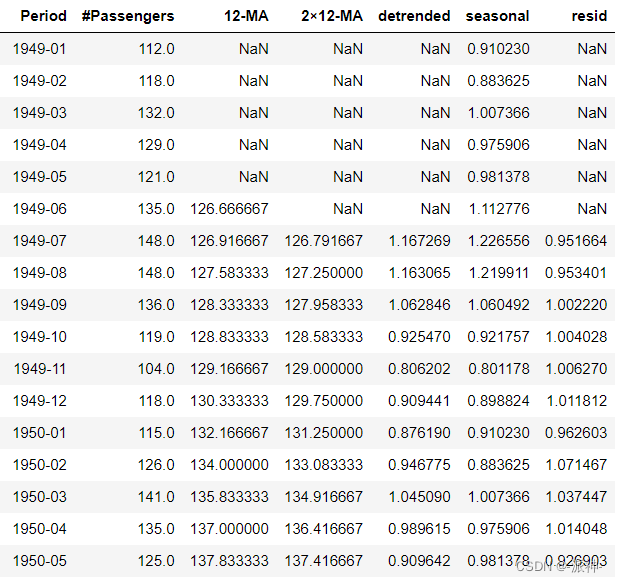
Finally, put the trend 、 Season item 、 The residuals are displayed together :
df['Period'] = pd.to_datetime(df['Period'])
plt.figure(figsize=(10,8))
plt.subplot(4,1,1)
plt.plot(df.Period.values,df['#Passengers'].values)
plt.ylabel('#Passengers');
plt.title('Multiplicative decomposition');
plt.subplot(4,1,2);
plt.plot(df.Period.values,df['2×12-MA'].values)
plt.ylabel('trend')
plt.subplot(4,1,3);
plt.plot(df.Period.values,df['seasonal'].values)
plt.ylabel('seasonal')
plt.subplot(4,1,4);
plt.scatter(df.Period.values,df['resid'].values,s=15)
plt.ylabel('resid');
5.3 Use statsmodels Package to automatically decompose time series
Let's use statsmodels Package to decompose time series , We will call statsmodels Of seasonal_decompose Method , And by setting parameters mode="additive(multiplicative)" To perform addition ( Multiplication ) Decomposition operation :
from statsmodels.tsa.seasonal import STL, seasonal_decompose
plt.rc("figure", figsize=(10, 6))
df=pd.read_csv("airline_Passengers.csv")
df.set_index('Period',inplace=True)
df.index = pd.to_datetime(df.index)
data = df["#Passengers"]
seasonal_decomp = seasonal_decompose(data, model="additive",period=12)
df['trend']=seasonal_decomp.trend
df['seasonal']=seasonal_decomp.seasonal
df['resid']=seasonal_decomp.resid
seasonal_decomp.plot();

From the data results in the figure above, we find that the results of automatic addition and decomposition are consistent with those of our manual decomposition .
summary
In this chapter, we learned the basic steps of additive decomposition and multiplicative decomposition of time series data , We calculated the trend step by step by hand 、 Go to the trend item 、 Season item 、 Residual term and other characteristic terms , The purpose of manual decomposition is to enable readers to further understand the calculation logic of each feature item , Finally, we used statsmodels Of seasonal_decompose Method to automatically decompose , The results of manual decomposition and automatic decomposition are compared , And confirm that they are consistent .
边栏推荐
猜你喜欢

Connaissance du matériel 1 - schéma et type d'interface (basé sur le tutoriel vidéo complet de l'exploitation du matériel de baiman)

论文解读:《开发和验证深度学习系统对黄斑裂孔的病因进行分类并预测解剖结果》

以不太严谨但是有逻辑的数学理论---剖析VIO之预积分

Vio --- boundary adjustment solution process

Solution to schema verification failure in saving substantive examination request

论文解读:《基于注意力的多标签神经网络用于12种广泛存在的RNA修饰的综合预测和解释》

Definition and application of method

NVIDIA NVIDIA released H100 GPU, and the water-cooled server is adapted on the road

实用卷积相关trick

论文解读:《利用注意力机制提高DNA的N6-甲基腺嘌呤位点的鉴定》
随机推荐
K核苷酸频率(KNF,k-nucleotide frequencies)或K-mer频率
Ninja file syntax learning
时间序列的数据分析(一):主要成分
笔记 | 百度飞浆AI达人创造营:深度学习模型训练和关键参数调优详解
Vio --- boundary adjustment solution process
NVIDIA 英伟达发布H100 GPU,水冷服务器适配在路上
Circular queue
Necessary mathematical knowledge for machine learning / deep learning
Using or tools to solve path planning problem (VRP)
How to develop the computing power and AI intelligent chips in the data center of "digital computing in the East and digital computing in the west"?
Notes | Baidu flying plasma AI talent Creation Camp: How did amazing ideas come into being?
Neo4j 知识图谱的图数据科学-如何助力数据科学家提升数据洞察力线上研讨会于6月8号举行
Use pyod to detect outliers
Introduction and practice of Google or tools for linear programming
怎么建立数据分析思维
Use steps of Charles' packet capturing
BST tree
Introduction and use of Ninja
Check the sandbox file in the real app
Résumé des connaissances mathématiques communes