当前位置:网站首页>Experiment: creation, expansion, and deletion of LVM logical volumes
Experiment: creation, expansion, and deletion of LVM logical volumes
2022-07-24 06:40:00 【Walking Di five flowers】
Catalog
One 、LVM Establishment of logical volumes
Two 、LVM Logical volume expansion
3、 ... and 、 Volume group expansion
Four 、LVM Logical volume deletion
LVM The role of logical volumes : Dynamically adjust the capacity of the disk , flexible , Can shrink elastically
One 、LVM Establishment of logical volumes
Ideas : Add and identify hard disk ---》[ optional ] Disk partition ----》 Define physical disks pv -----》 Define volume groups vg -----》 Define logical volumes lvm ------》 format -------》 Mount the use
step :
One 、 Add and identify hard disk
Add 4 A disk , Every disk 20G.

Let the system be distinguish Hard disk has two ways :① Restart the virtual machine
② Refresh the console :echo "- - -" > /sys/class/scsi_host/host0/scan
echo "- - -" > /sys/class/scsi_host/host1/scan
echo "- - -" > /sys/class/scsi_host/host2/scan

Two 、
1、 Experimental environment preparation , Turn off firewall , Turn off core protection

2、 take sdb Defined as a 20G The partition , Change the type to 8e,LVM type
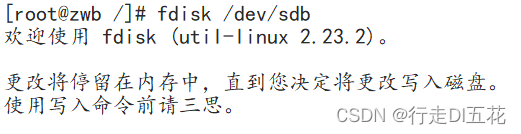

3、 take sdc Defined as a 20G The partition , Change the type to 8e,LVM type

4、 Create a physical volume Define object as sdb1 and sdc1
Grammar format :pvcreate /dev/sdb1 /dev/sdc1

see pvdisplay

5、 Create a volume group . The object is defined as a physical volume sdb1 and sdc1.
Grammar format :vgcreate Volume group name Physical volume name [ Physical volume name ]
vgcreate vgname /dev/sdb1 /dev/sdc1

see vgdisplay

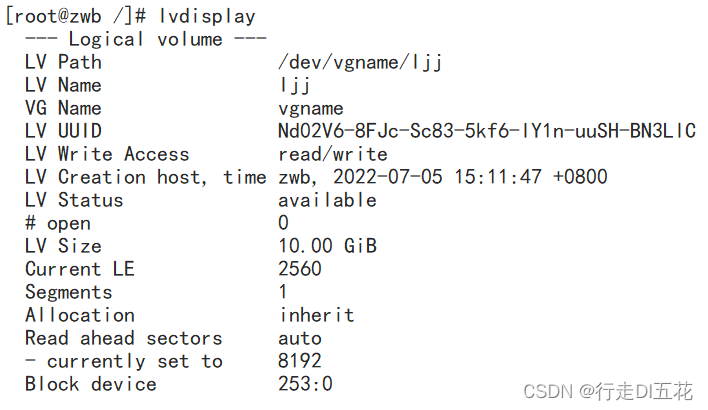
6、 Create logical volumes LVM.
Grammar format :lvcreate -L Capacity size -n Logical volume name Volume group name
lvcreate -L 10G -n ljj vgname

see lvdisplay
6、 format .
Grammar format : mkfs.xfs+ Format object location
mkfs.xfs /dev/vgname/ljj perhaps mkfs -t xfs /dev/vgname/ljj

7、 stay / So let's make a new one data2 Directory as mount point

8、① Mount the logical volume .( To mount temporarily )

② Permanently mount vim /etc/fstab

9、 Display all disk information .

Two 、LVM Logical volume expansion
Is a logical volume ljj Disk space increases 10G
1、 Logical volume expansion
Grammar format :lvextend -L +10G /dev/vgname/ljj

2、 You need to format the expanded disk space before you can mount it for use .( Logical volume expansion , Only when it is mounted can the new part of the formatted speech be added , If it is not mounted, it cannot be formatted , Will report a mistake )
Grammar format :xfs_growfs /dev/vgname/ljj Refresh xfs File system capacity , It is equivalent to expanding 10G format

3、 Query disk information

ps( Minor fault analysis ): Problems arise : After the logical volume is expanded, the newly added part cannot be formatted .
① View mount status :lvname The logical volume is mounted

② Format some new logical volumes and report errors

③ Mount logical volumes
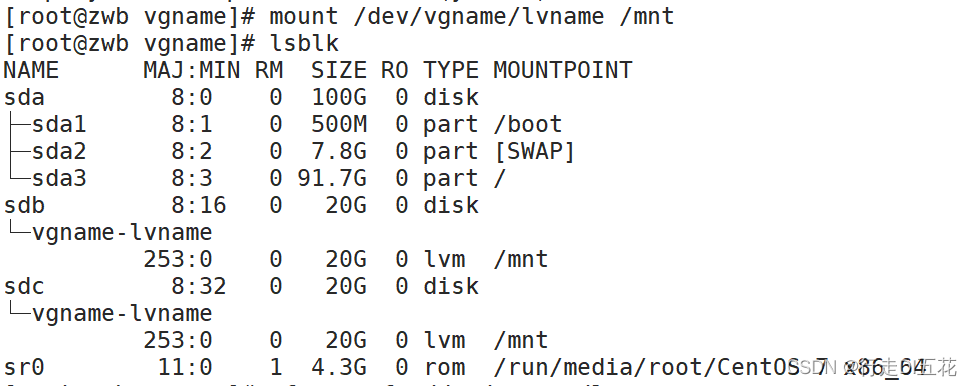
④ Then carry on the format words , success

3、 ... and 、 Volume group expansion
1、 First add a partition .
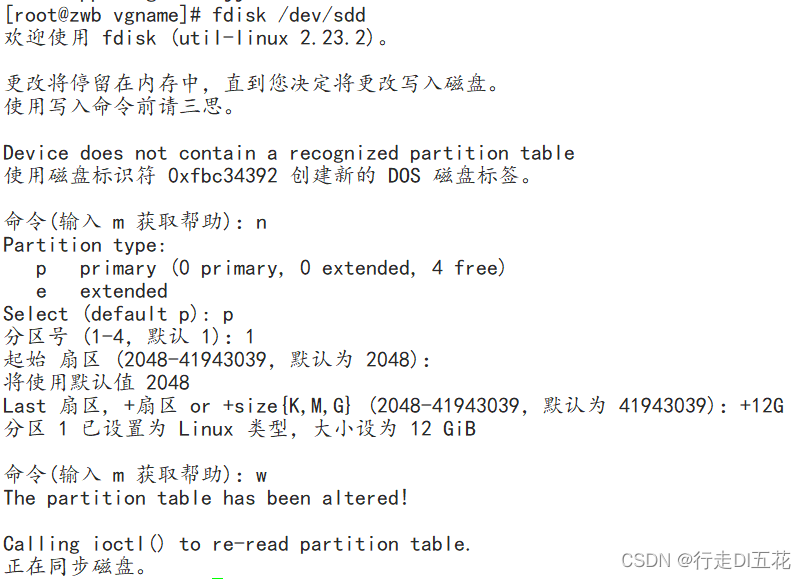
2、 Volume group expansion (sdd1 If it is not defined as a physical volume, it can also be added to the volume group , After joining the volume group, it will display sdd1 Is the physical volume type )( Complete in the case of mounting )
Grammar format : vgextend + Select the volume group name to be expanded + Expanded partition
vgextend vgname /dev/sdd1

Display volume group information vgdisplsy

Four 、LVM Logical volume deletion
Delete lvm Logical volume thinking : Unmount -----》 Delete LV Logic volume ------》 Delete VG The volume group -----》 Delete PV Physical volume ---》[ Change partition type ]
1、 Unmount umount

2、 Delete logical volume ljj
lvremove 
3、 Remove the volume group
 4、 Delete physical volume

summary :
Attention in the experiment :
Logical volume creation steps : Add and identify hard disk ---》[ optional ] Disk partition ----》 Define physical disks pv -----》 Define volume groups vg -----》 Define logical volumes lvm ------》 format -------》 Mount the use
Logical volume deletion ideas : Unmount -----》 Delete LV Logic volume ------》 Delete VG The volume group -----》 Delete PV Physical volume ---》[ Change partition type ]
1、 After the logical volume is expanded, it needs to be formatted before it can be mounted for use
2、 Volume group expansion The newly added partition does not need to be defined as a physical volume , Can be used directly , It is also unnecessary to change to 8e LVM.
边栏推荐
猜你喜欢




随机推荐
带你深入了解MySQL数据库扣减库存原理
神经网络超参数调整(基于ray包)
这10种定时任务学会了,直接飘
mysql 忘记退出直接关闭窗口现在要删除整个文件夹如何删除
Life warning Maxim
Quick start of go language
账号和权限管理
Customize MVC 3.0
history命令历史记录中加时间
LVM and disk quota
Leetcode refers to the duplicate number in the offer jz3 array
这些坑你不掌握,你还真不敢用BigDecimal
Custom MVC 1.0
Function application of MySQL
PXE technology network installation
Write blog at leisure ~ briefly talk about let, VaR and Const
Leetcode sword finger offer jz42 maximum sum of continuous subarrays
DHCP principle and configuration
迭代器与生成器
【波形/信号发生器】基于 STC1524K32S4 for C on Keil