当前位置:网站首页>Record a deletion bash_ Profile file
Record a deletion bash_ Profile file
2022-06-24 21:01:00 【comeoncode】
install jmeter, It is found that the test plan cannot be saved when using , Baidu found that jdk The version is 16,jmeter The version is 5.4.1 This will happen , Then I plan to install the latest jdk17 Try it out , And then I'm modifying jdk Configuration variables for , modify ~/.bash_profile The file exited abnormally once , For every use sudo vi ~/.bash_profile The file will prompt ,Found a swap file by the name "~/.bash_profile.swp", Then I checked this swp File is generated due to abnormal exit , So I intend to use the command rm -f ~/.bash_profile.swp Delete , Then when deleting, the command is written as rm -f ~/.bash_profile, And then put bash_profile The file has been deleted , It's ridiculous , Then find a way to recover :
export PATH=/bin:/usr/local/sbin:/usr/local/bin:/sbin:/bin:/usr/sbin:/usr/bin

open -e .bash_profile
Using the above method cannot restore , It even suggests that you can't find bash_profile file , This method should be applicable to modification or other operations , Anyway, this one is invalid , Because the files have been deleted , Then use the following method to rewrite bash_profile file , Try to recover , If you encounter a problem, you can solve it .
touch .bash_profile

open -e .bash_profile
Then enter the configuration information
JAVA_HOME=/Library/Java/JavaVirtualMachines/jdk-17.jdk/Contents/Home
PATH=$JAVA_HOME/bin:$PATH:.
CLASSPATH=$JAVA_HOME/lib/tools.jar:$JAVA_HOME/lib/dt.jar:.
export JAVA_HOME
export PATH
export CLASSPATH
In retrospect, there should be mysql,Hadoop,nvm,maven Environment configuration of , I can't remember any more , If you can't use it, just make it up .
preservation , Yes, it is source .bash_profile Make configuration effective .
source .bash_profileThat's about it .
Use mysql -uroot -p Then enter the password 123, You can still enter mysql Of , Strange , Yesterday input mysql An error is reported and no command is found zsh: command not found: mysql, Not today . So actually this ~/.bash_profile The file should be able to be deleted by mistake , No big problem , But we should keep a long memory , The next time you modify the configuration file , Back up first .
modify ~/.bash_profile Document flow :
open -e ~/.bash_profile
# This opens it with Notepad .bash_profile file , Make a copy of this first , And then modify it
# then command+s preservation
# And then use source Order the modification to take effect
source ~/.bash_profile
remember :
problem : Computer installed jdk Version is 16,jmeter Version is 5.4.1, And then run jmeter Unable to save test plan , There's no response
solve : install jdk17, Then change the environment variable to 17 The path of , function jmeter, Save test plan , The error report is about the following :
Uncaught Exception java.lang.IllegalAccessError: class com.github.weisj.darklaf.ui.filechooser.DarkFilePaneUIBridge$DetailsTableModel
cannot access class sun.awt.shell.ShellFolder (in module java.desktop) because module java.desktop does not export sun.awt.shell to unnamed module
Then the solution : Check as system, You can save the test plan , Normal use jmeter 了 ( It is now suspected that the installation may not be necessary at first jdk17, Just switch the appearance to system, You can try switching the appearance first , No, no more jdk17).
summary :
1、vi and vim The difference between
The same thing , Use vi perhaps vim When you modify a file , Use i You can enter the insert mode for modification , After the modification is completed , Click on esc Exit the editor , Enter command mode , And then use :q! perhaps :wq To quit .
sudo vi ~/.bash_profile
sudo vim ~/.bash_profile
vi and vim Is the difference between the ,vim Than vi Commands are more advanced ,vim Support use u Multi level cancellation (vi Use u Only the last operation can be undone ),vim Can run on multiple platforms ,unix,windows,mac etc. ,vi Can only be unix,vim You can highlight the code , Yes vi Fully compatible with , amount to vi Updated version of .
use vi perhaps vim After modifying the file , Action on exit :
(1) Save and exit
:wq(2) Save without exiting
:w(3) Exit without saving ( The file has been modified )
:q!(4) sign out ( The file has not been modified )
:q2、/etc/profile、/etc/bashrc、~/.bash_profile、~/.bashrc The difference of documents
/etc/profile File is the configuration file of the system , After modifying the file , must source The following changes will take effect , Effective for each user ;
/etc/bashrc File is bash File executed when opening , Restart after modification bash Effective immediately ;
~/.bash_profile Is a user specific configuration file , After modification, you need source It won't take effect until later ( and .login perhaps .profile Same file , For the difference shell It's different to call it );
~/.bashrc The file is opened every time under the user shell File executed when , Reopen after modification shell Effective immediately .
Difference and connection :
(1) When not found in the user directory .bash_profile perhaps .bashrc When you file , Will read the system configuration file ( In doubt );
(2)/etc/profile The set variable acts on the global , and ~/.bashrc The variables in the file are inherited from /etc/profile The variables in the , It only works locally , There is a father son relationship between the two ;
(3)~/.bash_profile It's interactive 、login Way in bash Running ; and ~/.bashrc It's interactive ,non-login Way in bash function , The two are roughly the same , It can be rebooted , It's fine too source take effect ;
(4)~/.bash_history yes bash shell The history file of , Recorded bash shell All commands entered in ( I can't find my own for the time being , I think it should be set , Not automatically saved ).
3、cat、open、vi perhaps vim The difference between
cat ~/.bash_profile
open -e ~/.bash_profile
vim ~/.bash_profile
Use cat ~/.bash_profile command , Display the contents of this document directly on the terminal , And can only view ;
Use open -e ~/.bash_profile command , Will use Notepad to open this file , You can edit and view , Use command+s preservation , At the same time, other command operations can be continued at the terminal ;
Use vim ~/.bash_profile command , You will see the contents of this file on the terminal , Cannot exit without doing anything , You have to press i Enter insertion mode , Then press esc Exit insertion mode , Enter command mode , Input :q! Just exit .
4、shell What is it? ,zsh、bash、cmd、dos The difference between

cmd and shell The difference between :
(1)shell yes Linux The interaction layer between the operating system and the user , and cmd It's just windows A small application under the system ;
(2)shell Is a shell between the operating system and the user , All applications interact with the kernel through shell, Include Linux Graphical desktop XWindows, and cmd It's just windows The next supplement ,cmd Whether it exists or not is right windows The operating system is not important ;
(3)Linux Almost anything can be done without a graphical interface , And it is more concise and efficient than the graphical interface , It can also cooperate with shell Programming to achieve automation , and cmd It's just windows The next terminal simulator , Equivalent to a desktop application .
5、 Command line
The general format of the command line :
Command word [ Options ] [ Parameters ]
Command words are case sensitive , Is the most important part of the whole command
[ Options ] Adjust the specific functions of the command , Decide how this command will be executed , The same command with different options can achieve subtle differences
[ Parameters ] The processing object of the command word , It could be a file , Catalog , Folder , The user etc. , Parameters can be 0 individual , Or more
Command word 、 Options 、 The parameters are separated by spaces , Extra spaces will be ignored
The order of options and parameters can be confused , Does not affect the execution of the command , Special exceptions
6、 Check out your shell edition
echo $SHELLInput... For the first time shell Lowercase , Not showing the results , Second input shell Capitalized , It shows shell Version of , explain shell Commands are really case sensitive .
You can also see my shell The default is zsh.

Check your computer shell, Use the following command :
cat /etc/shells
The following parts , I don't understand
Switch bash:
chsh -s /bin/bashSwitch zsh:
chsh -s /bin/zshExecute these two commands in my own terminal , And then through echo $SHELL Command to view the current shell, The discovery has always been zsh, The switch did not succeed ( In doubt )-------- Solve the problem : Switch shell After that, the terminal must be closed and reopened , Can find shell Already switched , Do not restart the terminal after switching , that shell The switch will not take effect .
bash Read the configuration file :~/.bash_profile
zsh Read the configuration file :~/.zshrc
Used on my own computer shell by zsh, But the configuration file is ~/.bash_profile, I don't know why I can use zsh shell, Read bash Configuration file for , All follow the online tutorials ( And it doesn't exist on my computer ~/.zshrc file ).
from bash Switch to a zsh when , If you do not want to reconfigure .zshrc file , Can be in ~/.zshrc Add a command to the file source ~/.bash_profile, Thus directly from .bash_profile File read configuration ( I understand , Corresponding shell The corresponding configuration asking price will be read during startup , Switch shell after , stay .zshrc Add that line of command to the file , That is to start. zsh when , Read .zshrc Configuration of files , Then it is equivalent to executing source ~/.bash_profile file , And then it was executed .bash_profile file ).
I don't know why the terminal used zsh, Then configure the file to use bash_profile It can take effect , Just created with the online method .zshrc file , Then it added that every time the terminal is opened, it will run .bash_profile The file .
establish zsh Configuration file for
vim ~/.zshrc
Press i Enter edit mode , Input
source ~/.bash_profileClick on esc, Exit edit mode , Enter the following command , Save and exit .
:wqTurn off the terminal , You will find that the default execution will be performed when the terminal is opened bash_profile The file .
边栏推荐
- Camera rental management system based on qt+mysql
- 消息称腾讯正式宣布成立“XR”部门,押注元宇宙;谷歌前 CEO:美国即将输掉芯片竞争,要让台积电、三星建更多工厂...
- The latest simulated question bank and answers of the eight members (Electrical constructors) of Sichuan architecture in 2022
- Byte and Tencent have also come to an end. How fragrant is this business of "making 30million yuan a month"?
- [performance tuning basics] performance tuning strategy
- Where is 5g really powerful? What is the difference with 4G?
- 伯克利、MIT、剑桥、DeepMind等业内大佬线上讲座:迈向安全可靠可控的AI
- DAPP system customization of full chain hash game (scheme design)
- Set up your own website (14)
- 基于SSM的物料管理系统(源码+文档+数据库)
猜你喜欢

Mapstacks: data normalization and layered color layer loading

Internet of things? Come and see Arduino on the cloud

Implement the redis simple client customized based on socket

Variable setting in postman

The latest simulated question bank and answers of the eight members (Electrical constructors) of Sichuan architecture in 2022

Intermediary model -- collaboration among departments

"Super point" in "Meng Hua Lu", is the goose wronged?
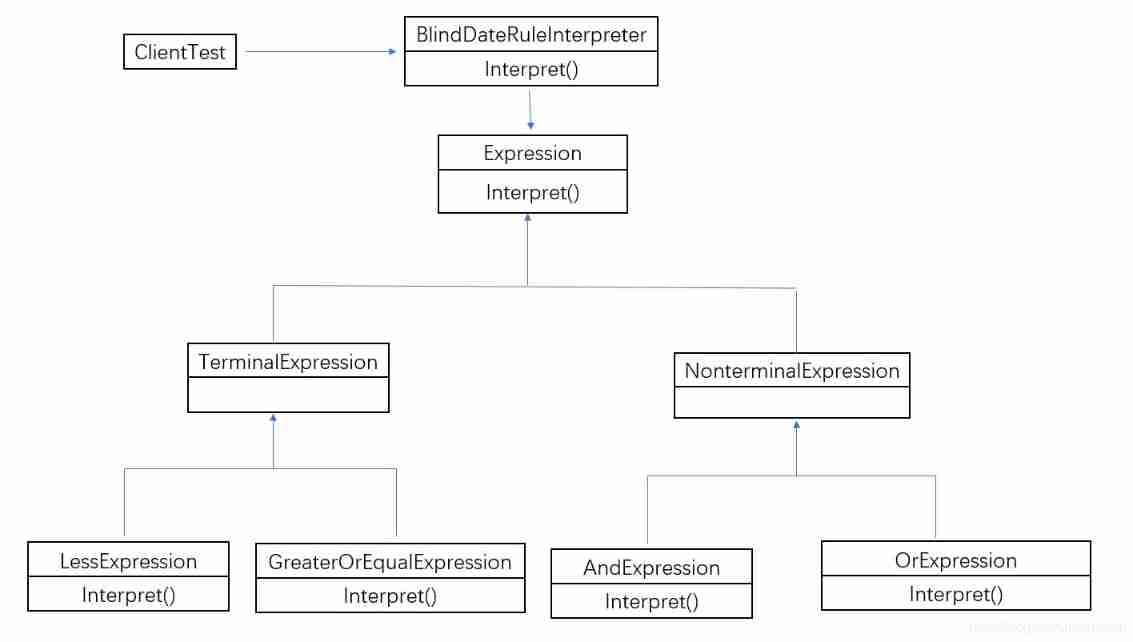
Interpreter mode -- formulas for dating
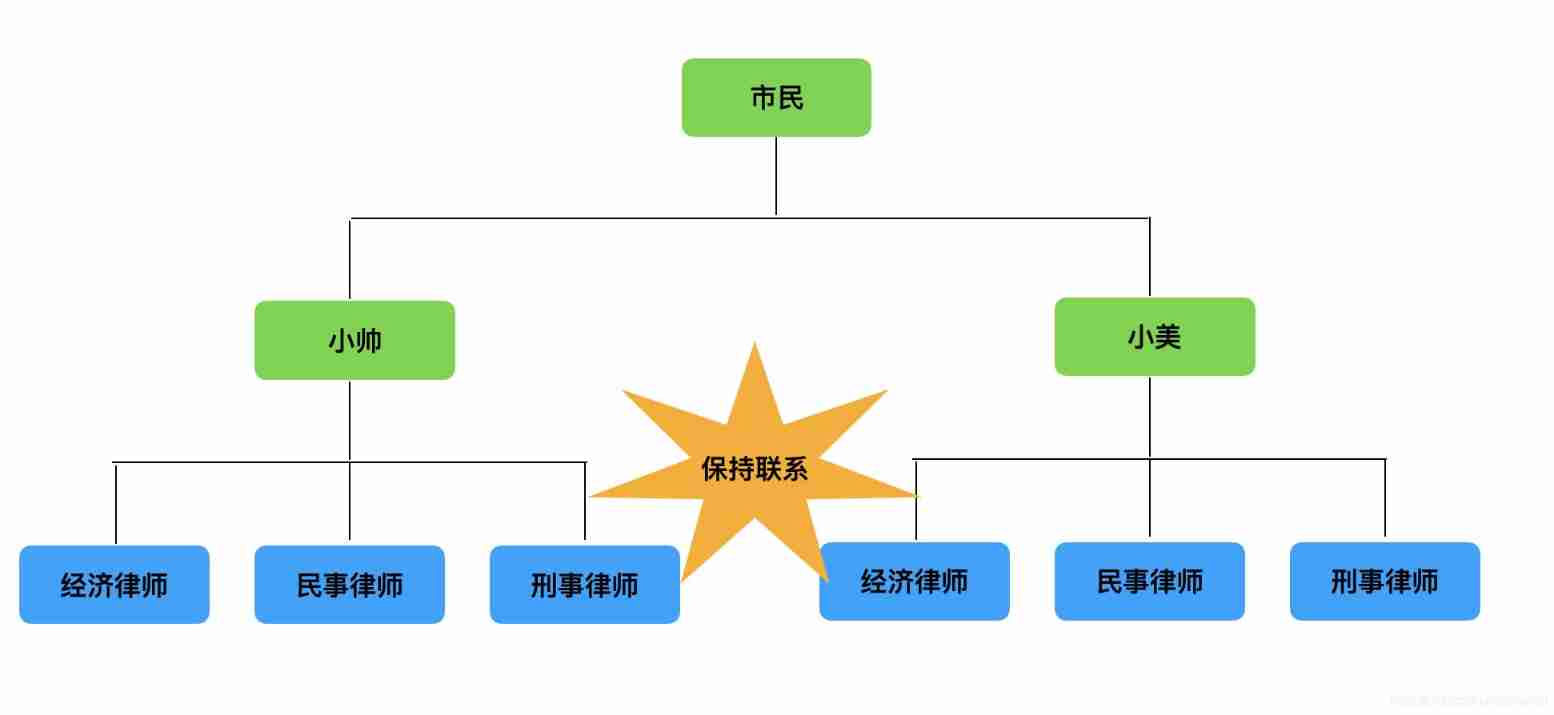
Bridging mode -- law firm

More than ten years' work experience is recommended at the bottom of the box: how much does it cost to find a job? See here! Brothers and sisters are recommended to collect and pay attention
随机推荐
Simulation lottery and probability statistics experiment of the top 16 Champions League
Builder mode -- Master asked me to refine pills
二叉树的基本性质与遍历
物联网?快来看 Arduino 上云啦
大一女生废话编程爆火!懂不懂编程的看完都拴Q了
开放可编程基础设施(OPI)项目,重新定义DPU/IPU
Is the waiting insurance record a waiting insurance evaluation? What is the relationship between the two?
等保备案是等保测评吗?两者是什么关系?
Berkeley, MIT, Cambridge, deepmind and other industry leaders' online lectures: towards safe, reliable and controllable AI
Combination mode -- stock speculation has been cut into leeks? Come and try this investment strategy!
云计算发展的 4 个阶段,终于有人讲明白了
[multi thread performance tuning] multi thread lock optimization (Part 1): optimization method of synchronized synchronization lock
Network security review office starts network security review on HowNet
C语言实现扫雷(简易版)
Image panr
Apple doesn't need money, but it has no confidence in its content
主数据建设的背景
Responsibility chain mode -- through interview
网络安全审查办公室对知网启动网络安全审查
【建议收藏】时间序列预测应用、paper汇总