当前位置:网站首页>Logging log usage
Logging log usage
2022-06-28 00:16:00 【sl01224318】
background
When it comes to logs , Whether it's developing code or writing UI automated testing , Are inseparable from the log records , It can give us a position in the problem 、 Defects bring great convenience . Usually, the method most used by testers is to use print To print out logs and error messages , But for some large projects , Use print It's not so convenient . because print The printed log has no time , I don't know the location of the log record , In this case , We can use python Self contained logging modular , It can solve the above problems well .
Environmental preparation
Compiler tools :pycharm
programing language :python
The level of logging
stay python Provided log modular , The log levels are divided into 5 level , Respectively :
1、Debug Level is the most detailed log information , A typical application field scenario is problem diagnosis .
2、INFO The level of detail is second only to DEBUG, Usually only key node information is recorded , It's used to confirm that everything is working as we expected .
3、WARNING Information recorded when something unexpected happens ( Such as , Disk free space is low ), But at this time, the application is still running normally
4、ERROR Because of a more serious problem, some functions can't run normally
5、CRITICAL When there is a serious mistake , Information recorded when the application cannot continue running
'''log Use '''
import logging

logging.basicConfig(level=logging.INFO)  # Set up logging Log level of
logging.info('infor Level debugging information ')
logging.debug('debug Level debugging information ')
logging.warning('warning Level debugging information ')
logging.error('error Level debugging information ')
logging.critical('critical Level debugging information ')
among log The level of logs increases gradually , By default, the log level is WARNING, lower than WARNING Level logs will not be output .
log Log level settings
It said log Log default output WARNING Grade , But I want to output INFO Level, you need to set the log level output , Before starting logging, you can use logging.basicConfig Method to set the log level .
logging.basicConfig(level=logging.INFO)  # Set up logging The log level of is INFO
logging.info(' Output info Level debugging information ')
logging.debug(' Output debug Level debugging information ')
logging.warning(' Output warning Level debugging information ')
logging.error(' Output error Level debugging information ')
By setting logging Log level is INFO after , The output is as follows :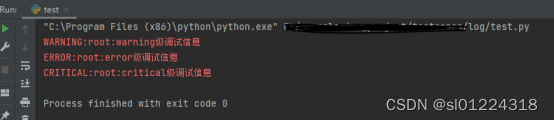
Logging.basicConfig Function description
If we want to specify log The format of the log output 、 Save the path , It can be used logging.basicConfig Function to implement , The main parameters are as follows :
1、filename: Specify the file name of the target file in the log , When this setting item is specified, the log information will not be output to the console .
2、filemode: Specify the opening mode of the log file , The default is ‘a', It should be noted that , This option should be in filename Only valid when specified
3、format: Specifies the log format string , Specify the field information contained in the log output and their order ,logging The format fields defined by the module are listed below
4、datefmt: Specify Date / Time format , It should be noted that , This option should be in format It contains the time field %(asctime)s Only when effective
5、level: Specify the log level of the logger
6、stream: Specify the log output target stream, Such as sys.stdout,sys.stderr And the Internet stream. It should be noted that ,stream and filename Can't provide at the same time , Otherwise, it will cause ValueError abnormal
7、style:Python3.2 The newly added configuration item , Appoint format The style of the format string , It can be taken as “%,{,$”,, The default is '%'.
8、handlers:Python3.3 The newly added configuration item , If this option is specified , It should be one created multiple handler The iteratable object of , these handler Will be added to root logger. It should be noted that :filename,stream and handlers Only one of these three configuration items can exist , Not at the same time 2 Or 3 individual , Otherwise, it will cause ValueError abnormal .
mport logging
my_format = '%(asctime)s-%(filename)s-%(module)s-%(lineno)d'  #log Log format settings , Print current time , The name of the currently executing program , The current line number 、 modular .
logging.basicConfig(
    filename = 'my.log',    # Log file name
    level = logging.INFO,     # Set the log level to INFO level
    format=my_format
)
logging.info('infor')
logging.debug('debug')
logging.warning('warning')
logging.error('error')
logging.critical('critical')
Open... After running the code my,log You can see the recorded log Information .
Logging Format string of the module
For this format , We can use it together , Between each format, you need to use ”-” Connect , Such as :
my_format = '%(asctime)s-%(filename)s-%(module)s-%(lineno)d'
Use format | Description information | Field / The attribute name |
%(asctime)s | Time to print the log | asctime |
%(filename)s | Print the name of the current executing program | fimename |
%(levelname)s | Print log level name | levelname |
%(message)s | Print log information | message |
%(levelno)s | Print log level values | levelno |
%(pathname)s | Print the path of the currently executing program | pathname |
%(funcName)s | Print the current function of the log | funcName |
%(lineno)d | Print the current line number of the log | lineno |
%(thread)d | Print thread id | thread |
%(threadName)s | Print thread name | threadName |
Log processor
What is? log processor , My understanding is to generate records log The process of processing logs , It's like a porter , Do not produce 、 Make products , Only responsible for moving items to the designated location .Python I have a lot of built-in processors , Common are :
1、StreamHandler Standard stream processor , Send the message to the standard output stream 、 Error flow
2、FileHandler File processor , Send message to file
3、RotatingFileHandler File processor , When the file reaches the specified size , Enable new file storage logs .
4、TimedRotatingFileHandler File processor , Logs rotate log files at specific time intervals .
 for example :
import logging
from logging import StreamHandler
from logging import FileHandler

logger = logging.getLogger(__name__)

#  Set to DEBUG Level
logger.setLevel(logging.DEBUG)

#  Standard stream processor , The set level is WARAING
stream_handler = StreamHandler()
stream_handler.setLevel(logging.WARNING)
logger.addHandler(stream_handler)

#  File processor , The set level is INFO
file_handler = FileHandler(filename="test.log")
file_handler.setLevel(logging.INFO)
logger.addHandler(file_handler)

logger.debug("this is debug")
logger.info("this is info")
logger.error("this is error")
logger.warning("this is warning")
summary
That's all logging The basic usage of log , I believe that mastering the above methods can help us better understand the log output 、 Print and select , In the future UI Automation is not limited to just using print Print , You can also use logging Module to systematically record error messages , Positioning problems is more convenient !
边栏推荐
猜你喜欢

吴恩达《机器学习》课程总结(13)_聚类
![[idea] idea formatting code skills](/img/06/38079517e901bc48dc4ca0f8cc63fe.jpg)
[idea] idea formatting code skills
Msp430f5529 MCU reads gy-906 infrared temperature sensor

ASP.NET仓库进销存ERP管理系统源码 ERP小程序源码
MongoDB-在windows电脑本地安装一个mongodb的数据库

翻译(5): 技术债务墻:一种让技术债务可见并可协商的方法

Cornernet understands from simple to profound

How to quote Chinese documents when writing a foreign language?

Webserver flow chart -- understand the calling relationship between webserver modules

Safe, fuel-efficient and environment-friendly camel AGM start stop battery is full of charm
随机推荐
Chapter 2 integrated mp
TIME_ Solutions to excessive wait
表单form 和 表单元素(input、select、textarea等)
CharSequence初探
Learning notes for qstringlist
系统学习+主动探索,是最舒适的入门学习方式!
自定义MySQL连接池
Msp430f5529 MCU reads gy-906 infrared temperature sensor
线程池实现:信号量也可以理解成小等待队列
Mise en œuvre du pool de Threads: les sémaphores peuvent également être considérés comme de petites files d'attente
[idea] idea formatting code skills
MATLB|改进的前推回代法求解低压配电网潮流
炼金术(7): 何以解忧,唯有重构
At the beginning of reading English literature, I would like to ask you how you should read it in the first place?
Request object, response object, session object
Is it safe to open a stock account through the account opening QR code of CICC securities manager? Or is it safe to open an account in a securities company?
線程池實現:信號量也可以理解成小等待隊列
搭建开源美观的数据库监控系统-Lepus
golang使用mongo-driver操作——查(进阶)
[AI application] detailed parameters of NVIDIA geforce RTX 3060