当前位置:网站首页>第四讲 back propagation 反向传播
第四讲 back propagation 反向传播
2022-08-05 05:13:00 【长路漫漫 大佬为伴】
课堂练习
手动推导线性模型y=w*x,损失函数loss=(ŷ-y)²下,当数据集x=2,y=4的时候,反向传播的过程。
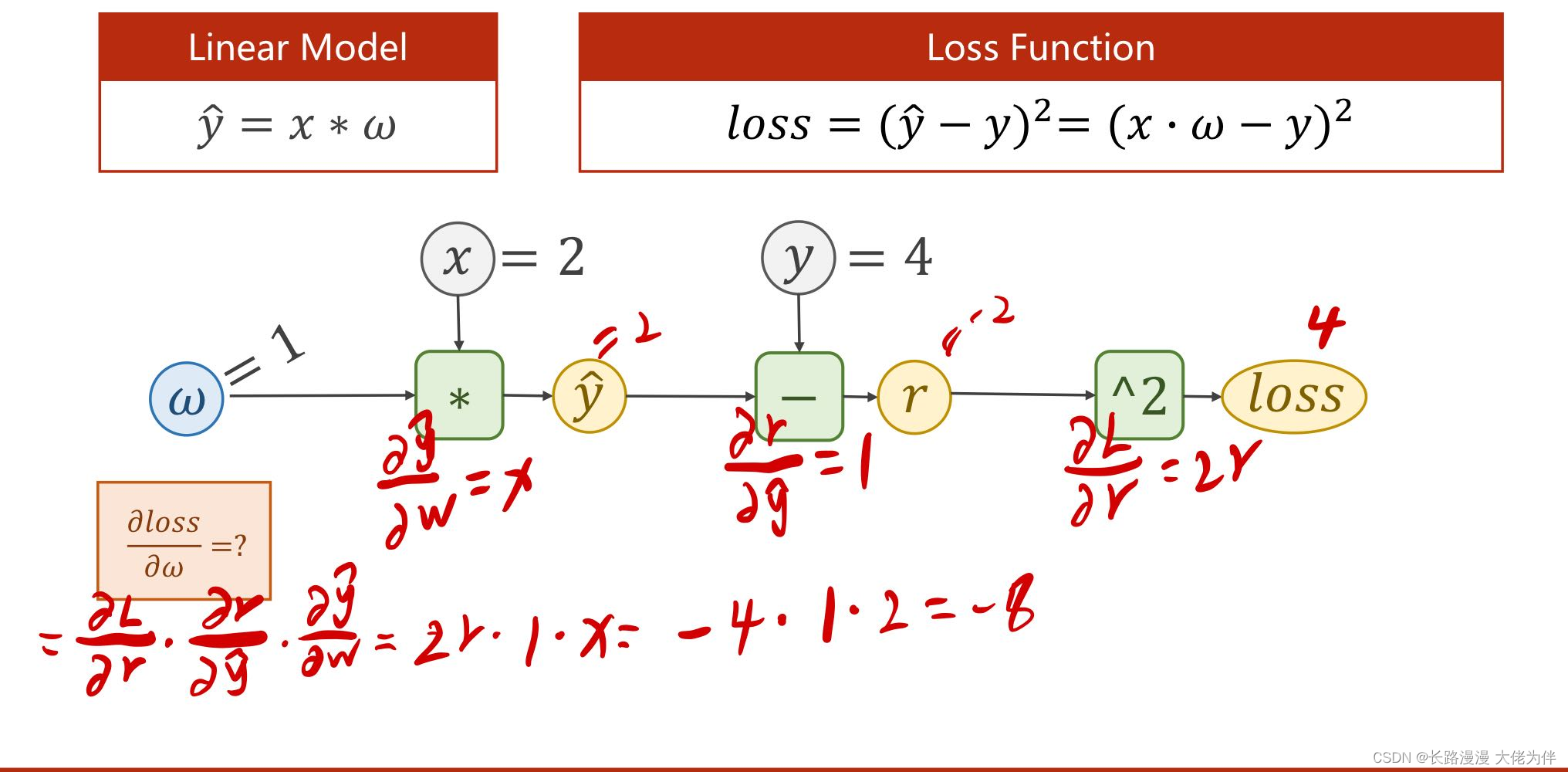
手动推导线性模型 y=w*x+b,损失函数loss=(ŷ-y)²下,当数据集x=1,y=2的时候,反向传播的过程。

线性模型y=w*x,损失函数loss=(ŷ-y)²下,当数据集x=2,y=4的时候,反向传播代码实现
注意:w.grad.data不会自动清0,需要手动人工清0
代码如下:
import torch

x_data = [1.0, 2.0, 3.0]
y_data = [2.0, 4.0, 6.0]

w = torch.Tensor([1.0])  # w的初值为1.0
w.requires_grad = True  # 需要计算梯度

learning_rate=0.05      #学习率

def forward(x):
    return x * w  # w是一个Tensor


def loss(x, y):
    y_pred = forward(x)
    return (y_pred - y) *(y_pred - y)


print("predict (before training)", 4, forward(4).item())

for epoch in range(100):
    for x, y in zip(x_data, y_data):
        l = loss(x, y)  # l是一个张量,tensor主要是在建立计算图 forward, compute the loss
        l.backward()  # backward,compute grad for Tensor whose requires_grad set to True
        print('\tgrad:', x, y, w.grad.item())
        w.data = w.data - learning_rate * w.grad.data  # 权重更新时,注意grad也是一个tensor

        w.grad.data.zero_()  # after update, remember set the grad to zero

    print('progress:', epoch, l.item())  # 取出loss使用l.item,不要直接使用l(l是tensor会构建计算图)

print("predict (after training)", 4, forward(4).item())
运行结果:
predict (before training) 4 4.0
	grad: 1.0 2.0 -2.0
	grad: 2.0 4.0 -7.520000457763672
	grad: 3.0 6.0 -12.859201431274414
progress: 0 4.593307018280029
	grad: 1.0 2.0 -0.6572480201721191
	grad: 2.0 4.0 -2.47125244140625
	grad: 3.0 6.0 -4.225842475891113
progress: 1 0.4960484504699707
	grad: 1.0 2.0 -0.2159874439239502
	grad: 2.0 4.0 -0.8121128082275391
	grad: 3.0 6.0 -1.388711929321289
progress: 2 0.05357002466917038
	grad: 1.0 2.0 -0.07097864151000977
	grad: 2.0 4.0 -0.2668800354003906
	grad: 3.0 6.0 -0.45636463165283203
。。。。。。。。。。。。。。。。。。。。
progress: 13 9.094947017729282e-13
	grad: 1.0 2.0 -4.76837158203125e-07
	grad: 2.0 4.0 -1.9073486328125e-06
	grad: 3.0 6.0 -5.7220458984375e-06
progress: 14 9.094947017729282e-13
	grad: 1.0 2.0 -2.384185791015625e-07
	grad: 2.0 4.0 -9.5367431640625e-07
	grad: 3.0 6.0 -2.86102294921875e-06
progress: 15 2.2737367544323206e-13
	grad: 1.0 2.0 0.0
	grad: 2.0 4.0 0.0
	grad: 3.0 6.0 0.0
progress: 16 0.0
	grad: 1.0 2.0 0.0
	grad: 2.0 4.0 0.0
	grad: 3.0 6.0 0.0
.。。。。。。。。。。。。。。。。。。。。
progress: 97 0.0
	grad: 1.0 2.0 0.0
	grad: 2.0 4.0 0.0
	grad: 3.0 6.0 0.0
progress: 98 0.0
	grad: 1.0 2.0 0.0
	grad: 2.0 4.0 0.0
	grad: 3.0 6.0 0.0
progress: 99 0.0
predict (after training) 4 8.0
边栏推荐
猜你喜欢

Multi-threaded query results, add List collection

Day019 Method overriding and introduction of related classes

Flutter学习2-dart学习

RL强化学习总结(一)

Flutter真机运行及模拟器运行

Qt制作18帧丘比特表白意中人、是你的丘比特嘛!!!

算法---一和零(Kotlin)
Algorithms - ones and zeros (Kotlin)
![[Student Graduation Project] Design and Implementation of the Website Based on the Web Student Information Management System (13 pages)](/img/86/9c9a2541f2b7089ae47e9832fffdb3.png)
[Student Graduation Project] Design and Implementation of the Website Based on the Web Student Information Management System (13 pages)

2022 Hangzhou Electric Multi-School 1st Session 01
随机推荐
Qt produces 18 frames of Cupid to express his love, is it your Cupid!!!
Excel画图
coppercam入门手册[6]
CAP+BASE
『递归』递归概念与典型实例
Flutter学习三-Flutter基本结构和原理
How does the Flutter TapGestureRecognizer work
电话溥功能
【过一下11】随机森林和特征工程
Error creating bean with name 'configDataContextRefresher' defined in class path resource
The role of DataContext in WPF
2022 Hangzhou Electric Multi-School 1st Session 01
【读书】长期更新
人性的弱点
【学生毕业设计】基于web学生信息管理系统网站的设计与实现(13个页面)
1.3 mysql批量插入数据
coppercam primer [6]
How can Flutter parent and child components receive click events
phone call function
多线程查询结果,添加List集合