当前位置:网站首页>【Unity3D】碰撞体组件Collider
【Unity3D】碰撞体组件Collider
2022-06-26 04:58:00 【little_fat_sheep】
1 前言
Unity3D 中碰撞体(Collider)组件用于检测运动的物体之间是否发生碰撞,也可以作为触发器使用。产生碰撞的条件是:
- 2 个游戏对象都有 Collider
- 至少有一个游戏对象有 Rigidbody
- 2 个游戏对象保持相对运动(一个 Cube 放在 Plane 上,不会产生碰撞,因为没有相对运动)
碰撞体的边界不一定与游戏对象的边界一致,用户可以点击 Edit Collider 按钮编辑碰撞体的边界,也可以在属性面板里调整碰撞体边界。另外,用户可以勾选 Is Trigger 选项,作为触发器使用(不勾选将作为碰撞器使用),作为触发器使用时,不会产生碰撞,游戏对象之间会相会穿越。

1)回调方法
碰撞器回调方法:
// 碰撞开始
void OnCollisionEnter(Collision other)
// 碰撞过程中,每帧调用一次
void OnCollisionStay(Collision other)
// 碰撞结束
void OnCollisionExit(Collision other)
触发器回调方法:
// 触发开始
void OnTriggerEnter(Collider other)
// 触发过程中,每帧调用一次
void void OnTriggerStay(Collider other)
// 触发结束
void OnTriggerExit(Collider other)
说明:碰撞器和触发器对应的回调方法都是 MonoBehaviour 里的方法,用户可以在脚本组件里重写这些方法,碰撞器和触发器对应的回调方方法只能执行其一,当作为触发器使用时,就不能执行碰撞器对应的回调方法。
2)回调参数
Collision 参数
// 碰撞对象的碰撞体组件
Collider collider = collision.collider;
// 碰撞点信息
ContactPoint[] contactPoint = collision.contacts;
Vector3 point = contactPoint[0].point;
Collider 参数
// 获取碰撞体的MeshRenderer组件
MeshRenderer meshRenderer = collider.GetComponent<MeshRenderer>();
2 应用
2.1 碰撞器应用
1)创建游戏对象
游戏对象的 Transform 组件参数如下:
| Name | Type | Position | Rotation | Scale | Color |
| Plane | Plane | (0, 0, 0) | (0, 0, 0) | (1, 1, 1) | #ABA4A4FF |
| Cube | Cube | (0.1, 3, -4.4) | (0, 0, 0) | (1, 1, 1) | #F41E1EFF |
| Sphere | Sphere | (0, 1, -4.5) | (0, 0, 0) | (1, 1, 1) | #F41E1EFF |

补充:给 Cube 添加 Rigidbody 刚体组件。
2)脚本组件
给 Cube 游戏对象添加脚本组件,如下:
ColliderController.cs
using UnityEngine;

public class ColliderController : MonoBehaviour {

	private void OnCollisionEnter(Collision other) {
		other.collider.GetComponent<MeshRenderer>().material.color = Color.green;
	}

	private void OnCollisionStay(Collision other) {
		GetComponent<MeshRenderer>().material.color = Color.yellow;
	}

	private void OnCollisionExit(Collision other) {
		other.collider.GetComponent<MeshRenderer>().material.color = Color.blue;
	}
}
3)运行效果
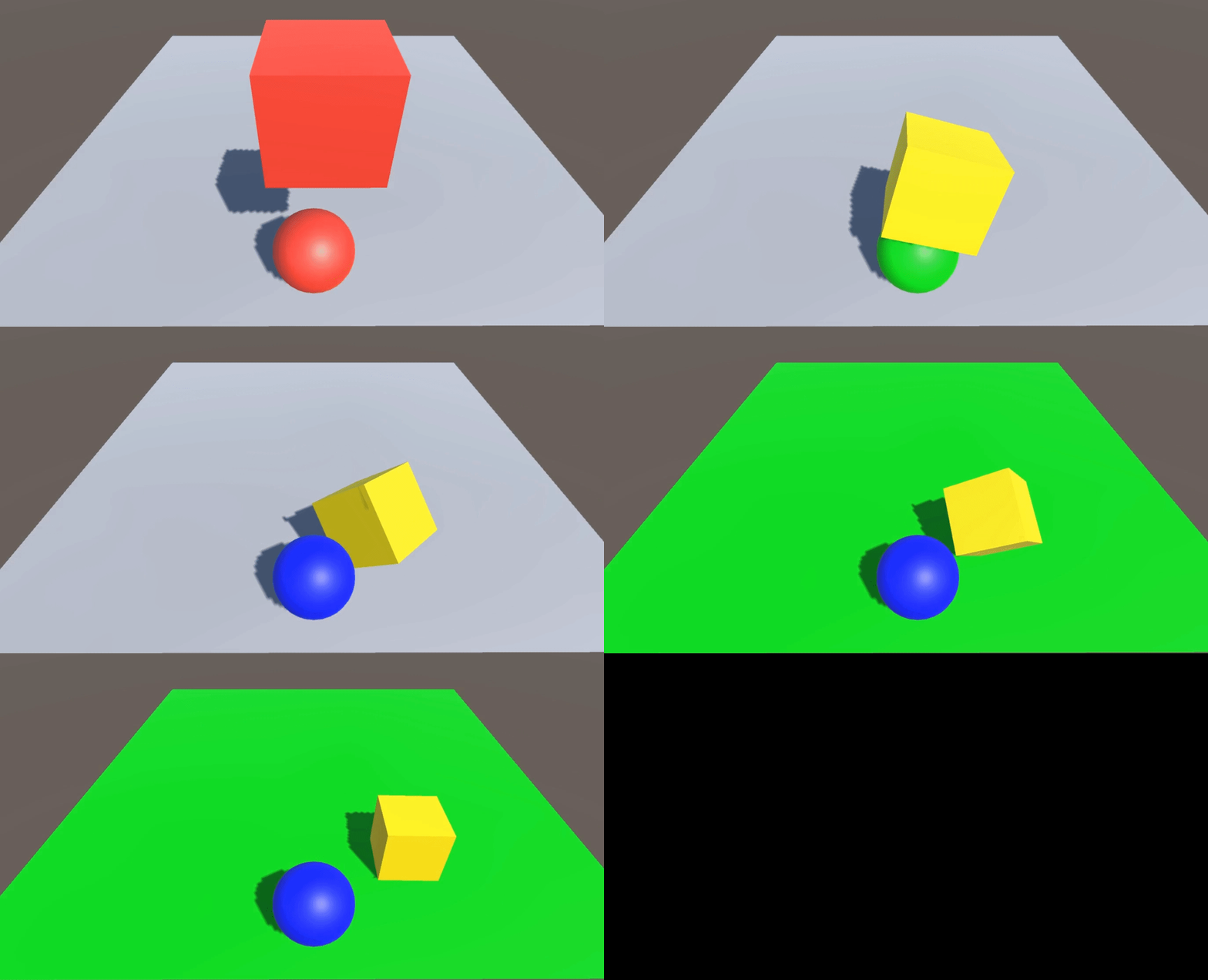
2.2 触发器应用
1)创建游戏对象
游戏对象的 Transform 组件参数如下:
| Name | Type | Position | Rotation | Scale | Color |
| Plane | Plane | (0, 0, 0) | (0, 0, 0) | (2, 2, 2) | #ABA4A4FF |
| Cube | Cube | (0, 3, -4.8) | (0, 0, 0) | (1.7, 0.5, 1.7) | #F41E1EFF |
| Sphere | Sphere | (0, 4.5, -4.8) | (0, 0, 0) | (1, 1, 1) | #F41E1EFF |

补充:给 Sphere 添加 Rigidbody 刚体组件,Collider 组件勾选 Is Trigger 选项。
2)脚本组件
给 Sphere 游戏对象添加脚本组件,如下:
TriggerController.cs
using UnityEngine;

public class TriggerController : MonoBehaviour {

	private void OnTriggerEnter(Collider other) {
		other.GetComponent<MeshRenderer>().material.color = Color.green;
	}

	private void OnTriggerStay(Collider other) {
		GetComponent<MeshRenderer>().material.color = Color.yellow;
	}

	private void OnTriggerExit(Collider other) {
		other.GetComponent<MeshRenderer>().material.color = Color.blue;
	}
}
3)运行效果

边栏推荐
- 2022.2.13
- 微信小程序保存图片的方法
- Genius makers: lone Rangers, technology giants and AI | ten years of the rise of in-depth learning
- 202.2.9
- Multipass Chinese document - use instance command alias
- Create a binary response variable using the cut sub box operation
- 5. <tag-栈和常规问题>补充: lt.946. 验证栈序列(同剑指 Offer 31. 栈的压入、弹出序列)
- -Discrete Mathematics - Analysis of final exercises
- 文件上传与安全狗
- 天才制造者:独行侠、科技巨头和AI|深度学习崛起十年
猜你喜欢

NVM installation and use and NPM package installation failure record

图像翻译/GAN:Unsupervised Image-to-Image Translation with Self-Attention Networks基于自我注意网络的无监督图像到图像的翻译

1.11 learning summary

ROS notes (07) - Implementation of client and server

天才制造者:獨行俠、科技巨頭和AI|深度學習崛起十年

YOLOV5超参数设置与数据增强解析

Zuul 實現動態路由

Final review of brain and cognitive science

Svn error command revert error previous operation has not finished; run ‘ cleanup‘ if

5. <tag-栈和常规问题>补充: lt.946. 验证栈序列(同剑指 Offer 31. 栈的压入、弹出序列)
随机推荐
UWB ultra high precision positioning system architecture
防撤回测试记录
Multipass中文文档-与实例共享数据
Numpy data input / output
Resample
Essential foundation of programming - Summary of written interview examination sites - computer network (1) overview
PowerShell runtime system IO exceptions
微信小程序保存圖片的方法
Stm8 MCU ADC sampling function is triggered by timer
ModuleNotFoundError: No module named ‘numpy‘
22.2.8
[H5 development] 03- take you hand in hand to improve H5 development - single submission vs batch submission with a common interface
MySql如何删除所有多余的重复数据
YOLOV5超参数设置与数据增强解析
Astype conversion data type
Multipass中文文档-设置驱动
微信小程序保存图片的方法
1.19 learning summary
Rsync common error messages (common errors on the window)
【Latex】错误类型总结(持更)