当前位置:网站首页>游戏背包系统,“Inventory Pro插件”,研究学习-----妈妈再也不用担心我不会做背包了(Unity3D)
游戏背包系统,“Inventory Pro插件”,研究学习-----妈妈再也不用担心我不会做背包了(Unity3D)
2022-07-25 10:24:00 【InfoQ】
- CSDN主页
- GitHub开源地址
- Unity3D插件分享
- 简书地址
- 我的个人博客
- QQ群:1040082875
一、前言
二、参考文章
三、正文
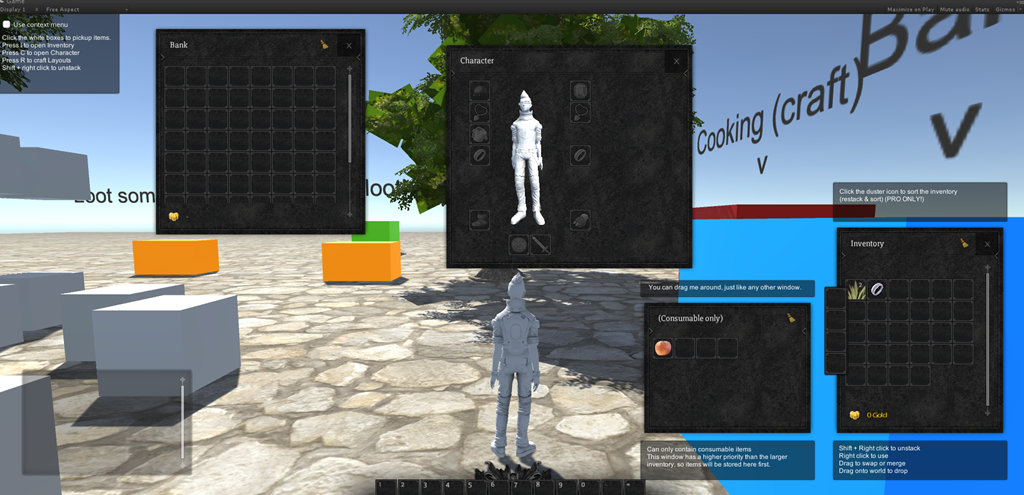
1、总体结构

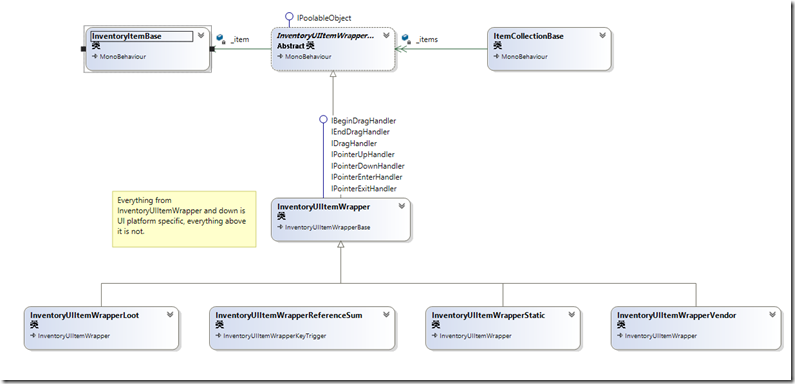
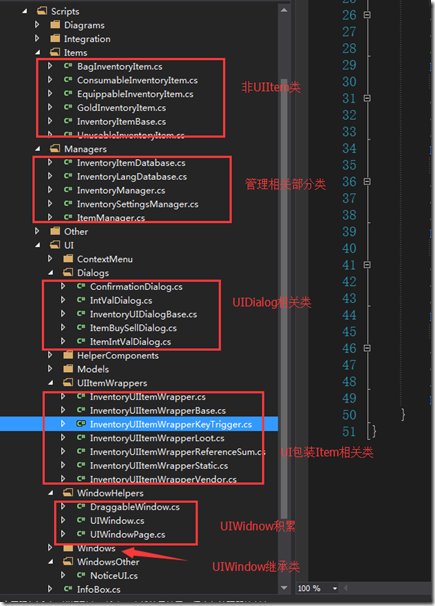
- 非UI相关InventoryItem 物品体系类,具体如装备,消耗品,商店物品等
- UI相关InventoryUIItemWrapper 物品体系
- UIItem的UI包装的Item继承体系
- ItemCollection这样的类,因为简单的增、删和改肯定是逃不了,复杂的如交换,容器间的交换等操作
- UIWindow体系的窗口类,具体有角色,银行,技能,店铺等窗口
- InventoryUIDialog系统下的对话框类,具体有确认框,买卖,通用提示
- 特殊窗口(非继承体系窗口),如上下菜单,通知窗口等
- 配置管理
- InvertoryManager
- ItemManger
- 数据库操作

2、使用教程

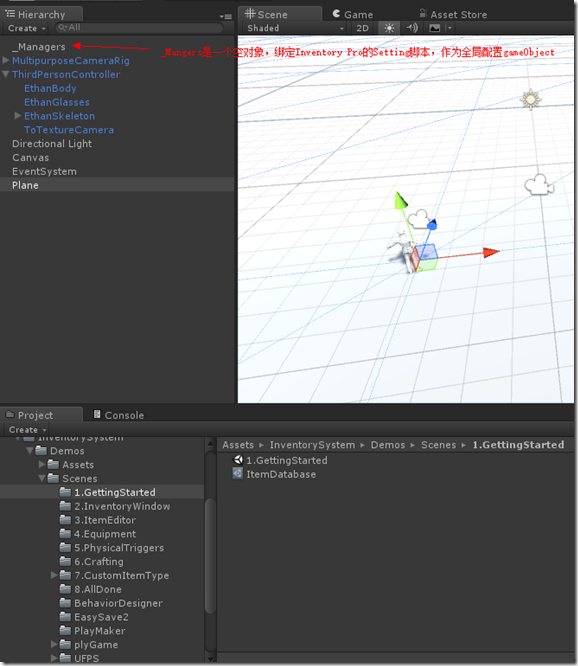
- 选择1(自动)打开设置向导,它可以发现在Tools/Inventory Pro/Setup wizard对于错误“没有管理者发现的对象”;单击确定按钮和一个管理对象命名为"_managers"将自动添加到你的场景里。
- 选择2(手动)创建一个空的游戏对象将inventorymanager组成,你可以找到在 库存/经理/ inventorymanager你会得到几个管理器组件包括inventorymanager,inventorysettingsmanager和更多的,我们不需要现在。
3、Demo解析


4、实例
- 1、实现了两个窗口,通过点击键盘I来,打开或者关闭窗口也就是Toggle功能
- 2、装备窗口中的物品栏空格数量动态生成可控,可以在属性窗口手动配置
- 3、窗口具有拖拽功能
- 4、窗口物品具有拖拽,及窗口间拖拽
- 5、可以在窗口使用物品的功能,物品有消耗扇形显示功能

5、总结

using UnityEngine;
using System.Collections;
using UnityEngine.EventSystems;

namespace Devdog.InventorySystem
{
 [AddComponentMenu("InventorySystem/UI Helpers/DraggableWindow")]
 public partial class DraggableWindow : MonoBehaviour, IBeginDragHandler, IDragHandler
 {
 public float dragSpeed = 1.0f;

 private Vector2 dragOffset;


 public void OnBeginDrag(PointerEventData eventData)
 {
 if (InventorySettingsManager.instance.isUIWorldSpace)
 dragOffset = transform.position - eventData.worldPosition;
 else
 dragOffset = new Vector2(transform.position.x, transform.position.y) - eventData.position;
 }

 void IDragHandler.OnDrag(PointerEventData eventData)
 {
 transform.position = new Vector3(eventData.position.x + dragOffset.x * dragSpeed, eventData.position.y + dragOffset.y * dragSpeed, 0.0f);
 }
 }
}
public virtual void Hide()
{
if (isVisible == false)
return;
isVisible = false;
if (OnHide != null)
OnHide();
if (hideAudioClip != null)
InventoryUIUtility.AudioPlayOneShot(hideAudioClip);
if (hideAnimation != null)
{
animator.enabled = true;
animator.Play(hideAnimation.name);
if (hideCoroutine != null)
{
StopCoroutine(hideCoroutine);
}
hideCoroutine = _Hide(hideAnimation);
StartCoroutine(hideCoroutine);
}
else
{
animator.enabled = false;
SetChildrenActive(false);
}
}
/// <summary>
/// Hides object after animation is completed.
/// </summary>
/// <param name="animation"></param>
/// <returns></returns>
protected virtual IEnumerator _Hide(AnimationClip animation)
{
yield return new WaitForSeconds(animation.length + 0.1f);
// Maybe it got visible in the time we played the animation?
if (isVisible == false)
{
SetChildrenActive(false);
animator.enabled = false;
}
}
/// <summary>
/// Container that olds the items, if any.
/// </summary>
public RectTransform itemContainer;
public UIWindow windowParent { get; set; }
public override void Awake()
{
base.Awake();
windowParent = transform.parent.GetComponentInParent<UIWindow>();
if (windowParent == null)
Debug.LogWarning("No UIWindow found in parents", gameObject);
// Register our page with the window parent
windowParent.AddPage(this);
}
public override void Show()
{
if(isEnabled == false)
{
Debug.LogWarning("Trying to show a disabled UIWindowPage");
return;
}
base.Show();
windowParent.NotifyPageShown(this);
}
/// <summary>
/// Keys to toggle this window
/// </summary>
public KeyCode[] keyCombination;

public virtual void Update()
{
 if (keyCombination.Length == 0)
 return;

 bool allDown = true;
 foreach (var key in keyCombination)
 {
 if (Input.GetKeyDown(key) == false)
 {
 allDown = false;
 }
 }

 if (allDown)
 Toggle();

}
- 1、实现了两个窗口,通过点击键盘I来,打开或者关闭窗口也就是Toggle功能
- 2、装备窗口中的物品栏空格数量动态生成可控,可以在属性窗口手动配置
- 3、窗口具有拖拽功能
- 4、窗口物品具有拖拽,及窗口间拖拽
- 5、可以在窗口使用物品的功能,物品有消耗扇形显示功能
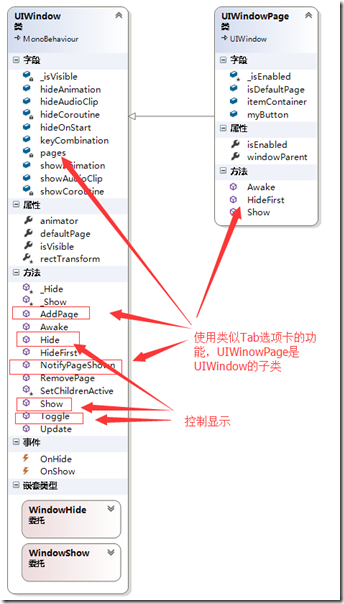
- 6、通用窗口的类体系结构

protected virtual void FillUI()
 {
 if (manuallyDefineCollection == false)
 {
 items = new InventoryUIItemWrapperBase[initialCollectionSize];

 // Fill the container on startup, can add / remove later on
 for (uint i = 0; i < initialCollectionSize; i++)
 {
 items[i] = CreateUIItem<InventoryUIItemWrapper>(i, itemButtonPrefab != null ? itemButtonPrefab : InventorySettingsManager.instance.itemButtonPrefab);
 }
 }
 else
 {
 for (uint i = 0; i < items.Length; i++)
 {
 items[i].itemCollection = this;
 items[i].index = i;
 }
 }
 }

 protected T CreateUIItem<T>(uint i, GameObject prefab) where T : InventoryUIItemWrapperBase
 {
 T item = GameObject.Instantiate<GameObject>(prefab).GetComponent<T>();
 item.transform.SetParent(container);
 item.transform.localPosition = new Vector3(item.transform.localPosition.x, item.transform.localPosition.y, 0.0f);
 item.itemCollection = this;
 item.transform.localScale = Vector3.one;
 item.index = i;

 return item;
 }
- 1、拖拽的事件发起者应该是那个类?
- 2、拖拽的事件的Drag是如何确定下方的UI元素的?
- 3、拖拽后的逻辑操作,应该由哪个类来承接?
- 4、窗口与窗口之间的拖拽,既有Drag又有Drop,如何更加合理的解决这个问题?
- 5、窗口间物品拖拽的以及同窗口物品拖拽的逻辑流程是什么?


- 1)在物品上点击鼠标左键(记录鼠标点击的元素)->
- 2)在鼠标不up,且move事件中确认了拖拽开始(Drag事件) –>
- 3) mouse Move事件中获得鼠标下的元素->
- 4)mouse up 事件触发Drop,判断鼠标位置及鼠标下元素是否可以drop如果可以进行Drop逻辑至此,这个拖拽操作结束
- OnPointerEnter:确定了点击了那个UI元素,对应1)
- OnBeginDrag:开始拖拽,对应2)
- OnDrag:拖拽中,对应3)
- OnEndDrag:结束拖拽,对应4)
- OnPointExit:清空选中元素,恢复默认值
public virtual void OnBeginDrag(PointerEventData eventData)
 {
 if (itemCollection == null)
 return;

 if (item != null && eventData.button == PointerEventData.InputButton.Left && itemCollection.canDragInCollection)
 {
 // Create a copy
 var copy = GameObject.Instantiate<InventoryUIItemWrapper>(this);
 copy.index = index;
 copy.itemCollection = itemCollection;

 var copyComp = copy.GetComponent<RectTransform>();
 copyComp.SetParent(InventorySettingsManager.instance.guiRoot);
 copyComp.transform.localPosition = new Vector3(copyComp.transform.localPosition.x, copyComp.transform.localPosition.y, 0.0f);
 copyComp.sizeDelta = GetComponent<RectTransform>().sizeDelta;

 InventoryUIUtility.BeginDrag(copy, (uint)copy.index, itemCollection, eventData); // Make sure they're the same size, copy doesn't handle this.
 }
 }

 public virtual void OnDrag(PointerEventData eventData)
 {
 if (item != null && itemCollection != null && itemCollection.canDragInCollection) // Can only drag existing item
 InventoryUIUtility.Drag(this, index, itemCollection, eventData);
 }

 public virtual void OnEndDrag(PointerEventData eventData)
 {
 if (item != null && itemCollection != null && itemCollection.canDragInCollection)
 {
 var lookup = InventoryUIUtility.EndDrag(this, index, itemCollection, eventData);

 // Didn't end on a button or used wrong key.
 if (lookup == null)
 return;

 if (lookup.endOnButton)
 {
 // Place on a slot
 lookup.startItemCollection.SwapOrMerge((uint)lookup.startIndex, lookup.endItemCollection, (uint)lookup.endIndex);
 }
 else if (lookup.startItemCollection.useReferences)
 {
 lookup.startItemCollection.SetItem((uint)lookup.startIndex, null);
 lookup.startItemCollection[lookup.startIndex].Repaint();
 }
 else if(InventoryUIUtility.clickedUIElement == false)
 {
 TriggerDrop();
 }
 }
 }
public static InventoryUIDragLookup BeginDrag(InventoryUIItemWrapper toDrag, uint startIndex, ItemCollectionBase collection, PointerEventData eventData)
{
if (draggingItem != null)
{
Debug.LogWarning("Item still attached to cursor, can only drag one item at a time", draggingItem.gameObject);
return null; // Can only drag one item at a time
}
if (eventData.button != PointerEventData.InputButton.Left)
return null;
draggingItem = toDrag;
//draggingButtonCollection = collection;
// Canvas group allows object to ignore raycasts.
CanvasGroup group = draggingItem.gameObject.GetComponent<CanvasGroup>();
if(group == null)
group = draggingItem.gameObject.AddComponent<CanvasGroup>();
group.blocksRaycasts = false; // Allows rays to go through so we can hover over the empty slots.
group.interactable = false;
var lookup = new InventoryUIDragLookup();
lookup.startIndex = (int)startIndex;
lookup.startItemCollection = collection;
return lookup;
}
public static void Drag(InventoryUIItemWrapper toDrag, uint startSlot, ItemCollectionBase handler, PointerEventData eventData)
{
if(eventData.button == PointerEventData.InputButton.Left)
draggingItem.transform.position = new Vector3(eventData.position.x, eventData.position.y, 0.0f);
}
public static InventoryUIDragLookup EndDrag(InventoryUIItemWrapper toDrag, uint startSlot, ItemCollectionBase handler, PointerEventData eventData)
{
if(eventData.button == PointerEventData.InputButton.Left)
{
var lookup = new InventoryUIDragLookup();
lookup.startIndex = (int)draggingItem.index;
lookup.startItemCollection = draggingItem.itemCollection;
if (hoveringItem != null)
{
lookup.endIndex = (int)hoveringItem.index;
lookup.endItemCollection = hoveringItem.itemCollection;
}
Object.Destroy(draggingItem.gameObject); // No longer need it
draggingItem = null;
//draggingButtonCollection = null;
return lookup;
}
return null;
}
/// <summary>
/// When the cursor enters an item
/// </summary>
public static void EnterItem(InventoryUIItemWrapper item, uint slot, ItemCollectionBase handler, PointerEventData eventData)
{
hoveringItem = item;
//hoveringItemCollection = handler;
}
/// <summary>
/// When the cursor exits an item
/// </summary>
/// <param name="item"></param>
/// <param name="slot">The slot is the IButtonHandler index not the inventory index.</param>
/// <param name="handler"></param>
/// <param name="eventData"></param>
public static void ExitItem(InventoryUIItemWrapper item, uint slot, ItemCollectionBase handler, PointerEventData eventData)
{
hoveringItem = null;
//hoveringItemCollection = null;
}
public static InventoryUIItemWrapper hoveringItem { get; private set; }
if (lookup.endOnButton)
{
 // Place on a slot
 lookup.startItemCollection.SwapOrMerge((uint)lookup.startIndex, lookup.endItemCollection, (uint)lookup.endIndex);
}
public override void TriggerDrop(bool useRaycast = true)
{
if (item == null || itemCollection.canDropFromCollection == false)
return;
if(item.isDroppable == false)
{
InventoryManager.instance.lang.itemCannotBeDropped.Show(item.name, item.description);
return;
}
Vector3 dropPosition = InventorySettingsManager.instance.playerObject.transform.position;
Ray ray = Camera.main.ScreenPointToRay(Input.mousePosition);
RaycastHit hit;
if (Physics.Raycast(ray, out hit, InventorySettingsManager.instance.maxDropDistance,
InventorySettingsManager.instance.layersWhenDropping))
{
dropPosition = hit.point;
}
else
{
return; // Couldn't drop item
}
var s = InventorySettingsManager.instance;
if (useRaycast && s.showConfirmationDialogWhenDroppingItem && s.showConfirmationDialogMinRarity.ID <= item.rarity.ID)
{
// Not on a button, drop it
var tempItem = item; // Capture list stuff
var msg = InventoryManager.instance.lang.confirmationDialogDrop;
s.confirmationDialog.ShowDialog(msg.title, msg.message, s.defaultDialogPositiveButtonText, s.defaultDialogNegativeButtonText, item,
(dialog) =>
{
ItemCollectionBase startCollection = tempItem.itemCollection;
uint startIndex = tempItem.index;
var d = tempItem.Drop(dropPosition);
if (d != null)
{
startCollection[startIndex].Repaint();
}
},
(dialog) =>
{
//Debug.Log("No clicked");
});
}
else
{
var d = item.Drop(dropPosition);
if (d != null)
{
Repaint();
}
}
}
public class InventoryUIDragLookup
 {
 public int startIndex = -1;
 public ItemCollectionBase startItemCollection;

 public int endIndex = -1;
 public ItemCollectionBase endItemCollection;

 public bool endOnButton
 {
 get
 {
 return endItemCollection != null;
 }
 }
 }


 #region Variables

 private static InventoryUIItemWrapper draggingItem;
 public static InventoryUIItemWrapper hoveringItem { get; private set; }
 public static bool isDraggingItem
 {
 get
 {
 return draggingItem != null;
 }
 }

 public static bool clickedUIElement
 {
 get
 {
 return EventSystem.current.IsPointerOverGameObject();
 }
 }


 public static bool isFocusedOnInput
 {
 get
 {
 if (EventSystem.current.currentSelectedGameObject != null)
 if (EventSystem.current.currentSelectedGameObject.GetComponent<UnityEngine.UI.InputField>() != null)
 return true;

 return false;
 }
 }

 #endregion
边栏推荐
- JS collection
- Signal integrity (SI) power integrity (PI) learning notes (XXXIII) 102 general design rules to minimize signal integrity problems
- Google Earth Engine——统计逐年土地分类的频率
- 2021 scenery written examination summary
- Learn NLP with Transformer (Chapter 5)
- 2021 CEC written examination summary
- 大佬们,flink cdc table api , mysql to mysql,一个应用程序,可以
- mysql高级语句(一)(总有一个人的出现,让你的生活不再继续糟糕)
- Learn NLP with Transformer (Chapter 8)
- Learn NLP with Transformer (Chapter 1)
猜你喜欢

Learn NLP with Transformer (Chapter 7)
I wrote code for openharmony, and the second phase of "code" pioneer officially opened!

Analysis of event channel principle in Kraken

最详细的mysql索引解析(文末附赠思维导图)

HCIP实验(03)

Esp32c3 based on the example tutorial of esp32 Rainmaker development under Arduino framework

哥廷根大学提出CLIPSeg:一个使用文本和图像prompt能同时作三个分割任务的模型
Code representation learning: introduction to codebert and other related models

HCIP(13)

Learn NLP with Transformer (Chapter 1)
随机推荐
【域泛化】2022 IJCAI领域泛化教程报告
Nb-iot control LCD (date setting and reading)
Leetcode 560 prefix and + hash table
Signal integrity (SI) power integrity (PI) learning notes (XXXIII) 102 general design rules to minimize signal integrity problems
API supplement of JDBC
Code representation learning: introduction to codebert and other related models
Flask framework - flask WTF form: data validation, CSRF protection
NowCoderTOP1-6——持续更新ing
企业实践开源的动机
Learn NLP with Transformer (Chapter 5)
HCIP (01)
HCIP实验(03)
软件测试技术之跨平台的移动端UI自动化测试(上)
HDD杭州站全程体验有感
SQL语言(一)
AI系统前沿动态第43期:OneFlow v0.8.0正式发布;GPU发现人脑连接;AI博士生在线众筹研究主题
MySQL | GROUP_CONCAT函数,将某一列的值用逗号拼接
MySQL advanced statement (I) (there is always someone who will make your life no longer bad)
30000 word express Servlet
[flask advanced] deeply understand the application context and request context of flask from the source code