当前位置:网站首页>Opencv实现图像的基本变换
Opencv实现图像的基本变换
2022-06-24 06:58:00 【Keep_Trying_Go】
1.图像缩放
函数
resize(src, dsize, dst=None, fx=None, fy=None, interpolation=None):
src:输入的图片 ;
dsize:缩放的目标尺寸大小;
dst:输入图片;
fx:x轴的缩放因子;
fy:y轴的缩放因子;
interpolation:插值算法;
插值算法:
(1)INTER_NEAREST:邻近插值算法,速度快,效果差;
(2)INTER_LINEAR:双线性插值(使用周围的四个像素作为参考);
(3)INTER_CURBIC:三次插值(使用周围的十六个像素作为参考);
(4)INTER_AREA:效果最好;
1.图像缩放
函数
resize(src, dsize, dst=None, fx=None, fy=None, interpolation=None):
src:输入的图片 ;
dsize:缩放的目标尺寸大小;
dst:输入图片;
fx:x轴的缩放因子;
fy:y轴的缩放因子;
interpolation:插值算法;

插值算法:
(1)INTER_NEAREST:邻近插值算法,速度快,效果差;
(2)INTER_LINEAR:双线性插值(使用周围的四个像素作为参考);
(3)INTER_CURBIC:三次插值(使用周围的十六个像素作为参考);
(4)INTER_AREA:效果最好;
def Resize():
    img=cv2.imread('images/lenna.png')
    #resize(src, dsize, dst=None, fx=None, fy=None, interpolation=None):
    #src:输入的图片 dsize:缩放的目标尺寸大小 dst:输入图片 fx:x轴的缩放因子 fy:y轴的缩放因子 interpolation:插值算法
    dst=cv2.resize(src=img,dsize=(500,500))
    cv2.imshow('img',img)
    cv2.imshow('dst',dst)
    cv2.waitKey(0)
    cv2.destroyAllWindows()

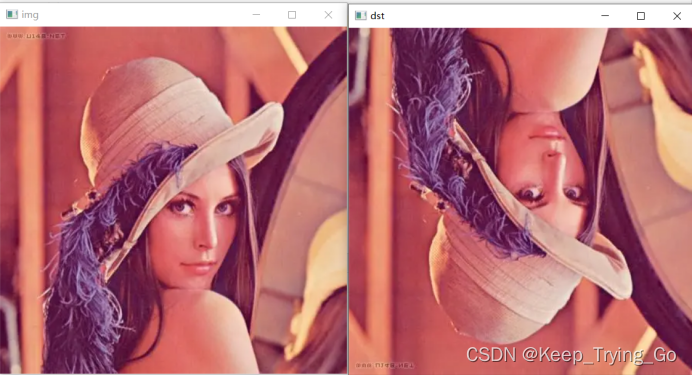
2.图像翻转
flip(src, flipCode, dst=None):
Src:输入的原始图像;
flipCode:翻转的方式;
Dst:输出图像;
flipCode==0表示上下翻转;
flipCode>0表示左右翻转;
flipCode<0表示上下+左右翻转;
def Rotate():
    img=cv2.imread('images/lenna.png')
    dst=cv2.flip(src=img,flipCode=0)
    cv2.imshow('img',img)
    cv2.imshow('dst',dst)
    cv2.waitKey(0)
    cv2.destroyAllWindows()
3.图像的旋转
rotate(src, rotateCode, dst=None):
Src:输入的原始图像;
rotateCode:旋转的方式;
Dst:输出图像;
旋转方式:
ROTATE_90_CLOCKWISE:顺时针旋转90度;
ROTATE_180:旋转180度;
ROTATE_90_COUNTERCLOCKWISE:逆时针旋转90度;
def Rotate():
    img = cv2.imread('images/lenna.png')
    dst = cv2.rotate(src=img,rotateCode=cv2.ROTATE_90_CLOCKWISE)
    cv2.imshow('img', img)
    cv2.imshow('dst', dst)
    cv2.waitKey(0)
    cv2.destroyAllWindows()

4.仿射变换获取矩阵
(1)仿射变换:图像的旋转,缩放,平移的总称;
warpAffine(src, M, dsize, dst=None, flags=None, borderMode=None, borderValue=None):
Src:输入的原始图像;
M:变换矩阵;
Dsize:输出的图像大小;
Flags:与resize中的插值算法一致;
borderMode:边界外推法标志;
borderValue:填充边界的值;
Dst:输出图像;
矩阵的平移:
(1)矩阵中的每个像素值都是由(x,y)组成;
(2)其变换矩阵为2x2的矩阵(单位阵);
(3)平移向量为2x1的向量;,所以平移矩阵为2x3的矩阵;
def WrapAffine():
    img = cv2.imread('images/lenna.png')
    #进行横向的平移,不进行竖向的平移
    M=np.float32([[1,0,100],[0,1,0]])
    dst = cv2.warpAffine(src=img,M=M,dsize=(450,450),flags=cv2.INTER_LINEAR)
    cv2.imshow('img', img)
    cv2.imshow('dst', dst)
    cv2.waitKey(0)
    cv2.destroyAllWindows()
进行横向的平移,不进行竖向的平移
获取变换矩阵
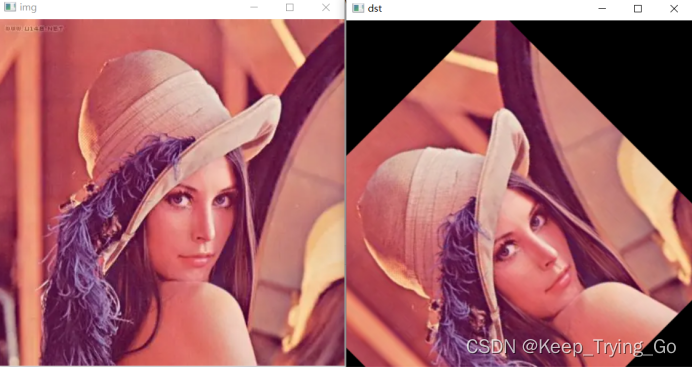
getRotationMatrix2D(center, angle, scale):
Center:旋转中心点;
Angle:旋转角度(逆时针旋转);
Scale:缩放比例;
def GetRotationMatrix2D():
    img = cv2.imread('images/lenna.png')
    # 进行横向的平移,不进行竖向的平移
    M=cv2.getRotationMatrix2D(center=(300,300),angle=45,scale=1.0)
    dst = cv2.warpAffine(src=img, M=M, dsize=(450, 450), flags=cv2.INTER_LINEAR)
    cv2.imshow('img', img)
    cv2.imshow('dst', dst)
    cv2.waitKey(0)
    cv2.destroyAllWindows()
获得变换矩阵
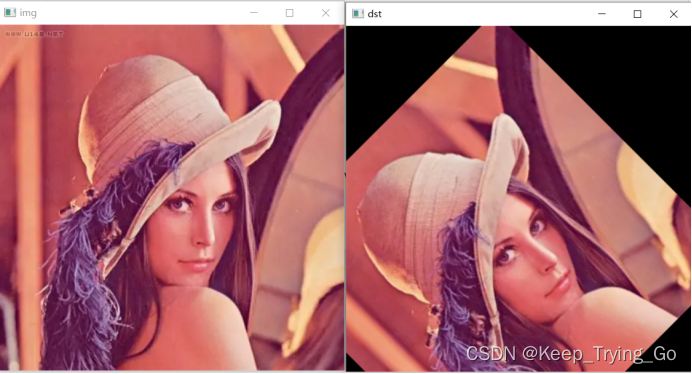
getAffineTransform(src, dst)
Src:三个点确定输入变换的位置;
Dst:三个点确定输出变换的位置;
def GetAffineTransform():
    img = cv2.imread('images/lenna.png')
    #输入图像的三个坐标点
    src=np.float32([[100,100],[100,300],[100,300]])
    #输出图像的三个坐标点
    dst=np.float32([[200,200],[300,350],[350,450]])
    M=cv2.getAffineTransform(src=src,dst=dst)
    dst = cv2.warpAffine(src=img, M=M, dsize=(450, 450), flags=cv2.INTER_LINEAR)
    cv2.imshow('img', img)
    cv2.imshow('dst', dst)
    cv2.waitKey(0)
    cv2.destroyAllWindows()
边栏推荐
- LabVIEW查找n个元素数组中的质数
- 疫情下更合适的开发模式
- 工控机防破解
- 2022茶艺师(中级)上岗证题库及在线模拟考试
- The first exposure of Alibaba cloud's native security panorama behind the only highest level in the whole domain
- 2021-03-16 COMP9021第九节课笔记
- Simple refraction effect
- 将mysql的数据库导出xxx.sql,将xxx.sql文件导入到服务器的mysql中。项目部署。
- 2021-03-04 comp9021 class 6 notes
- More appropriate development mode under epidemic situation
猜你喜欢

jwt(json web token)

Installation and use of selenium IDE

How to use the virtual clock of FPGA?

1279_ Vsock installation failure resolution when VMware player installs VMware Tools

Qt导出PDF文件的两种方法

C语言_字符串与指针的爱恨情仇

More than observation | Alibaba cloud observable suite officially released

蓝桥杯_N 皇后问题

疫情下更合适的开发模式

About the iframe anchor, the anchor is offset up and down, and the anchor has page display problems Srcdoc problem of iframe
随机推荐
Pipeline concept of graphic technology
11-- longest substring without repeated characters
Teach you how to use the reflect package to parse the structure of go - step 1: parameter type check
LINQ query (2)
貸款五級分類
The applet reads more than 20 data, and the cloud function reads more than 100 restrictions
Swift extension chainlayout (UI chain layout) (source code)
jwt(json web token)
OC extension detects whether an app is installed on the mobile phone (source code)
Écouter le réseau d'extension SWIFT (source)
[graduation season] Hello stranger, this is a pink letter
2022 mobile crane driver special operation certificate examination question bank and online simulation examination
Swift Extension ChainLayout(UI的链式布局)(源码)
C# Lambda
OpenCV get(propId) 常用的值
51 single chip microcomputer_ External interrupt and timer / Counter interrupt
Serialization of unity
transformers PreTrainedTokenizer类
Pagoda panel installation php7.2 installation phalcon3.3.2
Nodejs redlock notes