当前位置:网站首页>Opencv learning notes II
Opencv learning notes II
2022-06-26 08:26:00 【Cloudy_ to_ sunny】
opencv Study note 2
- grayscale
- HSV
- Image threshold
- Image smoothing
- morphology - Corrosion operation
- morphology - Expansion operation
- Open operation and closed operation
- Gradient operation
- Hats and black hats
- Image gradient -Sobel operator
- Image gradient -Scharr operator
- Image gradient -laplacian operator
- Canny edge detection
- Image pyramid
- Image outline
- The Fourier transform
- The role of Fourier transform
- wave filtering
grayscale
import cv2 #opencv The reading format is BGR
import numpy as np
import matplotlib.pyplot as plt#Matplotlib yes RGB
%matplotlib inline

img=cv2.imread('cat.jpg')
img_gray = cv2.cvtColor(img,cv2.COLOR_BGR2GRAY)
img_gray.shape
(414, 500)
cv2.imshow("img_gray", img_gray)
cv2.waitKey(0)
cv2.destroyAllWindows()
HSV
- H - tonal ( Main wavelength ).
- S - saturation ( The purity / The shadow of color ).
- V value ( Strength )
hsv=cv2.cvtColor(img,cv2.COLOR_BGR2HSV)

cv2.imshow("hsv", hsv)
cv2.waitKey(0)
cv2.destroyAllWindows()

b,g,r = cv2.split(hsv)
hsv_rgb = cv2.merge((r,g,b))
plt.imshow(hsv_rgb)
plt.show()

Image threshold
ret, dst = cv2.threshold(src, thresh, maxval, type)
src: Input diagram , Only single channel images can be input , It's usually grayscale
dst: Output chart
thresh: threshold
maxval: When the pixel value exceeds the threshold ( Or less than the threshold , according to type To decide ), The value assigned to
type: The type of binarization operation , Contains the following 5 Types : cv2.THRESH_BINARY; cv2.THRESH_BINARY_INV; cv2.THRESH_TRUNC; cv2.THRESH_TOZERO;cv2.THRESH_TOZERO_INV
cv2.THRESH_BINARY The part exceeding the threshold is taken as maxval( Maximum ), Otherwise take 0
cv2.THRESH_BINARY_INV THRESH_BINARY The reversal of
cv2.THRESH_TRUNC The part greater than the threshold is set as the threshold , Otherwise unchanged
cv2.THRESH_TOZERO Parts larger than the threshold do not change , Otherwise, it is set to 0
cv2.THRESH_TOZERO_INV THRESH_TOZERO The reversal of
ret, thresh1 = cv2.threshold(img_gray, 127, 255, cv2.THRESH_BINARY)
ret, thresh2 = cv2.threshold(img_gray, 127, 255, cv2.THRESH_BINARY_INV)
ret, thresh3 = cv2.threshold(img_gray, 127, 255, cv2.THRESH_TRUNC)
ret, thresh4 = cv2.threshold(img_gray, 127, 255, cv2.THRESH_TOZERO)
ret, thresh5 = cv2.threshold(img_gray, 127, 255, cv2.THRESH_TOZERO_INV)

titles = ['Original Image', 'BINARY', 'BINARY_INV', 'TRUNC', 'TOZERO', 'TOZERO_INV']
images = [img, thresh1, thresh2, thresh3, thresh4, thresh5]

for i in range(6):
    plt.subplot(2, 3, i + 1), plt.imshow(images[i], 'gray')
    plt.title(titles[i])
    plt.xticks([]), plt.yticks([])
plt.show()

Image smoothing
img = cv2.imread('lenaNoise.png')

cv2.imshow('img', img)
cv2.waitKey(0)
cv2.destroyAllWindows()

b,g,r = cv2.split(img)
img_rgb = cv2.merge((r,g,b))
plt.imshow(img_rgb)
plt.show()

#  Mean filtering
#  Simple average convolution operation
blur = cv2.blur(img, (3, 3))

cv2.imshow('blur', blur)
cv2.waitKey(0)
cv2.destroyAllWindows()

b,g,r = cv2.split(blur)
blur_rgb = cv2.merge((r,g,b))
plt.imshow(blur_rgb)
plt.show()

#  Box filtering
#  It's basically the same as the average , You can choose to normalize
box = cv2.boxFilter(img,-1,(3,3), normalize=True)  #-1 Indicates that the number of color channels is consistent with the number of previously entered image color channels

cv2.imshow('box', box)
cv2.waitKey(0)
cv2.destroyAllWindows()

b,g,r = cv2.split(box)
box_rgb = cv2.merge((r,g,b))
plt.imshow(box_rgb)
plt.show()
#  Box filtering
#  It's basically the same as the average , You can choose to normalize , Easy to cross the border  , That is, the pixel value is greater than 255
box = cv2.boxFilter(img,-1,(3,3), normalize=False)

cv2.imshow('box', box)
cv2.waitKey(0)
cv2.destroyAllWindows()

b,g,r = cv2.split(box)
box_rgb = cv2.merge((r,g,b))
plt.imshow(box_rgb)
plt.show()

#  Gauss filtering
#  The values in the convolution kernel of Gaussian blur satisfy the Gaussian distribution , It's equivalent to paying more attention to the middle , That is, the weight of the middle pixel value of the core is relatively large
aussian = cv2.GaussianBlur(img, (5, 5), 1)

cv2.imshow('aussian', aussian)
cv2.waitKey(0)
cv2.destroyAllWindows()

b,g,r = cv2.split(aussian)
aussian_rgb = cv2.merge((r,g,b))
plt.imshow(aussian_rgb)
plt.show()

#  median filtering
#  It's equivalent to using the median instead of
median = cv2.medianBlur(img, 5)  #  median filtering

cv2.imshow('median', median)
cv2.waitKey(0)
cv2.destroyAllWindows()

b,g,r = cv2.split(median)
median_rgb = cv2.merge((r,g,b))
plt.imshow(median_rgb)
plt.show()

#  Show all of them
res = np.hstack((blur,aussian,median)) # They are stitched together horizontally
#res = np.vstack((blur,aussian,median)) # Vertically spliced together
#print (res)
cv2.imshow('median vs average', res)
cv2.waitKey(0)
cv2.destroyAllWindows()

b,g,r = cv2.split(res)
res_rgb = cv2.merge((r,g,b))
plt.imshow(res_rgb)
plt.show()

morphology - Corrosion operation
img = cv2.imread('cloudytosunny1.png')

cv2.imshow('img', img)
cv2.waitKey(0)
cv2.destroyAllWindows()

b,g,r = cv2.split(img)
img_rgb = cv2.merge((r,g,b))
plt.imshow(img_rgb)
plt.show()

kernel = np.ones((4,4),np.uint8)
erosion = cv2.erode(img,kernel,iterations = 1)

cv2.imshow('erosion', erosion)
cv2.waitKey(0)
cv2.destroyAllWindows()

b,g,r = cv2.split(erosion)
erosion_rgb = cv2.merge((r,g,b))
plt.imshow(erosion_rgb)
plt.show()

pie = cv2.imread('pie.png')

cv2.imshow('pie', pie)
cv2.waitKey(0)
cv2.destroyAllWindows()

b,g,r = cv2.split(pie)
pie_rgb = cv2.merge((r,g,b))
plt.imshow(pie_rgb)
plt.show()

kernel = np.ones((30,30),np.uint8)
erosion_1 = cv2.erode(pie,kernel,iterations = 1)
erosion_2 = cv2.erode(pie,kernel,iterations = 2)
erosion_3 = cv2.erode(pie,kernel,iterations = 3)
res = np.hstack((erosion_1,erosion_2,erosion_3))
cv2.imshow('res', res)
cv2.waitKey(0)
cv2.destroyAllWindows()

b,g,r = cv2.split(res)
res_rgb = cv2.merge((r,g,b))
plt.imshow(res_rgb)
plt.show()

morphology - Expansion operation
img = cv2.imread('cloudytosunny1.png')
cv2.imshow('img', img)
cv2.waitKey(0)
cv2.destroyAllWindows()

b,g,r = cv2.split(img)
img_rgb = cv2.merge((r,g,b))
plt.imshow(img_rgb)
plt.show()
kernel = np.ones((5,5),np.uint8)
sunny_erosion = cv2.erode(img,kernel,iterations = 1)

cv2.imshow('erosion', sunny_erosion)
cv2.waitKey(0)
cv2.destroyAllWindows()

b,g,r = cv2.split(sunny_erosion)
sunny_erosion_rgb = cv2.merge((r,g,b))
plt.imshow(sunny_erosion_rgb)
plt.show()

kernel = np.ones((5,5),np.uint8)
sunny_dilate = cv2.dilate(sunny_erosion,kernel,iterations = 1)

cv2.imshow('dilate', sunny_dilate)
cv2.waitKey(0)
cv2.destroyAllWindows()

b,g,r = cv2.split(sunny_dilate)
sunny_dilate_rgb = cv2.merge((r,g,b))
plt.imshow(sunny_dilate_rgb)
plt.show()

pie = cv2.imread('pie.png')

kernel = np.ones((30,30),np.uint8)
dilate_1 = cv2.dilate(pie,kernel,iterations = 1)
dilate_2 = cv2.dilate(pie,kernel,iterations = 2)
dilate_3 = cv2.dilate(pie,kernel,iterations = 3)
res = np.hstack((dilate_1,dilate_2,dilate_3))
cv2.imshow('res', res)
cv2.waitKey(0)
cv2.destroyAllWindows()

b,g,r = cv2.split(res)
res_rgb = cv2.merge((r,g,b))
plt.imshow(res_rgb)
plt.show()

Open operation and closed operation
#  open : Corrode first , Re expansion
img = cv2.imread('cloudytosunny1.png')

kernel = np.ones((5,5),np.uint8)
opening = cv2.morphologyEx(img, cv2.MORPH_OPEN, kernel)

cv2.imshow('opening', opening)
cv2.waitKey(0)
cv2.destroyAllWindows()

b,g,r = cv2.split(opening)
opening_rgb = cv2.merge((r,g,b))
plt.imshow(opening_rgb)
plt.show()
#  close : Inflate first , Corrode again
img = cv2.imread('cloudytosunny1.png')

kernel = np.ones((5,5),np.uint8)
closing = cv2.morphologyEx(img, cv2.MORPH_CLOSE, kernel)

cv2.imshow('closing', closing)
cv2.waitKey(0)
cv2.destroyAllWindows()

b,g,r = cv2.split(closing)
closing_rgb = cv2.merge((r,g,b))
plt.imshow(closing_rgb)
plt.show()

Gradient operation
#  gradient = inflation - corrosion
pie = cv2.imread('pie.png')
kernel = np.ones((7,7),np.uint8)
dilate = cv2.dilate(pie,kernel,iterations = 5)
erosion = cv2.erode(pie,kernel,iterations = 5)

res = np.hstack((dilate,erosion))

b,g,r = cv2.split(res)
res_rgb = cv2.merge((r,g,b))
plt.imshow(res_rgb)
plt.show()

gradient = cv2.morphologyEx(pie, cv2.MORPH_GRADIENT, kernel)

b,g,r = cv2.split(gradient)
gradient_rgb = cv2.merge((r,g,b))
plt.imshow(gradient_rgb)
plt.show()

Hats and black hats
- formal hat = Raw input - The result of the open operation is
- Black hat = Closed operation - Raw input
# formal hat
img = cv2.imread('cloudytosunny1.png')
tophat = cv2.morphologyEx(img, cv2.MORPH_TOPHAT, kernel)

b,g,r = cv2.split(tophat)
tophat_rgb = cv2.merge((r,g,b))
plt.imshow(tophat_rgb)
plt.show()

# Black hat
img = cv2.imread('cloudytosunny1.png')
blackhat  = cv2.morphologyEx(img,cv2.MORPH_BLACKHAT, kernel)

b,g,r = cv2.split(blackhat)
blackhat_rgb = cv2.merge((r,g,b))
plt.imshow(blackhat_rgb)
plt.show()

Image gradient -Sobel operator

img = cv2.imread('pie.png',cv2.IMREAD_GRAYSCALE)

# b,g,r = cv2.split(img)
# img_rgb = cv2.merge((r,g,b))
plt.imshow(img)
plt.show()

cv2.imshow("img",img)
cv2.waitKey()
cv2.destroyAllWindows()

dst = cv2.Sobel(src, ddepth, dx, dy, ksize)
- ddepth: The depth of the image
- dx and dy Horizontal and vertical directions respectively
- ksize yes Sobel The size of the operator
def cv_show(img,name):
    b,g,r = cv2.split(img)
    img_rgb = cv2.merge((r,g,b))
    plt.imshow(img_rgb)
    plt.show()
def cv_show1(img,name):
    plt.imshow(img)
    plt.show()
    cv2.imshow(name,img)
    cv2.waitKey()
    cv2.destroyAllWindows()
sobelx = cv2.Sobel(img,cv2.CV_64F,1,0,ksize=3)

cv_show1(sobelx,'sobelx')

White to black is a positive number , Black to white is negative , All negative numbers are truncated to 0, So take the absolute value
sobelx = cv2.Sobel(img,cv2.CV_64F,1,0,ksize=3)
sobelx = cv2.convertScaleAbs(sobelx)
cv_show1(sobelx,'sobelx')

sobely = cv2.Sobel(img,cv2.CV_64F,0,1,ksize=3)
sobely = cv2.convertScaleAbs(sobely)
cv_show1(sobely,'sobely')

Separate calculation x and y, And then sum up
sobelxy = cv2.addWeighted(sobelx,0.5,sobely,0.5,0)
cv_show1(sobelxy,'sobelxy')

Direct calculation is not recommended
sobelxy=cv2.Sobel(img,cv2.CV_64F,1,1,ksize=3)
sobelxy = cv2.convertScaleAbs(sobelxy)
cv_show1(sobelxy,'sobelxy')

img = cv2.imread('lena.jpg',cv2.IMREAD_GRAYSCALE)
cv_show1(img,'img')
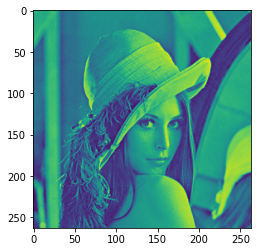
img = cv2.imread('lena.jpg',cv2.IMREAD_GRAYSCALE)
sobelx = cv2.Sobel(img,cv2.CV_64F,1,0,ksize=3)
sobelx = cv2.convertScaleAbs(sobelx)
sobely = cv2.Sobel(img,cv2.CV_64F,0,1,ksize=3)
sobely = cv2.convertScaleAbs(sobely)
sobelxy = cv2.addWeighted(sobelx,0.5,sobely,0.5,0)
cv_show1(sobelxy,'sobelxy')

img = cv2.imread(‘lena.jpg’,cv2.IMREAD_GRAYSCALE)
sobelxy=cv2.Sobel(img,cv2.CV_64F,1,1,ksize=3)
sobelxy = cv2.convertScaleAbs(sobelxy)
cv_show(sobelxy,‘sobelxy’)
Image gradient -Scharr operator

Image gradient -laplacian operator

# The difference between different operators
img = cv2.imread('lena.jpg',cv2.IMREAD_GRAYSCALE)
sobelx = cv2.Sobel(img,cv2.CV_64F,1,0,ksize=3)
sobely = cv2.Sobel(img,cv2.CV_64F,0,1,ksize=3)
sobelx = cv2.convertScaleAbs(sobelx)
sobely = cv2.convertScaleAbs(sobely)
sobelxy =  cv2.addWeighted(sobelx,0.5,sobely,0.5,0)

scharrx = cv2.Scharr(img,cv2.CV_64F,1,0)
scharry = cv2.Scharr(img,cv2.CV_64F,0,1)
scharrx = cv2.convertScaleAbs(scharrx)
scharry = cv2.convertScaleAbs(scharry)
scharrxy =  cv2.addWeighted(scharrx,0.5,scharry,0.5,0)

laplacian = cv2.Laplacian(img,cv2.CV_64F) # It is not used alone , Will be used in conjunction with other methods
laplacian = cv2.convertScaleAbs(laplacian)

res = np.hstack((sobelxy,scharrxy,laplacian))
cv_show1(res,'res')

img = cv2.imread('lena.jpg',cv2.IMREAD_GRAYSCALE)
cv_show1(img,'img')

Canny edge detection
Using a Gaussian filter , To smooth the image , Filter out noise .
Calculate the gradient intensity and direction of each pixel in the image .
Apply non maxima (Non-Maximum Suppression) Inhibition , To eliminate the spurious response brought by edge detection .
Apply double thresholds (Double-Threshold) Detection to determine real and potential edges .
Finally, the edge detection is completed by suppressing the isolated weak edge .
1: Gauss filter

2: Gradient and direction

3: Non maximum suppression


4: Double threshold detection

img=cv2.imread("lena.jpg",cv2.IMREAD_GRAYSCALE)

v1=cv2.Canny(img,80,150)
v2=cv2.Canny(img,50,100)

res = np.hstack((v1,v2))
cv_show1(res,'res')

img=cv2.imread("car.png",cv2.IMREAD_GRAYSCALE)

v1=cv2.Canny(img,120,250)
v2=cv2.Canny(img,50,100)

res = np.hstack((v1,v2))
cv_show1(res,'res')

Image pyramid
- The pyramid of Gauss
- The pyramid of Laplace

The pyramid of Gauss : Down sampling method ( narrow )

The pyramid of Gauss : Up sampling method ( Zoom in )

img=cv2.imread("AM.png")
cv_show(img,'img')
print (img.shape)

(442, 340, 3)
up=cv2.pyrUp(img)
cv_show(up,'up')
print (up.shape)

(884, 680, 3)
down=cv2.pyrDown(img)
cv_show(down,'down')
print (down.shape)

(221, 170, 3)
up2=cv2.pyrUp(up)
cv_show(up2,'up2')
print (up2.shape)

(1768, 1360, 3)
up=cv2.pyrUp(img)
up_down=cv2.pyrDown(up)
cv_show(up_down,'up_down')

cv_show(np.hstack((img,up_down)),'up_down')

up=cv2.pyrUp(img)
up_down=cv2.pyrDown(up)
cv_show(img-up_down,'img-up_down')

The pyramid of Laplace

down=cv2.pyrDown(img)
down_up=cv2.pyrUp(down)
l_1=img-down_up
cv_show(l_1,'l_1')

Image outline
cv2.findContours(img,mode,method)
mode: Contour retrieval mode
- RETR_EXTERNAL : Retrieve only the outermost outline ;
- RETR_LIST: Retrieve all the contours , And save it in a linked list ;
- RETR_CCOMP: Retrieve all the contours , And organize them into two layers : The top layer is the outer boundary of the parts , The second layer is the boundary of the void ;
- RETR_TREE: Retrieve all the contours , And reconstruct the entire hierarchy of nested profiles ;
method: Contour approximation method
- CHAIN_APPROX_NONE: With Freeman Chain code output outline , All other methods output polygons ( The sequence of vertices ).
- CHAIN_APPROX_SIMPLE: Compressed horizontal 、 The vertical and oblique parts , That is to say , Functions keep only the end part of them .

For higher accuracy , Use binary images .
img = cv2.imread('contours.png')
gray = cv2.cvtColor(img, cv2.COLOR_BGR2GRAY)
ret, thresh = cv2.threshold(gray, 127, 255, cv2.THRESH_BINARY)
cv_show1(thresh,'thresh')

binary, contours, hierarchy = cv2.findContours(thresh, cv2.RETR_TREE, cv2.CHAIN_APPROX_NONE)
Draw the outline
cv_show(img,'img')

# Pass in the drawing image , outline , Outline index , Color mode , Line thickness
#  Pay attention to the need for copy, Or the original picture will change ...
draw_img = img.copy()
res = cv2.drawContours(draw_img, contours, -1, (0, 0, 255), 2)
cv_show(res,'res')

draw_img = img.copy()
res = cv2.drawContours(draw_img, contours, 0, (0, 0, 255), 2)
cv_show(res,'res')

Contour feature
cnt = contours[0]
# area
cv2.contourArea(cnt)
8500.5
# Perimeter ,True It means closed
cv2.arcLength(cnt,True)
437.9482651948929
The outline is approximate

img = cv2.imread('contours2.png')

gray = cv2.cvtColor(img, cv2.COLOR_BGR2GRAY)
ret, thresh = cv2.threshold(gray, 127, 255, cv2.THRESH_BINARY)
binary, contours, hierarchy = cv2.findContours(thresh, cv2.RETR_TREE, cv2.CHAIN_APPROX_NONE)
cnt = contours[0]

draw_img = img.copy()
res = cv2.drawContours(draw_img, [cnt], -1, (0, 0, 255), 2)
cv_show(res,'res')

epsilon = 0.1*cv2.arcLength(cnt,True)
approx = cv2.approxPolyDP(cnt,epsilon,True)

draw_img = img.copy()
res = cv2.drawContours(draw_img, [approx], -1, (0, 0, 255), 2)
cv_show(res,'res')

Border rectangle
img = cv2.imread('contours.png')

gray = cv2.cvtColor(img, cv2.COLOR_BGR2GRAY)
ret, thresh = cv2.threshold(gray, 127, 255, cv2.THRESH_BINARY)
binary, contours, hierarchy = cv2.findContours(thresh, cv2.RETR_TREE, cv2.CHAIN_APPROX_NONE)
cnt = contours[0]

x,y,w,h = cv2.boundingRect(cnt)
img = cv2.rectangle(img,(x,y),(x+w,y+h),(0,255,0),2)
cv_show(img,'img')

area = cv2.contourArea(cnt)
x, y, w, h = cv2.boundingRect(cnt)
rect_area = w * h
extent = float(area) / rect_area
print (' The ratio of contour area to boundary rectangle ',extent)
The ratio of contour area to boundary rectangle 0.5154317244724715
Circumcircle
(x,y),radius = cv2.minEnclosingCircle(cnt)
center = (int(x),int(y))
radius = int(radius)
img = cv2.circle(img,center,radius,(0,255,0),2)
cv_show(img,'img')

The Fourier transform
We live in a world of time , morning 7:00 Get up for breakfast ,8:00 To squeeze the subway ,9:00 Start to work ... Time reference is time domain analysis .
But in the frequency domain everything is still !
https://zhuanlan.zhihu.com/p/19763358
The role of Fourier transform
high frequency : The grayscale components that change dramatically , For example, borders
Low frequency : Slowly changing gray components , For example, a sea
wave filtering
low pass filter : Keep only the low frequencies , It will blur the image
High pass filter : Keep only the high frequencies , Will enhance the image details
opencv The main thing is cv2.dft() and cv2.idft(), The input image needs to be converted into np.float32 Format .
The frequency of the result is 0 It's going to be in the upper left corner , It's usually a shift to a central position , Can pass shift Transform to achieve .
cv2.dft() The result returned is dual channel ( Real component , Imaginary part ), Usually it needs to be converted to image format to display (0,255).
import numpy as np
import cv2
from matplotlib import pyplot as plt

img = cv2.imread('lena.jpg',0)

img_float32 = np.float32(img)

dft = cv2.dft(img_float32, flags = cv2.DFT_COMPLEX_OUTPUT)
dft_shift = np.fft.fftshift(dft)
#  Get the form that the gray image can express
magnitude_spectrum = 20*np.log(cv2.magnitude(dft_shift[:,:,0],dft_shift[:,:,1]))

plt.subplot(121),plt.imshow(img, cmap = 'gray')
plt.title('Input Image'), plt.xticks([]), plt.yticks([])
plt.subplot(122),plt.imshow(magnitude_spectrum, cmap = 'gray')
plt.title('Magnitude Spectrum'), plt.xticks([]), plt.yticks([])
plt.show()

import numpy as np
import cv2
from matplotlib import pyplot as plt

img = cv2.imread('lena.jpg',0)

img_float32 = np.float32(img)

dft = cv2.dft(img_float32, flags = cv2.DFT_COMPLEX_OUTPUT)
dft_shift = np.fft.fftshift(dft)

rows, cols = img.shape
crow, ccol = int(rows/2) , int(cols/2)     #  Center position

#  Low pass filtering
mask = np.zeros((rows, cols, 2), np.uint8)
mask[crow-30:crow+30, ccol-30:ccol+30] = 1

# IDFT
fshift = dft_shift*mask
f_ishift = np.fft.ifftshift(fshift)
img_back = cv2.idft(f_ishift)
img_back = cv2.magnitude(img_back[:,:,0],img_back[:,:,1])

plt.subplot(121),plt.imshow(img, cmap = 'gray')
plt.title('Input Image'), plt.xticks([]), plt.yticks([])
plt.subplot(122),plt.imshow(img_back, cmap = 'gray')
plt.title('Result'), plt.xticks([]), plt.yticks([])

plt.show()

img = cv2.imread('lena.jpg',0)

img_float32 = np.float32(img)

dft = cv2.dft(img_float32, flags = cv2.DFT_COMPLEX_OUTPUT)
dft_shift = np.fft.fftshift(dft)

rows, cols = img.shape
crow, ccol = int(rows/2) , int(cols/2)     #  Center position

#  High pass filtering
mask = np.ones((rows, cols, 2), np.uint8)
mask[crow-30:crow+30, ccol-30:ccol+30] = 0

# IDFT
fshift = dft_shift*mask
f_ishift = np.fft.ifftshift(fshift)
img_back = cv2.idft(f_ishift)
img_back = cv2.magnitude(img_back[:,:,0],img_back[:,:,1])

plt.subplot(121),plt.imshow(img, cmap = 'gray')
plt.title('Input Image'), plt.xticks([]), plt.yticks([])
plt.subplot(122),plt.imshow(img_back, cmap = 'gray')
plt.title('Result'), plt.xticks([]), plt.yticks([])

plt.show()

边栏推荐
- I want to open a stock account at a discount. How do I do it? Is it safe to open a mobile account?
- 你为什么会浮躁
- How to debug plug-ins using vs Code
- GHUnit: Unit Testing Objective-C for the iPhone
- MySQL practice: 3 Table operation
- Reflection example of ads2020 simulation signal
- Area of Blue Bridge Cup 2 circle
- js文件报无效字符错误
- Wifi-802.11 2.4G band 5g band channel frequency allocation table
- Jupyter的安装
猜你喜欢

Necessary protection ring for weak current detection
![Comparison version number [leetcode]](/img/02/d1a1922c10e5360e511782b16690e1.jpg)
Comparison version number [leetcode]

(2) Buzzer

Baoyan postgraduate entrance examination interview - operating system

2020-10-20

Design of reverse five times voltage amplifier circuit

加密的JS代码,变量名能破解还原吗?

opencv学习笔记三

Baoyan postgraduate entrance examination interview - Network

Oracle 19C download installation steps
随机推荐
批量执行SQL文件
(vs2019 MFC connects to MySQL) make a simple login interface (detailed)
(2) Buzzer
MFC writes a suggested text editor
Database learning notes I
Application of wireless charging receiving chip xs016 coffee mixing cup
MySQL practice: 3 Table operation
Idea uses regular expressions for global substitution
Mapping '/var/mobile/Library/Caches/com. apple. keyboards/images/tmp. gcyBAl37' failed: 'Invalid argume
1GHz active probe DIY
STM32 encountered problems using encoder module (library function version)
2020-10-17
Batch execute SQL file
StarWar armor combined with scanning target location
Getting started with idea
Microcontroller from entry to advanced
opencv学习笔记三
Recognize the interruption of 80s51
(5) Matrix key
SOC的多核启动流程详解